



Why Your Small Business Website Isn't Getting Leads
Website Tips
Your website might look great, but if it’s not generating leads, it’s not doing its job. Common issues like poor design, vague calls-to-action (CTAs), slow load times, and weak SEO are likely holding you back. Here’s what you need to know:
Design matters: Visitors form an opinion of your business in just 50 milliseconds. Cluttered layouts or poor mobile optimization drive them away.
CTAs are critical: Without clear, action-oriented buttons like "Get My Free Quote", visitors won’t know what to do next.
Speed kills conversions: If your site takes more than 3 seconds to load, 53% of mobile users will leave.
SEO drives traffic: Weak keyword strategies and technical issues can bury your site in search results.
To fix these problems:
Simplify your site design for mobile users.
Add clear, benefit-focused CTAs above the fold.
Optimize loading speeds by compressing images and upgrading hosting.
Strengthen SEO with local keywords and consistent business info.
Build A Powerful Lead Generation Website (step-by-step guide)
Problem 1: Poor Website Design Drives Visitors Away
Your website has just 50 milliseconds to make a first impression. That’s all it takes for 94% of visitors to form an opinion about your business based solely on its design.
A cluttered or outdated website doesn’t just look bad - it sends a message of unreliability and overwhelms visitors. This is more than aesthetics; it’s about how the brain processes information. When users land on a page filled with competing visuals and confusing navigation, they’re forced to work harder to figure out what to do next. This mental strain leads to frustration, which can derail your lead-generation efforts before they even begin.
The problem is even worse for mobile users. With over 60% of web traffic now coming from mobile devices, a poorly optimized site - one that requires pinching, zooming, or hunting for tiny buttons - will drive potential leads away. Even websites labeled as “responsive” can fail if buttons are too small or text is hard to read without zooming. As Ciaran Connolly from ProfileTree explains:
"Business owners often install plugins hoping they'll solve problems without understanding the trade-offs... The sites that perform best use the minimum plugins necessary to achieve their goals, nothing more".
Another common issue is the lack of essential trust-building features. When websites omit features like customer reviews or team photos, it creates a gap in credibility. These design flaws make it harder to convert visitors into leads.
Solution: Use Modern, Mobile-Friendly Design
The solution starts with simplifying your site. A clean, modern layout with ample white space, readable fonts, and buttons that are easy to tap on any device can make a world of difference.
For example, Gatsboy’s done-for-you Framer websites are built with mobile-first, responsive design principles. These sites automatically adjust to any screen size and come with built-in features like Google Reviews and social media feeds to establish trust instantly. They also include a business dashboard, allowing you to manage leads and customer interactions without needing a developer. A professional design not only enhances your brand but also helps guide visitors toward engagement.
The key is to focus on one clear action for visitors. This means including a visible, tappable phone number, a simple contact form, and navigation limited to 5–7 essential pages. By reducing friction and making decisions easier for your audience, you’ll turn more visitors into leads.
Problem 2: Missing or Unclear Calls-to-Action
Unclear or missing calls-to-action (CTAs) can seriously hurt your website’s ability to turn visitors into leads. And the stats are eye-opening: 70% of small business websites don’t have prominent CTAs on their homepages, while 72% lack them on interior pages. This means many websites act more like static brochures - providing information but failing to guide visitors toward taking action.
Without a clear next step, visitors are left wondering: Should they call? Email? Fill out a form? Most won’t stick around to figure it out. As Hierographx explains:
"A call to action isn't just a 'Contact Us' button sitting in the top navigation. It's the thing on your site that turns passive viewers into paying customers".
The problem gets worse when CTAs rely on vague language like "Submit", "Click Here", or "Learn More." These phrases don’t tell visitors what to expect or why they should act. Compare "Submit" with "Get My Free Quote" - the latter is clear, benefit-driven, and removes uncertainty. When visitors don’t see the value or outcome of clicking, they’re unlikely to take the leap.
Placement is another key issue. A CTA buried at the bottom of a page or competing with multiple other CTAs creates confusion and hesitation. And hesitation costs you leads - 78% of customers choose the business that responds to their inquiry first. To fix this, your CTAs need a complete rethink in both design and strategy.
Solution: Add Lead Collection Forms and Action Tools
Your CTAs should be impossible to miss and easy to act on. Start by placing your primary CTA above the fold, so it’s visible right away without scrolling. Repeat it at logical points throughout the page to reinforce the message. Use action-oriented, benefit-driven language like "Schedule a Free Roof Inspection", "Book Your Consultation", or "Start My Free Trial" to make the value clear.
To streamline the process, tools like Gatsboy’s advanced forms and lead collection modules can help. These features allow you to create customized forms that collect essential information without overwhelming visitors. Shorter forms with fewer fields tend to see higher completion rates. For service-based businesses, Gatsboy also integrates Stripe Payments for quick bookings and offers live chat to answer questions in real time while visitors are still engaged.
Every page should have a specific goal. For instance, your homepage might feature "Get a Free Quote", while a blog post could end with "Download Our Free Checklist." Align your CTAs with the visitor’s stage in the decision-making process to guide them naturally toward becoming leads. This approach ensures every click has a purpose and eliminates dead ends.
Problem 3: Slow Loading Speeds Kill Conversions
Speed isn’t just a perk - it’s critical. If your website drags its feet, visitors won’t stick around. In fact, 53% of mobile users abandon a site if it takes longer than three seconds to load. That means potential leads are disappearing before they even get a chance to explore your offerings.
It’s not just about impatience; slow load times are infuriating for users. Studies show that as load time increases from one to three seconds, the likelihood of someone bouncing jumps by 32%, and at five seconds, that number skyrockets to 90%. If your key elements - like a “Get a Quote” button - load too slowly or shift around on the page, you’ve likely lost that conversion.
Google doesn’t cut you any slack either. Search engines now factor Core Web Vitals - metrics like Largest Contentful Paint (LCP), Interaction to Next Paint (INP), and Cumulative Layout Shift (CLS) - into rankings. Fail to meet these benchmarks, and your site risks being buried in search results. Mobile users feel the brunt of this issue, as mobile pages tend to load 70.9% slower than their desktop counterparts, even though mobile visitors expect faster performance.
The financial consequences are massive. A website that loads in one second converts at three times the rate of one that takes five seconds, and five times the rate of a site dragging along at ten seconds. Slow speeds don’t just frustrate users - they directly undercut your ability to generate leads.
Solution: Improve Website Speed and Performance
To fix slow loading times, you need to pinpoint what’s holding your site back. Common culprits include oversized images, poor hosting, and inefficient code. Start by converting images to modern formats like WebP and enabling lazy loading to reduce the initial page load. Upgrading from shared hosting can also improve your Time to First Byte (TTFB).
Gatsboy makes speed optimization effortless. Its no-code Framer editor and pro modules are designed with performance in mind. The platform automatically handles critical tasks like code minification, caching, and CDN delivery, so you don’t need technical expertise to meet Google’s performance standards. Plus, the Gatsboy dashboard integrates with Google Analytics, letting you monitor Core Web Vitals in real time. Keep an eye on metrics like LCP (under 2.5 seconds), INP (under 200 milliseconds), and CLS (under 0.1) to identify areas for improvement.
Even small tweaks can deliver big wins. For instance, shaving just 0.1 seconds off load time can boost retail conversions by 8% and lead captures by 10%. Landing pages that load in under three seconds achieve goal rates of 39%, compared to 29% for pages taking three seconds. Every fraction of a second counts when it comes to turning visitors into leads.
Problem 4: Weak SEO Keeps Your Website Hidden
A beautifully designed, high-performing website won’t bring in leads if search engines can’t find or understand it. Shockingly, around 47% of small business owners skip investing in SEO. This means they’re missing out on one of the most critical ways people discover local services. Imagine someone searching for "emergency plumber in Carlisle PA", and your site doesn’t show up - that potential customer will head straight to a competitor. This lack of visibility can cost you valuable leads.
One major issue is poor keyword strategy. Many small businesses focus on broad terms like "plumber" or "electrician", which are too general to attract high-intent customers. Instead, location-specific keywords like "emergency plumber in Carlisle PA" yield better results. Another common mistake? Publishing service pages with barely any content. Search engines need at least 500 words of relevant, helpful content on these pages to understand and rank your site effectively.
But it’s not just about keywords and content. Technical and local SEO factors also play a big role in your site’s visibility. For example, coding errors, misconfigured robots.txt files, or missing XML sitemaps might prevent Google from crawling your site. You can check your site’s crawlability by Googling "site:yourdomain.com." If only a few pages show up, you’ve got a problem.
Local SEO is another area where small businesses often fall short. Inconsistent Name, Address, and Phone number (NAP) details across directories confuse search engines, which can hurt your rankings. Also, make sure your NAP information is in actual HTML text - not embedded in an image - so Google can read it easily. Finally, an incomplete or neglected Google Business Profile is a massive missed opportunity. This profile is critical for appearing in Google’s Map Pack, which is prime real estate for local searches.
"SEO is the long game. You're planting seeds, not flipping switches." - Michael Etienne, SEO and Digital Marketing Strategist
Solution: Strengthen SEO with Targeted Tools
The good news? Strengthening your SEO doesn’t have to cost $1,000–$5,000 per month. Gatsboy offers affordable tools to help you solve these issues and boost your visibility. For example, the AEO add-on ($147/month) uses AI-driven optimization to get your business featured in AI overviews and conversational search results - where 40% of local searches now happen. Businesses with AI overview citations often see an 80% increase in click-through rates, connecting you with customers who use AI assistants.
The Citations add-on ($247 one-time) ensures your business gets listed in 50 top directories, creating consistent NAP signals and building trust with search engines. Pair this with Local Tracking ($99/month) to monitor your keyword rankings, keep an eye on competitors, and identify "low-hanging fruit" keywords - those where you already rank on page 2 (positions 11–30) - to make quick gains.
Gatsboy’s platform also simplifies the technical side of SEO. Its Framer-based infrastructure ensures proper schema markup, mobile-first design, and clean, optimized code that meets Google’s standards. Plus, the integrated dashboard syncs with Google Analytics, so you can track your organic traffic and leads in real time - without paying an SEO consultant $100–$150 per hour. By optimizing your SEO now, you can turn your website into a lead-generating machine.
Quick Diagnostic: Match Your Problem to the Right Solution
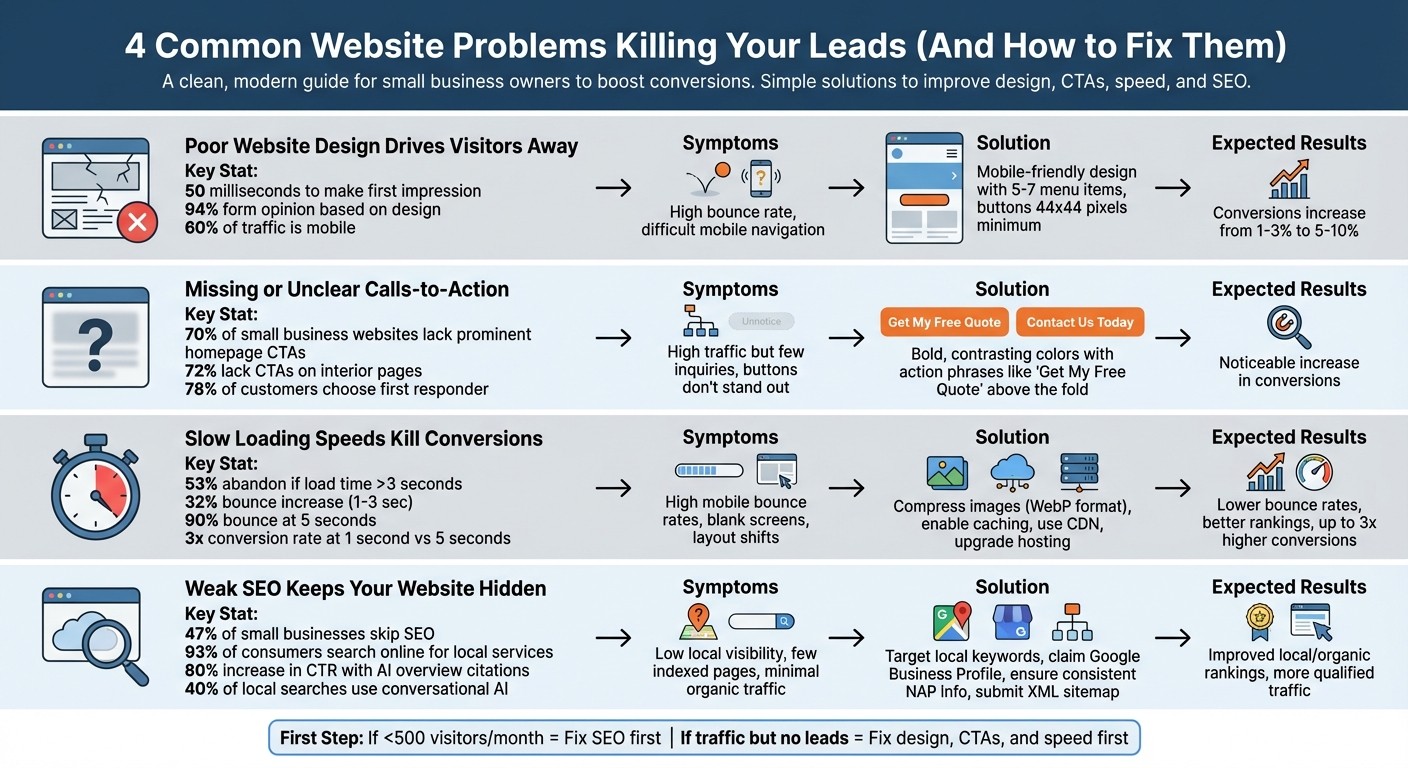
4 Common Website Problems and Solutions for Lead Generation
Trying to figure out what’s holding your website back? Use this table to quickly identify the problem and find the right fix.
Problem | Symptoms | Solution | Expected Results |
|---|---|---|---|
Poor Website Design | High bounce rate; difficult mobile navigation | Update to a mobile-friendly design with intuitive navigation (keep menus to 5–7 items) and ensure mobile buttons are at least 44x44 pixels | Users stay longer, engage more, and conversions climb from 1–3% to 5–10% |
Missing or Unclear CTAs | Plenty of traffic but few inquiries; buttons don’t stand out | Use bold, contrasting colors and action-driven phrases like "Get My Free Quote." Position CTAs above the fold and repeat them across key pages | A noticeable increase in conversions |
Slow Loading Speeds | High bounce rates on mobile; blank screens; layout shifts; visitors leave before content loads | Compress images, enable caching, use a CDN, and upgrade to faster hosting | Lower bounce rates, better search rankings, and up to 3x higher conversion potential |
Weak SEO | Low visibility for local terms; few indexed pages; minimal organic traffic; new content doesn’t rank | Target local keywords, claim your Google Business Profile, ensure NAP info is consistent, and submit an XML sitemap via Google Search Console | Improved rankings in local and organic search results, driving more qualified traffic |
The first step to turning your website into a lead-generating machine is identifying the core problem.
If your site gets fewer than 500 visitors a month, the issue is likely low traffic (SEO and visibility). Start by focusing on SEO. On the other hand, if you’re getting traffic but no leads, prioritize fixing your design, CTAs, and loading speed. Tackle the most glaring issue first for quicker results.
Conclusion: Turn Your Website Into a Lead Generator
Your website should be your tireless worker, generating leads 24/7 - whether it’s late at night, during weekends, or even on holidays. If it’s not delivering, now you know why. A poorly designed site can drive visitors away before they even learn about your offer. Missing or unclear calls-to-action leave potential customers unsure of what to do next. Slow load times frustrate mobile users, sending them straight to competitors. And weak SEO means your business stays invisible to the 93% of consumers searching online for local services. The good news? These problems are fixable.
Gatsboy’s platform offers the tools to address these issues head-on. With PROAdvanced Forms and PROLive Chat, you can capture leads instantly. Featuring PROGoogle Reviews builds trust at a glance, while the Business Information and Social Feeds modules help improve your local SEO and keep your site up-to-date. Each module is built to turn visitors into leads.
As Jason Polancich from VS Marketing puts it:
"Your website should be your hardest-working employee – generating leads 24/7. If it's not performing at this level, it's time to make a change."
Jason Polancich, VS Marketing
Taking action makes all the difference. Optimized websites typically convert at rates of 5–10%, a big leap from the usual 1–3%. That means more appointments and fewer missed opportunities.
Look back at the diagnostic table to identify your website's weak spots, and tackle them this week. Whether you fix one issue or all of them, every improvement adds up, especially when following a small business website checklist. While others stick with outdated, sluggish websites and unclear messaging, you’ll have the steps needed to transform your small business website into a lead-generating powerhouse.
FAQs
How do I know if my problem is traffic or conversions?
To figure out whether your challenge lies with traffic or conversions, start by examining your website's performance. Are enough people visiting your site (traffic)? Or are visitors failing to take the actions you want them to (conversions)?
Tools like Google Analytics can help you dive into this. Check metrics like visitor numbers, bounce rates, and time on site. If traffic is low, the issue is about getting more people to your site. But if visitors aren’t engaging or completing actions, the focus shifts to improving conversions.
What’s the best CTA to use on my homepage?
The best call-to-action (CTA) for your homepage should be clear, specific, and encourage action. For example:
"Get a Free Quote"
"Schedule a Consultation"
"Download Our Guide"
These types of CTAs direct visitors toward a clear next step, making it easier to turn them into leads.
Which site speed metric should I fix first?
Focus on improving First Contentful Paint (FCP) as a priority. This metric tracks how quickly the first visible content loads on a screen. Google suggests keeping FCP under 2.5 seconds to create a better user experience and encourage higher engagement. By optimizing FCP, you ensure visitors see something on the page faster, which can lower bounce rates and make their experience more seamless.
Related Blog Posts
Join our community of 15,000+ business owners
Popular articles
Popular articles about your website and marketing your small business


