



Small Business Website Checklist: 15 Essential Elements
Web Development
Your website is more than just a digital presence - it’s your 24/7 salesperson, lead generator, and customer support hub. Yet, 30% of small businesses still don’t have one, missing out on countless opportunities. If you already have a website, optimizing it is critical: 93% of users leave if it’s not mobile-friendly, and slow load times can cost you 7% in conversions per second.
Here’s a quick checklist of the 15 must-haves for a high-performing small business website:
Mobile-Friendly Design: Ensure smooth navigation on all devices.
Fast Loading Speeds: Aim for under 3 seconds to keep visitors engaged.
Clear Navigation: Use simple menus and labels like "Services" or "Contact."
Professional Images/Videos: Use real, high-quality visuals over stock photos.
Customer Reviews: Display testimonials to build trust.
Clear Contact Info: Include phone, email, and address prominently.
Strong Value Proposition: State what you offer and why it matters.
Effective CTAs: Use action-oriented buttons like "Get a Free Quote."
Optimized Forms: Keep them short - 5 fields or fewer.
SEO Basics: Use keywords, meta tags, and proper headers.
Local Search Optimization: Claim your Google Business Profile and use local keywords.
Fresh Content: Regularly update blogs or news for better rankings.
Accessibility: Make your site usable for everyone, including those with disabilities.
Analytics: Track performance with tools like Google Analytics 4.
Centralized Management: Use a dashboard to handle leads, bookings, and customer interactions.
A well-designed website doesn’t just look good - it drives results. Start with these essentials to attract visitors, build trust, and convert them into loyal customers.
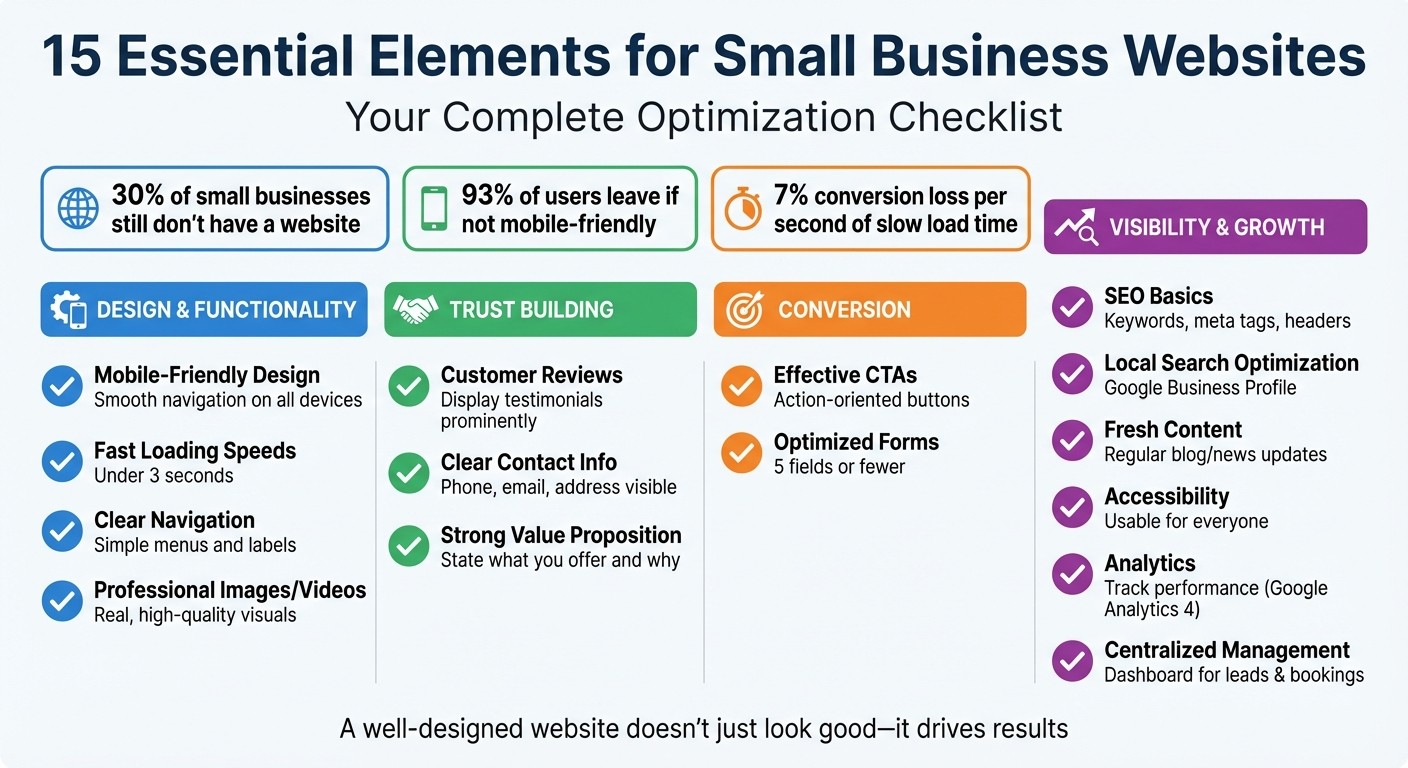
15 Essential Elements for Small Business Websites Checklist
5 Must-Have Website Features for Small Businesses in 2025 🚀
Website Design and Functionality Basics
The backbone of a successful small business website lies in three key aspects: mobile responsiveness, intuitive navigation, and fast loading speeds. A well-designed site keeps visitors engaged, while a poorly designed one pushes them away.
Mobile-Friendly Design
With over 60% of website traffic coming from mobile devices, your site must work seamlessly on phones and tablets - not just desktops. A responsive design ensures your site adjusts to any screen size, providing a smooth experience for all users.
To achieve this, follow a few simple guidelines: use a base font size of at least 16px for readability, design buttons large enough for touchscreens, and compress images using WebP format to avoid slow loading times. Google’s mobile-first indexing prioritizes the mobile version of your site for search rankings, making mobile optimization essential for SEO success.
Gatsboy’s Framer-based templates make this process effortless. Their designs automatically adapt across devices using flexible grids and built-in breakpoints. Whether visitors are browsing on an iPhone, tablet, or desktop, they’ll experience a professional and polished layout - no coding required.
"A great website combines layout, design, and function in a way that delivers a cohesive, smooth, user-friendly experience for the viewer." - Ben Miller, Founder, Focus On Digital
Don’t rely solely on software emulators to test your site. Check it on actual devices to ensure buttons are well-spaced, forms are easy to use with thumbs, and popups don’t disrupt the user experience. Avoid intrusive full-screen popups, as these can lead to search engine penalties. Instead, opt for slide-in banners or bottom notification bars to communicate your message effectively.
Once your site is mobile-friendly, shift your attention to creating straightforward navigation.
Easy-to-Use Navigation
Your navigation menu acts as a guide for visitors. If they can’t find what they’re looking for quickly, they’ll leave. Keep it straightforward by using clear labels like "Services", "Contact", or "About Us." Avoid overly creative terms that could confuse users.
Limit your primary menu to five to seven items and group related pages into dropdown menus to avoid clutter. Place your navigation bar at the top of the page with your logo on the top left - this is where users naturally look. Keep the menu consistent across all pages to maintain a sense of familiarity.
For mobile users, a "hamburger" menu works well to save screen space while keeping everything accessible. Consider adding a sticky navigation bar that remains visible as users scroll, so they can quickly jump to other sections without having to scroll back up. Breadcrumb navigation (e.g., Home > Services > Consulting) is another useful feature that helps users - and search engines - understand your site’s structure.
Once your navigation is in place, focus on optimizing your site’s loading speed to keep visitors engaged.
Fast Page Loading
Speed is critical for retaining visitors. 53% of mobile users abandon websites that take longer than 3 seconds to load. Google also factors site speed into its rankings, so every second matters. For instance, increasing load time from 1 to 3 seconds can raise bounce rates by 32%.
Aim for a total load time of under 3 seconds, with your Largest Contentful Paint (LCP) - the time it takes for the main content to load - under 2.5 seconds. Visitors expect the core content to appear almost instantly; otherwise, they’ll leave before engaging with your site.
Gatsboy simplifies this process with optimized code structures. It automatically minifies HTML, CSS, and JavaScript files, uses lazy loading for images, and applies modern compression techniques. These features ensure faster load times without requiring manual adjustments.
Regularly test your site’s speed using tools like Google PageSpeed Insights or GTmetrix to identify and fix bottlenecks. Compress images before uploading, keep full-screen images under 2,500 pixels wide, and use efficient formats like JPEG or WebP. These small tweaks can make a big difference, helping your site load faster and keeping visitors engaged long enough to convert into customers.
Building Customer Trust
Once you've optimized your site's design and speed, the next priority is establishing trust with your audience. A fast and mobile-friendly website alone won't convince visitors to take action - it needs to feel reliable and authentic. Research shows that 62% of consumers consider contact information the most crucial element on a business website. Trust signals, like professional visuals and customer reviews, play a key role in shaping perceptions. Real team photos and verified feedback can establish your credibility, increasing the likelihood that visitors will stick around and engage.
Professional Images and Videos
Stock photos might seem convenient, but they often fall flat when it comes to building trust. Using real images of your team, workspace, or completed projects creates a sense of authenticity that generic stock imagery simply can't replicate. In fact, real photos perform 35% better than stock images, making them a worthwhile addition to pages like "About Us" or service galleries.
Visuals should highlight your expertise. For example, service-based businesses can showcase before-and-after photos, while product sellers should focus on high-quality images that capture key details. Videos are also a powerful tool - two-thirds of people prefer learning about new products or services through video rather than text. A concise 45-second explainer video is an excellent way to quickly convey your value.
To maintain site speed and quality, compress images before uploading and include descriptive alt text for accessibility and SEO benefits. Tools like Gatsboy's Framer-based templates make it easy to embed videos and other media that adapt seamlessly to different devices, ensuring your visuals look polished on any screen.
Customer Reviews and Testimonials
What others say about your business often carries more weight than your own claims. Nearly 89% of consumers read online reviews during their buying journey, and only 11% trust a business's self-promotion over customer feedback. Prominently displaying reviews signals transparency and builds confidence in your brand.
Consider creating a dedicated "Reviews" or "Testimonials" page, and link it in your main navigation for easy access. Embedding reviews directly on product or service pages can also encourage conversions. Including details like the reviewer's name and location adds an extra layer of authenticity. And don’t forget to include your contact information so prospects can easily get in touch.
"Show your site's credibility by using original research, citations, links, reviews, and testimonials. An author biography or testimonials from real customers can help boost your site's trustworthiness and reputation."
– Google Search Console Course
With tools like Gatsboy, you can integrate Google Reviews directly into your site, ensuring verified feedback is always up to date without requiring manual updates. It's also important to embrace transparency - 70% of customers who leave negative reviews may revise them if their concerns are addressed professionally. Responding to all feedback promptly and respectfully demonstrates that you genuinely care about customer experiences.
Clear Contact Information
Beyond visuals and reviews, having clear contact details is non-negotiable. Visitors need to know they can easily reach you. Displaying a physical address, phone number, and email address reassures them that your business is legitimate. Include a "Contact" button in your site header and ensure your Name, Address, and Phone number (NAP) are consistently visible in the footer across all pages.
For mobile users, make phone numbers click-to-call for instant access. Go beyond a basic contact form by adding helpful elements like a map, written directions, or nearby landmarks to guide local visitors. Be sure to clearly state your business hours and expected response times, so customers know when they can expect a reply.
"You should at least clearly show your email address and social media accounts on your website. This information allows your customers to reach out to you quickly and helps them identify you as a legitimate business."
– Mark Daoust, CEO, Quiet Light
Providing clear contact information reduces barriers and encourages visitors to reach out. When customers know they can easily connect with you, they're more likely to trust your business and take the next step.
Converting Visitors into Customers
Once you’ve built a fast, reliable, and user-friendly site, the next step is turning visitors into customers. A well-optimized website doesn’t just attract attention; it guides users toward taking action. With the right mix of messaging, buttons, and forms, you can convert casual browsers into committed leads. Considering that 92% of consumers won’t make a purchase on their first visit, your site must work to capture their interest and build trust from the moment they arrive. Here’s how you can focus on driving conversions.
Clear Value Statement
Your homepage headline is your first - and sometimes only - opportunity to communicate what you offer and why it matters. It needs to be crystal clear, concise, and easy to understand. Avoid vague phrases like “We deliver innovative solutions.” Instead, be specific: “We help small businesses build websites that attract customers.”
A strong value statement should highlight the primary benefit you provide and show you understand your audience’s challenges. You can reinforce this with a supporting subheading that includes social proof or trust-building elements. The key is to focus on outcomes and benefits rather than features.
"A good headline combines getting to the point + emotion + benefit."
– Chantalle Alberstadt, Brand Designer
Write as if you’re having a one-on-one conversation with your ideal customer. Use their language, address their pain points, and make the information easy to skim with subheadings or bullet points. Adding a short video can also be powerful, as two-thirds of people prefer learning about products through videos. Once your value proposition is clear, the next step is guiding visitors to take action.
Action Buttons and CTAs
Your call-to-action (CTA) buttons should be impossible to miss. Use active, concise phrases - ideally four words or less - that inspire immediate action. Words like “Free” or “Now” can add urgency and appeal. Make sure your CTAs stand out by using contrasting colors and thoughtful spacing.
If you’re using tools like Gatsboy’s smart modules, you can easily customize button colors, text, and placement without needing any coding skills. Link these buttons to booking forms, payment pages, or lead capture tools to streamline the conversion process seamlessly.
Forms for Capturing Leads
A well-designed form is crucial for collecting leads, but overly complex forms can hurt your conversion rate. Studies show that each additional field can reduce conversions by about 8%. To keep things simple, stick to five fields or fewer. If you need more information, use a multi-step format with a progress bar to make the process feel less overwhelming.
For better results, design your forms in a single-column layout, which is easier to navigate. Include features like inline validation to help users fix errors instantly and use drop-downs or sliders to minimize typing. Position your form above the fold so it’s visible without scrolling.
Gatsboy’s advanced forms offer features like multi-step functionality, conditional logic, and seamless integration with your business tools. Don’t forget to add a privacy policy link near the form to build trust and comply with legal requirements for platforms like Google Ads. After submission, redirect users to a “Thank You” page and send a confirmation email.
"The longer the form, the more incentive users need to fill it."
– Black Propeller
Small tweaks can make a big difference. For instance, using first-person language in your CTA (e.g., “Start my free trial” instead of “Start your free trial”) can feel more personal and engaging. Highlighting benefits near your form and running A/B tests can also help you figure out what works best for your audience.
Search Engine and Local Visibility
A strong website does more than just convert visitors - it helps them find you by leveraging effective local search strategies. Online visibility is a key driver for growth, especially considering that nearly 50% of all Google searches are for local information. Even more compelling, 80% of smartphone searches for local businesses lead to an offline purchase. To stand out, your website must communicate effectively with search engines while also being easy for nearby customers to locate. Below are the core strategies to enhance your visibility both locally and technically.
SEO-Friendly Website Structure
Search engines rely on clear signals to understand what your business offers and where you're located. Start with the basics: HTTPS security and a mobile-friendly design are non-negotiable [28,32].
Make sure every page has a unique title (50–60 characters) and meta description (150–160 characters) that include your location and key services [28,29]. Use H1, H2, and H3 tags to structure your content clearly for search engines. Avoid embedding your business name, address, and phone number (NAP) in images - use crawlable HTML text instead, so search engines can easily read it [29,31].
"Think of your business's NAP (name, address, and phone number) as your digital thumbprint."
– Moz
Incorporate structured data, such as LocalBusiness and Service JSON-LD, to define your business details clearly [32,34]. If you're using Gatsboy, their websites come pre-equipped with proper SEO structures, including schema markup, so you can skip the technical hassle. Want to check how many of your pages are indexed? Use the search string site:yourdomain.com in Google.
Local Search Optimization
Optimizing your local presence goes beyond technical tweaks - it’s about making your business easy to find in your community. Start by claiming and verifying your Google Business Profile (GBP), which ensures your business appears on Google Maps and in the "Local Pack" at the top of search results [28,30]. Consistency is key - ensure your NAP details are identical across all platforms [28,34].
Embed a Google Map on your contact page to reinforce your location. Use local keywords throughout your website. For example, instead of a generic phrase like "plumbing services", use "plumbing services in Chicago" in your titles, headers, and on-page content. If you serve multiple locations, create dedicated landing pages for each area, complete with localized testimonials and service details [29,30].
Customer reviews play a big role in local rankings. Make it easy for customers to leave feedback by providing direct links to your Google review page. Respond to all reviews - whether glowing or critical - to show you're engaged and trustworthy. For faster results, consider Gatsboy’s Citations add-on ($247 one-time), which submits your business to 50 top directories, strengthening your local search credibility.
Regular Content Updates
Keeping your website updated signals to search engines that your site is active and relevant. Text remains the primary driver of Google rankings, so regularly adding fresh content like blog posts, event updates, or job listings gives search engines more reasons to index your site. Plus, it’s a great opportunity to target local keywords. Write about topics that resonate with your community, such as neighborhood events, customer success stories, or practical tips for your industry.
"Text is not even close to being dead and is still the main driver of ranking on Google."
– Joy Hawkins, Sterling Sky
Gatsboy offers dynamic content modules that make it simple to add blogs, events, or job boards without needing any coding skills. Each new piece of content creates another chance for potential customers to find you. To stay ahead, audit your local SEO every three months. Check your NAP consistency, review insights from your GBP, and monitor your page speed using tools like Google Search Console.
Website Management and Growth
Once visitors become customers, the journey doesn't stop there. Keeping your website updated and primed for growth is crucial to sustaining success. As Chantalle Alberstadt, Brand Designer, aptly says: "A website is never really finished – it grows with the company". To keep up, you need the right tools and strategies to simplify updates and scale smoothly.
Centralized Business Dashboard
Juggling leads, bookings, payments, and customer messages across multiple platforms can get overwhelming - and inefficient. A centralized dashboard can solve this by bringing everything together in one place. For example, Gatsboy's business dashboard integrates seamlessly with your website, automatically capturing form submissions, tracking appointment requests, and organizing customer inquiries. It consolidates email, payment processors, and contact forms into a single interface. This setup not only saves you hours each week but also ensures no potential business opportunities slip through the cracks. Once your operations are streamlined, it's time to make sure your website is accessible to everyone.
Website Accessibility
Ensuring your website is accessible is not just a good practice - it’s essential. One in four Americans (around 61 million people) live with a disability, and over 2,500 ADA website accessibility lawsuits have been filed in recent years. The Department of Justice emphasizes: "An inaccessible website can exclude people just as much as steps at an entrance to a physical location".
To avoid issues, address these common triggers for lawsuits: missing alt text for images, form fields without proper labels, and navigation that doesn’t work with a keyboard. Quick-fix widgets may seem tempting, but they don’t solve underlying code problems and could even increase legal risks. Instead, focus on lasting solutions like ensuring color contrast meets a 4.5:1 ratio for text, adding captions to videos, and publishing an accessibility statement in your site’s footer. Tools like WAVE or Google Lighthouse can catch some issues (around 25%), but manual testing is essential for full compliance.
Performance Tracking and Analytics
Tracking your website’s performance is key to improving it. Tools like Google Analytics 4 can show you where visitors come from, which pages they’re viewing, and where they’re dropping off. This data can highlight what’s working and what needs attention. For instance, if visitors leave after viewing your pricing page, you might need clearer explanations or stronger trust signals.
Page load speed is another critical factor - slow pages can drive visitors away. Use analytics tools to monitor load times and address any issues. Set up weekly or monthly reports to track metrics like traffic trends, conversion rates, and goal completions. These insights will help you make informed decisions about content updates, design tweaks, and marketing efforts. As Studio Five puts it: "In 2026, successful websites combine design, psychology, AI, analytics, accessibility, and tight security into one streamlined experience".
Next Steps
Now that you’ve reviewed the 15 key elements, it’s time to put them into action to fuel consistent growth. These components work hand in hand to enhance your site’s visibility, build trust, and increase conversions.
Start with the basics: a custom domain, SSL certificate, mobile-responsive design, and fast load times. Once those are in place, layer on advanced features to stay ahead in a competitive market. Think of your website as more than just an online storefront - it’s your round-the-clock sales rep, lead generator, and trust builder all in one. The best online businesses treat their websites as dynamic assets that evolve over time, not as one-and-done projects.
With a solid foundation, take advantage of integrated tools to simplify and accelerate your growth. Gatsboy’s websites and business dashboard include essential features like mobile-first design, SEO-friendly architecture, lead capture tools, and performance tracking to get you started on the right foot. You can choose the Website Only plan for a one-time fee of $500, which includes a 5-page site with core tools. Or, go for the Website + Pro plan at $500 upfront plus $47 per month for access to advanced features and growth-focused modules.
Start tackling these 15 essentials today, and you’ll be on your way to creating a website that drives meaningful results.
FAQs
Which 3 website fixes should I do first?
To improve your website's user experience and credibility, focus on three key areas: speed, guidance, and security. First, ensure your site loads in under 3 seconds - nobody likes to wait. Next, add a clear and visible call-to-action to guide visitors toward what you want them to do. Finally, secure your site with an SSL certificate. Not only does this protect user data, but it also builds trust with your audience. These steps can make a big difference in how visitors perceive and interact with your site.
How do I test my site on real mobile devices?
To see how your site performs on actual mobile devices, you can open it directly on smartphones or tablets to evaluate its look and functionality. Another option is to use browser developer tools, such as those in Google Chrome or Safari, which allow you to simulate different devices. These tools enable you to preview various screen sizes, test touch interactions, and check performance. This makes it easier to spot and address any mobile-specific issues before your site goes live.
What should I track in Google Analytics 4?
In Google Analytics 4, you can monitor key aspects like traffic sources, user behavior, conversions, engagement metrics, and specific events that align with your business goals. These insights reveal how visitors engage with your site and help pinpoint the channels that deliver the best results. By concentrating on metrics tied to your objectives, you can fine-tune your strategies and gain a deeper understanding of your audience.
Related Blog Posts
Únete a nuestra comunidad de 15,000+ propietarios de negocios
Artículos populares
Artículos populares sobre su sitio web y la comercialización de su pequeña empresa


