



Ultimate Guide To Google Reviews For Small Businesses
Small Business Marketing
Google Reviews can affect whether people call you, book with you, or skip you. If you run a small business, the play is simple: set up your Google Business Profile the right way, ask every customer for a review, reply within 24–48 hours, and show your best reviews on your site.
Here’s the short version:
98% of people read online reviews before they buy
Reviews affect trust, clicks, and local search visibility
A strong target is 4–10 new reviews per month
A rating around 4.3 to 4.7 stars often works better than chasing a perfect 5.0
Replying to reviews can help with both customer trust and Google visibility
You should ask all customers for honest feedback, not just happy ones
Private feedback forms can help you fix problems, but they should not be used to screen who gets a review request
If I had to boil the whole guide down to a few steps, it would be this:
Claim and verify your Google Business Profile
Keep your hours, category, phone, and photos up to date
Send one review request after each completed job, visit, or payment
Send one follow-up reminder 3–5 days later
Reply to every review in a calm, human way
Flag fake or policy-breaking reviews
Put strong reviews on your homepage, service pages, and contact page
Use review patterns to fix service issues and improve your website copy
Area | What to do |
|---|---|
Profile setup | Verify your profile and keep business details accurate |
Review requests | Ask every customer and use a direct review link |
Timing | Send requests right after the service or visit |
Replies | Answer all reviews within 24–48 hours |
Bad reviews | Stay calm, move the issue offline, and protect private info |
Website use | Add strong reviews near calls to action |
Feedback | Use both public reviews and private forms |
This guide is about building a simple review system you can run every week without a lot of extra work.
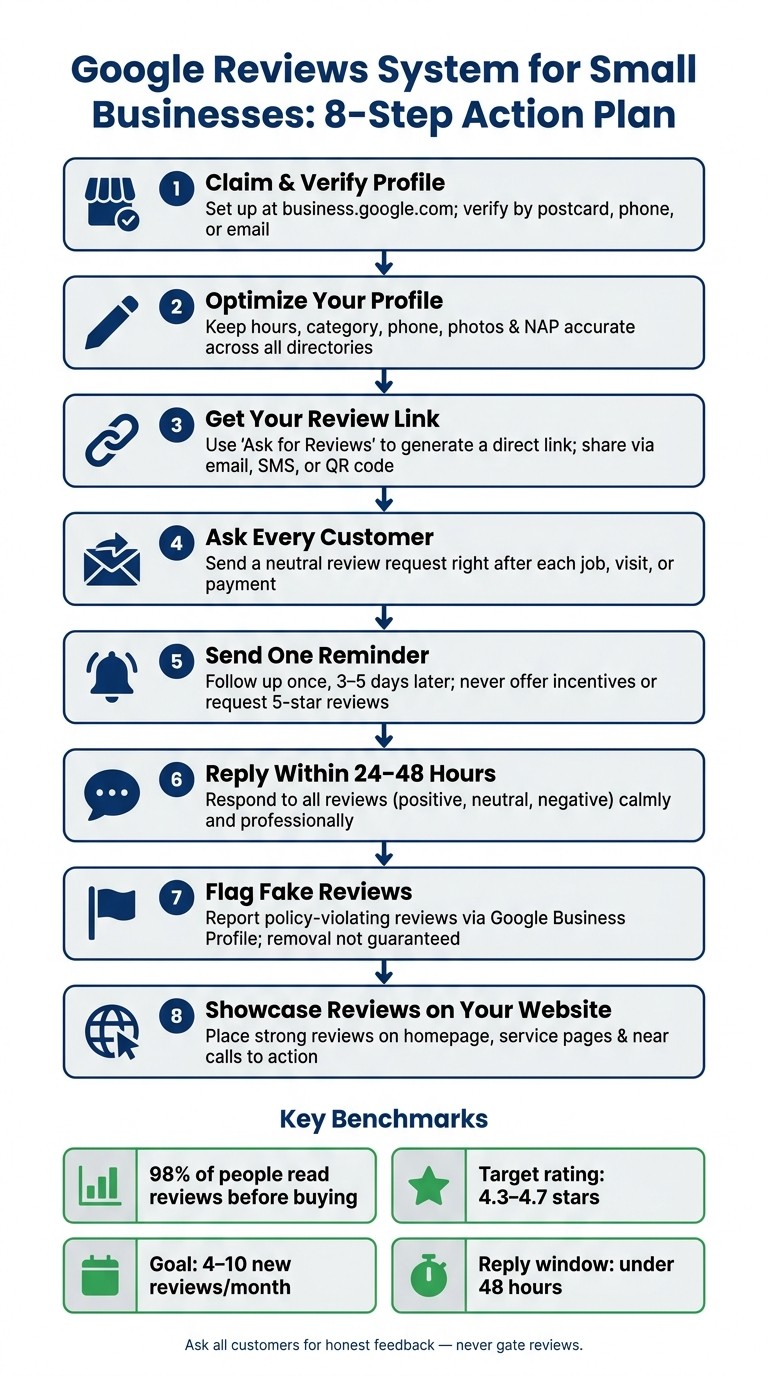
Google Reviews System for Small Businesses: 8-Step Action Plan
How to get more Google reviews – a step-by-step guide for small businesses
1. What Google Reviews Are and Why They Matter for Small Businesses
Google Reviews are customer star ratings and written comments left on your Google Business Profile. That profile is where you manage reviews. Google Search and Google Maps are where people actually see them. That split matters because your reviews often shape a first impression before anyone visits your website.
Next, it helps to see where these reviews show up and how that visibility can affect clicks.
How Google Reviews Appear in Google Search and Google Maps
Reviews show up in Google Search, Google Maps, and the business panel on the right side of search results. In those spots, people can quickly see your average star rating, total review count, and recent feedback before they decide whether to click, call, or visit.
How Reviews Affect Trust, Clicks, and Local Visibility
Reviews are a major local ranking signal, which makes them one of the top factors in local search visibility.
Here’s the basic chain reaction: reviews help drive visibility, visibility shapes trust, and trust affects action. If your rating drops below 4.0 stars, conversions can suffer. On the other hand, the 4.3 to 4.7 star range is a strong benchmark for trust and clicks.
It’s not just about having a big pile of reviews, either. Recency matters, and in many cases, fresh reviews matter more than total volume. A steady flow of 4–10 new reviews per month can make a business look active and reliable in a way that a one-time burst often doesn’t.
Response speed matters too. When you reply to reviews, you show that someone is paying attention and that customer care isn’t an afterthought. That can shape how people view your business, and it can support local visibility at the same time.
Once you understand how reviews affect trust and visibility, the next step is making sure your profile is set up to collect them well.
2. Setting Up and Optimizing Google Reviews
Before you collect or reply to any review, you need to claim and verify your Google Business Profile. If the profile isn't verified, you can't manage reviews or see performance data. Once that's done, the next step is simple: make it easy for customers to leave feedback.
Claim and Verify Your Google Business Profile
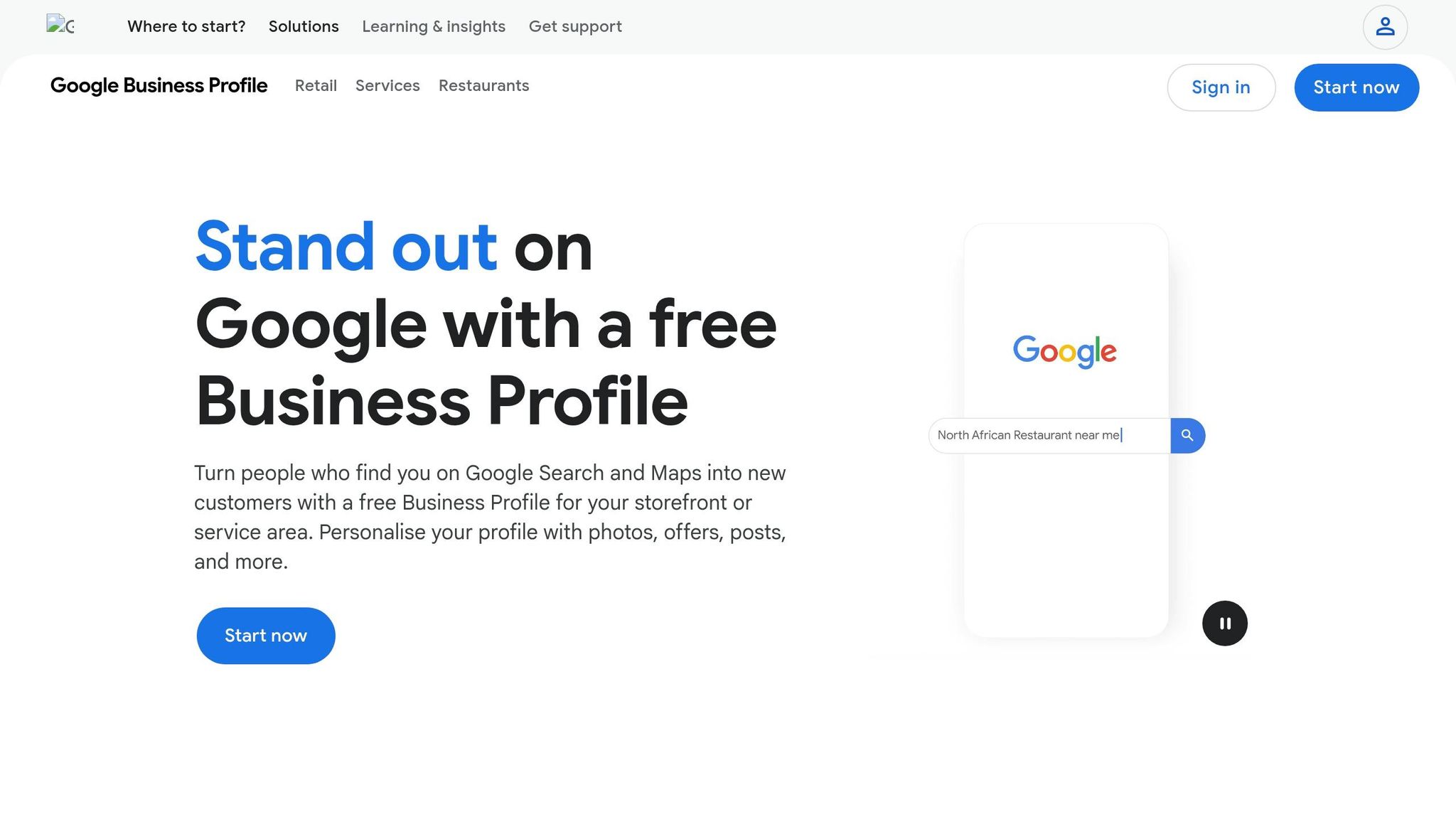
Claim and verify your Google Business Profile at business.google.com. Google usually verifies profiles by postcard, phone, or email. After verification, you can manage reviews and access insights.
Get Your Review Link and Turn On Notifications
Use "Ask for reviews" to create a direct review link. Then share it through email, text, a QR code, or a short URL. Turn on review notifications too, and aim to reply within 24 to 48 hours.
Once your link is ready, the next job is making sure your profile sets clear expectations before a customer ever walks in.
Optimize Your Profile to Avoid Mismatched Expectations
A lot of negative reviews come from simple mix-ups. Someone arrives when you're closed. Someone expects a service you don't offer. That's frustrating for them, and avoidable for you.
The fix is pretty straightforward: keep your profile accurate.
The table below shows the main fields that have the biggest impact on review quality:
Profile Field | Optimization Action | Why It Matters |
|---|---|---|
Business Name | Match your signage exactly; no extra keywords | Prevents confusion and potential profile suspension |
Primary Category | Choose the most specific category | Helps you appear for the right local searches |
Business Hours | Update holidays and seasonal changes | Prevents 1-star reviews from customers arriving when you're closed |
Photos | Upload real photos of your team, location, and work | Builds trust and shows you're a legitimate business |
Business Description | Write a clear summary within 750 characters | Adds keyword relevance and sets accurate expectations |
Phone Number | Use a local number | Helps reinforce your local business presence |
Also check that your NAP - Name, Address, and Phone number - matches exactly across your website and any other directories where your business appears.
When your profile is accurate, you cut down on preventable complaints and give your reviews a better shot at reflecting the experience you actually provide.
3. Build a System to Get More Google Reviews Consistently
Once your profile is set up, the next move is building a repeatable review system. You want every customer to get the same review ask without anyone on your team having to remember it each time. Put simply: every finished customer interaction should lead to a review request.
Ask for Reviews the Right Way Under Google's Rules
Google's review rules are pretty clear. The biggest mistakes small businesses make are offering rewards for reviews, only asking people they think had a good experience, and asking for "5-star" reviews by name. Those actions go against Google's policies.
The fix isn't hard. Ask every customer for honest feedback, and send the same request no matter how you think the visit or job went. Use neutral wording like "We'd love to hear what you think" instead of "Leave us a 5-star review." Keep it simple: send one request, then one reminder 3–5 days later at most.
Use Simple Timing and Scripts That Fit Real Customer Moments
Timing matters. Ask right after the job, visit, or appointment ends, while the experience is still fresh in the customer's mind. Here's the best request window by business type:
Business Type | Ideal Request Window |
|---|---|
Retail / Food / Haircuts | Within 1 hour |
Home Services / Trades | 2–6 hours after completion |
Appointments (Medical/Beauty) | Same day, after 2 PM |
Professional Services | Next morning |
For the message itself, less is more. Keep it short, ask for honest feedback, and include one clear link to your Google review form. SMS often works best here: text review requests convert at about 21%, helped by a 98% open rate.
The strongest setups connect that timing to the way your business already works, like bookings, payments, or completed service steps.
Automate Follow-Ups Through Your Website, Bookings, and Payments
Tie review requests to finished bookings, paid invoices, or completed jobs so they go out without manual effort. When requests happen the same way every time, you get a steadier flow of reviews and stronger public trust.
Gatsboy supports this workflow through its dashboard, with Reviews Management, Online Bookings, Online Payments, and Feedback tools that can trigger review requests after a booking or payment.
Once that part is automated, the next job is watching reviews, replying to them, and dealing with problem reviews.
4. Manage, Respond to, and Report Google Reviews
Once reviews start coming in, the work shifts to handling them fast and with care.
Set a Review Monitoring and Response Process
Check reviews every day through Google Business Profile notifications. Put one person in charge of replies so nothing slips through the cracks. Speed matters here because the reply window is short.
Google has confirmed that responding to reviews can improve local search ranking. So each reply does double duty: it helps the customer, and it sends a signal that the business is active.
Reply to Positive, Neutral, and Negative Reviews Professionally
People looking you up will read the reviews and your replies. That means every response is public-facing.
For positive reviews, thank the customer by name and mention something specific from their visit or job. For example, say something like "glad the deck staining turned out well" instead of dropping in a plain "thanks for your review." That small detail makes the reply feel human.
For negative reviews, wait at least an hour before responding. That pause helps you avoid writing something you'll regret. Then:
Acknowledge the issue
Take ownership when it makes sense
Move the conversation offline with a direct phone number or email
Stay calm and professional
Never post private customer details or transaction info in a public reply.
Google alerts the reviewer when you respond, and that can sometimes lead to an updated rating.
Flag Fake or Policy-Violating Reviews and Track Your Results
Fake, abusive, or off-topic reviews can hurt how people see your business, so flag them when needed. In your Business Profile, open "Read reviews" and use the flag option on the review in question.
Google will check the review against its content policies, but removal is not guaranteed. Reviews that include personal attacks, expose private information, or were posted in exchange for discounts, gift cards, or free services can be flagged under Google's policies.
Track these four metrics month over month:
Metric | What to Watch For |
|---|---|
New Reviews Per Month | Aim for 2–5 on a steady basis; it shows Google that the business is active. |
Average Rating Trend | Target 4.2–4.8 stars; with only a few reviews, a perfect 5.0 can look less believable. |
Response Rate | Aim for 100% across all reviews, both positive and negative. |
Response Time | Stay under 48 hours. That helps build trust and can lead customers to revise negative ratings. |
Once your reply process is up and running, put your best reviews on key website pages to back up trust.
5. Use Google Reviews to Build More Trust on Your Website
Show Google Reviews on Key Website Pages
Once you've replied in public, put your best reviews on the pages that drive action. Your homepage, service pages, contact page, and footer are all smart spots because that's where people decide whether to call, book, or pay.
Keep review blocks short so pages stay fast. You can also add a simple "Leave us a Google Review" button on service pages and in the footer for customers who are ready to share feedback. A recent review placed near a call-to-action can calm last-minute hesitation and give people that extra nudge to move ahead.
Gatsboy makes this easy for small businesses. Its Google Reviews integration pulls reviews onto your website without a complicated setup, and it works alongside bookings, payments, and lead collection tools in one place.
Turn Review Themes Into Better Service and Better Messaging
Reviews do more than build trust. They're also a free source of customer insight. When several people mention the same thing, pay attention. Those patterns can tell you what to feature in your messaging and what to fix behind the scenes.
A simple habit helps: scan 10–20 recent reviews each month and look for repeated themes. Maybe customers keep praising your "fast response" or your team's "friendliness." Maybe they keep mentioning "wait times" in a bad way. That gives you a clear read on what's landing and what's causing friction.
If "pricing clarity" shows up again and again in positive reviews, add a plain pricing section to your service pages using the same words customers use. Review text and review volume support local pack visibility, so echoing that natural language on your site can also help with local SEO. On the other hand, if "communication during delays" keeps appearing in negative reviews, that's a staff training problem worth fixing before it snowballs.
Those patterns should shape both your website copy and your service fixes.
Combine Public Reviews With First-Party Feedback
Public Google Reviews and private website feedback forms do different jobs, and you need both. Google Reviews help with visibility and trust. Private feedback, gathered through forms on your site, gives you the kind of detailed input people may not want to post in public.
One thing matters here: don't use private feedback to filter who gets a review request. That practice, called review gating, violates Google's policies and can lead to removed reviews or a suspended profile. Ask all customers for a public review, and also give them a private way to share more if they want to.
Use both channels together:
Feature | Public Google Reviews | Private Website Feedback |
|---|---|---|
Visibility | Publicly visible on Google Search and Maps | Internal only; seen by you and your team |
Depth of Insight | Usually brief or focused on one experience | Can include detailed forms and specific questions |
Ideal Use Case | Building trust, social proof, and local visibility | Issue resolution, staff training, and service design |
Follow-up Options | Public response visible to prospects | Direct, private communication with the customer |
Gatsboy supports both public reviews and private feedback. Its Feedback tools, advanced forms, and AI Content Generation help you collect private input, spot patterns, and draft response ideas after bookings or payments.
Conclusion: The Practical Google Reviews Plan for Small Businesses
Google Reviews aren't a one-and-done task. They're a system you keep running. And local businesses that grow tend to treat them that way. One local HVAC company turned steady review requests into major lead growth and stronger Google Maps visibility.
The biggest win here is simple: be consistent. Make reviews a repeatable part of each customer interaction. Keep the process lean:
Optimize your profile
Ask every customer for honest feedback
Send one reminder after 3–5 days
Reply within 24–48 hours
A good target is 4–10 new reviews per month. Newer reviews and honest customer feedback matter more than chasing a perfect rating.
Put those reviews where people are close to making a choice, especially as part of your essential website features and near your calls to action. It also helps to pair public reviews with private feedback forms so you can catch details customers may not want to share in public. Gatsboy puts reviews, online bookings, online payments, and feedback forms in one dashboard for small businesses.
Start small. Build one system, send one reminder, and use one response process you can repeat each week.
FAQs
How many Google reviews do I need to look credible?
Most small businesses should aim for 20–40 reviews. That’s usually enough to look credible and help improve local search rankings.
If you want a benchmark, 47 reviews is common among top local results.
The exact number can vary by industry and market, but 20–40 reviews is a solid target.
What should I do if I get a fake Google review?
If you get a fake Google review, start by taking a screenshot and figuring out which Google policy it may violate. That gives you a record to work from if the review changes or disappears later.
Next, post a calm, factual public reply. Say you have no record of the reviewer as a customer, and invite them to contact you directly. The goal isn’t to argue. It’s to show other people reading the review that you’re handling the situation in a professional way.
Then report the review through your Google Business Profile and include any proof that supports your claim that the review is fake.
You should also keep asking for genuine customer reviews. That won’t erase the fake one, but it can help soften the damage over time since removal isn’t guaranteed.
Can I ask every customer for a Google review?
Yes. Google lets business owners ask every customer for a review, as long as the request is honest and neutral.
That means you shouldn’t offer rewards, ask only happy customers, or tell people what to say. The best approach is simple: ask everyone the same way, every time. That helps you build a genuine review profile people can trust.
Related Blog Posts
Join our community of 15,000+ business owners
Popular articles
Popular articles about your website and marketing your small business


