


Local SEO with Google Business Profiles
Small Business Marketing
Want to attract more local customers? Your Google Business Profile is key.
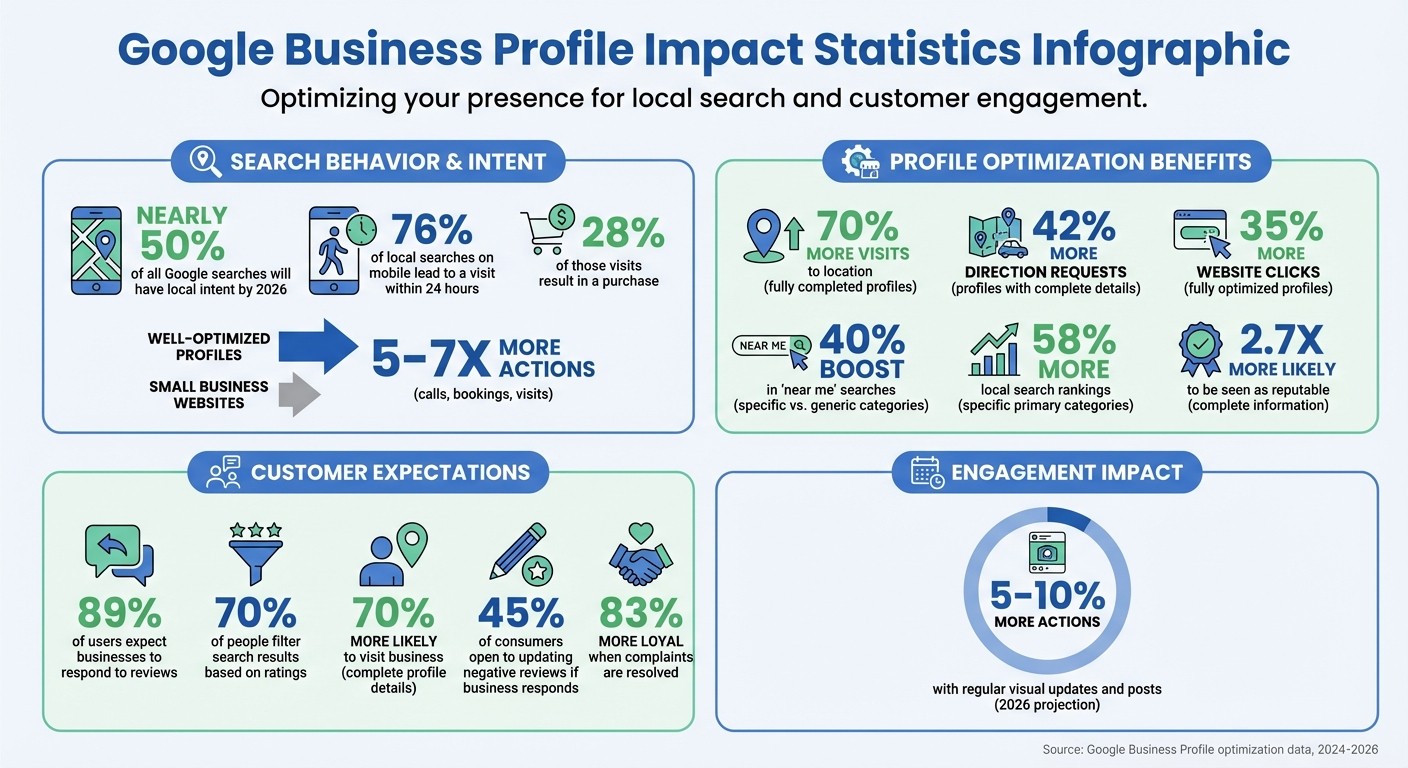
By 2026, nearly half of all Google searches will have local intent. A well-optimized Google Business Profile can drive 5–7x more actions like calls, bookings, and visits compared to most small business websites. Here’s why it matters:
76% of local searches on mobile lead to a visit within 24 hours.
28% of those visits result in a purchase.
Google ranks businesses based on relevance, distance, and prominence - two of which you can directly control.
To stand out in local searches, you need to:
Claim and verify your profile.
Accurately update business details like name, address, and hours.
Choose precise primary and secondary categories.
Add services, photos, and regular updates.
Manage reviews and Q&A actively.
This isn’t a one-time task. Regular updates, fresh photos, and consistent engagement are critical to staying visible and driving results. Let’s dive into how to make your profile work for you.
Google Business Profile Impact Statistics and Optimization Benefits
Google Business Profile Optimization: 20 Expert Tips to Dominate Local Search in 2025
Claim and Verify Your Google Business Profile
To manage your Google Business Profile effectively, you first need to claim and verify it. Without completing this step, you won’t be able to update your business details, respond to customer reviews, or show up in local search results.
Find Your Business on Google Maps
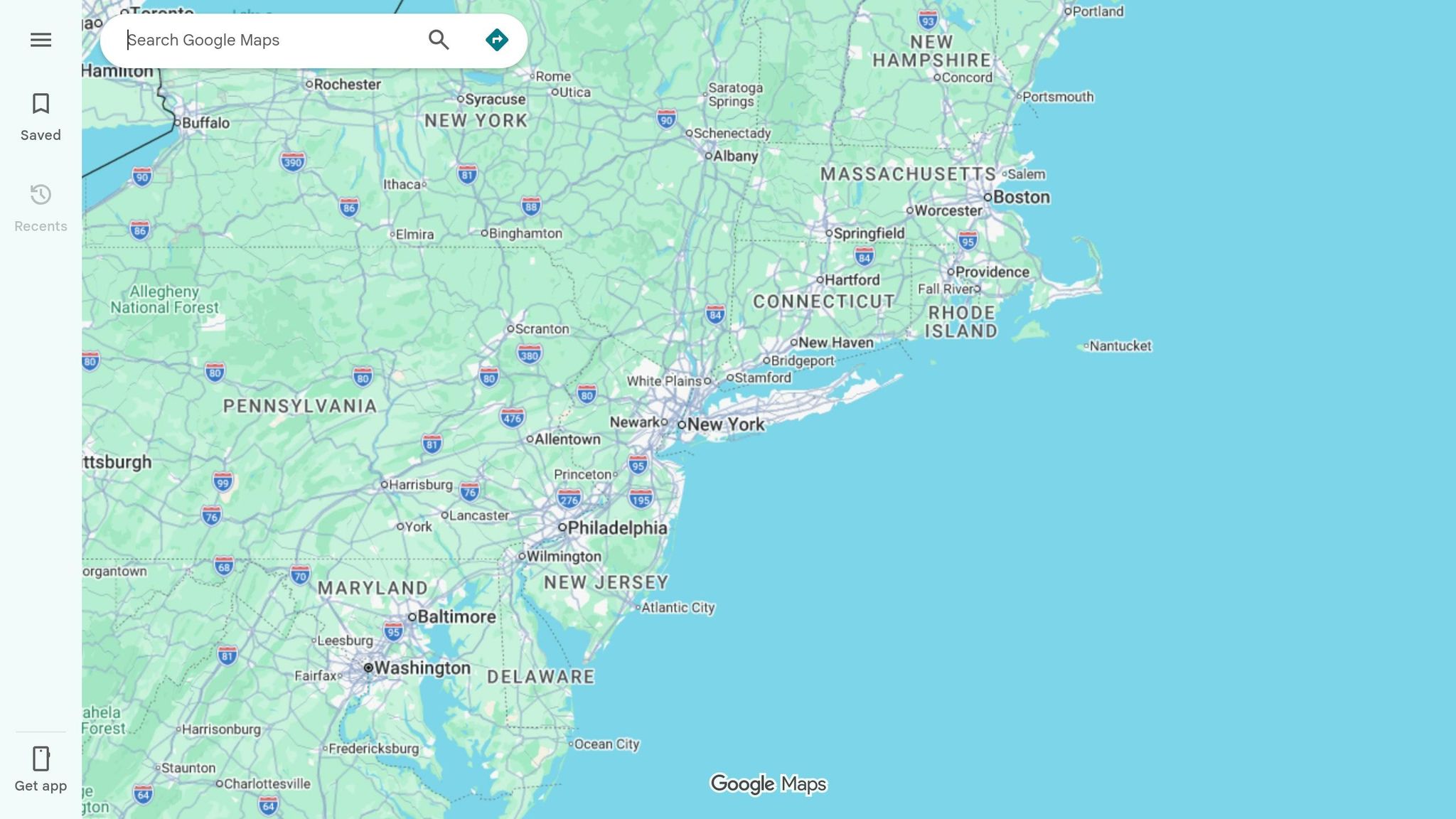
Start by checking if your business already has a profile. Open Google Maps or Google Search and type in your business name along with your city. If a profile exists, it will show up in a Knowledge Panel on the right-hand side of the search results.
You can also go to business.google.com/add while signed into your Google Account. Enter your business name to see if a profile exists. If you don’t see a “Claim this business” or “Own this business” button, it’s possible you’re already the owner. To confirm, check your dashboard at business.google.com.
"If you look for your Business Profile and can't find the 'Claim this business' or 'Own this business' button, you might already be the owner." - Google Business Profile Help
If your business isn’t listed, you can create a new profile by selecting “Add a missing place” on Google Maps. Additionally, if multiple profiles appear for the same location, make a note of them, as duplicate listings can hurt your search visibility.
Claim Your Profile
Once you locate your business, click on “Claim this business” or “Manage now.” If someone else has already verified the profile, you’ll need to click “Request Access.” The current owner has three days to respond, after which you may be able to claim it yourself.
Verification is required to complete the process, and Google assigns the method based on your business type and location. Most businesses receive a postcard with a five-digit code, which typically arrives within 5–14 days. Other methods, such as phone, email, or video verification, may also be available.
Verification Method | Typical Timeline | Best For |
|---|---|---|
Postcard | 5–14 days | Most brick-and-mortar businesses |
Phone or Email | Instant | Businesses with existing contact info |
Video Recording | Varies | Businesses needing to prove their location and operations |
Important: If you’re waiting for a postcard, don’t edit your business name, address, or category, as this will invalidate the code and delay the process. Once the code arrives, enter it at business.google.com to finalize verification. Keep in mind that it can take up to a month for a newly verified business to appear in search rankings.
"Only verified businesses can show their business info on Maps and Search." - Google Business Profile Help
Verified profiles are essential for building credibility. Nearly 70% of users perceive businesses with complete and verified profiles as more trustworthy and reliable. Taking the time to claim and verify your profile is a crucial step in connecting with local customers.
Set Up Your Business Information and Categories
Once your profile is verified, it’s time to fine-tune your business details and categories. These updates play a huge role in determining how often and where your business shows up in local searches. Accuracy here directly influences your visibility.
Select Your Primary and Secondary Categories
Your primary category is one of the most important factors for local rankings, second only to location. It tells Google what your business is all about and determines which searches you’re eligible to appear in. With over 3,900 categories available, picking the most specific one can make a noticeable difference.
Instead of going for a generic category, always choose the most precise option that matches your business. For example, "Vietnamese Restaurant" is much better than just "Restaurant", or "Nail Salon" instead of "Salon." A great example: In 2024, a small family-owned restaurant switched from the generic "Restaurant" to "Vietnamese Restaurant" as their primary category. They also added secondary categories like "Soup Restaurant", "Noodle Restaurant", and "Asian Restaurant." Within three months, they saw a 40% boost in 'near me' searches, a 26% rise in website clicks, and a 32% jump in direction requests.
"Your primary category should reflect your core business function. It tells Google, 'This is fundamentally what we do.'" - Entrenexus
Research backs this up: businesses that choose specific primary categories rank in 58% more local searches compared to those using generic ones. To find the right category for your business, search for your main service on Google Maps and study the categories used by the top 10–20 competitors. You can even uncover hidden secondary categories by viewing the page source of a competitor's Google Maps listing.
You can add up to nine secondary categories to highlight additional services. For example, a grocery store might include "Bakery" and "Deli", while a plumber could list "Emergency Plumber" and "Water Heater Installer." However, avoid adding irrelevant categories - only include services you actually provide and have dedicated pages for on your website. The rule is simple: describe your services clearly, don’t overdo it.
Business Type | Recommended Primary Category | Effective Secondary Categories | Categories to Avoid |
|---|---|---|---|
Bakery | Bakery | Dessert Shop, Coffee Shop, Wedding Bakery | Restaurant, Food Delivery |
Plumber | Plumber | Emergency Plumber, Water Heater Installer | Handyman Service, General Contractor |
Yoga Studio | Yoga Studio | Fitness Center, Pilates Studio | Gym, Health Spa |
Law Firm | Law Firm | Personal Injury Attorney, Family Law Attorney | Legal Services, Consultant |
Note: Changing your primary category may require re-verification of your business. Choose wisely from the start and review your categories every three to six months to stay aligned with your services and market trends.
Update Your Business Details
Consistency is key when updating your business details. Your name, address, and phone number (commonly called "NAP") should match exactly across your website, social media, and directories like Yelp or Bing. Inconsistent information confuses Google and can hurt your local SEO rankings.
Use your official, legally registered business name exactly as it appears on your signage and documents. Avoid adding extra keywords or city names unless they’re part of your actual business name. Violating this rule can lead to profile suspension.
"Google expects your GBP name to match your real, legally registered business identity." - Anthony Scott
For your address, keep formatting consistent. If your website lists "Suite 200", make sure that matches everywhere else. Adjust your map pin to the precise location of your entrance or parking area. If you’re a service-based business (like a landscaper or plumber), hide your residential address and instead define your service areas by zip codes or neighborhoods.
Your phone number should be local, not a toll-free 800 number. A local number boosts your relevance to the area. Stick to one number and avoid frequent changes. You can even add UTM parameters (like ?utm_source=google&utm_medium=gbp) to your website link to track traffic and conversions through Google Analytics.
Keep your hours of operation accurate and updated. Incorrect hours can drive customers away - most won’t give you a second chance if they visit while you’re closed. Update holiday and special event hours early, and make sure they match across your website and social media. If your competitors close at 5:00 PM but you’re open until 7:00 PM, being one of the few "Open" options during evening searches can bring in a lot more leads.
Fully completed profiles get 70% more visits to their location. When making updates, follow this order: update your Google Business Profile first, then your website, followed by social media and major directories. This ensures Google sees the most current information and minimizes inconsistencies that could hurt your rankings.
Create Your Business Description and Add Attributes
Your business description and attributes work together to inform Google - and potential customers - about what you offer and what sets you apart. As of 2026, Google Business Profiles serve as structured data sources for AI Search and AI Overviews, making these details essential for visibility. A profile with minimal information may not show up in AI-generated answers, even if it performs well in traditional Map Pack results. Once your profile is verified and detailed, focus on crafting a standout description and listing your services comprehensively.
Write a Business Description with Local Keywords
With a 750-character limit, your business description needs to pack a punch. Highlight what makes your business stand out, include specific services, and mention your city or neighborhood. Adding your location helps Google connect you with local searchers.
Write in a way that resonates with people, but also incorporate keywords for your services and area. For instance, instead of saying, "We fix air conditioners", try something like, "Emergency AC repair, available 7 days a week in Austin". Google uses your profile description alongside your website content to confirm your expertise and relevance. So, make sure the services you highlight match the ones on your website.
"Your Business Profile description helps potential customers learn more about your business, such as what you do and what makes your business unique." – Google Business Profile Help
Google provides an AI-powered "Suggest description" tool in the "Edit profile" section, which drafts a basic description based on your profile and website. Use this as a starting point, then refine it by adding local keywords and ensuring all details are accurate. Updates to your description usually appear within 10 minutes, though some may take up to 30 days. Fully optimized profiles can drive 35% more website clicks compared to incomplete ones.
Add Your Services and Attributes
Once your description is polished, focus on detailing your services and attributes to boost your search relevance. The Services section is often overlooked on Google Business Profiles. Be thorough - list each service you provide as a separate entry. For example, an HVAC company might include items like "Smart Thermostat Installation", "Air Quality Testing", "Duct Cleaning", and "Emergency AC Repair".
Each service should have a short, 100–150 character description optimized for keywords. For example: "Water heater installation and replacement for gas and electric models - licensed plumbers serving [City Name] homes and businesses". Align these service descriptions with your website content to avoid mismatches that could hurt your visibility in AI-generated answers.
Attributes, which are simple yes/no flags, help your business appear in filtered searches on Google Maps and Search. These options vary by business type and location but often include accessibility features (like wheelchair-accessible entrances), business identity (such as women-owned or veteran-owned), amenities (like free Wi-Fi), and service options (like online appointments). Selecting all relevant attributes can significantly impact customer trust - profiles with complete information are 2.7 times more likely to be seen as reputable.
Attribute Category | Examples |
|---|---|
Accessibility | Wheelchair-accessible entrance, Accessible parking |
Business Identity | Women-owned, Veteran-owned, LGBTQ+ owned |
Amenities | Free Wi-Fi, Outdoor seating, Gender-neutral restroom |
Recycling | Electronics, Batteries, Glass bottles |
Service Options | Online appointments, On-site services |
Check the "Edit profile" > "More" section frequently, as Google regularly adds new attribute options. Profiles with complete details receive 42% more direction requests and make customers 70% more likely to visit your business.
Add Photos, Videos, and Posts
Accurate business details are crucial for local SEO, but adding fresh visual content can take your profile to the next level. Regular photo updates and weekly posts can boost engagement and trust. By 2026, businesses that keep their profiles updated with visuals and posts are expected to see 5% to 10% more actions - like calls, website clicks, and direction requests - compared to profiles that remain inactive. Google views this visual activity as a sign of legitimacy and engagement, which can indirectly enhance your local search ranking.
Upload Photos and Videos
Start with the essentials: upload at least three photos each of your exterior (including signage and entrance), interior (showcasing atmosphere and workspace), products or services, and team members. Stick to Google’s guidelines - photos should be in JPG or PNG format, between 10 KB and 5 MB, with a recommended resolution of 720 px by 720 px. For videos, keep them under 30 seconds and 75 MB, with a minimum resolution of 720p.
Avoid using stock images, as Google prohibits them. Instead, take authentic photos. For optimal lighting, capture your storefront during the early morning or late afternoon. Make sure to include clear shots of your signage and entry door - this helps Google confirm your physical location. If you’re in a service-based industry, "before and after" photos can be especially compelling. For instance, dental practices that showcase smile makeovers have reported up to a 40% increase in patient inquiries.
"A slightly imperfect photo of your actual work outperforms a polished stock image every time." – LXGIC Studios
To keep things fresh, upload new images every one to two weeks. This consistency signals to Google that your business is active, which can help your profile stand out in search results. Pair this strategy with Google Posts to highlight timely updates.
Create Google Posts
Google offers four post types: Updates (news or tips), Offers (promotions with specific dates), Events (like workshops or open houses), and Products (highlighting items with pricing). Posts are archived after about seven days for Updates and up to six months for other types.
To keep your profile active, aim to post at least once a week. Mix up the content - one week, feature a service; the next, share a customer success story or announce a seasonal promotion. Keep your most important details within the first 300 characters, as Google truncates text in the listing view. Always include a call-to-action button, like "Book", "Order Online", or "Learn More", to make it easier for customers to take the next step.
"A profile that posts weekly looks alive. A profile that's been silent for months looks abandoned. Google notices. So do potential customers." – Josh Krueger, Founder, 716 Co.
Manage Reviews and Questions
Customer reviews and the Q&A section are some of the most prominent features of your Google Business Profile. Engaging with these areas builds trust with both Google and potential customers. In fact, 89% of users expect businesses to respond to reviews, and 70% of people filter search results based on ratings. Once you've optimized your profile details and visuals, actively managing reviews and questions can further strengthen your local presence. Before diving into responses, make sure your profile is verified and aim to reply to all reviews - whether positive, neutral, or negative - within 24 to 72 hours.
Get and Respond to Reviews
Encourage reviews right after a successful interaction by sharing a direct Google review link or using tools like QR codes on receipts, invoices, or in-store signage. However, steer clear of offering incentives like discounts or freebies for reviews, as this goes against Google's policies and could be flagged as fake engagement. Instead, focus on asking customers to share their honest experiences.
When replying to reviews, make it personal. Address customers by name, thank them, and reference specific details they mentioned. For positive reviews, highlight what they enjoyed and invite them to return. For negative feedback, stay calm, apologize sincerely, and offer a solution - whether it’s a refund, a replacement, or another resolution. If the issue is more complex, provide a direct phone number or email to handle the matter privately. Interestingly, 45% of consumers are open to updating or removing a negative review if the business responds appropriately, and 83% are more loyal when their complaints are resolved.
"Replying to positive reviews can have even more impact than responding to negative ones."
– Magda Marchowska-Raza, Assistant Professor of Marketing and Management at North Dakota State University
Incorporate keywords naturally in your responses - like your business name, services, or location - to boost local search relevance. Remember, your replies aren't just for the reviewer; they're also for every potential customer reading them. Consistent engagement with reviews demonstrates your credibility and sets the tone for managing the Q&A section effectively.
Answer Questions in the Q&A Section
Keep a close eye on the Q&A section of your profile. Responding within 24 hours helps prevent misinformation, as anyone with a Google account can post or answer questions on your listing. Replies from your verified account are marked with a blue store icon and an "(Owner)" label, which can enhance your authority.
Avoid short, vague answers. Instead, provide detailed and helpful responses, using local keywords where relevant. For instance, if someone asks, "Do you offer free consultations?" a strong reply could be: "Yes, we provide free 30-minute consultations for new clients at our downtown location. Call us at (555) 123-4567 to book your session." You can also take a proactive approach by posting and answering frequently asked questions like "What’s your service area?" or "Do you accept walk-ins?" to make your profile a valuable resource.
To ensure important information stays visible, upvote key questions and answers, and flag any spam or incorrect content.
"If a prospective customer sees a bevy of unanswered questions on the listing, they may assume the owner/management does not care enough about customer concerns."
– Igniting Business
Conclusion
Your Google Business Profile isn’t just a static listing - it’s a dynamic tool that requires consistent care and attention. In 2026, it stands out as the primary discovery hub for local businesses, driving visibility across Google Maps, AI-powered answers, and zero-click searches. The secret to staying at the top of the local pack isn’t about flashy tricks; it’s about mastering the basics and doing them consistently well.
Regularly updating your profile is key. Weekly posts, responding to reviews, uploading fresh photos, and managing the Q&A section all signal to Google that your business is active and trustworthy. Keep in mind that recent reviews (within the last 90 days) carry more weight than the total number of reviews over time.
"Google Business Profile optimization in 2026 is not a one-time task. It is brand building, reputation management, and AI discovery optimization. Those who 'set it and forget it' disappear."
– LocalMighty
Think of your profile as an asset that grows over time. Every photo, post, and review response adds to your presence, boosting results like 70% more location visits, 42% more direction requests, and 35% more website clicks. Make it a habit to review and update your business hours, services, and categories every month - outdated information can quickly drive potential customers away.
To stay competitive, establish a weekly routine. Add 2–3 new photos, post updates consistently, and respond to every review promptly. This steady engagement not only keeps your profile fresh but also strengthens your visibility in AI-driven search results and local rankings.
FAQs
How do I know which Google Business Profile category will rank best?
Picking the most specific and relevant primary category for your business is a game-changer when it comes to local SEO. Why? Because your primary category plays a huge role in how search engines rank your business - and how easily local customers can find you.
It’s critical to choose a category that clearly represents your main product or service. Steer clear of broad or generic categories that don’t tell the full story of what your business offers. For example, if you’re a bakery specializing in gluten-free desserts, “Gluten-Free Bakery” is a better choice than just “Bakery.”
While secondary categories can help round out your profile, they’re not a substitute for a well-chosen primary category. The primary category is the foundation of how search engines connect your business to local searches, so make it count!
What should I do if my business has multiple or duplicate profiles on Google?
If your business has more than one profile or duplicate listings on Google, it's important to address this issue. Multiple profiles can confuse potential customers and may even violate Google's policies. Remember, Google allows only one verified profile per business.
To resolve this, start by claiming ownership of any existing profiles. If duplicates represent the same business, you can merge them into a single listing. Take time to investigate why duplicates were created and ensure your business information is accurate and consolidated.
How can I track calls, clicks, and bookings from my Google Business Profile?
To keep tabs on calls, clicks, and bookings from your Google Business Profile, you’ll need to rely on call tracking and analytics tools. After July 31, 2024, Google discontinued its call records feature, making third-party call tracking solutions a must for this purpose.
Beyond call tracking, you can use analytics tools to monitor clicks and bookings, giving you a clearer picture of how users interact with your profile. These insights are essential for refining your local marketing strategy and enhancing your profile’s performance.
Related Blog Posts
Join our community of 15,000+ business owners
Popular articles
Popular articles about your website and marketing your small business


