


Google Maps SEO: 7 Tips for Small Businesses
Small Business Marketing
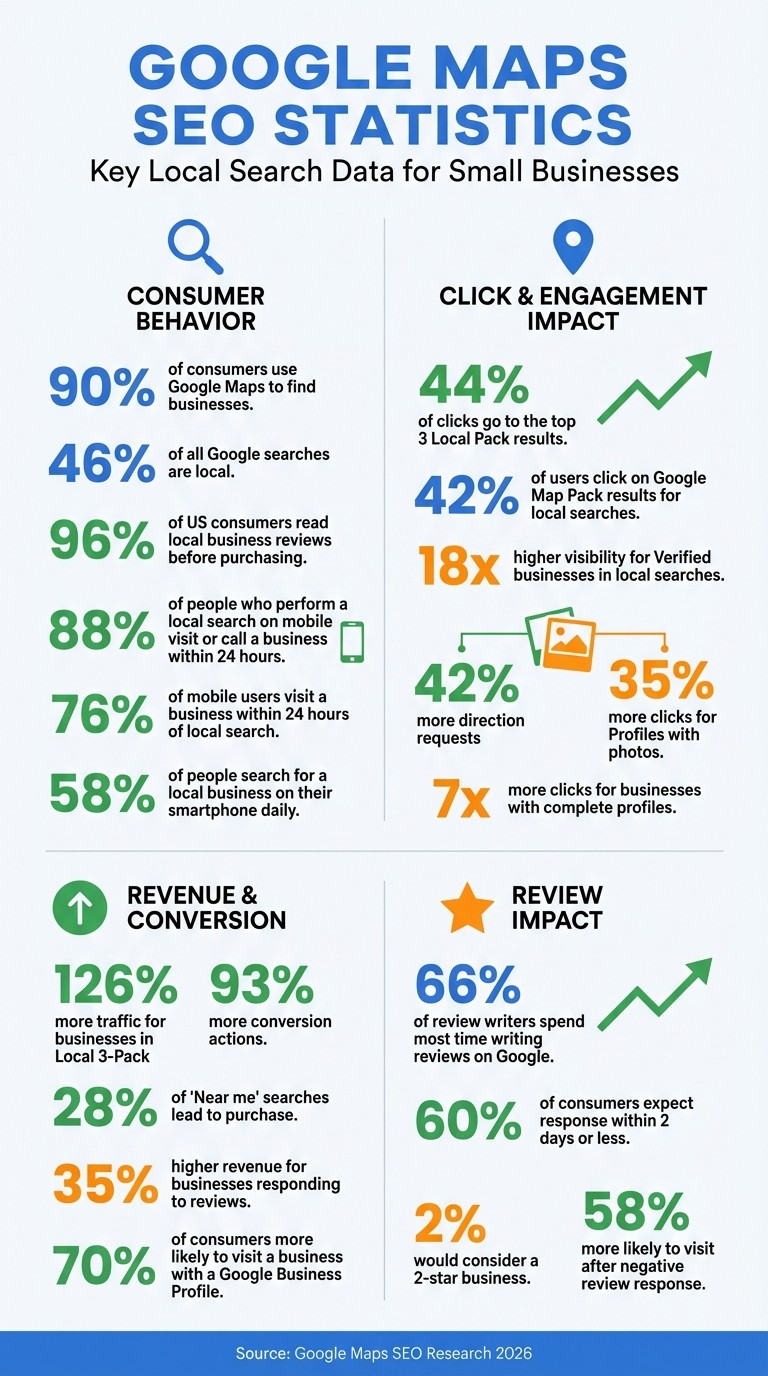
Want more local customers? Start by optimizing your Google Business Profile. Nearly 90% of consumers use Google Maps to find businesses, and the top three results grab 44% of clicks. Here’s how to improve your visibility and drive foot traffic:
Claim and verify your Google Business Profile: Accurate details and verification boost visibility by up to 18x.
Pick the right categories: Specific categories like “Italian Restaurant” help you rank higher for niche searches.
Ensure NAP consistency: Match your Name, Address, and Phone number across all platforms to build trust with Google.
Upload quality photos: Profiles with photos get 42% more direction requests and 35% more clicks.
Get customer reviews: Businesses with better ratings rank higher and attract more visitors.
Use local keywords: Add location-specific terms to your profile to appear in relevant searches.
Add maps and schema markup to your website: This reinforces your location and improves search rankings.
Quick Fact: 46% of all Google searches are local, and 76% of mobile users visit a business within 24 hours. Start with these steps to increase visibility and connect with nearby customers.
Google Maps SEO Statistics: Local Search Impact for Small Businesses
Google Maps SEO Checklist 2025
1. Claim and Complete Your Google Business Profile
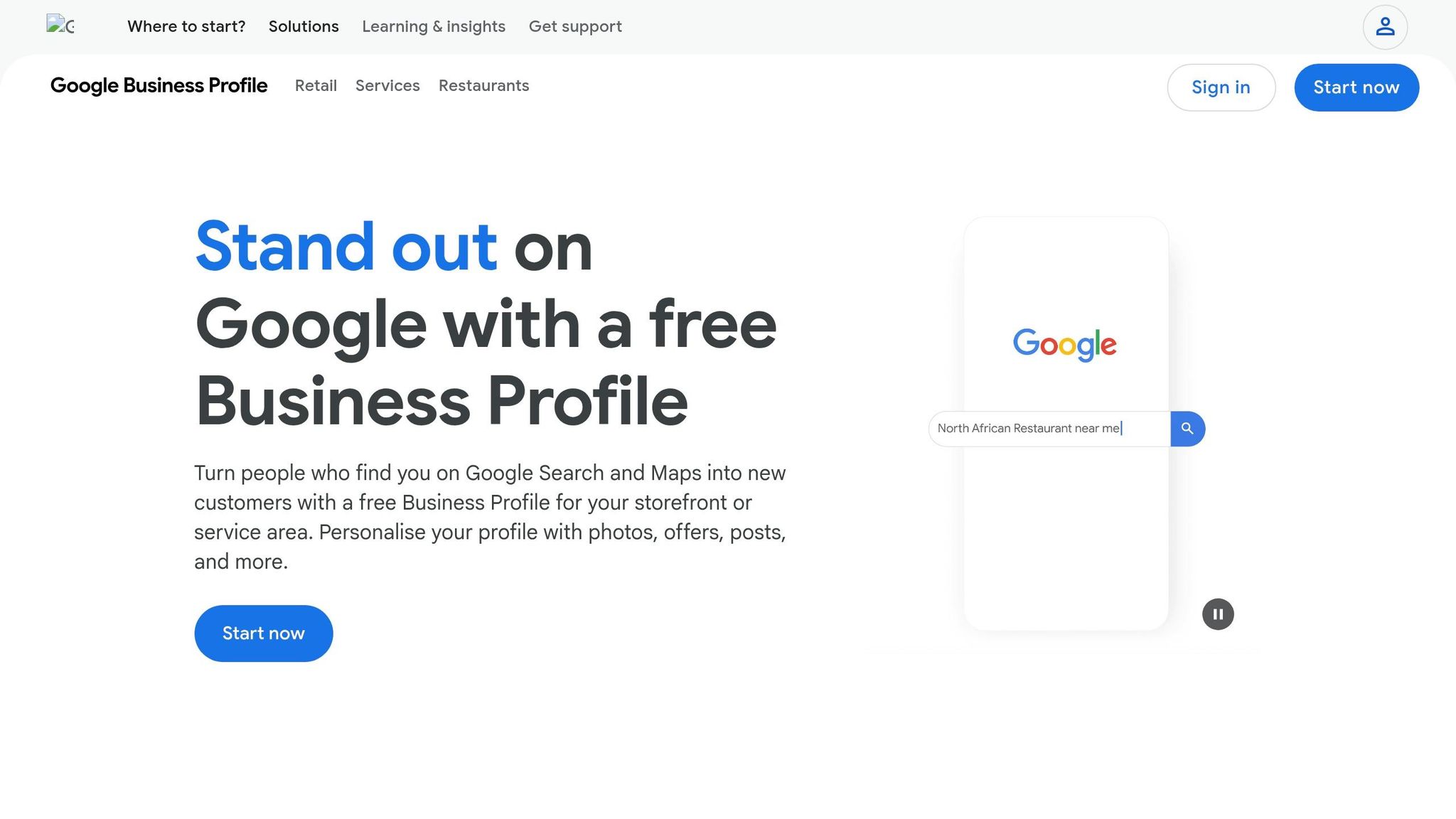
To get started, head to business.google.com or use Google Maps to claim your Google Business Profile. If a profile for your business already exists, select "Claim this business." If not, you’ll need to create one from scratch.
Once you’ve claimed your profile, the next step is verification. Google usually sends a postcard with a verification code, which can take 5–14 days to arrive. Alternatively, you might have the option to verify via phone, email, or even video. For video verification, you’ll need to record a short clip showing your storefront, signage, and accessible entry points.
Impact on Local Search Visibility
A verified profile is your gateway to appearing in the Local 3-Pack - the top three map results displayed above regular search listings. Verified businesses with accurate details enjoy up to 18 times higher visibility in local searches. On top of that, a fully completed profile helps establish trust with potential customers.
Simple Setup for Small Businesses
Google makes the setup process straightforward with a step-by-step wizard and a Profile Strength Indicator to flag any missing details. Be sure to include your exact legal business name (avoid adding unnecessary keywords), address, phone number, operating hours, and relevant categories. Choosing a precise primary category, like "Italian Restaurant" instead of just "Restaurant", can significantly improve your search relevance.
Boost Foot Traffic and Customer Engagement
A well-rounded profile doesn’t just enhance credibility - it also encourages customer interactions. Businesses with complete profiles receive seven times more clicks. Adding high-quality photos can make a big difference, too, leading to 42% more direction requests and 35% more clicks to your website, which you can optimize using a business website SEO checker. Features like messaging allow customers to reach out directly through search results, while the Q&A section lets you address frequently asked questions proactively.
Once your profile is set up, take the time to refine your business categories to enhance your local relevance even further.
2. Choose the Right Primary and Secondary Categories
Once your Google Business Profile is set up, the next step is fine-tuning your categories to improve search relevance.
Your primary category is the cornerstone of your Google Business Profile. It tells Google what your business is about and determines your eligibility for relevant searches. Si Quan Ong, Content Marketer at Ahrefs, emphasizes its importance:
Your primary category is the #1 ranking factor for Google Maps.
Impact on Local Search Visibility
The primary category plays a major role in local search rankings. Being specific with your choice - like selecting "Italian Restaurant" instead of the more general "Restaurant" - can significantly boost your visibility for niche searches. This approach helps attract customers who already know what they’re looking for. Businesses featured in the Google Local Pack enjoy 126% more traffic and 93% more conversion actions, such as calls or requests for directions, compared to businesses that rank just below it.
Simple for Small Businesses to Implement
Picking categories is straightforward and doesn’t require technical skills. Log in to your Google Business Profile dashboard, type your main service into the drop-down menu, and select from around 4,000 available categories. You can also add up to nine secondary categories to showcase additional services. For example, a dentist might choose "Teeth Whitening Service" or "Cosmetic Dentist" as secondary categories alongside the primary "Dental Clinic".
However, it’s important to avoid selecting unrelated categories in an attempt to appear in more searches. Si Quan Ong cautions:
Don't try to game the system by selecting unrelated categories. Google will penalize you for category confusion.
Stick to categories that accurately represent your business and related services. Regularly review your category selections - monthly if possible - to ensure they align with your current offerings or any seasonal changes.
Boosting Foot Traffic and Customer Engagement
Accurate categorization is key to capturing "near me" searches, which lead to a purchase 28% of the time. Additionally, 76% of people who perform a local search on their smartphone visit a nearby business within 24 hours. By carefully selecting a specific primary category and fully utilizing secondary category options, you can attract high-intent customers who are actively searching for what you offer.
3. Keep Your NAP Consistent Across All Platforms
Once you've fine-tuned your business categories, the next step is making sure your contact details are consistent everywhere.
NAP stands for Name, Address, and Phone number - the core details Google uses to confirm your business's legitimacy. When your NAP information matches across your website, social media, and directories, it builds Google's confidence in your business and improves your visibility in local searches. On the flip side, conflicting details can confuse Google, reducing trust and potentially hurting your rankings.
Kristen McCormick, Head of Marketing at Hatch, emphasizes this point:
Google Maps ranks businesses it can trust, and one measure of your trustworthiness is the consistency of information about your business across the web.
Impact on Local Search Visibility
Inconsistent NAP details can create confusion for search engines, which directly impacts your local search performance. This matters because businesses featured in the "Local 3-Pack" capture a staggering 44% of all clicks. Additionally, 52% of consumers say they’d leave a bad review if they encounter incorrect or misleading information about a business online. Beyond rankings, inaccurate details frustrate potential customers - if they can't find your correct address or phone number, they’re unlikely to visit. This makes maintaining consistent NAP information a critical step for both search visibility and customer trust.
Simplifying NAP Consistency for Small Businesses
Ensuring your NAP is uniform doesn’t have to be complicated. Start by using your Google Business Profile as the central reference point for your contact details. Stick to one consistent format - for example, write "Street" instead of "St." or "Suite 100" instead of "Ste 100". Make sure your NAP is displayed in text format (not as an image) in the header or footer of every page on your website so search engines can easily read it.
Use a local phone number with the appropriate area code, as toll-free numbers can sometimes be flagged as spam by Google. To maintain accuracy across platforms, audit your listings on directories like Yelp, Bing Places, Facebook, and Apple Maps twice a year. If manual updates sound overwhelming, tools like Moz Local (around $14–$20/month) or BrightLocal (around $39–$79/month) can simplify the process.
Boosting Foot Traffic and Customer Engagement
Accurate NAP information plays a key role in "near me" searches that lead to real-world visits. For instance, 88% of people who perform a local search on their mobile device either visit or call a business within 24 hours. Even more impressive, 76% of users searching for something nearby end up visiting a related business the same day. By keeping your NAP consistent, you increase your chances of appearing in these high-intent searches, making it easier for customers to find and connect with your business.
4. Upload High-Quality Photos of Your Location
Once your NAP details are consistent, it's time to make your business stand out visually by uploading high-quality photos.
Visual content plays a huge role in Google Maps SEO. Businesses with photos on their profiles see 42% more requests for driving directions and 35% more clicks to their websites compared to those without images. Google favors profiles with clear, high-quality photos because they signal an active, well-maintained presence. Plus, photos can improve user engagement - like click-through rates and direction requests - which can indirectly help your local search rankings.
Impact on Local Search Visibility
In 2026, Google Business Profiles have become even more integral to AI-driven search results, making image optimization essential. Tools like Google’s Cloud Vision API analyze photos to understand their content, which helps match your business to relevant search queries. As RateGather puts it:
Images can make or break your visibility in local search. Great photos don't just make your business look good - they can boost your local rankings, attract more clicks, and turn browsers into buyers.
Adding new photos regularly - weekly or bi-weekly - is key. This signals to Google that your business is active and up-to-date, which is more effective than uploading a large batch of photos all at once and then neglecting updates.
Ease of Implementation for Small Businesses
You don’t need professional gear to get started - modern smartphone cameras can do the job just fine. Aim to upload at least three sharp, well-lit photos that showcase your business from different angles: exterior, interior, products or services, and team members. Rename your image files to include descriptive, keyword-rich titles (e.g., "exterior-view-bakery-downtown-austin.jpg") instead of generic names like "IMG_1234.jpg". For best results, use JPG or PNG formats, keep file sizes between 10 KB and 5 MB, and ensure a resolution of 720 x 720 pixels.
It's worth noting that 68% of consumers trust customer-shared photos more than those provided by businesses. Avoid using stock images or heavily filtered photos - authentic, unposed shots of your staff and customers build more trust and connection than polished, generic pictures.
Ability to Drive Foot Traffic and Customer Engagement
Think about the questions potential customers might have and use your photos to answer them. For example, exterior shots help people identify your building, interior photos showcase your atmosphere and cleanliness, and team photos give your business a personal touch. If you’re a service-based business, consider adding "before and after" shots or images of your team in action to highlight your expertise and credibility.
You can also use tools like Canva to create graphics featuring customer testimonials, as text reviews can’t be uploaded directly to your photo gallery.
These high-quality visuals, paired with a fully optimized Google Business Profile, can significantly enhance your local search performance and customer engagement.
5. Get More Customer Reviews and Respond to Them
Customer reviews are one of the most effective ways to build trust and credibility. Did you know that 96% of US consumers read local business reviews before making a purchasing decision? Plus, 66% of review writers spend the most time writing reviews on Google. Reviews not only act as social proof but also play a key role in improving your local search rankings. Google prefers businesses with a steady stream of reviews over those with sporadic feedback. Additionally, the keywords and tone of these reviews help Google understand what your business offers. In short, reviews directly influence both customer trust and your search visibility.
Impact on Local Search Visibility
When it comes to Google's local pack rankings, reviews are a major factor. Businesses with better ratings and more reviews tend to rank higher. Responding to reviews - whether they're glowing or critical - shows Google that your business is active and engaged, which can boost your visibility and build trust with potential customers. By 2026, AI-powered search features are expected to analyze review patterns and responses to recommend businesses for specific queries.
Interestingly, a mix of positive and negative feedback can make your business appear more credible to both Google's algorithm and potential customers. However, there's a catch: most consumers won't even consider a business with less than a 4.0-star rating. For example, only 2% would consider a 2-star business, and just 1% would choose a 1-star business.
Ease of Implementation for Small Businesses
Getting reviews doesn't have to be complicated. Start with simple tools, like generating a direct review link through the "Ask for Reviews" button in your Google Business Profile dashboard. Share this link via text or email within 1 to 4 hours after completing a service - this is when customers are most satisfied and likely to leave feedback. For walk-in customers, you can make the process even easier by adding QR codes to receipts, business cards, or table tents.
Train your team to ask for reviews during positive interactions. A brief, friendly script can go a long way. Just remember, offering incentives for reviews is against Google’s policies and FTC regulations, which could result in fines of up to $51,744 per violation.
Ability to Drive Foot Traffic and Customer Engagement
Responding to reviews is just as important as collecting them. Businesses that consistently reply to reviews see 35% higher revenue on average compared to those that don’t. Addressing negative reviews promptly and offering solutions can make a big difference: 58% of consumers are more likely to visit your business, and 56% are more likely to give you another chance. As Moz puts it:
A negative review is not the end of the world, but... the last chance the business will likely be given to make amends and win back the customer.
Timeliness matters, too. 60% of consumers expect a response within two days or less. Aim to reply within 24 to 48 hours, addressing reviewers by name and referencing specific details to show your response is genuine. For more complex issues, include a direct phone number or email in your reply to move the conversation offline. It’s a small effort that can lead to big results in customer satisfaction and loyalty.
6. Use Local Keywords in Your Business Description
After fine-tuning your profile structure and reviews, the next step is to optimize your business description with local keywords. This section of your Google Business Profile plays a big role in informing potential customers about your services and the areas you cover. By weaving in targeted local keywords, you can significantly improve your visibility in local searches. Considering that nearly half of search queries are driven by local intent, your business description becomes a key tool for connecting with nearby customers. The right keywords not only help you rank higher but also make it easier for potential customers to decide if your services are a good match for their needs.
Impact on Local Search Visibility
Local keywords are critical for boosting Google's "Relevance" signal, one of the three main factors Google uses to rank local businesses (the other two being Distance and Prominence). For example, when someone searches for "emergency plumber in Brooklyn" or "Thai restaurant near me", Google examines your description to determine if your business aligns with the search. The better the match, the higher your chances of landing in the Local Pack - the top three results displayed in Google Maps and regular search results.
Here’s an eye-opening stat: 84% of consumers discover businesses through category or service searches, rather than searching for a specific business name. This means your description should include the exact phrases your local audience uses. By aligning your language with what people are searching for, you can dramatically improve your chances of being found.
Ease of Implementation for Small Businesses
You don’t need a massive budget or advanced tools to identify the right local keywords. Start by listening to your customers. Pay attention to how they describe your services - whether they say "sub" or "hoagie", for example - and review call logs or staff notes for recurring questions. Another simple trick? Type your main service into Google’s search bar and see what autocomplete suggests. These suggestions reflect real searches happening in your area.
Keep in mind that your description can be up to 750 characters long, but Google often truncates it after the first few hundred characters in search results. This makes it crucial to prioritize specific location names, commonly used local phrases, and service-location combos like "water heater repair Brooklyn". As Miriam Ellis from Search Engine Land explains:
The more effort you put into proper optimization, the stronger a signal you will send to both the public and search engines that the local brand you're marketing can meet specific needs within a specific geography.
Write in a way that feels natural and trustworthy. SEO consultant Dalton Luka emphasizes that while keywords may not directly influence rankings, they help ensure "customers who read it will be better informed". And an informed customer is far more likely to take action.
Ability to Drive Foot Traffic and Customer Engagement
Using the right keywords can attract high-intent customers - people who are ready to take the next step. For instance, including phrases like "pet-friendly cafe with free Wi-Fi" in your description speaks directly to customers who are actively searching for those features. Consider this: 70% of consumers are more likely to visit a business with a Google Business Profile, and 58% of people search for a local business on their smartphone daily.
To capture hyper-local searches, include neighborhood names or landmarks in your description, such as "bakery near Central Park". You can also highlight specific features like "wheelchair-accessible" or "outdoor dining", which can help your business appear in filtered searches. These small but thoughtful details not only make it easier for nearby customers to find you but also build confidence that your business meets their needs. This, in turn, can lead to more phone calls, direction requests, and foot traffic. By focusing on local keywords, you enhance your profile’s relevance and complement the other optimization strategies you’ve already implemented.
7. Add Google Maps and Schema Markup to Your Gatsboy Website
You can strengthen your local SEO by embedding a Google Map and incorporating schema markup into your website. This not only confirms your location and business details for search engines but also connects your website to your Google Maps listing. Together with your profile, reviews, and local keyword strategies, these technical elements complete your local SEO setup.
Impact on Local Search Visibility
Adding a Google Map and LocalBusiness schema markup to your Gatsboy website enhances your credibility in local search. These steps contribute to what SEO professionals call "On-Page Local Signals", a crucial element of local SEO. Schema markup, typically written in JSON-LD, provides search engines with clear, structured information about your business - like your name, address, phone number, hours, and location coordinates.
As LocalMighty puts it:
Local business schema markup is no longer optional in 2026. It is a structural trust layer that helps Google, Maps, and AI systems understand exactly who you are, where you operate, what you offer, and why your business is legitimate.
This matters because businesses in Google's "Local 3-Pack" capture 44% of clicks for local search queries. While schema markup alone won’t directly improve rankings, it enhances trust signals, supporting elements like your Google Business Profile and customer reviews.
Ease of Implementation for Small Businesses
Adding these features to your website is simpler than it sounds. Embedding a Google Map is straightforward: go to maps.google.com, locate your verified business, click "Share", then "Embed a map." Copy the code and paste it into your Contact or Location page. This not only helps visitors get directions but also reinforces your location data for search engines.
For schema markup, you’ll need to create a JSON-LD schema that includes key details like @type, name, address, telephone, openingHoursSpecification, geo (latitude and longitude), and url. Free online tools can generate this code for you. Once the script is ready, add it to the <head> section of your website. Make sure your NAP (Name, Address, Phone) matches exactly across your Google Business Profile, website footer, and schema. Afterward, test your page using Google's Rich Results Test or Schema Markup Validator to catch any errors.
Ability to Drive Foot Traffic and Customer Engagement
These additions can directly influence foot traffic and engagement. For instance, 88% of people who perform a local search on their smartphone either visit or call a business within 24 hours, and 72% visit a business within five miles. Embedding a map on your website eliminates barriers, allowing users to quickly locate your business and get directions.
Schema markup also enhances your search visibility by enabling rich snippets - like star ratings or "Open Now" tags - that make your listing stand out. This is significant because 42% of users click on results displayed in the Google Map Pack for local searches. Together, these tools help bridge the gap between online searches and in-person visits, boosting both visibility and customer interaction.
Conclusion
Building your presence on Google Maps requires steady, ongoing effort. The seven strategies discussed - claiming your Google Business Profile, choosing accurate categories, ensuring NAP (Name, Address, Phone) consistency, uploading quality photos, collecting reviews, integrating local keywords, and optimizing your website with technical elements - work together to elevate your local search rankings. Each step plays a role in improving your visibility.
Local searches are powerful drivers of customer actions. For example, businesses featured in the "Local 3-Pack" capture an impressive 44% of all clicks. These clicks often lead directly to phone calls, requests for directions, and in-person visits.
To make progress, tackle these strategies step by step. Start by verifying your Google Business Profile and auditing your NAP details this week. In the first month, focus on gathering a few reviews and uploading professional, eye-catching photos. By months four to six, you should notice your business showing up in local search results for your key terms. For instance, a Dallas-based HVAC company used this approach and saw dramatic results between late 2025 and early 2026. In just six months, they climbed from page two to the #2 spot in the local pack, boosting monthly calls from 20 to 85 and driving over $40,000 in new revenue.
Keep in mind, local SEO isn’t a one-and-done deal. Unlike paid ads, these efforts grow over time, creating a foundation for sustained visibility. Experts emphasize that consistency is critical to staying competitive in local search. Features like schema markup and embedded maps on your website further strengthen your local signals. Regular updates and refinements will ensure your strategy stays effective.
Don’t wait - small updates, like adding reviews or tweaking your profile, can yield noticeable results within weeks. The sooner you begin, the sooner you’ll start attracting more local customers.
FAQs
How long does Google Maps SEO take to work?
Most small businesses start seeing progress on Google Maps in about 2–4 weeks. That said, climbing into the top 3 rankings typically takes 3–6 months of steady work. This involves fine-tuning your Google Business Profile, collecting customer reviews, and targeting local keywords. The timeline can vary based on how competitive your area is and how well your profile is optimized.
What should I do if my business has multiple locations or no storefront?
If your business operates in multiple locations, it's crucial to create and fine-tune a Google Business Profile for each one. Make sure every profile includes accurate details, such as operating hours, photos, and customer reviews tailored to that specific location.
For businesses without a physical storefront, you can set up a service-area business profile. Instead of listing an address, specify the areas you serve. Properly managing these profiles not only boosts your local visibility but also makes it easier for potential customers to connect with your business.
Which Google Business Profile updates matter most for rankings?
To improve your rankings on Google, it's crucial to keep your Google Business Profile accurate and up-to-date. Start by ensuring your business name, address, and categories are correct. These details are fundamental for search engines to understand and display your business properly.
Another major factor? Reviews. Make sure you're consistently gathering recent and genuine feedback from customers. Positive reviews not only build trust but also play a big role in how Google ranks your profile.
By regularly updating your profile and maintaining accurate information, you can boost your visibility in local search results.
Related Blog Posts
Join our community of 15,000+ business owners
Popular articles
Popular articles about your website and marketing your small business


