


The Complete Guide to Managing a Business Website
Website Tips
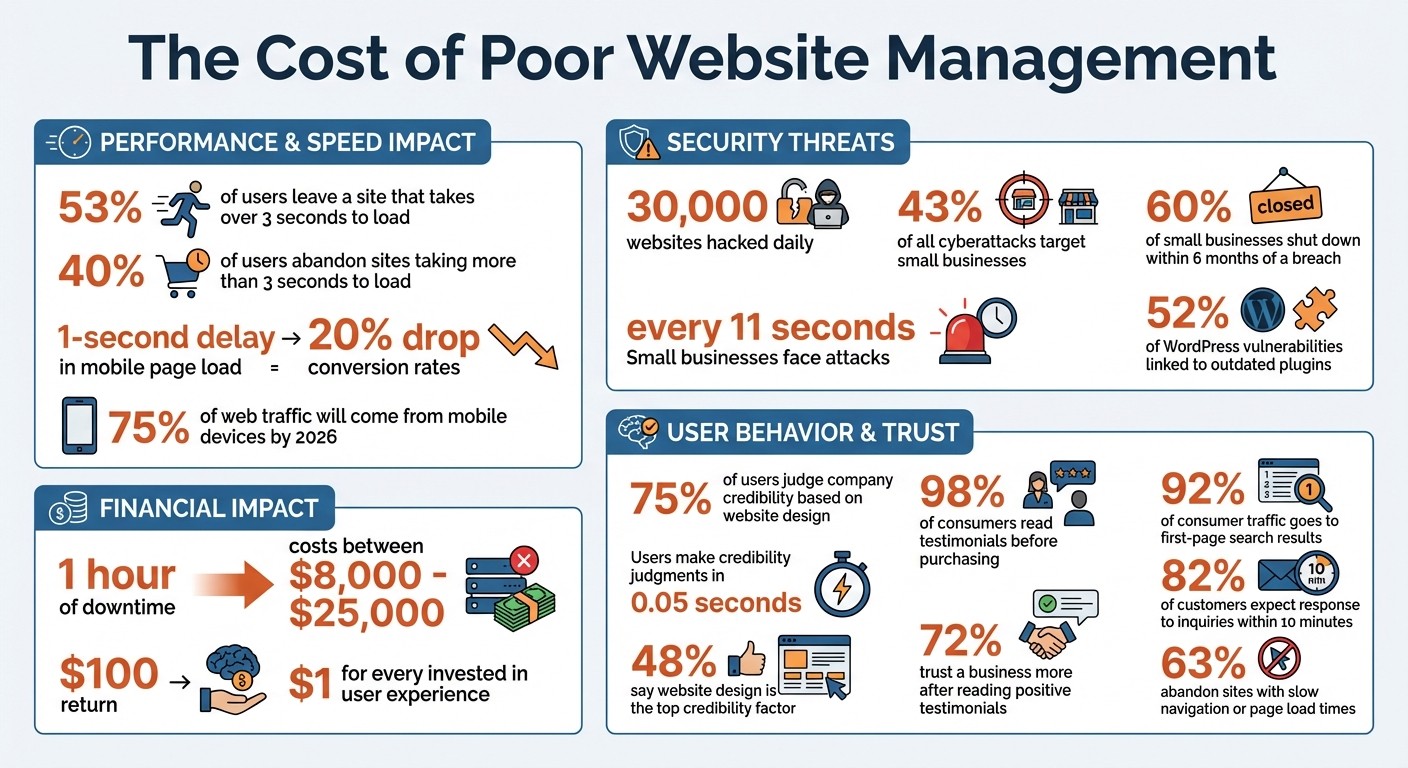
Your business website is more than just a digital presence - it’s a constant tool for generating leads and building trust. But poor management can cost you, with 53% of users leaving a site that takes over 3 seconds to load and 30,000 websites hacked daily. Here’s what you need to know:
Downtime is expensive: Just one hour offline could cost between $8,000 and $25,000.
Mobile matters: By 2026, 75% of web traffic will come from mobile devices.
Cybersecurity is critical: Small businesses face attacks every 11 seconds, and 60% shut down within six months of a breach.
This guide covers everything from planning and building your site to maintaining it for speed, security, and usability. Learn how to set clear goals, use no-code tools like Gatsboy for quick updates, and stay on top of daily and monthly maintenance tasks. Whether you’re fixing broken links, improving navigation, or tracking performance with analytics tools like GA4, small, consistent efforts can transform your website into a 24/7 revenue engine.
Website Management Statistics: Performance, Security, and User Behavior Data
How to Maintain a Website: A Complete Guide
Planning Your Website
Before diving into code or picking out colors, take a step back and plan your website. Here's why: 75% of users judge a company's credibility based on its website design. And they make that judgment in just 0.05 seconds. That’s practically instant. If your site doesn’t immediately communicate who you serve and what you offer, visitors are already moving on.
Setting Goals and Identifying Your Audience
Start with one clear goal for your site. Whether it’s generating leads through form submissions, selling products, or booking consultations, every element - from your homepage headline to your call-to-action buttons - should align with that objective.
Need help narrowing your focus? Try creating an ideal customer profile. Give them a name and a backstory. For example, a landscaping company might target “Michael, a 42-year-old suburban homeowner who wants a low-maintenance backyard but doesn’t know where to start.” This level of detail makes your messaging feel personal and relatable, far more effective than generic copy.
To understand your audience, dig into your existing customer data. Look for patterns in job titles, company size, age, or location. If you’re just starting out, third-party research, focus groups, or surveys can help validate your assumptions. Keep in mind: 48% of people say website design is the top factor in determining a company’s credibility. Your design should align with your audience’s preferences and values.
Creating a Clear Site Structure
Think of your sitemap as your website’s blueprint. At a minimum, it should include these key pages:
Homepage: Clearly state your value proposition.
About Page: Build trust by sharing your story or mission.
Services/Products Page: Highlight the benefits of what you offer.
Contact Page: Make it easy for visitors to reach you.
Test your structure using the "5-Second Test". Show your homepage to someone unfamiliar with your business for five seconds. Then, ask them to explain what you do and who you help. If they can’t, your messaging needs work. This simple exercise ensures your site communicates effectively and guides visitors toward taking action.
Also, plan for growth. Design your site structure so it can handle future pages without needing a complete overhaul. Tools like Lucidchart, Miro, or Slickplan can help you map out how pages connect and ensure everything flows logically. And don’t forget a crucial detail: 82% of customers expect a response to inquiries within 10 minutes. Make sure your contact information is easy to find on every page.
Building and Updating Your Website with No-Code Tools
Creating and maintaining a website has never been easier, thanks to no-code tools. These platforms let you design and update your site using visual editors - just drag, drop, and arrange blocks of content. No coding required. This means you can quickly tweak pricing, swap out images, or add new services in just a few minutes.
Another perk? No-code platforms handle the behind-the-scenes work for you. Hosting, security patches, and software updates are all managed automatically, so you can focus on running your business while the platform ensures everything stays optimized. It’s this simplicity that aligns with Gatsboy’s efficient approach, which is explored further below.
Using Gatsboy for Done-for-You Websites
Gatsboy offers a streamlined solution for building websites, promising delivery within 7 to 10 days. Using Framer, a no-code editor known for its speed and simplicity, Gatsboy takes care of the entire process. All you need to do is answer 10 questions about your business, and their team handles the design, content, and setup. Once completed, the website is handed over to you via your own Framer account, allowing you to make updates on your own.
To date, Gatsboy has delivered over 3,000 websites tailored to small businesses. Their approach is built around the Four Pillars:
Clarity: Clearly defining who your business serves.
Credibility: Showcasing testimonials to build trust.
Conversion: Including clear calls-to-action to guide visitors.
Findability: Implementing basic SEO to help people find you online.
After your site goes live, managing it becomes hassle-free through a centralized Business Portal. From one dashboard, you can handle leads, bookings, and customer messages, making it a seamless part of your overall business operations.
"Gatsboy gives me control without complexity. Our team picked it up quickly and now uses it daily." - Ella B, Brightline
Adding Features for Functionality and Growth
Gatsboy doesn’t just stop at building your website. They make it easy to enhance your site with pre-built Smart Modules designed to integrate directly into your business workflows. These modules are already helping over 5,000 small businesses streamline their operations.
Popular essential website features include:
Email Collectors: Build and manage subscriber lists.
Advanced Forms: Capture detailed lead information.
Live Chat: Provide real-time customer support.
Booking/Events Management: Simplify scheduling and event planning.
Each module connects to your dashboard, so actions like form submissions or bookings are instantly visible. You can respond to leads or inquiries right from the same login, saving time and keeping everything organized.
"The speed I can now update and manage my website is unreal. It's become a core part of our workflow." - Mark Reynolds, Reynolds & Co
Gatsboy Plans Comparison
Plan | Price | What's Included | Best For |
|---|---|---|---|
Website Only | $500 (one-time) | 5-page Framer site, SEO structure, contact form, Business Dashboard, free modules, 2 revisions | Businesses needing a professional site with basic functionality |
Website + Pro | $500 + $47/month | Everything in Website Only plus advanced forms, Pro modules (Stripe, Reviews, etc.), messaging from dashboard | Businesses requiring payment processing, advanced lead management, or booking systems |
Note: Both plans require Framer hosting (additional cost) and guarantee delivery within 7-10 days.
For businesses that need to collect payments, manage bookings, or handle a high volume of customer inquiries, the Pro plan is a great fit. Plus, with mobile devices driving over 75% of website traffic by 2026, both plans include mobile-friendly designs with tappable buttons and easy-to-read text.
Website Maintenance: Daily and Monthly Tasks
Staying on top of website maintenance is crucial for keeping your site secure, functional, and fast. Regular upkeep not only protects your reputation but also safeguards your revenue. Consider this: 43% of all cyberattacks target small businesses, and just one hour of downtime can cost anywhere from $8,000 to $25,000. Clearly, maintenance isn't something to put on the back burner.
The good news? Many tasks are quick or can be automated. Daily checks focus on uptime and essential functions, while monthly tasks dig deeper into performance, security, and accuracy. By sticking to a routine, you can stop small problems from turning into expensive disasters.
Software Updates and Backups
Keeping your website software updated is one of the simplest ways to guard against security threats. Outdated plugins are a major weak spot, with over 52% of WordPress vulnerabilities linked to insecure or outdated plugins. But here's a pro tip: never update plugins or themes directly on your live site. Instead, use a staging environment to test updates and catch compatibility issues before they cause any damage.
Backups are your safety net. Set up daily automated backups and store them off-site - think Google Drive or Amazon S3 - so you're covered even if your server gets compromised. Don’t stop there. At least once a quarter, perform a restore test to make sure those backups actually work when you need them.
Another task to tackle is database optimization. Monthly cleanup - removing spam comments, post revisions, and temporary files - keeps your site running smoothly. A cluttered database can slow down your website, frustrating visitors and cutting into your conversions.
Once your software is updated and backups are secure, turn your attention to performance monitoring and link reliability.
Monitoring Performance and Fixing Broken Links
Speed is everything. If your site takes more than 3 seconds to load, 40% of users will abandon it. Even worse, a 1-second delay in mobile page load time can slash conversion rates by up to 20%. Monthly performance checks using tools like Google PageSpeed Insights or GTmetrix can help you pinpoint issues - whether it’s oversized images, inefficient code, or server problems.
Beyond speed, uptime monitoring ensures your site is always available. Automated tools can check your site every few minutes and notify you instantly if it goes down. Pair this with a quick daily scan of your homepage and key landing pages to catch glaring issues like broken images or layout problems. Also, test a critical conversion path - like your contact form or checkout process - daily to avoid losing potential leads or sales.
Broken links are another common headache. These not only frustrate users but can also hurt your SEO. Tools like Google Search Console or Screaming Frog make it easy to spot and fix 404 errors on a monthly basis. Since 66% of external links eventually "rot" or die, regular audits are essential to keep visitors from hitting dead ends and to maintain your search rankings.
Here’s a quick breakdown of essential maintenance tasks and how often to handle them:
Task Frequency | Essential Activities |
|---|---|
Daily | Uptime monitoring, verify key functionality, visual breakage scan, backup verification |
Weekly | Plugin/CMS updates (after backup), reviewing Search Console for errors, checking lead delivery |
Monthly | Full security scan, performance/speed testing, fixing broken links, database optimization |
Quarterly | Restore test (verifying backups work), content accuracy sweep, testing on new devices/browsers |
Improving Content and User Experience
Keeping a website running smoothly is just the beginning. To truly engage visitors and climb search rankings, you need fresh content and easy-to-use navigation. A website that feels outdated sends the wrong message to both users and search engines. Consider this: 98% of consumers read testimonials before making a purchase, and Google rewards websites that consistently publish high-quality, up-to-date content. On the flip side, content that’s over a year old can hurt both rankings and trust.
Here’s the bright side - you don’t need a full website overhaul to make a difference. Regular updates and thoughtful navigation tweaks can go a long way toward keeping visitors hooked and improving your site’s overall performance.
Updating Content and Adding Customer Testimonials
Fresh content doesn’t just mean new blog posts - it’s about keeping your website accurate and relevant. For example, high-traffic pages and local landing pages should be updated monthly, while service pages and blog posts benefit from a refresh every 90–120 days. This could involve swapping out hero images, updating product photos for a cohesive look, or ensuring details like pricing, team bios, and contact hours are always accurate.
Customer testimonials are a powerful trust-building tool, but they’re often underutilized. Instead of tucking them away on a single "Reviews" page, feature them prominently on your homepage and service pages. Why? 72% of consumers trust a business more after reading positive testimonials, and 84% trust online reviews as much as personal recommendations. To make testimonials more impactful, include details like the reviewer’s full name, job title, and photo. Rotate older reviews out every 60 to 90 days to keep things fresh.
"What others say about you and your product, service, or business is at least 1000 times more persuasive than what you say, even if you are 1000 times more articulate." - Basta & Company
Beyond testimonials, consider linking your social media feeds to your site. This allows real-time updates and photos to appear automatically, keeping your site dynamic. To maintain a professional look, manually approve blog comments to prevent spam, and use a content calendar to schedule updates. Even small tweaks, like converting images to modern formats for faster loading, show that your site is actively maintained.
While updating content is crucial, don’t overlook the importance of intuitive navigation.
Improving Navigation for Better Usability
Fresh content alone isn’t enough - your website’s navigation needs to guide users effortlessly. A well-designed menu should feel almost invisible, allowing visitors to find what they need without thinking too hard. Keep your top-level menu simple, with five to seven items at most. Use straightforward labels like "Services" instead of vague or overly creative terms like "Our Magic".
Here’s a real-world example: In August 2025, a Nashville hair salon simplified its mobile navigation from seven links to just four essentials ("Book Now", "Services", "Team", "Contact"). The result? A 52% increase in mobile bookings over three months.
Your call-to-action (CTA) placement is equally important. Position key CTAs like "Get a Quote" or "Book Now" in the top-right corner of the navigation bar or as a sticky button that stays visible as users scroll. For instance, a Franklin home inspector moved their "Schedule Inspection" CTA to a secondary mobile navigation bar, leading to a 12% boost in bookings over three months. For mobile users, make sure buttons are large enough (at least 48x48 pixels) with enough spacing to avoid accidental clicks.
Internal linking is another essential element. By connecting related pages, you not only help visitors find information faster but also make it easier for search engines to crawl your site. Use the footer for secondary links - like Privacy Policies or FAQs - while keeping the header focused and clean. And don’t forget: 63% of visitors will abandon a site if navigation or page load times are slow.
Tracking Performance and Making Improvements
Keeping your website effective and relevant means more than just updating content - it’s about consistently tracking performance. Monitoring how your site is doing transforms guesswork into actionable insights. As TG Marketing puts it:
"You can't fix what you can't see."
The good news? Most analytics tools are free, so you don’t need to invest in expensive software. A quick weekly check on traffic trends combined with a deeper monthly dive into conversion metrics can reveal how well your site is performing. Let’s explore how to use analytics to measure your website’s success.
Using Analytics to Track Traffic and Conversions
When it comes to traffic, quality beats quantity every time. A thousand visitors won’t mean much if they’re not your target audience and leave immediately. Instead, focus on attracting organic visitors from relevant searches and local traffic. For example, if 75% of your traffic comes from mobile users but those users aren’t engaging, it’s a clear sign your mobile experience needs work.
Set up tools like GA4 and Search Console to track key metrics like where visitors are coming from, how long they stay, and what actions they take. Beyond major conversions like sales or bookings, keep an eye on smaller actions like newsletter signups or downloads - these micro-conversions can provide quicker feedback on what’s working. As Analytify explains:
"Most small businesses don't lack data; they lack clarity."
A balanced traffic profile often includes 60–70% new visitors and 30–40% returning visitors.
Here are some key GA4 signals to monitor and what to do about them:
GA4 Signal | What It Means | Recommended Action |
|---|---|---|
Low Organic Traffic | Your SEO needs attention | Improve your content and fix technical SEO issues |
High Traffic, Low Conversions | Visitors aren’t convinced | Add reviews, testimonials, and refine your CTAs |
Low Engagement Rate | Visitors aren’t finding what they need | Adjust your content to better match their intent |
High Mobile Traffic, Low Engagement | Mobile experience is lacking | Focus on improving mobile UX and site speed |
For more detailed insights, try tools like Microsoft Clarity, which lets you record user sessions to identify frustration points like "rage-clicks" (when users repeatedly click in one spot out of irritation). You can also use UTM parameters in your social posts and emails to track exactly which campaigns drive conversions.
Using Gatsboy Add-Ons for Local Visibility
Once you’ve gathered insights from your analytics, tools like Gatsboy add-ons can help strengthen your local search presence. For businesses targeting specific communities, appearing in local search results is critical.
Gatsboy’s Citations add-on ($247 one-time) submits your business to 50 top directories, creating strong citations that boost your credibility and local relevance in Google’s eyes.
Want even more targeted insights? The Local Tracking add-on ($99/month) monitors your rankings for local keywords and provides competitor analysis. You’ll see exactly where you stand for searches like “plumber near me” or “Nashville hair salon” and track changes over time. Pairing this with regular analytics reviews ensures you’re not just tracking how many people find your site but also understanding how they’re finding it - and whether you’re showing up for the searches that matter most to your business.
Conclusion
Running a business website isn’t a “set it and forget it” deal - it requires ongoing care and attention. From regular updates to maintaining strong security measures and keeping content fresh, these efforts ensure your site stays relevant and effective.
And the payoff? It’s hard to ignore the numbers. A solid investment in user experience can bring in as much as $100 for every $1 spent. Plus, with 92% of consumer traffic going to first-page search results, neglecting your website could mean missing out on a massive audience.
To get started, focus on the essentials: automate your backups, test your contact forms weekly, and review your analytics monthly. Tools like Gatsboy can take care of the technical side while you work on growing your business. These small but consistent actions - like ensuring your forms work or analyzing site traffic - add up over time. Whether you’re targeting local search rankings or fine-tuning conversion rates, every tweak makes a difference.
"A website is a direct reflection of a business's vitality. An unmanaged site suggests neglect, while a consistently updated one signals an active, trustworthy, and customer-focused brand." - Cody Ewing, Founder of Bruce and Eddy.
Your website should be your hardest-working employee, running 24/7 to support your business. Choose one strategy from this guide, put it into action this week, and watch the benefits build over time.
FAQs
What should I do first if my website gets hacked?
If your website has been hacked, the first thing to do is confirm the breach. Once verified, enable maintenance mode immediately. This limits further damage by restricting access to your site while you work on recovering and resolving the issue.
How do I know if my website is fast enough on mobile?
To see if your website is loading quickly on mobile, try tools like Google PageSpeed Insights or GTmetrix. These platforms analyze your site's mobile performance and highlight areas for improvement.
A good target is a load time of under three seconds - this aligns with user expectations and Google's Core Web Vitals guidelines. Keep an eye out for problems like large, slow-loading images or scripts that aren't optimized. Follow the tools' suggestions to boost your site's speed and overall performance.
Which website metrics should I check every month?
To keep tabs on your website's performance and spot trends, it's essential to monitor key metrics every month. Pay close attention to factors like traffic, bounce rate, conversion rate, form submissions, and engagement metrics. These numbers give you a clear picture of what's working, highlight areas that need attention, and help you measure growth over time.
Related Blog Posts
Join our community of 15,000+ business owners
Popular articles
Popular articles about your website and marketing your small business


