



How Page Load Speed Affects Local SEO Rankings
Small Business Marketing
If your website is slow, you're losing customers. Here's why:
Page speed directly impacts local SEO rankings. Google prioritizes fast-loading sites, especially for mobile users.
Core Web Vitals matter. Metrics like Largest Contentful Paint (LCP), Interaction to Next Paint (INP), and Cumulative Layout Shift (CLS) affect rankings and user experience.
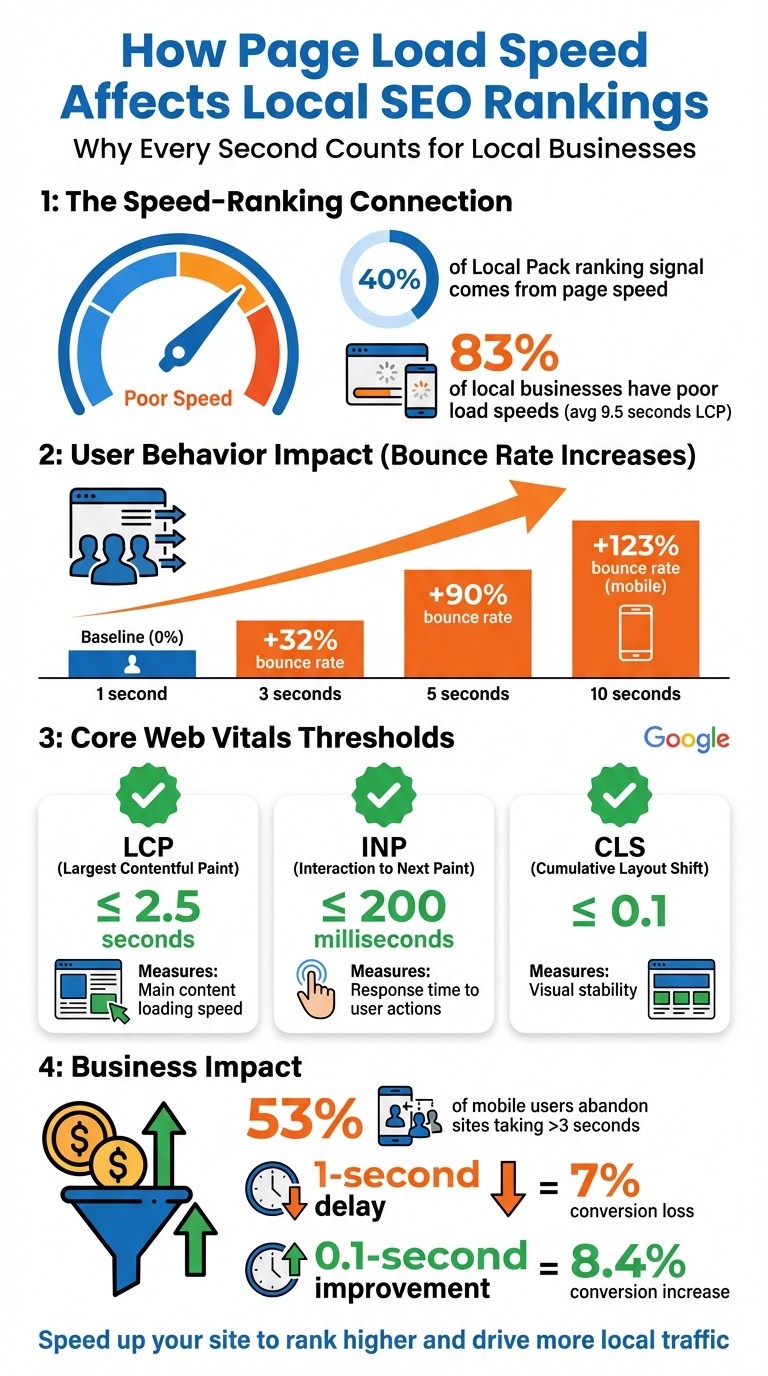
Users won’t wait. 53% of mobile users leave a site that takes over 3 seconds to load. A 1-second delay can reduce conversions by 7%.
Local businesses risk losing visibility in Google's "Local Pack" if their site is slow.
Bottom line: Speed up your site to rank higher, keep users engaged, and drive more local traffic. Tools like Google PageSpeed Insights and GTmetrix can help identify and fix issues like oversized images, slow servers, and render-blocking scripts.
How Page Load Speed Impacts Local SEO Rankings and User Behavior
Mobile Page Speed: Boost Local SEO & Google Ranking
The Problem: Slow Page Load Speeds Hurt Local SEO
A sluggish website doesn't just frustrate users - it can also tank your local search rankings. Google uses "prominence" as one of its key factors for determining which businesses show up in the Local Pack and on Google Maps. And slow page speeds directly undermine that prominence. Let’s break down how this impacts both user behavior and local SEO performance.
For local businesses, page speed is a big deal. It accounts for about 40% of the ranking signal for Local Pack results. These are the map-based listings that often dominate the top of search results.
How Slow Speeds Drive Users Away
When your website takes too long to load, users are more likely to leave and visit a competitor's site instead. Google calls this behavior "pogo-sticking", and it signals to the algorithm that your site isn’t delivering a good experience. Over time, this can drag your rankings down even further.
The stats don’t lie: if your load time increases from 1 second to 3 seconds, your bounce rate jumps by 32%. At 5 seconds, it skyrockets to 90%. The problem is even worse for mobile users - who dominate "near me" searches. A 10-second load time can cause a 123% increase in bounce rate. Every extra second means fewer customers sticking around and converting.
Core Web Vitals and Their Role in Local SEO
Google measures your site’s performance using three Core Web Vitals: Largest Contentful Paint (LCP), Interaction to Next Paint (INP), and Cumulative Layout Shift (CLS). These metrics are a critical part of Google’s "Page Experience" algorithm and directly impact your local rankings.
Metric | What It Measures | "Good" Threshold | Why It Matters |
|---|---|---|---|
LCP | Speed of main content loading | ≤ 2.5 seconds | Slow LCP leads to high bounce rates and poor first impressions. |
INP | Page response time to user actions | ≤ 200 milliseconds | Delays frustrate users, causing them to abandon forms or leave. |
CLS | Visual stability during loading | ≤ 0.1 | Poor CLS creates accidental clicks and makes your site feel unreliable. |
Google collects real-world performance data through the Chrome User Experience Report over a 28-day period. If your site struggles to perform well on older devices or slower 4G connections, your rankings will take a hit.
"Ignoring [Core Web Vitals] is akin to putting up a 'Closed' sign during business hours – you're simply turning potential customers away." - Sumit Yadav, Netclubbed
Why Slow Pages Hurt Local Pack Visibility
Page speed doesn’t just affect user experience - it also impacts your Local Pack rankings. Google prioritizes fast-loading, mobile-friendly sites for these coveted spots. A slow site puts you at a disadvantage compared to competitors who’ve optimized their speed.
There’s another hidden issue: Google’s "crawl budget." This is the amount of time its bots spend scanning your site. If your pages load slowly, bots can’t efficiently index your content. That means updates like new service pages or location changes might take weeks to show up in search results. Looking ahead to 2026, this will become even more critical as Google prioritizes speed for AI Overviews and voice search results - both of which are becoming essential for local discovery.
A study analyzing 4,500 Google Business Profiles found that 83% of local businesses suffer from "poor" content load speeds, with an average LCP of 9.5 seconds. For small businesses, fixing page speed isn’t just about keeping up - it’s about gaining a competitive edge in local search. If your site falls into that majority, improving load times could be the key to outranking your competitors.
Diagnosing Page Load Speed Bottlenecks
To tackle your site's speed issues effectively, you first need to figure out what's causing the delays. Pinpointing these bottlenecks is a crucial step toward improving your local search rankings. Tools like Google PageSpeed Insights and GTmetrix can help you uncover the root causes of slow loading times.
Using Google PageSpeed Insights
Google PageSpeed Insights (PSI) is a great tool to start with. It provides both real-world and simulated performance data, helping you understand how users experience your site. Pay attention to the 75th percentile of user data - this is the threshold Google uses to determine if your page meets its Core Web Vitals standards.
The PSI report categorizes issues into sections like Opportunities and Diagnostics, making it easier to identify problems. Common culprits include:
Oversized or outdated images
Render-blocking resources (like CSS and JavaScript)
Slow server response times
Each recommendation comes with an estimated time savings, so you can prioritize fixes that will have the biggest impact.
Don’t forget to check your mobile performance score separately. Since Google uses mobile-first indexing, it evaluates your site's mobile version for search rankings. This makes mobile optimization a top priority.
Using GTmetrix for Detailed Analysis
GTmetrix provides an in-depth look at your site's performance using tools like the Waterfall Chart, which visually breaks down every resource your page loads - HTML, CSS, JavaScript, images, and fonts - in the order they load. This makes spotting bottlenecks much easier.
Here’s what to watch for in the Waterfall Chart:
Long purple bars signal server delays.
Blue bars indicate oversized files.
A staircase pattern may point to sequential loading caused by third-party scripts, such as chat widgets, tracking pixels, or social media embeds.
For example, a northern Utah HVAC company used GTmetrix in 2025 to identify 14 render-blocking scripts slowing down their homepage. After removing these scripts and compressing their images, their load time dropped from 6.2 seconds to 1.3 seconds. This change led to a 220% boost in organic search traffic and improved rankings for terms like "AC repair in Ogden".
Once you've addressed desktop issues, shift your focus to mobile performance.
Finding Mobile Performance Issues
Mobile optimization is often a challenge, but it’s worth the effort. Studies show that 53% of mobile users abandon sites that take longer than 3 seconds to load, yet fewer than half of mobile sites currently pass all Core Web Vitals assessments. Improving your mobile performance can set you apart from competitors.
Use PSI's mobile testing feature to pinpoint issues specific to smartphones and tablets. Common problems include:
Serving desktop-sized images to mobile devices
Using unoptimized fonts that add extra HTTP requests
Overloaded HTML causing excessive DOM sizes
For more advanced insights, try the Chrome DevTools Coverage panel. This tool highlights unused code in third-party scripts, such as chat widgets that load immediately instead of waiting for key content to appear.
Finally, run multiple tests - ideally 3–5 - and use the median values. Network variability and server load can sometimes skew individual results, so testing multiple times ensures a more accurate picture of your site’s performance.
Solutions: How to Improve Page Load Speed for Local SEO
Improving your website's performance is key to standing out in local search results. Here's how you can fine-tune your site for faster load times.
Optimizing Website Assets
Large images, bulky stylesheets, and unnecessary scripts can hurt your site's speed. Start by compressing images with tools like TinyPNG or Squoosh to shrink file sizes. Switching to modern formats like WebP can reduce image sizes by 25–35% compared to JPEGs.
For JavaScript, move non-essential scripts to the bottom of your HTML and use the async or defer attributes to prevent them from blocking the page's initial load. Inline only the CSS needed for above-the-fold content, and load additional styles after the page renders.
Browser caching is another simple way to speed things up. Configure static assets like images, CSS, and JavaScript files to cache for up to a year. This ensures returning visitors don’t need to re-download them. Additionally, reduce HTTP requests by combining CSS and JavaScript files where possible and getting rid of unused plugins or scripts.
Once you've optimized your desktop site, turn your attention to mobile performance.
Mobile Optimization Best Practices
With mobile devices dominating local searches, ensuring a smooth mobile experience is crucial. Start by implementing a responsive design that adapts seamlessly to different screen sizes using fluid grids, flexible images, and CSS media queries.
Make your site user-friendly by incorporating large, tappable buttons (at least 48×48 pixels), clear navigation options like hamburger menus, and avoiding intrusive pop-ups. To improve readability, keep paragraphs concise and highlight key information upfront.
Lazy loading is especially effective for mobile. Load below-the-fold images only as users scroll, while ensuring the hero image loads immediately to maintain a strong Largest Contentful Paint score. For example, a local gym reduced its mobile page load time from 12 seconds to 2.8 seconds by compressing 50 high-resolution images and implementing lazy loading. This change boosted their ranking for "gym near me" from position 8 to position 3 in just 30 days.
Also, focus on reducing server response time (Time to First Byte or TTFB) to under 200 ms. If necessary, consider upgrading from shared hosting to a more robust server.
These steps create a solid foundation for improved speed and performance, especially when paired with platforms designed for efficiency.
Using Gatsboy for Fast, SEO-Optimized Websites

To take performance even further, consider a platform like Gatsboy, which is built for speed. Gatsboy uses static site generation to pre-build your website into HTML files, eliminating the need for database queries. Content is then served quickly through a CDN.
Another standout feature is its intelligent link prefetching. When a visitor hovers over a link, Gatsboy preloads the page data in the background, resulting in nearly instant navigation. It also automates image optimization by resizing images for different devices, converting them to modern formats, and enabling lazy loading.
"I designed Gatsby with the goal that when using it, it'd be really hard to build a slow site."
– Kyle Matthews, Creator, GatsbyJS
In one case study, SoftBlues transitioned their website from a traditional dynamic CMS to a Gatsby-powered frontend. This change reduced their Time to Interactive from 2.6 seconds to 0.5 seconds and improved their Speed Index from 4.3 seconds to 0.8 seconds. These technical upgrades not only enhance performance but also help businesses focus on growth while achieving better local SEO results.
Faster loading speeds directly improve local search rankings by enhancing Core Web Vitals, lowering bounce rates, and increasing visibility in Google's local search algorithm.
Measuring Success: Local SEO Gains from Improved Page Speed
After optimizing your site's speed, the next logical step is to measure how these changes impact your local SEO performance. Tracking results helps you understand what's working and where to refine your efforts.
Tracking Core Web Vitals Improvements
Google Search Console's Core Web Vitals report is your go-to resource for evaluating real-world performance. It classifies URLs into three categories - Good, Needs Improvement, or Poor - based on actual user experiences. Once you've implemented fixes, use the "Start Tracking" feature to monitor progress over a 28-day period. Keep in mind that field data reflects a rolling 28-day average from the Chrome User Experience Report, so improvements won't show up immediately.
Key thresholds to aim for include:
Largest Contentful Paint (LCP): Under 2.5 seconds
Interaction to Next Paint (INP): Under 200 milliseconds
Cumulative Layout Shift (CLS): Below 0.1
Interestingly, pages that rank in the top position on Google are 10% more likely to meet these thresholds compared to lower-ranking pages. While tools like PageSpeed Insights and Lighthouse provide instant feedback during development, rely on Search Console's field data for an accurate reflection of your users' experiences. And since Google prioritizes mobile-first indexing - especially for local searches - focus on optimizing Core Web Vitals for mobile users.
Monitoring Local Rankings and Visibility
Beyond Core Web Vitals, it's important to assess how speed improvements influence your local search visibility. Google Business Profile Insights offers valuable metrics like search impressions, calls, direction requests, and website visits. To gain more detailed insights, connect Google Analytics to your Business Profile using UTM codes, which allow you to track local search traffic effectively.
For even deeper analysis, advanced local tracking tools can monitor keyword rankings and provide competitor insights. Geo-grid tracking tools are particularly useful for visualizing how your rankings vary across different neighborhoods, as local results often depend on the searcher's precise location.
Benefits for Small Businesses
Speeding up your website delivers measurable benefits for small businesses. For example, Blast Zone, a children's product manufacturer, improved mobile page speed by 69% through WebP images and script minification. The result? An 85% increase in conversions and a 78% rise in transactions. Research highlights just how critical speed is: a 1-second delay can reduce conversions by 7%, while shaving off 0.1 seconds can boost conversion rates by 8.4%.
For local businesses, faster websites not only enhance search rankings but also attract more foot traffic, improve customer satisfaction, and lower advertising costs by improving Google Ads Quality Scores. A fast-loading site reflects professionalism and builds trust, making it easier to connect with potential customers.
Conclusion: The Long-Term Impact of Page Speed on Local SEO
Page speed isn't just a technical detail - it’s a long-term investment that can shape your local SEO success. With Google prioritizing Core Web Vitals, faster websites consistently outperform slower competitors in local search rankings. For small businesses operating in competitive local markets, speed can be the deciding factor that gives you an edge over rivals with similar content and backlinks.
A fast website doesn’t just help with rankings - it builds trust. A slow site leaves potential customers frustrated, often leading them to perceive your business as unreliable. On the flip side, a quick-loading site signals professionalism and competence, which are essential for earning trust in local markets where reputation matters most.
The financial benefits are hard to ignore too. Amazon discovered that every 100 milliseconds of extra latency cost them 1% in sales. For small businesses, speed optimization has driven ROI as high as 500% in some local SEO campaigns. Additionally, improving page speed enhances your Google Ads Quality Score, reducing your cost-per-click and maximizing the value of your ad spend.
From a technical standpoint, faster sites also allow search engine bots to crawl more pages within their allocated budget. This ensures that your key pages - like service pages, location pages, and blogs - stay visible in search results. Better visibility doesn’t just improve rankings; it fuels overall growth for your business.
Experts in the field emphasize the importance of speed:
"Speed is also a reflection of digital maturity. In a competitive local market, faster sites appear more trustworthy, professional and competent." – Cody Kluge, Best Version Media
To stay ahead, aim for load times under 2.5 seconds for Largest Contentful Paint (LCP) and 0.1 for Cumulative Layout Shift (CLS). With mobile users expecting instant results, fast-loading pages are vital - not just for rankings but for keeping customers engaged and satisfied.
FAQs
How fast does my site need to load to improve local rankings?
Your website should load in 2.5 seconds or less to improve local search rankings. Google considers this a crucial benchmark for assessing Core Web Vitals and ranking signals.
A fast-loading site does more than just boost your position in search results. It creates a smoother experience for visitors, which is especially important for small businesses aiming to attract and keep local customers. After all, nobody wants to wait around for a slow site - speed can make or break that first impression.
How long until speed fixes affect my Local Pack visibility?
Speed improvements can boost your Local Pack visibility in as little as 4 to 12 weeks. Google takes note of changes in Core Web Vitals and page load times over time, which can translate into better rankings. While you might see some early results, it usually takes a few weeks to a few months for the full impact to become clear.
Which speed fixes should I prioritize first for local SEO?
To boost your local SEO, pay close attention to your website’s Core Web Vitals: Largest Contentful Paint (LCP), First Input Delay (FID), and Cumulative Layout Shift (CLS). Improving these metrics involves steps like compressing images, enabling browser caching, and streamlining your code. Additionally, tools like a Content Delivery Network (CDN) and server-side rendering can help cut down load times. These efforts not only improve user experience but also reduce bounce rates and strengthen your local search rankings.
Related Blog Posts
Join our community of 15,000+ business owners
Popular articles
Popular articles about your website and marketing your small business


