



How to Rank Higher Locally Without Breaking the Bank
Small Business Marketing
You don’t need a big budget to improve your local search rankings. By focusing on a few key strategies, small businesses can connect with nearby customers searching for their services. Here’s a quick rundown of what works:
Optimize Your Google Business Profile: Claim, verify, and fully complete your profile with photos, services, and updates. Businesses with complete profiles see up to 70% more visits.
Use Local Keywords: Incorporate location-specific terms like “plumber in Dallas” into your website and create dedicated pages for each service and area.
Get Reviews: Ask customers for reviews within 24–48 hours of service and respond to all feedback. Businesses with 50+ reviews generate 266% more leads.
Build Citations and Backlinks: Ensure your business info is consistent across directories like Yelp, BBB, and local chambers of commerce. Sponsor local events for backlinks.
Improve Website Speed and Mobile Experience: Over 60% of searches are on mobile. A fast, mobile-friendly site with local schema markup boosts rankings.
Track Results: Use free tools like Google Search Console and low-cost options like Gatsboy to monitor rankings and competitor activity.
With just 2–4 hours a week, these steps can drive more foot traffic and sales. Start by claiming your Google Business Profile and asking for reviews today.
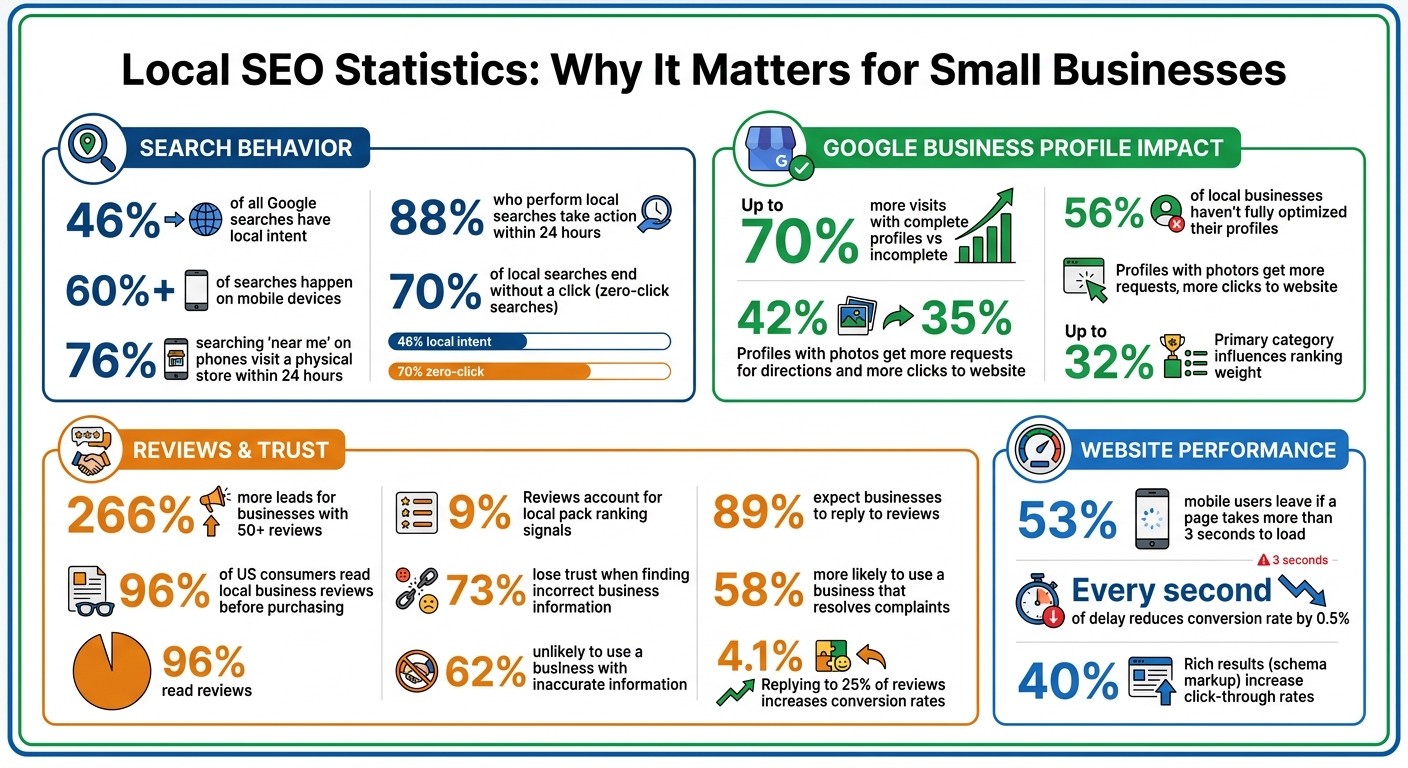
Local SEO Statistics: Impact on Rankings, Traffic, and Conversions
Local SEO For Beginners (2025 Complete Guide)
Set Up Your Google Business Profile
Optimizing your Google Business Profile is a smart and budget-friendly way to boost your local SEO. With nearly 46% of Google searches focused on local information, having a complete profile can make a big difference - up to 70% more visits compared to incomplete profiles. Best of all, it’s completely free.
Claim and Verify Your Profile
Start by searching for your business on Google Maps. If it’s already listed, click “Claim this business” (or “Own this business?”) and then select “Manage now.” If your business isn’t listed, head over to business.google.com/create to add your business name, category, and location.
Google will determine how you verify your business, often by sending a postcard within 5–14 days. While awaiting verification, avoid making changes to your business name, address, or category.
For service-area businesses without a physical storefront, select “No” when asked about a location and define up to 20 service areas within a two-hour driving radius.
Once verified, make sure to fully complete your profile to improve your local search ranking.
Fill Out Your Profile Completely
Aiming for a 90% or higher profile completion rate can help you compete for one of the top three spots in the "Map Pack" results. Start by selecting a very specific primary category - like “Mexican Restaurant” instead of just “Restaurant” - as this choice can influence up to 32% of your ranking weight for service relevance. You can also add up to nine secondary categories to expand your visibility.
Photos are key. Upload 10–15 high-quality images (at least 720px) showcasing your business’s exterior, interior, team, and products. Profiles with photos tend to get 42% more requests for directions and 35% more clicks to their website. Add attributes like “wheelchair accessible” or “free Wi-Fi” to make your business easier to find in filtered searches. Also, list your services or products with clear descriptions and pricing.
Use the 750-character business description to highlight your main services and what makes you stand out. Naturally include your city or neighborhood name for local relevance. Lastly, use a local area code for your phone number rather than a toll-free one - it reinforces your connection to the community.
Once your profile is complete, keep it up-to-date with regular updates and posts.
Use Google Posts to Share Updates
Google Posts are a great way to show potential customers that your business is active. You can create Updates for general news, Offers for promotions, or Events for scheduled activities. Posting once a week is better than occasional bursts of activity, as consistency keeps your profile fresh. Posts can stay visible for up to six months.
When creating a post, use a high-quality image (720 x 540px or 1200 x 900px) and keep your message between 100 and 300 words. Make sure the most important details are in the first 150 characters to grab mobile users’ attention. Always include a call-to-action button like “Learn More,” “Book,” or “Order Online” to guide users to the next step.
"Consistency beats volume. One thoughtful post per week is better than sporadic bursts of activity." – Jonathan Page, Local Search Expert
Add Local Keywords to Your Website
Incorporating location-based keywords into your website helps Google pinpoint where your business operates. Considering that 46% of all Google searches are local, using the right local terms can connect you with customers who are ready to take action.
Find Local Keywords with Free Tools
Google Keyword Planner is a powerful, free resource for discovering what people search for in your area. Start by logging in at ads.google.com, selecting "Discover new keywords", and entering 5–10 core terms related to your services, such as "plumber", "bakery", or "yoga studio." Then, set the location filter to your city or region to get search volume data tailored to your area.
Focus on keywords that fall into the 100–1,000 monthly searches range. These terms strike a balance between being relevant and not overly competitive. To confirm their local intent, search each keyword on Google. If you see a "Map Pack" (the three local listings with a map), that keyword is worth pursuing.
Don’t just stop at explicit terms like "plumber in Dallas." Also target implicit searches like "plumber near me" by creating pages that highlight your services in specific neighborhoods.
"Local keyword research is not about finding the highest-volume terms nationally. It's about finding the terms your nearby customers use right before they make a buying decision." – Allan de Wit, Founder, RankYak
Once you've identified the right keywords, it’s time to tailor your website to match local search behavior.
Write Content for Your Local Area
With your local keywords in hand, adjust your content to resonate with your community. Create dedicated pages for each service in each area you serve. Instead of a single "Services" page, divide it into specific pages like "Water Heater Repair Denver" or "Drain Cleaning Denver." This approach prevents keyword cannibalization and improves your chances of ranking for multiple searches. For example, in 2026, Milano Bakery in Joliet, Illinois achieved the top spot for "Joliet bakery" by strategically mapping 391 local keywords across their site, leading to 3,000 monthly desktop visits.
Incorporate these local keywords naturally into your title tags, H1 headers, meta descriptions, and on-page content. Mention neighborhood names, landmarks, and even zip codes to attract highly targeted, micro-local traffic. For instance, targeting "plumber in Capitol Hill" instead of "plumber in Denver" can bring in searchers who are closer to making a decision.
Another effective strategy is to write blog posts tailored to your area. Share local project highlights, offer neighborhood-specific advice, or create guides. For example, a roofing company could publish posts like "Best Roofing Materials for Colorado Hail Storms" or "Before and After: Roof Replacement in Cherry Creek." These types of posts not only establish local authority but also increase your chances of ranking for location-specific searches. Check out Google's "People Also Ask" section for questions your local audience is searching for, and address those in your content.
Here’s a real-world example: In April 2024, an Austin-based DUI law firm optimized its website and Google Business Profile with precise local keywords. Within just four weeks, their local search visibility doubled, with all tracked positions landing in the top three or five for their target searches.
Build Citations and Get Local Backlinks
Once you've optimized your profiles and identified the right local keywords, the next step is to focus on citations and local backlinks. Citations - mentions of your business's name, address, and phone number (NAP) across the web - are essential for building trust with search engines like Google. When your business information is consistent across multiple platforms, it reassures search engines that your business is legitimate and locally relevant. This consistency is also critical for customer trust. In fact, 73% of consumers lose trust in a brand when they encounter incorrect information in online listings.
List Your Business in Local Directories
Start by listing your business on major directories like Bing Places, Apple Business Connect, Facebook, Yelp, and LinkedIn. Additionally, use aggregators such as Data Axle, Neustar Localeze, and Foursquare to broaden your visibility.
When creating these listings, ensure your NAP details are identical across all platforms. For instance, avoid inconsistencies like using "Street" on one directory and "St." on another. Such discrepancies can confuse search engines and harm your local rankings. Before adding new citations, audit your existing listings to correct any errors and merge duplicates. It’s worth noting that 62% of consumers are unlikely to use a business if they find inaccurate information online.
To strengthen your online presence further, include high-authority directories in your strategy. General directories like Yellow Pages (YP.com), Better Business Bureau (BBB.org), and MapQuest can enhance your authority. Industry-specific directories add even more value - Healthgrades for healthcare providers, Avvo for lawyers, Houzz for home service businesses, and TripAdvisor for hospitality providers are excellent examples. Don’t forget about local sources like your Chamber of Commerce, city government directories, or local news websites, which are invaluable for geographic relevance.
These consistent citations act as a foundation for your local SEO efforts, and you can amplify their impact by engaging with your community.
Join Community Activities for Backlinks
Backlinks from local organizations can further establish your business as a trusted local entity. Community involvement is a great way to earn these links. For example, sponsoring a local 5K run, a youth sports team, or a school program often comes with the opportunity to have your logo linked on the organizer's website. Many of these sites, such as .org or .edu domains, carry significant authority. Sponsorships can start as low as $250, and when negotiating, ask specifically for a linked logo on the sponsor's page.
Membership in local organizations such as your Chamber of Commerce or business associations can also provide valuable backlinks. These groups often feature their members in directories, event recaps, or spotlight articles. Another option is co-marketing partnerships with non-competing local businesses. For instance, a roofer could team up with a real estate agent to create co-branded content or a partner recommendation page. Additionally, local government sites, libraries, and neighborhood associations often maintain resource lists for residents - offering them a helpful guide or resource could secure a trusted backlink.
If managing citations manually feels overwhelming, automation tools can help streamline the process.
Use Gatsboy Citations Add-on
Submitting your business information across multiple directories can be time-consuming. The Gatsboy Citations Add-on simplifies this by automating submissions to 50 top directories for a one-time fee of $247. Considering that managed citation services usually charge $2 to $5 per citation, this tool saves both time and money while ensuring your business details remain consistent across key platforms.
Get and Manage Customer Reviews
Once you've bolstered your citations and local backlinks, it's time to turn your attention to customer reviews. This step is essential for improving your local SEO while keeping costs in check.
Customer reviews are a key factor in local search rankings, accounting for about 9% of local pack ranking signals. That puts them among the top three factors, alongside profile completeness and backlinks. Here's why they matter: 96% of US consumers read local business reviews before making a purchase decision, and businesses with 50+ reviews generate 266% more leads from Google Search compared to those with fewer than 10.
The more reviews you accumulate, the better your rankings - and higher visibility leads to even more reviews. Google's algorithm also prioritizes recent reviews, meaning feedback from the last 30 days holds more weight than older reviews. So, a steady flow of new reviews is far more effective than relying on outdated ones.
Ask for Reviews After Each Service
Timing is everything when it comes to asking for reviews. The sweet spot? Within 24–48 hours after providing a service. Send a direct link to your Google Business Profile via text or email. Text messages are especially effective, with response rates 3–5 times higher than email follow-ups.
When asking for reviews, encourage customers to include details about the service and their location. This helps generate natural keyword signals that boost your local SEO. For instance, a review like "Quick and reliable HVAC repair in downtown Chicago" is far more helpful than a generic "Great service!" But remember - offering incentives like discounts or freebies in exchange for reviews is against Google's policies and could get your profile suspended. Also, avoid "review gating", which is the practice of only asking happy customers for feedback while steering unhappy ones elsewhere. This tactic violates Google's guidelines.
Reply to Every Review
Collecting reviews is only half the battle. Responding to them is just as crucial. In fact, 89% of people expect businesses to reply to their reviews, and 60% of consumers want a response within two days. Even replying to just 25% of reviews can increase conversion rates by 4.1%.
"Replying to positive reviews can have even more impact than responding to negative ones. People don't just look at the product anymore - they look at how the company responds, and whether it seems trustworthy." - Magda Marchowska-Raza, Assistant Professor of Marketing and Management at North Dakota State University
For positive reviews, keep your responses personal and thoughtful. Show genuine appreciation, and casually mention your location or the service provided. For example: "Thanks for stopping by our Miami bakery! We're thrilled you enjoyed the cupcakes." This not only builds goodwill but also reinforces your relevance to local searches.
For negative reviews, act quickly - ideally within one hour. Address the issue, take responsibility, and offer a resolution. Then, move the conversation offline to avoid further public escalation. 58% of consumers are more likely to use a business that resolves their complaints, and 62% of unhappy reviewers would give a business a second chance if their issue is handled effectively.
Manage Reviews with Gatsboy
Handling reviews across multiple platforms can be overwhelming, but tools like Gatsboy make it easier. Their Google Reviews integration streamlines the process, letting you manage feedback efficiently. Included in the Website + Pro plan (priced at $500 setup + $47/month), this feature enables you to stay on top of reviews without juggling multiple logins. This ensures you're actively engaging with both your customers and Google's algorithm, saving you time and effort.
Make Your Website Mobile-Friendly and Fast
Mobile performance is a game-changer for user experience and local search rankings. With over 60% of searches happening on mobile devices, it’s clear that your site needs to perform well on smaller screens. Google’s mobile-first indexing means the mobile version of your site is what gets crawled, indexed, and ranked. And here’s a staggering fact: 88% of people who perform local searches take action within 24 hours. If your mobile site is slow or unresponsive, you’re likely losing out on valuable traffic and potential leads.
Speed is non-negotiable. Research shows that 53% of mobile users will leave if a page takes more than 3 seconds to load. Even worse, every second of delay can chip away at your conversion rate by 0.5%. Google takes these performance signals into account, directly impacting your local search rankings.
"Mobile SEO is a speed date with Google - you've got to load fast, look clean, and speak structured data. Remember, Google doesn't rank mobile sites - it ranks mobile experiences."
– Kurt Fischman, Principal, Growth Marshal
Speed Up Your Website Loading Time
Start by analyzing your site's Core Web Vitals using Google’s PageSpeed Insights tool. Aim for these benchmarks: an LCP (Largest Contentful Paint) of 2.5 seconds or less, an INP (Interaction to Next Paint) of 200 milliseconds or less, and a CLS (Cumulative Layout Shift) score of 0.1 or lower.
Here’s an example of how speed can make or break your results: In a 2025 study by Rankley, Denver Plumbing Co. achieved a 1.8-second load time and featured clear "Call Now" buttons. This helped them secure a top-three spot for "plumber near me" searches, leading to a 20% increase in calls. Meanwhile, Metro Plumbing Pros struggled with a 6-second load time and a broken mobile menu, resulting in a 40% drop in calls.
To boost your site’s speed, try these simple tweaks:
Compress images using formats like WebP.
Minify CSS and JavaScript files.
Use a Content Delivery Network (CDN) to deliver content faster.
Enable browser caching so returning visitors don’t have to reload all elements.
Once your site is lightning-fast, you can take it a step further by incorporating structured data to improve your local search visibility.
Add Local Schema Markup
Local schema markup, written in JSON-LD, can enhance your local search presence by improving how your business appears in rich results. For example, adding LocalBusiness schema can increase your chances of showing up in Google’s Local 3-Pack, while also displaying helpful details like star ratings, hours of operation, and contact info. Rich results have been shown to increase click-through rates by around 40%.
Here’s how to do it:
Use specific schema subtypes (like Dentist or FoodEstablishment) when applicable.
Include key details such as your business name, address, opening hours, and geo-coordinates.
Test your schema markup with Google’s Rich Results Test to catch any errors before going live.
Use Gatsboy Website + Pro Features
If you’re looking for an all-in-one solution, Gatsboy's Website + Pro plan can simplify your mobile optimization efforts. For a one-time setup fee of $500 and $47 per month, this plan handles everything from Core Web Vitals improvements to mobile responsiveness. With Gatsboy, you’ll get a fast-loading site equipped with advanced forms, lead collection tools, booking modules, and seamless Google Reviews integration. It’s a hassle-free way to focus on growing your business while leaving the technical details to the pros.
Track Your Results with Affordable Tools
Once you've optimized your website's speed and mobile experience, it's time to measure your local SEO progress using budget-friendly tools. Tracking performance ensures that your efforts are moving the needle and helps you identify what’s working and what needs improvement.
Measuring your local SEO efforts gives you an edge. Many small business owners skip this step, which means you're already ahead of the game. Understanding the difference between visibility (how often people see your business in search results) and traffic (how many people actually click through) can highlight areas for improvement. For example, a page might rank well but need small adjustments to turn those views into actual visitors. Regularly monitoring these metrics allows you to refine your strategy and drive better results.
Interestingly, 70% of local searches end without a click to a website because users find what they need - like hours, reviews, and contact details - directly on your Google Business Profile. This makes traditional website analytics only part of the story. You’ll need tools that can also track these "zero-click" actions, where customers engage without visiting your site.
"If you had to pick ONE way to measure how you're doing in the local search results, one place to monitor progress, one tool to help you troubleshoot, Google Search Console is your best (or least-bad) choice."
– Phil Rozek, Local Visibility System
Monitor Performance with Google Search Console
Google Search Console (GSC) is a free tool that shows how your business appears in search results. While Google Analytics focuses on what happens after someone clicks on your site, GSC tracks impressions (how often your listing is seen) and average position for search terms. This data is key for identifying "striking distance" keywords - terms where you're ranking in positions 4–10 and need just a little boost to break into the top 3.
Check the "Queries" tab weekly to uncover unexpected terms you're already ranking for. You might find you're appearing for searches like "[your service] [neighborhood name]" without even targeting those terms. Filtering by "near me" searches or specific service pages can also help you spot visibility gaps. For positions 1–3, healthy click-through rates typically range from 15–30%. If your clicks are low despite good rankings, tweak your title tags, meta descriptions, and consider using UTM parameters to separate Map Pack traffic from organic traffic.
The "Index Coverage" report is another critical tool. Check it weekly to catch any technical issues that might prevent your local pages from appearing in search results. GSC also tracks Core Web Vitals - aim for a page load time under 2.5 seconds, as most local searches happen on mobile devices.
Try Gatsboy Local Tracking Add-on
While GSC is great for internal data, the Gatsboy Local Tracking Add-on provides detailed insights into your competitors and hyperlocal rankings. For $99 per month, this tool tracks your rankings across different neighborhoods - important since proximity can cause your business to rank #1 in one area and #8 just a mile away.
Gatsboy also monitors your competitors’ activity. You’ll know when they publish new content, get fresh reviews, or experience ranking changes. This allows you to stay ahead by responding strategically rather than reacting after the fact. The add-on complements GSC by filling in gaps around competitor intelligence and hyperlocal ranking variations that free tools can’t capture effectively.
Metric | Tool Recommendation | Check Frequency |
|---|---|---|
Keyword Rankings & Impressions | Google Search Console | Weekly |
Local Map Position | Gatsboy Local Tracking | Monthly |
Competitor Activity | Gatsboy Local Tracking | Monthly |
Site Speed & Technical Health | Monthly |
Review your data weekly for ranking trends and monthly for deeper insights into what’s driving conversions. Local SEO rewards consistency, so aim to evaluate progress on a 30-day cycle. Spend 15 minutes each week looking for quick updates and 30 minutes monthly for a more detailed analysis.
Conclusion
You don’t need a massive budget to climb the local search rankings - just a focus on the basics. The strategies outlined here - optimizing your Google Business Profile, targeting local keywords, managing reviews, building citations, improving site speed, and tracking progress - are all within reach, even for small businesses with limited resources. Did you know 46% of all Google searches have local intent? That’s a huge opportunity waiting to be tapped.
Consistency is the real game-changer. Dedicating just 2–4 hours a week to local SEO can deliver far better results than a one-time push followed by months of inactivity. Plus, it sets you apart from the 56% of local businesses that haven’t fully optimized their profiles. Start with the basics: claim your Google Business Profile and ask happy customers to leave reviews. These simple actions can make a big difference.
Here’s why it matters: 76% of people searching for something "near me" on their phones visit a physical store within 24 hours. That means your local SEO efforts can directly drive more foot traffic and sales. Unlike paid ads that stop working when your budget runs out, local SEO keeps delivering results for months - or even years.
If you want to make this process even easier, tools like Gatsboy can help. The Gatsboy Local Tracking Add-on monitors your rankings across different neighborhoods, while the Citations Add-on automates directory submissions, saving you hours of manual work. But even without paid tools, sticking to these free strategies consistently can help you attract more local customers.
Don’t wait. Claim your profile, request a review, and spend 30 minutes this week checking your NAP details. Small, consistent efforts can create a big impact on your local visibility.
FAQs
Which local SEO task should I do first if I only have 30 minutes a week?
If you’re short on time but want to improve your local SEO, focus on your Google Business Profile. It’s one of the easiest and most impactful ways to boost your local online presence.
Start by claiming and verifying your profile if you haven’t already. Then, double-check that all your business details - like name, address, phone number, and hours - are accurate and complete. Don’t forget to sprinkle in some relevant local keywords to help search engines connect you to nearby customers.
Keep your profile fresh by regularly adding photos, responding to customer reviews, and posting updates about your business. These small actions not only keep your profile active but also show potential customers that you’re engaged and trustworthy. Plus, it’s a quick, cost-efficient way to strengthen your local search visibility without eating up too much of your time.
How many location pages is too many for one small business website?
When it comes to the number of location pages your small business website should have, there’s no hard-and-fast rule. It really depends on factors like the size of your business and the areas you serve. That said, adding too many irrelevant or poorly optimized pages can actually backfire, harming your SEO efforts. Instead, prioritize creating high-quality, relevant pages that genuinely reflect your local presence and provide value to users. This approach helps maintain strong rankings without spreading your SEO efforts too thin.
How can I track phone calls and direction requests from my Google Business Profile?
To monitor phone calls and direction requests from your Google Business Profile, you can use tools like UTM tagging and GA4 events. By setting up UTM parameters, you can track specific user actions, and configuring analytics allows you to capture data on calls and direction requests. These methods provide valuable insights into how users interact with your profile and help evaluate your local SEO efforts effectively.
Related Blog Posts
Join our community of 15,000+ business owners
Popular articles
Popular articles about your website and marketing your small business


