


How to Manage Customer Bookings Without the Hassle
Marketing
Managing customer bookings manually - through phone calls, emails, or paper calendars - is time-consuming and error-prone. It can lead to double bookings, no-shows, and missed opportunities, especially since 40% of bookings happen outside business hours. Automated booking systems solve these issues by offering:
24/7 self-service scheduling: Customers can book anytime, reducing back-and-forth communication.
Real-time calendar syncing: Prevents double bookings and scheduling conflicts.
Automated reminders: Cuts no-shows by up to 90%, ensuring a smoother schedule.
Integrated payment processing: Accept deposits or full payments securely during booking.
Customization options: Tailor booking forms with your branding and gather essential customer details upfront.
Switching to automation can save up to 5 hours weekly, increase attendance rates, and improve the overall customer experience. Businesses using tools like Gatsboy often see increased revenue and reduced administrative workload. By embedding booking forms on your website, enabling notifications, and tracking performance through analytics, you can streamline operations and focus on delivering better services.
Assess Your Booking Requirements
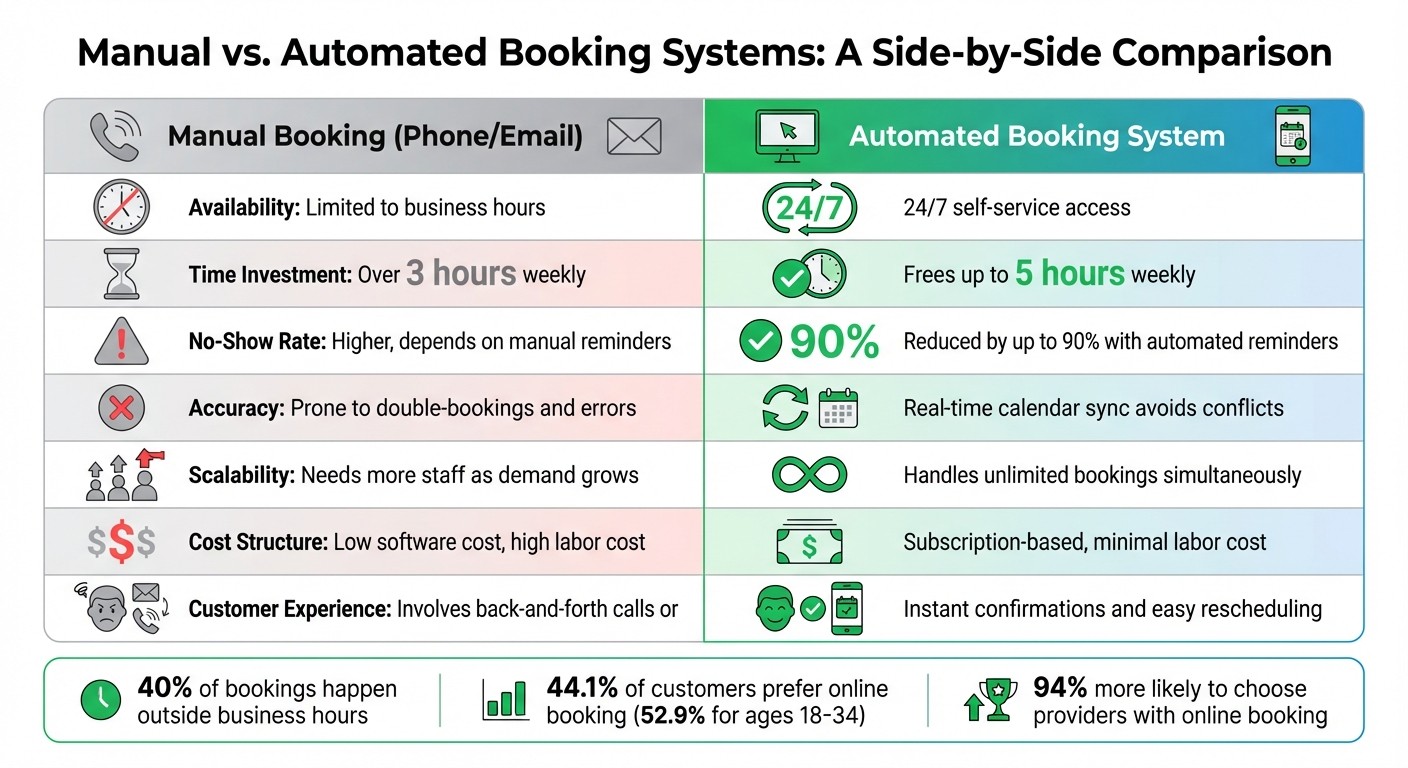
Manual vs Automated Booking Systems Comparison
Determine What Your Booking System Needs
Before selecting a booking solution, take a close look at how your business operates. The complexity of your services plays a big role - a solo consultant offering quick 30-minute sessions has very different needs compared to a salon juggling six stylists and multiple service options at once.
Track how much time you spend on scheduling and how many appointments you handle. If scheduling eats up more than three hours of your week, it’s a clear sign that automation could save you time and effort.
Next, think about integrations. Does your booking system need to connect with tools like your CRM, calendar, or point-of-sale system? Also, consider payment processing - if you require deposits to cut down on no-shows, your system should make this process seamless during booking. For businesses with multiple team members, look for features such as individual calendars, commission tracking, or even round-robin scheduling to evenly distribute leads.
Don’t forget administrative controls like appointment buffers, minimum lead times, and automated cancellation policies. With 75% of bookings now happening online - and over a third of those made outside regular business hours - your system must be available 24/7, even when you’re not.
When you compare these needs with manual scheduling methods, the advantages of automation become pretty obvious.
Manual vs. Automated Booking Comparison
The difference between manual and automated booking systems is striking. Here’s a side-by-side look:
Feature | Manual Booking (Phone/Email) | |
|---|---|---|
Availability | Limited to business hours | 24/7 self-service access |
Time Investment | Over 3 hours weekly | Frees up to 5 hours weekly |
No-Show Rate | Higher, depends on manual reminders | Reduced by up to 90% with automated reminders |
Accuracy | Prone to double-bookings and errors | Real-time calendar sync avoids conflicts |
Scalability | Needs more staff as demand grows | Handles unlimited bookings simultaneously |
Cost Structure | Low software cost, high labor cost | Subscription-based, minimal labor cost |
Customer Experience | Involves back-and-forth calls or emails | Instant confirmations and easy rescheduling |
Manual booking systems might work fine for businesses with low volume and simple, one-on-one appointments. However, the moment you add more staff, varying service lengths, or group bookings, things get complicated fast. Plus, with 44.1% of customers preferring online booking - and that number jumping to 52.9% for those aged 18-34 - sticking to phone-only scheduling could mean losing out on a big chunk of potential clients.
Set Up Gatsboy Smart Modules for Bookings
Configure Your Booking System
Start by logging into your business dashboard and heading to the Online Booking section to enable the feature. Here, you’ll set up service templates that include key details like the service name, duration, pricing, and a short description to help guide your customers through the booking process.
Next, sync your availability by connecting your Google Calendar or Outlook account. This ensures real-time updates and helps prevent double-bookings. You can also add buffer times between appointments - for example, a 15-minute gap after each session. This is especially handy if you’re juggling multiple locations or need time to prepare between services.
To make the booking experience seamless and on-brand, customize the interface by tweaking colors and adding your logo. With 82% of customers preferring to book on their smartphones, Gatsboy's mobile-responsive design guarantees your booking form looks great on any device. You can also include intake questions to gather essential details upfront, such as gate codes for home services or specific client preferences. Keep these questions brief to ensure a smooth booking process.
Once your system is set up, integrate Stripe to securely handle payments.
Connect Stripe for Payment Processing
Stripe integration is straightforward - just connect it through your dashboard settings. This allows customers to pay using credit cards, debit cards, or digital wallets like Apple Pay and Google Pay at the time of booking, eliminating the need for follow-up payment requests.
Requiring deposits upfront can significantly reduce no-shows. Stripe handles all the heavy lifting, including PCI compliance and data encryption, so you don’t have to manage sensitive payment data. With 94% of people more likely to choose a provider offering online booking, combining easy scheduling with instant payment creates a hassle-free experience that today’s customers expect. Businesses using online booking tools often see an average profit boost of 37%, with some reporting increases as high as 120%.
Automate Reminders and Confirmations
Configure Automated Notifications
Head to the Communications section in your Gatsboy dashboard to set up automated reminders. These notifications can go out via email, SMS, or both, depending on your needs. For example, SMS reminders - boasting an impressive 98% open rate - work well for last-minute alerts, like same-day or hour-before notifications. Meanwhile, email is a great option for sending detailed information, such as directions, intake forms, or preparation instructions, well ahead of time.
To make these messages feel more personal, you can customize them with your branding and include automated fields like [Client Name], [Service Type], and [Appointment Time]. Keep SMS messages concise - under 1,024 characters - to ensure smooth delivery. You can also schedule reminders to go out at strategic times, such as one day, three days, or even a week before the appointment. Including a direct link for rescheduling or cancellations allows customers to manage their bookings independently, keeping your calendar accurate with minimal effort.
"The email and text reminders have helped make my no-calls/no-shows nonexistent." - A Little Gelly
By using automated reminders, you can reduce no-shows by up to 90%, leading to more consistent revenue and a smoother schedule. For clients who haven’t confirmed their bookings, you can set up follow-up emails to go out automatically after a specific period. This extra nudge often turns hesitant prospects into confirmed appointments.
Track Customer Interactions
Once your notifications are up and running, you can track customer interactions directly from the Gatsboy dashboard. The dashboard provides a clear, centralized view of booking statuses with visual indicators - like checkmarks for confirmed appointments and question marks for unconfirmed ones. This setup makes it easy to see who has responded, resend confirmation requests when needed, or manually mark appointments as confirmed. If a client reschedules, the system automatically cancels the original appointment and sends a new invitation link, saving you from the hassle of manual updates.
Monitoring your no-show rate is another key feature. By comparing the percentage of clients who show up versus those who don’t, you can tweak your reminder frequency or messaging as needed. Considering that nearly half of professionals spend over three hours a week on scheduling, automating these tasks not only saves time but also helps you focus on providing top-notch service. These tools simplify the booking process and give you more control over your appointments, all while cutting down on time-consuming admin work.
Add Bookings to Your Website and Growth Tools
Add Booking Forms to Your Website
With Gatsboy, embedding a booking system on your website is simple, thanks to the no-code Framer editor. You can showcase your booking calendar in three ways: inline embeds, pop-up widgets, or pop-up text/buttons. Inline embeds are ideal for dedicated "Book Now" pages, while pop-up widgets provide easy access to bookings on any page as users scroll.
Modern booking tools use backend-less setups, ensuring your site stays lightweight and fast. Adding a booking form is straightforward - just copy the HTML/JavaScript snippet from your booking tool's dashboard and paste it into an "Embed" or "HTML" component in the Framer editor. Don’t forget to include the async attribute in the script tag to keep your page loading smoothly.
To maintain a seamless experience for visitors, customize the booking form’s appearance - colors, fonts, and button styles - so it matches your brand. This helps avoid the perception that users are being redirected, which can hurt conversion rates. You can also configure features like buffer times (e.g., 15–30 minutes between appointments) and routing forms to guide customers to the correct staff member or service.
"Adding appointment booking to a website should not require backend development. With embeddable booking components, you can stay focused on your website [and] avoid technical complexity." - Supaframe
Once your booking form is live and tailored to your brand, it’s time to increase its visibility with additional tools.
Increase Visibility with AEO and Local Tracking
Making your booking form easy to find is key. Gatsboy’s AEO (AI Engine Optimization) ensures your business appears in AI-driven search results, while Local Tracking provides insights into your local search rankings and performance. Together, these tools complement the scheduling automation and analytics features, giving you a complete booking management system.
For even greater reach, consider integrating with Reserve with Google if your industry qualifies. This feature allows customers to book directly from Google Search or Maps, which often results in higher conversion rates - bookings through Google Business Profiles on mobile devices account for around 87% of such interactions.
To track where your bookings are coming from, add UTM parameters to your booking links (e.g., utm_source=google_maps). The data flows into your Gatsboy dashboard, helping you identify which channels perform best. You can also use JavaScript event listeners to track booking completions, ensuring accurate conversion data. Place these tracking scripts in your site’s footer, just before the closing </body> tag, to avoid slowing down page content.
Monitor and Improve Booking Performance
Review Analytics in the Gatsboy Dashboard
The Gatsboy Dashboard provides a straightforward way to track how your booking system is performing. With filters for specific date ranges like yesterday, the last 7 days, or the past 30 days, you can spot booking trends and identify peak hours - typically between 10 AM and 2 PM. This insight helps ensure you’re properly staffed during busy times.
The dashboard also highlights which booking pages or services are most popular, giving you a better understanding of customer preferences. Monitoring key metrics like cancellations, reschedules, and no-shows can be a game-changer, offering early indicators of potential issues. Businesses that embrace data-driven strategies often see a 25% boost in conversion rates and an 18% increase in revenue per booking.
Use Data to Improve Efficiency
Once you’ve analyzed the data, use it to fine-tune your operations. Align staffing levels with peak demand, and consider adjusting pricing - raising rates by 15–20% during high-demand periods and offering discounts during slower times. If seasonal patterns emerge - like fitness bookings surging in January and September or healthcare appointments peaking from October to December - plan your resources accordingly.
If analytics reveal that 25–40% of users abandon the payment page, take action. Adding security badges and offering digital wallet payment options can help reduce drop-offs. Comparing pages with lower traffic to those that perform well can uncover areas for improvement. Additionally, introducing automatic upgrade suggestions during checkout can increase average revenue per booking by 8–12%.
"We used the dashboard trends to quickly reduce our meeting cancellations by 10%."
– Nabil Belmezouar, Sr. Product Manager, Scout24
To further streamline your process, implement a 24-hour minimum notice for rescheduling to allow time to fill any last-minute openings. Use SMS delivery tracking to ensure reminders are reaching customers effectively. These small adjustments not only enhance operational efficiency but also create a smoother, more automated booking experience.
Conclusion
Free up 15–20 hours each week by automating your bookings. With a system that works 24/7, you can capture bookings around the clock, reclaiming up to 20–30% of revenue that might otherwise slip through the cracks.
This isn't just about saving time - it’s about driving results. Automated reminders can cut no-shows by as much as 90%, while real-time calendar syncing eliminates double-bookings, a common headache with manual systems. Customers also love the convenience: 82% prefer booking on their smartphones. The result? A smoother, self-sustaining system for both you and your clients.
The numbers speak for themselves. Sarah's Dental Practice in Phoenix reduced scheduling time from 18 hours a week to just 3 hours after switching to automation, adding $47,000 in annual revenue. Martinez Law Firm in Chicago saw a 45% jump in monthly appointments, going from 65 to 94, which translated to an extra $89,000 per year. These aren’t isolated cases - they’re proof of what’s possible when you let automation handle the heavy lifting.
With the Gatsboy Dashboard, you gain valuable insights into peak hours, popular services, and customer preferences, helping you refine your operations. Features like Stripe payment integration, automated notifications, and seamless embedding into your website make everything run like clockwork. Gatsboy’s tools are designed to simplify scheduling while boosting your bottom line.
Say goodbye to phone tag and scheduling chaos. With the right automated system, you can focus on providing excellent service while your bookings take care of themselves in the background.
FAQs
How do I choose the right booking settings for my business?
To get started, figure out exactly what you need - think about the types of appointments you offer and how you prefer to schedule them. Adjust your settings to manage how clients book. For instance, you can enable or disable same-day bookings, add buffer times between appointments, or set specific working hours. Personalize reminders and confirmations to help cut down on no-shows and create a smoother experience for your clients. Lastly, make sure your payment and cancellation policies match your business operations and meet customer expectations for an easy and hassle-free booking process.
What’s the best reminder schedule to reduce no-shows?
To cut down on no-shows, use automated reminders at carefully chosen moments before the appointment. A typical approach is sending notifications 24 hours and 1 hour ahead of time. This schedule keeps clients informed without bombarding them, striking the right balance between being useful and not intrusive, which helps boost attendance.
How can I track which marketing channel drives bookings?
To figure out which marketing channels are bringing in bookings, take advantage of your online booking platform's analytics and reporting tools. Many platforms allow you to set up unique booking links or add tracking parameters to pinpoint the source of traffic, whether it’s from an email campaign, social media, or another channel.
You can also integrate your booking system with CRM or marketing tools. This not only helps you dive deeper into booking data but also makes it easier to refine your marketing efforts and prioritize the channels that deliver the best results.
Related Blog Posts
Join our community of 15,000+ business owners
Popular articles
Popular articles about your website and marketing your small business


