



10 Must-Have Features for Small Business Websites
Web Development
Your small business website is your digital storefront, sales rep, and first impression all in one. To succeed in 2026, it must deliver on speed, usability, and functionality.
Here’s what your website needs to attract visitors, keep them engaged, and convert them into customers:
Mobile Responsiveness: Over 60% of web traffic is mobile. A site that works seamlessly on phones is non-negotiable.
Fast Loading Speeds: 53% of users leave if a page takes over 3 seconds to load. Speed impacts both user experience and conversions.
Clear Call-to-Action Buttons: Guide visitors with action-focused buttons like "Get a Free Quote" or "Buy Now."
SEO Optimization: Boost visibility on search engines with optimized content, local SEO, and proper site structure.
Local SEO and Directory Listings: Appear in "near me" searches by maintaining accurate profiles on platforms like Google Business Profile.
Integrated Payment Processing: Keep customers on your site with secure, embedded payment options like Stripe or PayPal.
Lead Collection Forms: Simplify forms to capture key info without overwhelming visitors.
Customer Reviews Display: Build trust by showcasing real reviews directly on your site.
Business Dashboard and No-Code Editor: Manage your site, track leads, and make updates without needing technical skills.
Live Chat and Customer Engagement Tools: Offer instant support and boost conversions with real-time chat.
These features work together to create a website that’s fast, user-friendly, and optimized for conversions. Whether you’re starting from scratch or upgrading an existing site, these elements are essential to stay competitive in today’s digital landscape.
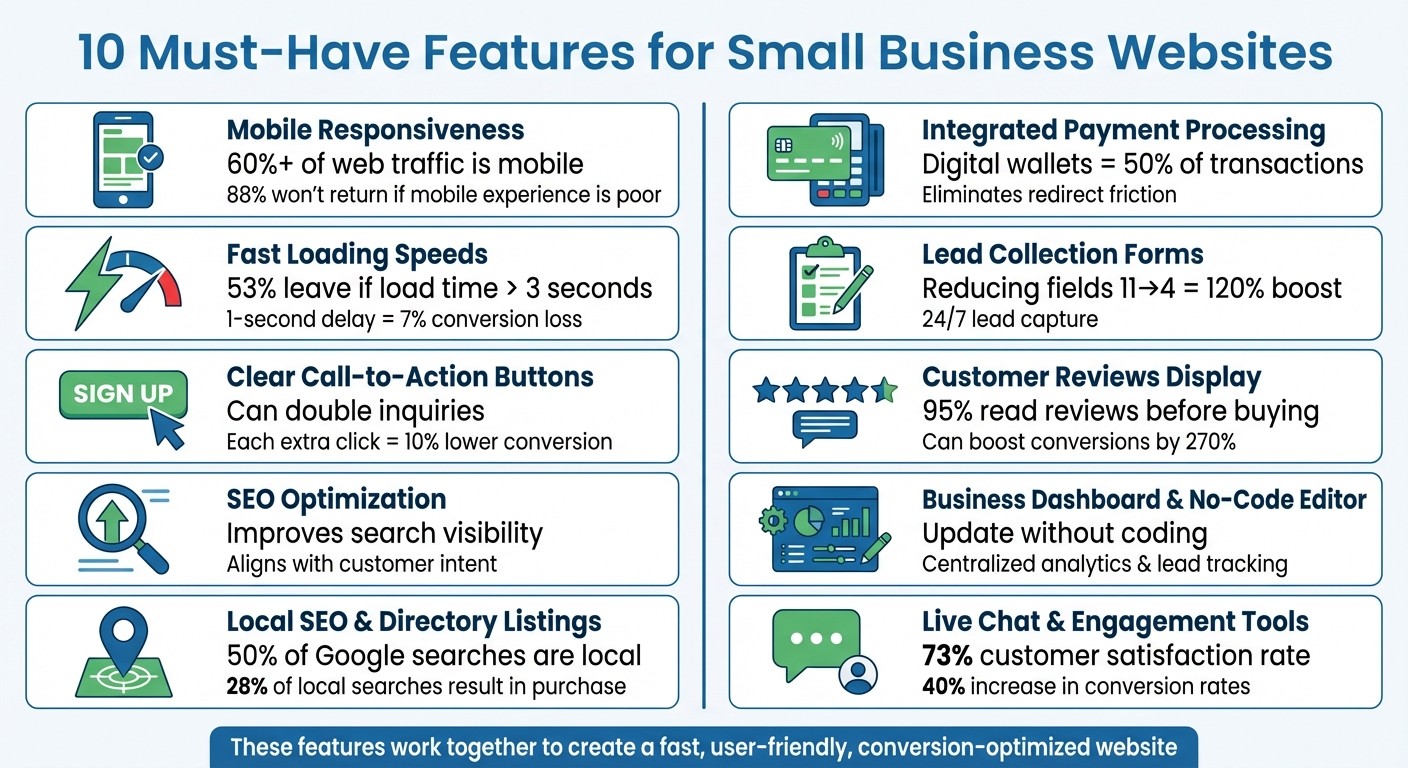
10 Essential Features for Small Business Websites in 2026
1. Mobile Responsiveness
Impact on User Experience
Mobile responsiveness plays a major role in keeping users engaged and driving conversions. With over 60% of web traffic coming from mobile devices - and some industries seeing figures as high as 70% - your website must function seamlessly on smartphones. A mobile-first design ensures that key elements are easily accessible on smaller screens.
Andrew Buccellato, Owner and Lead Developer at Good Fellas Digital Marketing, sums it up well:
"Mobile-first design isn't just about making your site 'look good' on phones: it's about creating an optimized conversion experience for the majority of your visitors."
A responsive site allows visitors to read, tap, and navigate with ease. On the flip side, if your site performs poorly on mobile, 88% of users are unlikely to return.
Practicality for Small Businesses
For small businesses, mobile responsiveness simplifies operations. Instead of managing separate desktop and mobile websites, a single responsive design adjusts automatically to any screen size. This saves both time and money. Plus, Google gives priority to mobile-friendly sites in its search rankings. If someone searches for "plumber near me" on their phone, a responsive site increases the chances they'll find your business.
Ease of Implementation
Modern website builders make it simple to create a responsive site. Many offer themes that automatically scale layouts, images, and navigation to fit different devices - no coding required. Tools like Google’s Mobile-Friendly Test can help you spot and fix any issues quickly.
Here are a few tips to optimize your mobile experience:
Use large, touch-friendly buttons (at least 44px).
Opt for modern image formats like WebP for faster loading.
Ensure phone numbers are clickable, so users can call directly from their devices.
These adjustments make your site easier to use and boost the likelihood of visitors converting into customers.
Potential to Improve Conversions
A responsive design doesn’t just improve usability - it also drives results. When users can navigate your site effortlessly on their phones, they’re more likely to take action, whether that’s calling your business, filling out a form, or completing a purchase. In fact, mobile devices now account for the largest share of online orders.
Speed is another critical factor. Bounce rates skyrocket by 32% when load times increase from one to three seconds, and even a one-second delay can shave 7% off your conversions. By ensuring fast load times, readable text, and clear calls to action above the fold, you remove barriers and make it easier for visitors to turn into paying customers.
2. Fast Loading Speeds
Impact on User Experience
How fast your site loads can make or break a visitor's impression of your business. People want instant access - waiting isn't an option. In fact, 53% of mobile users will leave a page if it takes more than three seconds to load. That’s over half your audience disappearing before they even explore what you offer.
And it gets worse: bounce rates soar by 32% when load times go from one to three seconds. Stretch that to four seconds, and bounce rates can climb by a staggering 150%. Time is money, and slow pages are costly.
Potential to Improve Conversions
Speed isn’t just about keeping visitors - it’s about converting them. A delay of just one second in page load time can slash conversions by 7%. Google even factors speed into its rankings using Core Web Vitals, which measure metrics like Largest Contentful Paint (LCP), Interaction to Next Paint (INP), and Cumulative Layout Shift (CLS).
For a small business making $10,000 a month online, that one-second delay means losing $700 - money slipping through your fingers because of a fixable issue. Faster loading times not only keep users on your site but also improve their overall experience, boosting engagement and sales.
Ease of Implementation
The good news? You don’t need to be a tech wizard to speed up your site. Start by analyzing your current performance with tools like Google PageSpeed Insights or GTmetrix. These tools pinpoint problem areas so you know what to fix.
Simple solutions can make a big difference. Compress images with free tools like TinyPNG or switch to modern formats like WebP. Enable caching using plugins like WP Rocket or W3 Total Cache to help returning visitors load pages faster. For broader improvements, try a Content Delivery Network (CDN) like Cloudflare, which has a free plan to serve your content from servers closer to your users.
Practicality for Small Businesses
Fast loading speeds give small businesses a fighting chance against larger competitors. Even without a massive budget, you can create a seamless experience that keeps customers engaged. Upgrading from basic shared hosting to performance-driven providers like SiteGround or Kinsta may seem costly upfront, but it’s worth avoiding the revenue loss caused by slow load times.
Think of speed as an investment in your business. A site that loads in under three seconds sends a clear message: you respect your customers’ time. That respect builds trust, leading to more inquiries, higher sales, and a stronger standing in your industry. Next, we’ll explore how well-designed call-to-action buttons can further boost engagement.
3. Clear Call-to-Action Buttons
Impact on User Experience
Call-to-action (CTA) buttons are like a roadmap for your website visitors. They guide users toward the next step, minimizing confusion and reducing the risk of losing potential conversions. Think of them as digital signposts - without them, visitors might feel lost and abandon your site. Here's a key stat: every extra click a visitor has to make lowers the chances of conversion by about 10%. That’s why effective CTAs are designed to stand out. They use bold, contrasting colors, plenty of white space, and action-driven language like "Get", "Schedule", or "Download." Avoid vague phrases like "Learn More", which don’t inspire immediate action.
"CTAs serve as signposts, directing users on the steps they should take next, ensuring they don't feel lost or overwhelmed." – Strategic Solutions Labs
Potential to Improve Conversions
CTAs aren’t just functional - they’re powerful tools for boosting engagement. A well-crafted CTA can double the number of inquiries you receive. Add customer reviews near your CTAs, and conversion rates can soar by as much as 270%. The language you use matters. Swap generic terms like "Submit" for something more enticing, such as "Get My Free Quote", or replace "Click Here" with "Start Your Free Trial". Placement is just as important - position your main CTA above the fold where it’s immediately visible, and repeat it after key sections like service descriptions to keep it top of mind.
Ease of Implementation
Creating effective CTAs doesn’t require advanced tech skills. No-code tools and website builder plugins make it simple to design and tweak buttons in real time. Start by focusing on one primary action per page to avoid overwhelming users with too many choices. Make sure your buttons are mobile-friendly, with a touch target of at least 44 pixels for easy tapping. If you include phone numbers, enable click-to-call functionality so mobile visitors can connect with just one tap. Regular testing of button colors, text, and placement will help you figure out what works best for your audience.
Practicality for Small Businesses
For small businesses, CTAs can be tailored to match where visitors are in their buying journey. Offer low-commitment options like signing up for a newsletter or downloading a free checklist on blog pages. On service pages, feature medium-commitment CTAs such as free consultations. For product pages, go for high-commitment actions like direct purchases. This tiered approach ensures you’re capturing leads at every stage without overwhelming them. To streamline follow-ups, integrate your CTAs with a CRM system to automatically collect lead data and trigger emails or text messages. Once you’ve nailed your CTAs, the next step is optimizing your site’s visibility through SEO.
4. SEO Optimization
Impact on User Experience
Good SEO isn't just about climbing the rankings - it’s about creating a smooth and enjoyable experience for your visitors. A well-organized heading structure makes it easy for users to skim through and find exactly what they’re looking for. On the technical side, practices like image compression and caching can significantly cut down load times. This matters because search engines reward fast-loading sites, and users expect pages to load quickly. Plus, implementing HTTPS not only secures your site but also prevents those annoying browser warnings that can scare users away. Adding descriptive alt text to images is another simple way to improve accessibility for all visitors.
"On-page SEO isn't about tricks - it's about aligning your digital presence with your customer's real-world intent." – Small Business Rebrand
Practicality for Small Businesses
For small businesses, SEO - especially local SEO - can be a game-changer. Think of your Google Business Profile as your "second homepage." It’s a critical tool for boosting visibility in local searches. To make the most of it, fill out every section, from your business hours to services and photos, and keep everything up to date. Consistency is key: ensure your business Name, Address, and Phone number match across your website, social media, and directories. This builds trust with both search engines and potential customers. Instead of generic posts, focus on creating content that directly answers the specific questions your customers are asking.
Ease of Implementation
You don’t need to be a tech wizard to get started with SEO. Begin with the basics: craft clear, concise page titles (under 60 characters) that include your location and main service. Write meta descriptions (under 160 characters) that not only summarize your page but also entice users to click. Before uploading images, compress them to improve loading times and add alt text to help search engines understand the content. Free tools like Google PageSpeed Insights and Search Console can help you identify and fix speed or indexing issues. Many of these tasks can be handled with no-code platforms or simple plugins, making SEO accessible even for beginners.
Potential to Improve Conversions
Targeting specific local search terms - like "cruelty-free vegan T-shirts" - can attract visitors who are ready to make a purchase. These are the people further along in their decision-making process, meaning they’re more likely to convert. Internal links between related pages also play a big role by keeping visitors on your site longer and guiding them toward key conversion points. By strengthening your SEO now, you not only boost your local visibility but also set the stage for future growth and success.
5. Local SEO and Directory Listings
Practicality for Small Businesses
Local directory listings are a powerful tool for boosting your website's visibility and driving foot traffic to your business. With 50% of all Google searches focused on local information and 97% of people discovering local businesses online, having a strong presence in these directories is essential. If your business doesn't show up in these searches, you're potentially losing a significant slice of your local audience. Platforms like Google Business Profile, Apple Business Connect, Bing Places for Business, and Yelp should be your starting points. Beyond these, secondary directories can help you broaden your reach even further. These listings also play a role in voice and navigation searches. For instance, a location-based AR campaign in 2024 increased in-store visits by 22% - a clear example of how local SEO can directly impact foot traffic.
Impact on User Experience
Consistency is key when it comes to local listings. Ensuring that your Name, Address, and Phone number (NAP) are identical across all platforms is critical for success.
"If a business can't be found on the web today, it's akin to being 'nowhere.'" – Moz
This consistency not only improves your visibility but also builds trust with potential customers.
Ease of Implementation
Start by claiming and verifying your Google Business Profile - this is one of the most impactful steps to boost your local visibility. Make sure every section of your profile is complete, including business hours, services, photos, and your service area. On your website, display your address and phone number as crawlable HTML text rather than embedding them in images. If your business operates in multiple locations, create dedicated landing pages for each one instead of relying on a generic contact page. These steps not only improve search rankings but also lay the groundwork for better conversion rates.
Potential to Improve Conversions
Local searches are incredibly effective at driving action. About 28% of local searches result in a purchase, and nearly 80% of smartphone users who search for a local business end up making an offline purchase. Plus, most "near me" searches lead to a business visit within 24 hours.
In 2024, Chris Hinman, CEO of TheBestReputation, worked with a 15-location coffee shop chain to optimize their Apple Business Connect profiles. By adding geo-tagged photos and using conversational descriptions tailored for Siri, the chain saw a 28% increase in Apple Maps direction requests and a 15% jump in "Call" button taps over six months. This shows just how impactful a well-optimized local presence can be on conversions and customer engagement.
5 Must-Have Website Features for Small Businesses in 2025 🚀
6. Integrated Payment Processing
Integrated payment processing is the final step in turning website visitors into paying customers, ensuring your website's conversion flow is seamless.
Practicality for Small Businesses
With integrated payment processing, your website becomes a round-the-clock sales hub. Whether you’re selling products, booking appointments, or offering services, it allows customers to complete transactions without leaving your site. Considering that digital wallets now account for nearly 50% of online transactions, having this capability is a must. For small businesses, Payment Service Providers (PSPs) like Stripe or PayPal offer an easier and quicker setup compared to traditional merchant accounts. With global e-commerce sales projected to hit $8.1 trillion by 2026, integrating payment solutions is no longer just a convenience - it's a necessity.
Impact on User Experience
Redirecting customers to a third-party payment site can disrupt the buying process and lead to cart abandonment. Integrated payment systems keep users on your site, maintaining consistency in branding and building trust. To enhance the experience, display security badges prominently and optimize the mobile checkout process with touch-friendly buttons and minimal form fields. Offering a guest checkout option instead of requiring account creation further reduces barriers, making it easier for customers to complete their purchases.
Ease of Implementation
Setting up payment processing doesn’t require technical expertise. Many platforms offer embeddable payment buttons and widgets that can be added in minutes. Start by selecting a reliable PSP - Stripe and PayPal are both trusted by small businesses. Ensure your site has an SSL certificate to encrypt customer data and avoid browser warnings that flag your site as "Not Secure". Use the processor’s "sandbox" mode to test transactions and iron out any issues before going live. Additionally, automate order confirmation emails to reassure customers post-purchase. If you’re using Gatsboy’s built-in Stripe Payments integration, the setup becomes even simpler, letting you focus on growing your business while enjoying a smoother checkout process and higher conversion rates.
Potential to Improve Conversions
Integrated payment processing eliminates the friction caused by redirects, simplifying the checkout experience. Providing multiple payment options - credit cards, debit cards, and digital wallets like Apple Pay and Google Pay - ensures you meet a variety of customer preferences, increasing the likelihood of a sale. Keep the checkout process streamlined by asking only for essential details; every extra form field can lower completion rates. Make sure to display all accepted payment methods clearly so customers know their options upfront. Combining robust payment solutions with other user-friendly features creates a smooth journey from product discovery to purchase.
7. Lead Collection Forms
Practicality for Small Businesses
Lead collection forms give your website the ability to gather leads 24/7, even when your team is off the clock. Unlike phone calls, which require someone to answer immediately, these forms let potential customers reach out whenever it’s convenient for them. When paired with tools like a CRM or email marketing platform, these forms can automatically assign inquiries to the right team member and kick off nurturing campaigns. This ensures every lead is followed up on without delay. With features like automated lead management accessible through your website dashboard, high-performing websites stand out from the rest.
Impact on User Experience
Embedded forms make it easy for visitors to contact you without navigating away from your site. But here’s the catch: the more fields you include, the less likely people are to complete the form. For example, in 2025, healthcare company Qualicorp used VWO's Form Analytics to uncover where users abandoned their forms. By addressing these problem areas, they increased sign-up rates by 16.93%. Similarly, SafeSoft Solutions ran an A/B test, adding transparent pricing to their lead form, which doubled their lead generation. The lesson? Keep it simple. Stick to asking for the essentials - name, phone number, email, and a short message - to respect your visitors' time and boost completion rates.
Ease of Implementation
You don’t need to be a tech wizard to add lead forms to your site. Place them on high-traffic pages like your homepage, contact page, or footer. Use a clean, single-column layout, and since 60–70% of visitors browse on mobile devices, make sure the forms are touch-friendly and easy to use. Automated confirmation emails sent right after submission also help build trust and set clear expectations for follow-up. If you’re using Gatsboy’s advanced forms feature, managing leads through your business dashboard becomes even easier. These small adjustments can make a big difference in how effectively your forms convert.
Potential to Improve Conversions
Simplifying your forms can lead to dramatic results. For instance, reducing the number of fields from 11 to just 4 can boost conversions by 120%. Even removing just one field can improve completion rates by nearly 50%. Swap out generic "Submit" buttons for action-oriented ones like "Get Your Free Quote" or "Schedule a Consultation" to make the value clear. If your form has more than seven fields, consider breaking it into smaller steps with a progress bar - multistep forms can convert 87% better than long, single-page ones. Adding a short privacy statement near the submit button can also increase conversions by 20–30%. And here’s a bonus: businesses that excel at nurturing their leads generate 50% more sales-ready prospects.
8. Customer Reviews Display
Practicality for Small Businesses
Customer reviews are a powerful way to establish trust. With 95% of shoppers reading online reviews before making a purchase and 87% specifically checking reviews for local businesses, having a system to display these reviews ensures your testimonials stay relevant. Automated review displays highlight real customer feedback, which can greatly influence potential buyers.
Impact on User Experience
When it comes to reviews, transparency beats perfection. While 84% of people trust online reviews as much as personal recommendations, a flawless 5-star rating can sometimes seem too good to be true. Mike Blumenthal, co-founder of GetFiveStars, explains:
I strongly encourage business owners to show all feedback. I think transparency in reviews is critical for customer trust and we find that showing all legitimate feedback results in less than a half-point decline in star ratings on average.
A great example of this is Barbara Oliver Jewelry in Williamsville, NY. In October 2016, they worked with Blumenthal to create a reviews page using GetFiveStars technology. By displaying and responding to both positive and negative feedback, the reviews page generated 9% of total website visits, with new visitors spending an average of 4 minutes reading testimonials.
Ease of Implementation
Adding reviews to your website is easier than ever. Tools like Jotform, Shapo, and Elfsight provide simple code snippets that you can copy and paste into your site. For those using Gatsboy's Google Reviews integration, the process is even more streamlined through the business dashboard. Positioning matters too - widgets placed at the top of your homepage perform 34% better than those in the footer. Additionally, using review schema markup (JSON-LD) allows Google to display star ratings directly in search results, giving your business an edge with a strong first impression. These small tweaks can lead to noticeable improvements in conversions.
Potential to Improve Conversions
The data is clear: displaying reviews can boost conversion rates by up to 270%. Businesses with a 4-star rating see a 110% increase in click-through rates compared to those with a 3-star rating. For instance, TrovaTrip, a travel website, moved their Google Reviews widget to the top of their homepage and experienced a 10%+ increase in bookings. Visual star ratings also perform better, with 22% higher conversions than text-only ratings. Engaging with reviews and maintaining a strong reputation can lead to 58% more revenue. Up next, we’ll dive into tools that enhance customer engagement and drive even better results.
9. Business Dashboard and No-Code Editor
Practicality for Small Businesses
For small businesses, managing a website shouldn't feel like navigating a maze of technical jargon. This is where a no-code editor with drag-and-drop functionality becomes a game-changer. It allows you to update content, add image galleries, animations, or even create complex layouts - all without touching a single line of code. Pair this with a centralized business dashboard, and you’ve got a tool that streamlines analytics, lead tracking, and customer interactions. The result? A lot less time spent on development and a lot more focus on growing your business.
Impact on User Experience
Keeping your website up-to-date is essential to retain visitors' interest. With instant updates, your audience will always see fresh and relevant content. Dashboards that integrate tools like Google Analytics 4 and Search Console provide a direct line to user behavior insights - think session durations, pageviews, and bounce rates. Armed with this data, you can make informed tweaks to improve navigation and engagement. Heatmap tools, such as Hotjar or Microsoft Clarity, go a step further by showing exactly where visitors click, scroll, or leave. This kind of visual feedback ensures you can fix navigation hiccups or confusing layouts before they impact your bottom line.
Ease of Implementation
Take Gatsboy’s business dashboard as an example. Powered by a Framer-based no-code editor, it simplifies website management for non-technical users. You can effortlessly make updates while benefiting from integrated analytics, lead management, and CRM connections for automatic lead tracking. Schema markup tools are built-in, helping search engines understand your business details - like your name, address, and phone number - without requiring you to write complex code. Many modern editors also come with accessibility features, such as prompts to add alt-text to images or check color contrast, ensuring your site is inclusive and user-friendly. This level of control not only makes website management easier but also boosts your site's ability to convert visitors into customers.
Potential to Improve Conversions
Quick testing and optimization can make all the difference when it comes to conversions. As Andrew Buccellato, Owner and Lead Developer at Good Fellas Digital Marketing, says:
Your website isn't just your digital storefront: it's your 24/7 sales rep, lead magnet, and credibility builder all rolled into one.
With A/B testing tools built into your dashboard, you can experiment with various elements - like headlines, button colors, or layouts - to see what resonates most with your audience. These tools ensure ongoing refinement of the user experience, helping you achieve higher conversion rates. Dashboards make it easy to monitor performance in real-time and adjust quickly, keeping your website running at its best.
10. Live Chat and Customer Engagement Tools
Practicality for Small Businesses
Live chat is a game-changer for small businesses, offering real-time interaction and instant customer support. With live chat, businesses can stay connected with customers around the clock. Even when you're not available, an AI chatbot can handle up to 90% of inquiries, covering everything from business hours to pricing details. This ensures you're always ready to engage potential leads, even outside traditional working hours.
It's no surprise that 75% of people prefer live chat over other communication methods. The response time is impressive too - just 57 seconds on average, compared to the 12-hour wait typical of email. Ravi Sundararajan, Chief Operating Officer at Gupshup, highlights the versatility of live chat:
Small businesses typically use website chats for various customer engagement services including customer support, lead generation, lead qualification, appointment booking and product discovery.
This immediate availability makes a noticeable difference in customer experience.
Impact on User Experience
Live chat consistently delivers the highest customer satisfaction rate at 73%, outperforming email (61%) and phone support (44%). Quick responses - often within the first 10 seconds - keep visitors engaged and reduce the chances of them leaving your site.
Modern live chat tools are smarter than ever. They integrate seamlessly with your CRM, giving agents access to a customer's full history and eliminating the need for repetitive questions. Features like real-time typing previews allow your team to anticipate customer needs and respond faster. These tools are not just convenient but impactful - 52% of customers are more likely to stay loyal to businesses with live chat, and 79% of companies report gains in sales, revenue, and customer loyalty.
Ease of Implementation
Setting up live chat is simpler than you might think. Many platforms include drag-and-drop builders, letting you design automated chat flows without any coding skills. For example, Gatsboy's live chat module integrates straight into your business dashboard, making it easy to manage conversations alongside leads and bookings. Mobile apps for iOS and Android let you respond to customer inquiries on the go.
To streamline operations, you can create canned responses for common questions like "What are your hours?" or "Do you offer delivery?" And if you're not available 24/7, automated away messages can collect visitor emails for follow-up. These straightforward tools can significantly boost your conversion rates.
Potential to Improve Conversions
Live chat is a proven driver of conversions, increasing rates by 40% and revenue per chat hour by 48%. Pre-chat forms collect key details - like a visitor's name, email, and their reason for reaching out - so your team can focus on serious leads. Proactive chat triggers, such as pop-up messages when someone lingers on your pricing page, can reduce cart abandonment and help hesitant visitors make a purchase.
Reviewing chat transcripts is another powerful way to improve your services. Businesses that analyze these transcripts see a tenfold increase in annual revenue compared to those that don't. Use these insights to identify gaps in your website content, create FAQ sections, and enhance both user experience and SEO.
Feature Comparison Table
Here’s an overview of the 10 key features offered by Gatsboy, all delivered through a streamlined, no-code process.
Feature | Gatsboy Implementation |
|---|---|
Mobile Responsiveness | Mobile-first design powered by Framer, automatically adapting to any device size. |
Fast Loading Speeds | Framer’s high-performance engine ensures quick load times. |
Clear CTAs | Optimized layouts featuring Email Collector and Stripe Payments modules for action-driven results. |
SEO Optimization | Pre-built SEO framework with integrated Business Schema for better search visibility. |
Local SEO | Includes Google Business Profile setup and directory submissions to 50 top sites. |
Integrated Payments | Stripe Payments module, fully manageable from your dashboard. |
Lead Collection | Advanced Forms and Email Collector funnel leads into a centralized portal. |
Customer Reviews | Automated import and display of Google Reviews to boost credibility. |
Business Dashboard | All-in-one portal with a no-code Framer editor for complete control over your site. |
Live Chat | Integrated Live Chat and Messaging modules for real-time customer engagement. |
Gatsboy delivers all these features through a done-for-you service that’s ready in just 7 to 10 days, starting at a one-time fee of $500. For those looking for more, the Website + Pro plan (priced at $500 plus $47 per month) unlocks advanced features like Stripe Payments, Google Reviews, and Live Chat. Once completed, your website is transferred to your Framer account, giving you full ownership and the ability to make updates with zero technical hassle.
Mark Reynolds from Reynolds & Co shared his experience:
"The speed I can now update and manage my website is unreal. It's become a core part of our workflow."
With over 3,000 websites delivered and a thriving community of more than 15,000 business owners, Gatsboy’s modular design saves countless hours while ensuring consistency. These features work seamlessly together to improve user experience, streamline lead generation, and drive conversions.
Conclusion
Your website acts as a tireless sales rep, constantly working to attract visitors, earn their trust, and turn them into paying customers. The 10 features discussed in this article lay the groundwork for a site that delivers real business results. With mobile traffic now accounting for over 60% of visits and most online journeys starting with a search, features like fast load times and strong SEO are non-negotiable. Plus, with 95% of shoppers checking online reviews before buying, showcasing those reviews can have a big impact on conversions.
Each feature plays a role in creating a website that drives revenue. From quick loading speeds to clear calls-to-action (CTAs), lead capture forms, and local SEO, these elements work together to build a professional, results-driven site. Local SEO, in particular, ensures nearby customers can easily find you, amplifying your reach and impact.
The best part? You don’t need to be a tech expert or spend months building this yourself. Gatsboy offers all 10 features in a done-for-you package, ready in just 7–10 days, with full ownership transferred to your Framer account. Whether you’re building a brand-new site or upgrading an old one, these features turn your website into a revenue-driving machine that aligns with your growth goals - working just as hard as you do.
FAQs
Which 3 features should I prioritize first?
When building or improving your small business website, there are three key features you should focus on: mobile responsiveness, clear call-to-action (CTA) buttons, and fast load times.
Mobile Responsiveness: With so many people browsing on their smartphones and tablets, your website needs to look and function perfectly across all screen sizes. Not only does this enhance the user experience, but it also helps your site rank better in search engines.
Clear Call-to-Action (CTA) Buttons: Whether you want visitors to make a purchase, fill out a form, or contact you, clear and prominent CTAs are essential. They guide users toward taking the actions that matter most to your business, ultimately driving more conversions.
Fast Load Times: Nobody likes a slow website. A fast-loading site keeps visitors engaged, reduces bounce rates, and even gives you an edge in SEO rankings. It’s a win-win for both users and search engines.
Focusing on these three elements can make a big difference in your website’s performance and your business’s growth.
How can I test my site’s speed and mobile performance?
Tools like Google PageSpeed Insights and GTmetrix are excellent for analyzing your website's speed and pinpointing areas that need improvement. These tools provide detailed insights into performance metrics and practical recommendations to help your site load faster.
For mobile optimization, try Google’s Mobile-Friendly Test. It assesses how well your site performs on mobile devices, focusing on usability and load speed.
By consistently using these tools, you can ensure your site stays fast, user-friendly, and aligned with SEO best practices.
What’s the simplest way to improve local SEO fast?
To give your local SEO a quick lift, start by ensuring your Google My Business listing is accurate. Verify details like your business name, address, phone number, and even your reviews. These elements play a key role in how visible your business is in local searches. Keeping everything current helps potential customers find you effortlessly online.
Related Blog Posts
Únete a nuestra comunidad de 15,000+ propietarios de negocios
Artículos populares
Artículos populares sobre su sitio web y la comercialización de su pequeña empresa


