


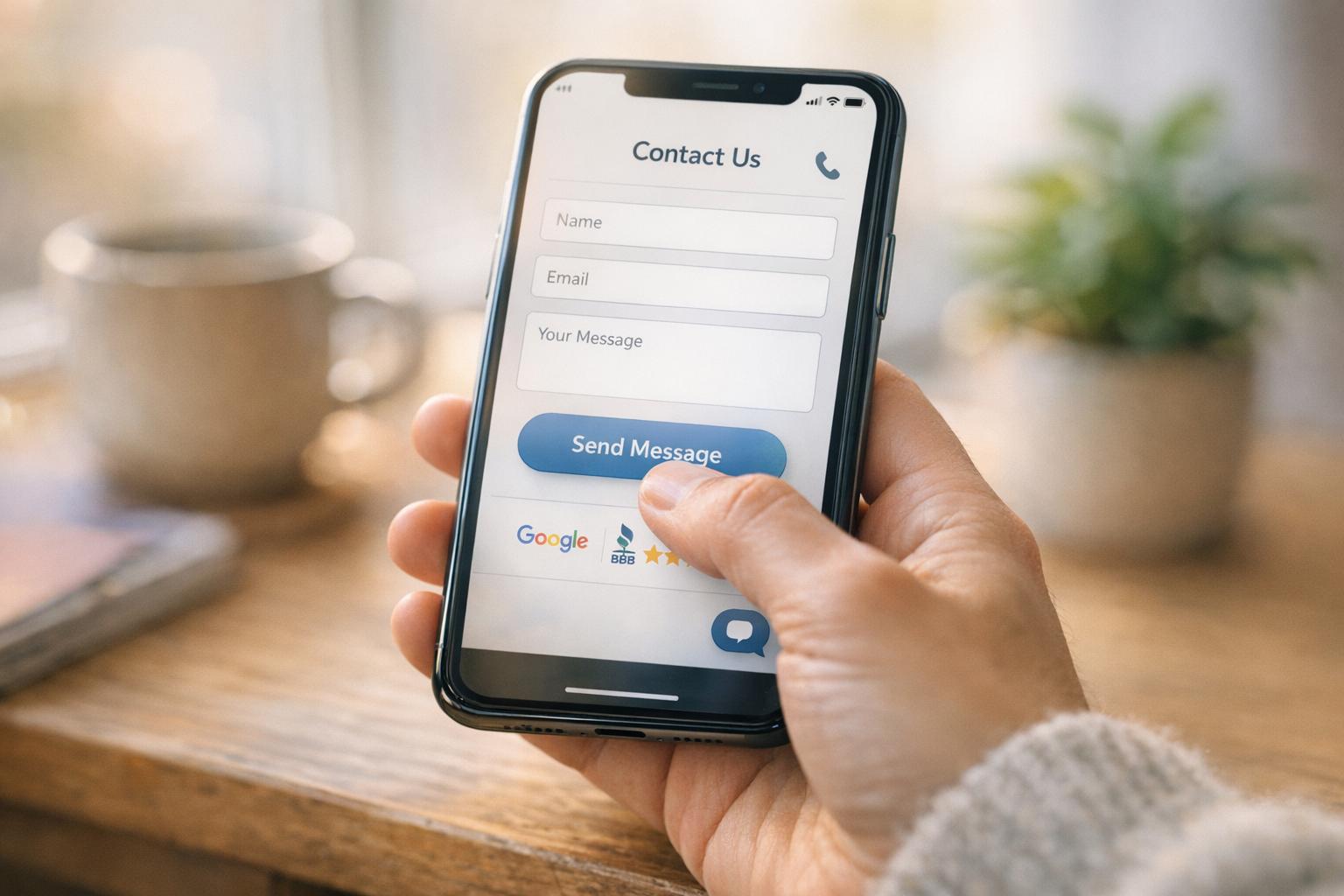
15 tips for more website inquiries
Website Tips
Boosting website inquiries doesn't require a complete website overhaul. Small, targeted changes can significantly improve conversion rates. Here are the key takeaways:
Simplify Forms: Shorten forms to 3 fields (Name, Email, Message) to improve completion rates by up to 40%. Avoid asking unnecessary questions upfront.
Mobile-Friendly Features: Add click-to-call buttons and online booking systems for mobile users. Over 66% of site visits come from mobile devices.
Trust Signals: Display Google Reviews and testimonials near CTAs. These build confidence and can increase conversions by over 30%.
Live Chat: Use live chat or messaging tools to answer questions in real-time, reducing form abandonment rates of up to 81%.
Prominent CTAs: Place inquiry forms and CTAs above the fold and repeat them throughout the page for better visibility.
Dedicated Service Pages: Create individual pages for each service with specific CTAs to improve relevance and engagement.
Track Leads: Use a dashboard to monitor inquiries and respond quickly. Leads are 7x more likely to convert with fast responses.
These adjustments can help small businesses improve their website's conversion rate from the average 2–4% to as high as 10–11%, resulting in more inquiries and potential customers.
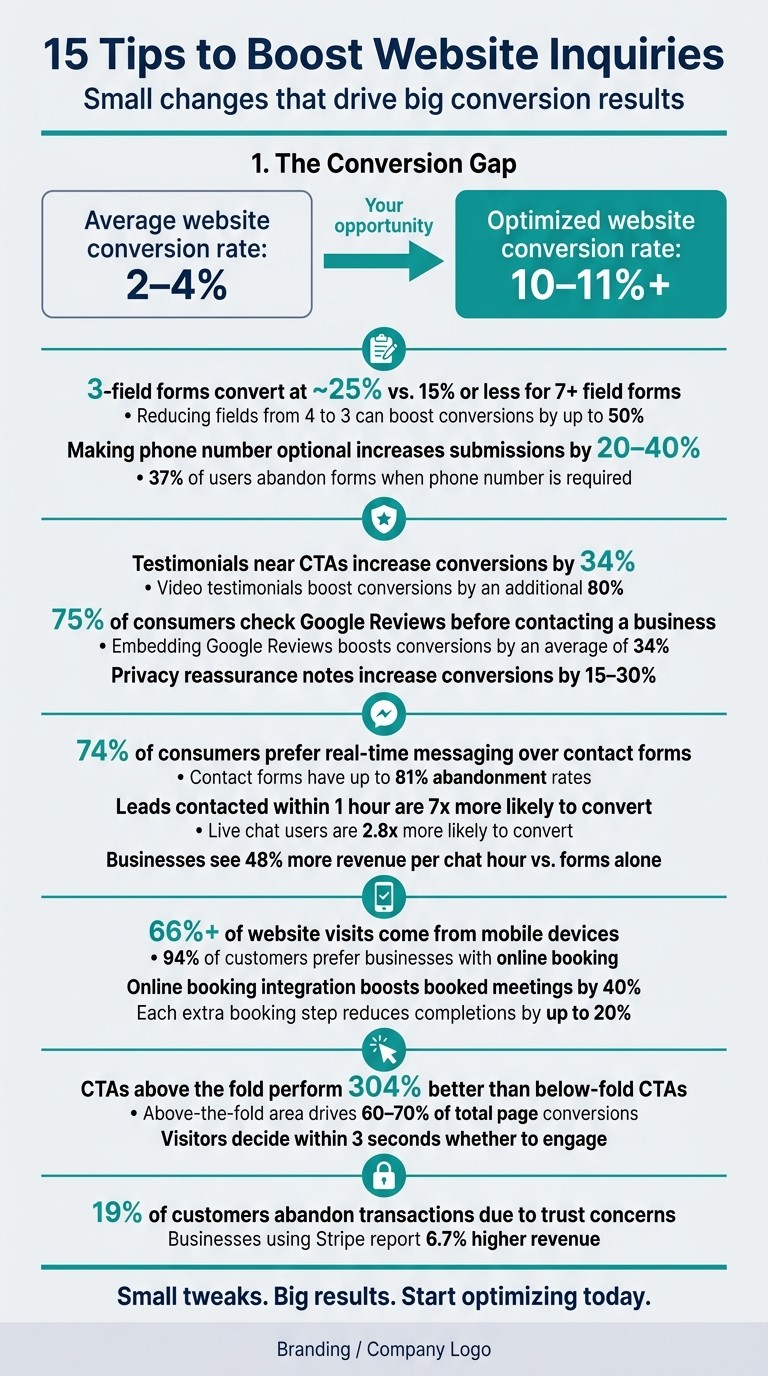
15 Tips to Boost Website Inquiries: Key Stats & Conversion Data
2X Your Conversions with these 3 Easy Website Changes
1. Shorten Your Contact Form
Every additional field in a contact form acts as a barrier, discouraging potential leads. Studies show that each extra field can lower completion rates by 4–6%. For example, forms with 7 or more fields convert at just 15% or less, while those with only 3 fields see conversion rates closer to 25%.
To keep users engaged, stick to the essentials: Name, Email, and an optional Phone field, along with a short Message section. This pared-down approach minimizes friction and encourages more submissions. As Ruud ten Have from Searchlab explains:
"Qualify on the call, not on the form. The form's only job is to get a real human to start a conversation with you."
Avoid asking for details like budget, timeline, or company size upfront. These questions can feel intrusive and often lead to abandoned forms. Save them for follow-up conversations when the lead is already engaged.
You can also make small tweaks for better results. For instance, make the phone field optional and combine "First Name" and "Last Name" into a single "Full Name" field. These simple changes can increase submissions by 20–40%.
If your service requires more detailed information, consider switching to a multi-step form with a progress indicator. Breaking the process into smaller steps feels less daunting and keeps users motivated to complete the form.
2. Cut Down on Required Fields
Even the simplest forms can discourage potential leads if they demand too much upfront. Every required field is like a small barrier, and the more you add, the more likely visitors are to give up before hitting "Submit."
Reducing the number of mandatory fields can make a massive difference. For instance, studies show that trimming a form from 4 fields to just 3 can increase conversion rates by as much as 50%. And requiring a phone number? That alone causes 37% of users to hesitate or abandon the form altogether. Each additional required field multiplies this friction.
"Ask: 'Is this information essential now or can it be gathered later?'" - Bohdan Khodakivskyi, Founder, Fomr
Think about it: Do you really need to know someone's budget, company size, or how they found you right away? These details can easily come up later during a follow-up call or email. For example, instead of asking "How did you hear about us?" in the form, you can capture that data through analytics tools like UTM tracking.
Here are a few tweaks to streamline your forms:
Combine "First Name" and "Last Name" into a single Full Name field.
Drop address fields unless you're shipping something.
Make the phone number optional unless it's absolutely necessary.
These small changes reduce decision fatigue for users, making them more likely to complete your form. Simplifying the process is not just about convenience - it's about creating a smoother path for potential leads to connect with you.
3. Use Clear Form Labels and Error Messages
Unclear labels and cryptic error messages can frustrate users, especially those ready to take action. A confusing label or an unhelpful error prompt can be enough to make someone abandon the form altogether. By simplifying and clarifying these elements, you can create a smoother, more user-friendly submission process.
Swap out overly formal or technical terms for plain, familiar language. For example, instead of "Organization", use Company Name, and replace "Designation" with Job Title. These small tweaks reduce hesitation and make the form feel approachable. When paired with a streamlined structure, this approach ensures the user journey is as smooth as possible.
"Using technical language in form labels creates hesitation and reduces completions." - Bohdan Khodakivskyi, Founder of Fomr
Position labels directly above input fields to maintain clarity and consistency. For error messages, be specific and helpful. For instance, instead of a vague "Invalid", use something like "Please enter a valid email address (example@domain.com)". Adding visual cues - such as red borders for errors and green checkmarks for valid entries - further enhances usability and builds user confidence.
Here’s a quick comparison of poor and improved examples:
Label/Message Type | Poor Example | Better Example |
|---|---|---|
Field Label | Name | Your Name |
Error Message | Invalid | Please enter a valid phone number |
Button Text | Submit | Get My Free Estimate |
Privacy Note | Privacy Policy | We respect your privacy. Your info is never shared. |
4. Make Your Phone Number and Email Easy to Find
When contact details are hard to locate, visitors often leave a website. Surprisingly, while 78% of small business owners recognize their website's value, many still tuck away contact information on a separate "Contact" page that visitors might never see.
To avoid losing potential customers, make your phone number and email visible on every page. Place them prominently in the header - ideally at the top-right corner for desktop users - and repeat them in the footer for those who scroll to the bottom before deciding to reach out.
This is especially critical for mobile users. With over 66% of visits coming from mobile devices, many users arrive with a specific goal - like calling your business or finding directions. Ensuring your contact info is immediately accessible removes unnecessary hurdles.
Also, rethink the wording near your contact details. A generic "Contact Us" link is less effective than something action-driven, like "Get a Free Quote" or "Schedule a Call." These phrases encourage visitors to act right away.
Finally, adding a small privacy reassurance, such as "Your info is safe with us", can increase conversions by 15–30%. These simple tweaks improve the user experience and make it easier for visitors to connect with you.
5. Add Click-to-Call on Mobile
When people visit your site on their phones, they’re often looking for quick answers - not filling out lengthy forms. If they're ready to call, having them type out your number manually creates unnecessary hassle, which could mean losing a potential customer.
The solution? Use a simple HTML "tel:" link like this: <a href="tel:+15551234567">Call for a Free Quote</a>. With just one tap, their phone’s dialer opens - no memorizing or copying required.
The text on your call button is just as important as the functionality. Instead of something vague like "Call Us", try "Call for a Free Quote" or "Speak to an Expert Now". These phrases clearly highlight what the user gains by calling and encourage immediate action.
"For mobile users, offering a one-tap call or SMS option can drastically improve response rates - especially for high-intent service pages." - Inspira Digital Agency
To make your call button even more effective, follow these design tips:
Size matters: Ensure the button is at least 48×48 pixels, so it’s easy to tap.
High visibility: Use a bold, high-contrast color that stands out.
Sticky placement: A button that stays visible as users scroll works wonders, especially on service pages where decisions are being made.
For visitors who prefer texting over calling, consider adding a one-tap SMS option. This small tweak can make your site even more user-friendly for mobile users.
6. Add an Online Booking Option
When potential customers are ready to commit, a generic contact form can be a roadblock. Offering an online booking option allows them to pick a time and confirm instantly. This not only speeds up the process but also works perfectly alongside the streamlined forms and clear calls-to-action mentioned earlier.
Here’s a compelling stat: 94% of customers say they’d choose a new service provider if online booking were available. Businesses that integrate scheduling directly into their websites report an average 40% boost in booked meetings.
"A contact form collects details. A booking system confirms a time. That difference matters." - Patricia Magaz, Content Lead, Koalendar
Make your booking button specific and enticing. For example, use text like "Schedule a Free 15-Minute Consultation" instead of a plain "Book Now." Adding subtle urgency, such as "Limited to 5 calls per week", can encourage quicker decisions without feeling overbearing.
Tools like Calendly and Acuity Scheduling make it easy to embed scheduling features with minimal effort. Both offer free or affordable plans and provide simple code snippets for integration. If you’re using Gatsboy, you’re in luck - it comes with a built-in Online Bookings module, so you can set up scheduling without relying on third-party tools.
Keep the process as straightforward as possible. Start by asking only for a name and email; you can collect additional details after the booking is confirmed. Why? Because every extra step in the process can lower completion rates by up to 20%. Streamlining this experience can make all the difference in converting visitors into customers.
7. Add Live Chat or a Messaging Tool
Live chat is all about quick, real-time answers. Studies show that 74% of consumers prefer real-time messaging, while contact forms often fall short, with up to 81% abandonment rates. Plus, responding to inquiries within an hour makes you nearly 7x more likely to qualify a lead. Even outside business hours, a chat widget can stay active - bots can handle basic questions and collect contact details until a human steps in.
"Speed builds trust. When a visitor can ask a question and get a near-instant response... you're reducing friction and increasing engagement at the exact moment they're most curious." - Xavier Cloitre, Marketing Expert, Inspira
Here’s why live chat works: visitors who use it are 2.8x more likely to convert, and businesses see a 48% boost in revenue per chat hour compared to relying on forms alone. Even a simple bot that greets users and collects names and emails can make a noticeable difference.
To maximize its impact, place your chat widget at the bottom right corner of your site - this is where users naturally expect it. Use a friendly tone to encourage interaction and offer help before asking for an email, making the experience feel approachable and easy. If you're using Gatsboy's Pro plan, you’re in luck - the live chat feature is already included, so there’s no need for extra tools or integrations. This seamless, real-time connection can turn casual visits into meaningful inquiries.
8. Display Google Reviews on Your Site
Let’s face it - most visitors are cautious. They don’t know your business yet, and a sleek website design alone isn’t enough to win them over. That’s where Google Reviews come in. These reviews carry credibility because they’re hosted on a third-party platform, making them much harder to fabricate than testimonials you write yourself.
With 75% of consumers checking Google Reviews, showcasing them directly on your site saves visitors the hassle of verifying your reputation elsewhere. This simple step not only builds trust but also keeps potential customers focused on your page, bringing them closer to taking action. In fact, embedding reviews can boost conversions by an average of 34%.
"Embedding Google reviews on a website can increase its trustworthiness. These reviews, coming from a third party, appear more authentic." - Michael Alexis, CEO, teambuilding.com
Where Should You Place Reviews?
Placement is key. Consider adding your star rating or a standout review near your contact form or "Get a Quote" button. This is where potential customers might need that final push to reach out. For a broader appeal, try a review carousel or grid further down on your homepage or service pages. And don’t shy away from showing a mix of reviews - sometimes, a thoughtful response to a 4-star review can build more trust than a wall of perfect 5-star ratings. This approach complements other essential website elements and trust-building strategies covered earlier.
How to Embed Google Reviews
Skip outdated methods like taking manual screenshots - they quickly become outdated and are a pain to update. Instead, use tools like Elfsight or EmbedSocial, which allow you to embed a live, auto-updating review feed in minutes, no coding skills required. If you’re using Gatsboy's Pro plan, Google Reviews integration is already included, so you can display your reviews effortlessly without relying on third-party widgets.
9. Add Testimonials and Business Credentials
Customer testimonials, certifications, and professional credentials can significantly increase trust in your business. While third-party reviews are helpful, these elements provide an extra layer of credibility, making visitors more confident about reaching out and boosting inquiries. This approach complements the streamlined contact strategies discussed earlier.
Testimonials are powerful tools for reducing buyer hesitation. In fact, sales pages that include testimonials convert 34% better, and video testimonials can amplify this effect by 80%. Credentials like trade memberships, industry awards, and SSL certificates also signal trustworthiness and establish authority. As Inspira Digital Agency highlights:
"Logos build instant credibility and reduce perceived risk. Authority by association works."
Where you place testimonials on your website is just as important as having them. Instead of burying them on a separate "Reviews" page, integrate them directly into your service pages, near contact forms, or close to "Get a Quote" buttons. This strategic placement can lead to a 22.6% increase in conversion rates. For example, a travel company saw bookings rise by over 10% simply by moving customer testimonials next to their call-to-action. Sometimes, positioning alone can make all the difference.
When selecting testimonials, focus on ones that highlight measurable results rather than generic praise. For instance, "increased our inquiries by 48% in two months" is far more compelling than "great service, highly recommend." To make testimonials feel authentic, include details like the reviewer’s full name, job title or location, and, if possible, a photo. These small touches enhance credibility and help assure potential customers that the reviews are genuine.
10. Offer Secure Payment or Deposit Options with Stripe
When it comes to online transactions, uncertainty can scare off potential customers. Adding a trusted deposit option can help turn casual visitors into paying customers by building confidence right when it matters most.
Here’s a staggering fact: 19% of customers abandon a transaction because they don’t trust the website with their credit card information. That’s why showcasing trusted payment options, like those offered by Stripe, along with recognizable logos (Visa, Mastercard, Apple Pay), near your call-to-action can make a big difference.
"A professional website is often the first indicator of a business's legitimacy that customers see." - Stripe Resources
Stripe’s security credentials are top-notch, as it’s PCI DSS Level 1 compliant and employs end-to-end encryption. Businesses using Stripe have reported 6.7% higher revenue. Keeping the entire payment process on your site - rather than redirecting customers to a third-party page - helps maintain your brand’s credibility and reassures users at the most crucial point in their journey.
For an even smoother experience, offer a small deposit option alongside full payments using Stripe Payments. This lowers the barrier to commitment, making it easier for customers to take that first step. To further inspire trust, you can add a "Secure Checkout" label or a padlock icon near the payment form. Don’t forget to set up automated confirmation emails to let customers know their payment went through successfully. Small touches like these can go a long way in making your site feel reliable and professional.
11. Place Inquiry Forms Above the Fold
The above-the-fold area - the first thing visitors see when they land on your site - is prime real estate. Yet, many small business websites waste it on a hero image and a vague tagline. To make the most of this space, place your inquiry form here to grab visitors' attention right away.
Why is this so effective? Calls-to-action (CTAs) above the fold perform 304% better than those placed below. Even more compelling, this section accounts for 60–70% of a page's total conversion results. Visitors typically decide within three seconds whether they’ll engage with your site. If your form is buried lower down, many may never even see it. By putting the form front and center, you're making it easier for users to take the next step.
"Visitors should be able to start a conversation within two seconds of arriving." - Fernside Studio
This approach is especially important for traffic from targeted ads or referrals, where users often arrive with a specific intent. A second form placed further down the page can serve as a backup, reinforcing your call to action.
To make your form even more effective, pair it with a clear, action-driven headline. For example, “Get a Free Quote” is far more engaging than a generic “Submit.” Adding a note like “Response within 24 hours” can further ease any hesitation, reassuring users that their inquiry will be addressed promptly. These small tweaks can make a big difference in driving conversions.
12. Repeat Contact Options Throughout Key Page Sections
Reinforcing call-to-action (CTA) buttons across your page can significantly improve conversion rates. Why? Because most visitors won’t scroll back to the top when they’re ready to reach out. If the only contact option is in the header, you risk losing potential inquiries from users who are already convinced after exploring your services. By strategically placing contact options throughout the page, you make it easy for visitors to act from wherever they are. This complements the approach of placing forms above the fold by ensuring users always have a clear next step.
A helpful approach is the triple-placement strategy - include your primary CTA at least three times on a page: at the top (above the fold), in the middle, and at the bottom.
"Every page, including service pages and blog posts, should either have a visible CTA or direct access to the contact page. Never assume visitors will navigate back to the top or main menu." - a-fresh
To make CTAs more effective, tailor the wording to match the visitor’s intent as they move through the page. Here’s a simple guide:
Location | CTA Example | Visitor Intent |
|---|---|---|
Hero / Header | "Book a 15-Min Intro Call" | Medium-High |
Mid-Page | "Get a Free Quote" | Medium |
Bottom of Page | "Start My Project" | High |
Footer | Full contact details | All visitors |
By repeating your contact options, you maintain momentum and reduce the chances of losing a visitor’s interest.
For an extra boost, pair each CTA with a micro-reassurance. Add a short note like "We respond within 24 hours" or include a quick star-rated review next to the button. These small details help ease doubts and encourage clicks.
13. Create Dedicated Pages for Each Service
When all your services are crammed onto a single page, visitors are left hunting for specific details. This extra effort can lead to frustration - and fewer inquiries. By creating a separate page for each service, you give visitors exactly what they need without making them dig for it. This focused approach improves navigation and helps keep users engaged.
Dedicated pages also allow you to craft call-to-actions (CTAs) that feel personal and relevant. Think about it: a generic "Contact Us" button on a general services page doesn't quite hit the mark. But on a roofing services page, a button like "Get a Free Roof Inspection Quote" aligns perfectly with what the visitor is already considering. That kind of relevance makes it much easier for potential customers to take the next step.
And here’s the kicker: optimized, targeted pages can significantly improve your conversion rates. While average service websites convert at just 2–4%, those with well-optimized, specific pages can hit 10–11% or more. For example, a financial coaching business saw its inquiry rate jump from 0.6% to 4.1% simply by tweaking its headline. That’s the power of speaking directly to your audience.
A great strategy for these pages is the "Ladder of Commitment" approach. Start with a low-pressure CTA at the top of the page, like "See How It Works", to engage visitors who are still exploring. Then, as they scroll and learn more, introduce higher-intent CTAs, such as "Start My Project", to capture those ready to take action. Here’s a quick guide:
Intent Level | CTA Copy Example | Placement |
|---|---|---|
Low | See How It Works | Hero (Secondary) |
Medium | Get a Free [Service] Quote | Service Page |
Medium-High | Book a 15-Min Intro Call | Hero (Primary) |
High | Start My Project / Hire Me | Bottom of Page |
But the benefits don’t stop there. Dedicated service pages can also boost your local search rankings. For example, a page specifically targeting "bathroom remodeling in Austin" is far more likely to rank well than a generic services page. And with nearly 50% of Google searches being for local information, this strategy can drive more relevant traffic - and more inquiries - to your site.
14. Add an Email Collector for Follow-Up
An email collector is a simple yet effective way to engage visitors who may not be ready to commit immediately. While contact forms are useful for those prepared to take action, many visitors are still exploring. Without an email collector, these potential leads might leave your site without leaving any way to reconnect.
The idea is straightforward: keep it simple. Ask only for a name and an email address. This low-barrier approach encourages more sign-ups, as it doesn’t overwhelm visitors with too many fields to fill out.
To entice visitors to share their information, offer something in return - this is where a lead magnet comes into play. A lead magnet is a free resource that provides value to your audience. For example, a service-based business might offer a free audit template or a concise how-to guide. It doesn’t have to be overly complex; it just needs to address a specific need or problem for your audience.
"A lead generation form converts interested visitors into contacts by asking for the minimum information needed to continue the conversation." - FormHug Team
Placement matters. Strategically position your email collector where it’s most likely to catch attention. Consider adding it at the end of blog posts, in a sticky banner that stays visible as users scroll, or through an exit-intent popup. Exit-intent popups, in particular, can be highly effective, recovering 10–15% of visitors who might have otherwise left without engaging.
Once you’ve captured email addresses, automation can take over to nurture these leads. Start with an automated confirmation email - it creates a professional impression and sets the stage for future communication. Tools like Gatsboy's email collector module can handle this seamlessly, saving you from the hassle of manual follow-ups. By integrating automation into your strategy, you not only secure potential leads but also streamline your overall conversion process.
15. Use a Business Dashboard to Track Leads and Responses
Keeping up with inquiries from forms, chat, bookings, or email can quickly become overwhelming. A business dashboard simplifies this by gathering all your leads in one place and sending instant alerts, so you can respond while the lead is still warm. This complements the contact methods we’ve discussed earlier, ensuring no opportunity goes unnoticed.
The biggest danger isn’t a lack of inquiries - it’s letting them slip through the cracks due to delayed responses. With automatic notifications, you’re alerted the moment a new inquiry comes in, giving you the chance to follow up before a potential customer looks elsewhere.
A dashboard does more than just notify you. It also provides insights into where your leads are coming from - whether it’s organic search, social media, or paid ads - and flags trends like form abandonment. These insights help you focus your energy and resources where they matter most.
For example, Gatsboy’s built-in dashboard consolidates all incoming leads, tracks form submissions, and syncs seamlessly with your contact forms, email tools, and booking systems. This gives you a complete view of your lead activity in one place.
Make it a habit to review your dashboard weekly. Check response times, follow up on any missed inquiries, and analyze which pages are driving the most engagement. Regular reviews like this ensure your lead pipeline stays healthy and effective.
Conclusion
Boosting website inquiries isn't about making sweeping changes. It's about addressing small hurdles at every step. Simple tweaks like shortening forms, using clear labels, ensuring contact options are easy to find, and adding trust signals such as reviews and testimonials can make a significant difference. Together, these adjustments can transform a site from generating occasional inquiries to consistently driving conversions.
The data speaks for itself. Forms with just three fields tend to convert at about 25%, while those with seven or more fields see conversion rates plummet to 15% or less. Even small changes, like making a phone number optional, can increase submissions by 20–40%. These aren't massive overhauls - they're precise, incremental changes that deliver quick results.
"Small business CRO is dramatically simpler. You're not chasing a 1% incremental lift... you're closing a 4-5x gap between average sites (2–4% conversion) and well-optimized ones (10–11%+)." - Ruud ten Have, Marketing & AI Strategy, Searchlab
Trust signals amplify these improvements. Displaying real testimonials and reviews - especially near your calls-to-action (CTAs) rather than hiding them on a separate page - helps build confidence and encourages visitors to take the next step. Combine that with a clear, compelling message above the fold and a low-friction form on your service pages, and you've created a site that works tirelessly for your business.
Finally, staying organized is key to maximizing results. Tools like Gatsboy's built-in dashboard help you manage leads efficiently, send instant notifications, and identify which pages are performing best. This allows you to respond quickly and refine your strategy based on what’s already driving success.
FAQs
Which 3 website changes should I do first for more inquiries?
To get more inquiries through your website, consider making these three adjustments:
Streamline your contact form: Keep it simple with just 3-4 fields. Place it where visitors can easily find it, and include trust elements like instant field validation and a note on how quickly they can expect a response.
Improve your call-to-action (CTA): Use clear, action-driven buttons that tell users exactly what to do. Also, create separate landing pages tailored to each service you offer for a more focused approach.
Upgrade your user experience: Make sure your site works seamlessly on mobile devices, loads quickly, and looks polished with professional visuals. These small tweaks can go a long way in building trust with potential clients.
How can I qualify leads without adding more form fields?
You can make lead qualification easier without overloading your forms with extra fields by focusing on smarter design and better user experience. For instance, conditional logic allows you to display or hide specific fields based on a user's earlier responses, keeping the form clean and straightforward. Adding instant validation helps users fix mistakes as they go, which can improve completion rates. Finally, placing a clear value proposition right above the form can clarify its purpose, attract the right audience, and filter for more relevant leads.
What’s the best way to follow up faster on new inquiries?
To keep up with inquiries more efficiently, consider setting up an automated response system. This allows you to acknowledge messages instantly and alert your team without delay. Tools like no-code platforms or CRM integrations can make this process seamless. Additionally, ensure your contact form offers instant validation, guiding users to a clear thank-you page that outlines the next steps. Acting quickly and thoughtfully not only engages potential clients but also helps you stay on top of inquiries effectively.
Related Blog Posts
Únete a nuestra comunidad de 15,000+ propietarios de negocios
Artículos populares
Artículos populares sobre su sitio web y la comercialización de su pequeña empresa


