


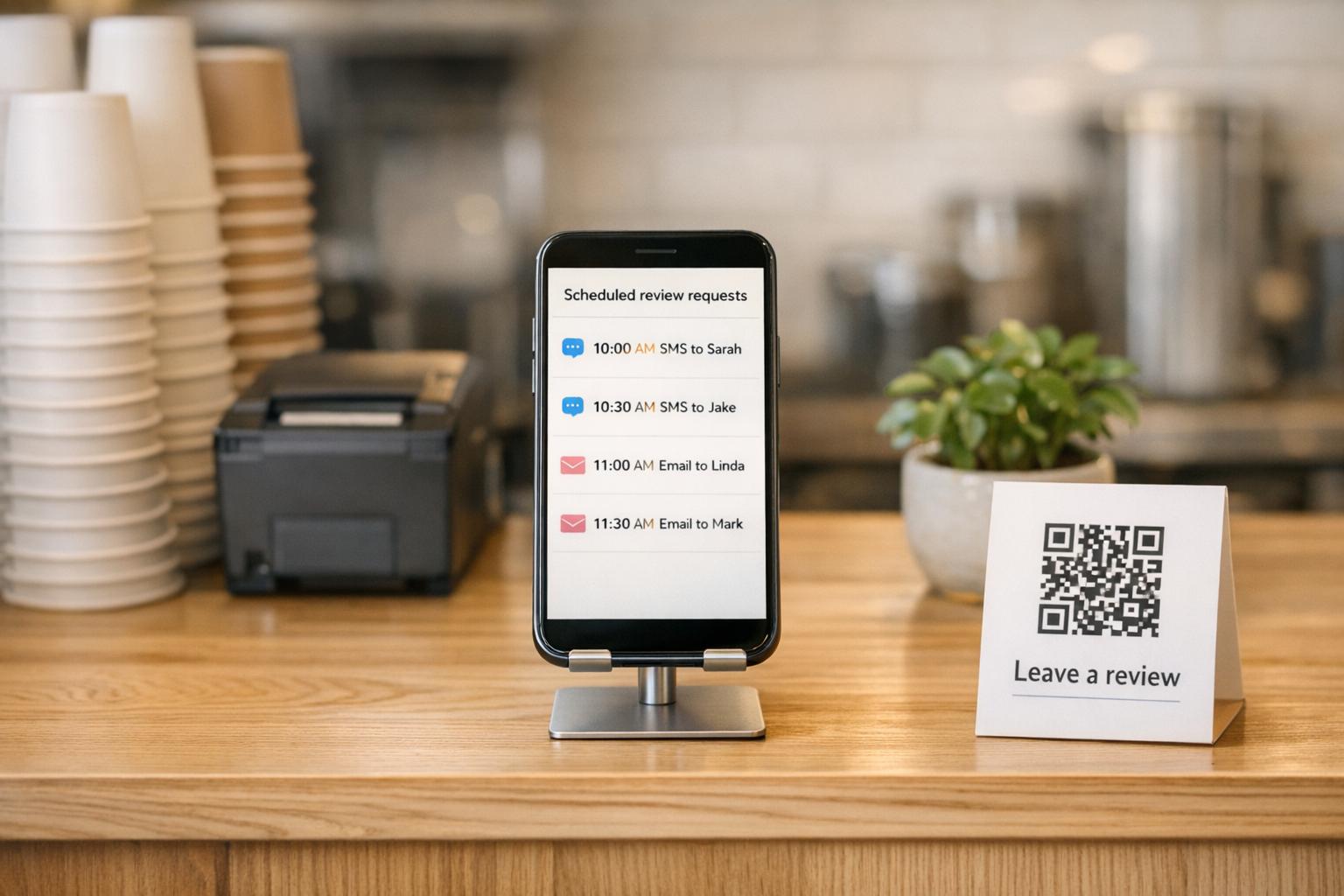
How to Automate Review Requests for Small Businesses
Small Business Marketing
Running a small business is demanding, and asking every customer for a review can feel impossible. Yet, 72% of customers will leave a review if asked, while only 8% do so on their own. Reviews don’t just build trust - they directly impact how customers find your business online, influencing local search rankings and visibility.
Automation simplifies this process. By using tools like Gatsboy, you can automatically send review requests at the right time - after a payment, appointment, or service. This saves time, ensures consistency, and increases response rates. Features like SMS requests (with a 98% open rate) and follow-up reminders boost results even further, helping businesses gather 3–7 times more reviews compared to manual methods.
Key Benefits of Automating Review Requests:
Save time: Automate tasks like sending requests and follow-ups.
Better engagement: SMS requests outperform email with higher open and response rates.
Stronger reputation: More reviews improve visibility and attract new customers.
Gatsboy’s Website + Pro Plan ($47/month + $500 setup fee) offers an all-in-one solution to manage review requests, customer data, and Google reviews from a single dashboard. With automation, you’ll spend less time managing reviews and more time growing your business.
Benefits of Automating Review Requests
Save Time and Increase Efficiency
Automation eliminates the need for time-consuming manual tasks that are easy to overlook. Business owners, busy with daily operations, often forget to send personalized emails or texts asking for reviews. Research shows that when relying on manual methods, businesses request reviews from only about 30% of their customers.
With automated workflows in place, the system handles these tasks for you. For example, it can trigger review requests automatically after a payment is processed, a job is completed, or an appointment ends. These systems integrate seamlessly with tools like Square, Shopify, Google Calendar, or Salesforce, pulling customer data directly - no manual input required.
Automation also takes care of follow-ups. If a customer doesn’t respond to the initial request, the system sends a reminder 48 hours later. This simple step can recover an additional 15–25% more reviews without requiring any extra effort. For businesses with a growing customer base, maintaining this level of consistency manually would be nearly impossible.
Increase Customer Engagement
Timing is everything when it comes to requesting reviews. Customers are most likely to leave feedback within 1–2 hours after their experience, while it’s still fresh in their minds. Automated systems ensure you never miss this critical "window of peak willingness", which can be difficult to manage manually, especially with multiple customers to track.
The communication channel also plays a major role. SMS review requests boast a 98% open rate, with 95% of messages read within three minutes. Compare this to email, where open rates hover around 20%. On top of that, text-based requests generate response rates 3–5 times higher than email. By combining the right timing with the most effective channel, automated requests can achieve conversion rates of 10% to 25%.
Automation makes the process easier for customers too. Instead of searching for your business online, they receive a direct link that takes them straight to your Google or Yelp review page. This one-tap convenience reduces friction, encouraging more customers to leave feedback. Improved engagement like this directly enhances your online presence.
Build a Better Online Reputation
The efficiency and engagement benefits of automation also translate into a stronger online reputation. More reviews mean better visibility and increased credibility. Take Lake Powell Paddleboard, for example. After implementing automated review requests, they grew from fewer than 100 TripAdvisor reviews and 11 Google reviews to nearly 300 TripAdvisor reviews and 400 Google reviews - all while maintaining a 4.9-star average. This highlights how consistently asking for feedback can drive meaningful results.
Beyond sheer numbers, having a steady flow of fresh, positive reviews helps improve your local search rankings. Google’s algorithm factors in review volume, recency, and ratings when determining local search visibility. With over 70% of consumers trusting online reviews as much as personal recommendations, gathering more positive feedback can give your business a serious edge. Businesses that actively request reviews typically receive 3–7 times more feedback than those that don’t, ensuring you capture input from nearly every customer.
How to Choose Review Automation Tools with Gatsboy
Gatsboy's Review Automation Features
Gatsboy simplifies operations for small businesses with its all-in-one business portal. Instead of juggling multiple platforms, users can manage everything through a single dashboard. This tool is trusted by over 5,000 small businesses.
One standout feature is the PRO Google Reviews module, which lets you seamlessly import Google reviews directly onto your website. It eliminates the need for manual updates while boosting your social proof. Another key feature, PRO Messaging & Leads, allows you to email customers, manage contact data, and automate review requests - all from the same dashboard.
Gatsboy also includes smart modules like Email Collector and Advanced Forms to gather customer details needed for automated review requests. Plus, the platform integrates with external tools, ensuring it fits smoothly into your workflow.
What Small Businesses Should Look For
Once you’ve reviewed Gatsboy’s features, consider the main factors that matter when choosing a review automation tool. Simplicity should be at the top of your list. Businesses that consistently generate a high volume of Google reviews often rely on automation. Look for tools that offer must-have features like SMS capabilities, Google integration, and automated follow-ups - without unnecessary complications.
Cost is another key consideration. High-end enterprise tools can cost between $249 and $599 per month, but small business solutions are generally more affordable, ranging from $10 to $125 monthly. Gatsboy’s Website + Pro Plan starts at $47 per month, making it a budget-friendly option that still delivers on functionality.
Integration is crucial to ensure the tool works seamlessly with your current systems. Check if it connects with your point-of-sale software, CRM, or Google Business Profile, and whether it can automatically trigger review requests after transactions or appointments. Don’t overlook mobile functionality and security features like Two-Factor Authentication, which are vital for a smooth and secure experience.
Keeping these factors in mind will help you effectively automate your review process with Gatsboy.
How to Automatically Ask for Google Reviews After Every Job (Tally + Make.com)
How to Automate Review Requests with Gatsboy
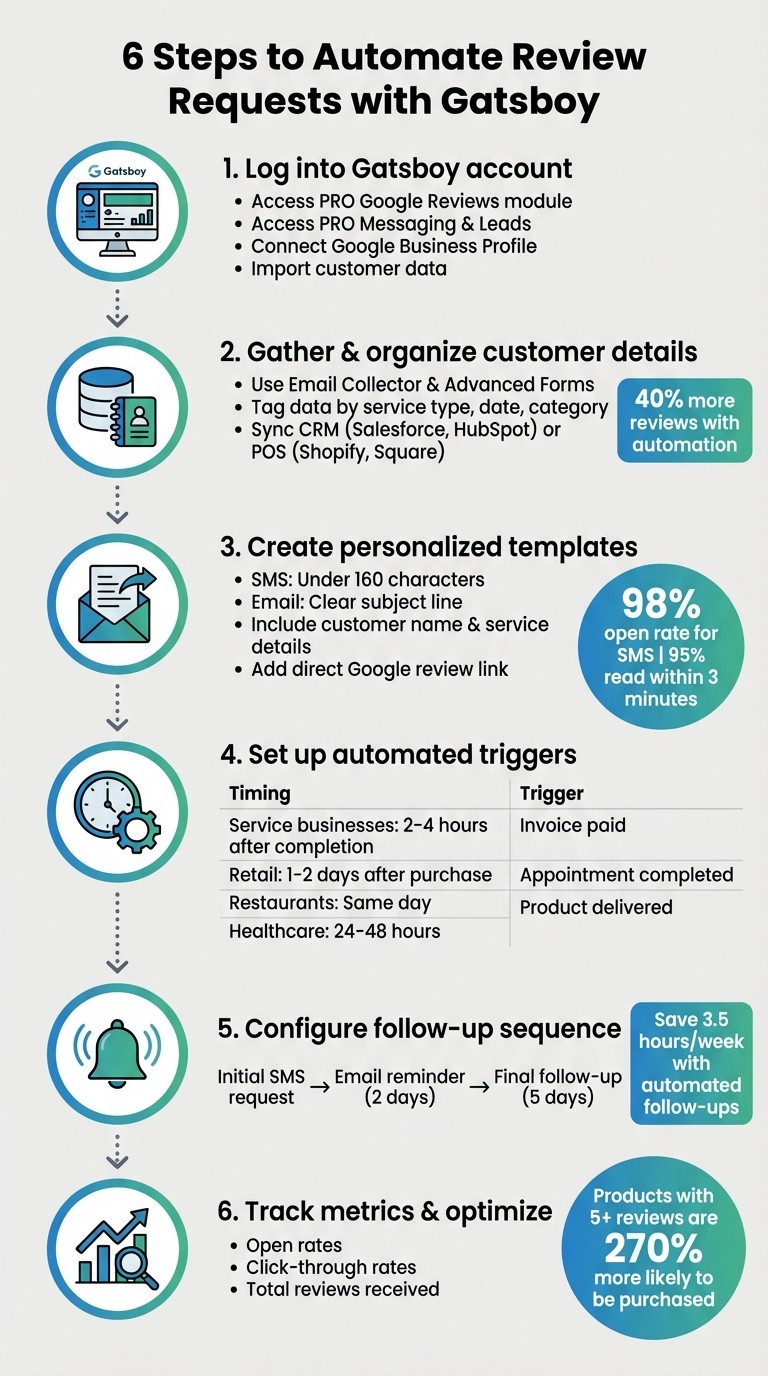
6-Step Process to Automate Review Requests with Gatsboy
Step 1: Access the Gatsboy Business Dashboard
Start by logging into your Gatsby account and heading straight to the business dashboard. From there, locate the PRO Google Reviews module and the PRO Messaging & Leads feature. These tools help you streamline the process. Next, connect your Google Business Profile within the dashboard to centralize your review management. Once connected, import your customer data to lay the groundwork for personalized review requests.
Step 2: Import and Organize Customer Data
Leverage Gatsboy's Email Collector and Advanced Forms to gather customer details. Tag this data based on factors like service type, purchase date, or product category. If you're already using a CRM, like Salesforce or HubSpot, or a point-of-sale system such as Shopify, Square, or Lightspeed, you can sync that data directly into Gatsboy. This integration makes it easier to send highly targeted review requests. In fact, businesses that use automated review tools often see over 40% more reviews. With your data in order, you’re ready to move on to crafting effective review request templates.
Step 3: Design Personalized Review Request Templates
Create templates that feel personal by using dynamic fields like the customer's name or the service they purchased. For SMS messages, keep them concise - under 160 characters - as text-based requests boast a 98% open rate, with 95% of texts read within three minutes. For email requests, use a clear and engaging subject line, such as "How did we do, [Name]?" Include a direct link to your Google review form, formatted as: https://search.google.com/local/writereview?placeid=[YOUR_PLACE_ID].
Step 4: Automate Triggers and Timing
Set up automated triggers to send review requests based on specific customer actions. For example:
Service businesses: Send requests 2–4 hours after completing a job.
Retail businesses: Wait 1–2 days to allow customers to use the product.
Restaurants: Send the request the same day.
Healthcare and professional services: Wait 24–48 hours.
Configure these triggers to activate automatically when an invoice is marked as paid, an appointment is completed, or a product is delivered. This hands-off approach ensures timely and relevant requests.
Step 5: Add Follow-Up Reminders
Follow-up reminders are key to boosting response rates. Create a sequence that starts with an initial SMS request, followed by an email reminder two days later, and a final follow-up after five days if no review has been submitted. Automated reminders not only improve submission rates but also save time - businesses using these tools save an average of 3.5 hours per week by eliminating manual follow-ups. Review your sequences regularly to maintain an appropriate tone and address any negative feedback that arises.
Step 6: Monitor Your Reviews and Adjust Strategy
Use the Gatsboy dashboard to track metrics like open rates, click-through rates, and the total number of reviews received. Products with at least five reviews are 270% more likely to be purchased. Regularly analyze this data to see which customer segments respond best, and tweak your messaging or timing as needed. Consistent monitoring not only helps measure success but also ensures your review strategy evolves to strengthen your online reputation further.
How to Get More Customers to Leave Reviews
Building on the advantages of automation, refining your timing and crafting clear messages can significantly boost the number of reviews you receive.
When and How Often to Send Requests
Timing is everything when it comes to getting customers to leave reviews. Most people are happy to share their feedback, but the key is reaching out while their experience is still fresh. For example, restaurants should send review requests within 2–3 hours of the visit. Salons and spas can wait until later the same day or the following morning, while customers are still thrilled with their new look. For home service businesses like plumbers or HVAC technicians, a 24–48 hour window works better, giving customers time to evaluate the work done. Retail and e-commerce businesses see better results by waiting 2–3 days after delivery, allowing customers to try out the product first.
For the best results, send review requests between Tuesday and Thursday, ideally from 10 AM to 2 PM in the customer’s local timezone. To avoid overwhelming your customers, limit requests to one per person every 90 days. And here’s a pro tip: text messages have a 98% open rate and a 45% response rate, far outperforming email’s 20% open rate and 6% response rate. This makes SMS the perfect choice for businesses that need quick feedback.
Write Clear and Personal Messages
Personalization can make a big difference in how people respond. Use the customer’s name, mention the product or service they purchased, and, if possible, include the name of the team member who assisted them. It’s worth the effort - personalized review requests can improve conversion rates by up to 26%.
For SMS, keep your message short and to the point (under 160 characters), and always include a direct link to your Google review form. For email, use a clear subject line like "How did we do, [Name]?" and explain why their feedback is important to your business. The more relatable and straightforward your message, the better your chances of getting a response.
Make It Easy to Submit Reviews
Every extra step in the review process drastically reduces the likelihood of a customer completing it - by almost 50% per step. To avoid this, simplify the process as much as possible. When sending digital requests, always use a direct link to the review page. The best format is: https://search.google.com/local/writereview?placeid=[YOUR_PLACE_ID]. This link takes customers straight to the review text box, eliminating the need for them to search for the review button on your profile.
For in-person interactions, QR codes are a game-changer. Add them to receipts, invoices, business cards, or even table tents. With 87% of consumers reading online reviews for local businesses and 79% trusting them as much as personal recommendations, removing barriers to submission can lead to a noticeable increase in reviews.
Gatsboy Plans for Review Automation
Website + Pro Plan
The Website + Pro plan offers an efficient way to automate reviews for a setup cost of $500 and a monthly fee of $47. With the Google Reviews Module, you can easily import your existing Google reviews and showcase them on your website, helping to establish trust with potential customers. Plus, the Messaging & Email feature lets you connect with leads directly from the Gatsboy dashboard. This makes it simple to send personalized review requests right after completing a service, with all responses conveniently organized in one place.
This plan also includes Advanced Forms for capturing leads effectively and PRO Leads, which allows you to collect, export, and filter customer contacts. These tools are perfect for managing and streamlining your review outreach campaigns. Additionally, Gatsboy provides Google Business Profile setup or management, ensuring that all your customer reviews are centralized in one key location. Everything is managed from a single dashboard, offering a seamless experience for handling customer interactions.
Add-Ons for Local Visibility
Gatsboy also offers optional add-ons to enhance your local visibility and improve how your reviews are displayed. The Citations add-on ($247 one-time fee) submits your business details to 50 leading directories, ensuring your listings are accurate and professional. This consistency is crucial, as review signals account for about 17% of local search rankings.
Another option is the Local Tracking add-on ($99 per month), which monitors your local search rankings and competitor performance. It highlights how your review count impacts visibility. Since businesses with a 4-star rating or higher capture 94% of clicks in local search results, these tools work hand-in-hand to transform automated review requests into noticeable gains in your online presence.
Conclusion
Here's the essence of the review automation strategy:
By automating review requests, you can save 15–20 hours each week and gather customer feedback within 24–48 hours - right when it's most relevant.
Gatsboy's Website + Pro plan offers a streamlined solution. For $47/month (plus a $500 setup fee), it centralizes customer data, provides personalized templates, and automates review requests that directly enhance your Google Business Profile.
The impact? Automated systems can boost review volume by an impressive 340%. Plus, they tap into the 68% of consumers who are willing to leave a review when asked.
"It's simple, easy to use... it helped us to get really good and positive Google reviews from our clients because we have a nice system and clients like that organization."
Tiffany Perez, Ink Gallery Tattoo Studio
Tiffany's success story highlights how automation improves efficiency and builds trust with clients.
You can try it out yourself with Gatsboy's 14-day free trial. The setup takes just 15 minutes, giving you a quick way to strengthen your online reputation while focusing on what matters most - your business.
FAQs
How do I connect Gatsboy to my Google Business Profile?
To link Gatsboy with your Google Business Profile, start by making sure your profile is already set up, verified, and active. After that, head to Gatsboy's settings and use the integration feature to connect your verified profile. Once the connection is established, you can customize the integration to activate tools like review requests and updates. These steps help streamline the process and make it easier to manage your online reputation effectively.
What’s the best timing to send review requests for my business type?
The best time to send review requests is usually 24 to 48 hours after a customer has had a positive experience. For instance:
Restaurants: Sending requests within 24 hours of a visit works well.
Salons, spas, and medical practices: Aim for the same day or the following morning.
Home service and retail businesses: Timing is key - sending requests 2–3 days after delivery or project completion often yields the best results.
This timing ensures the experience is still fresh in the customer's mind, increasing the chances of a response.
How can I automate review reminders without annoying customers?
To encourage reviews without frustrating your customers, it’s all about timing and tone. A well-thought-out system can make all the difference. Here’s how to strike the right balance:
Send requests promptly: Aim to reach out within 24–48 hours of a positive interaction when the experience is still fresh.
Make it easy: Provide direct links to the review page, so customers can share their feedback with minimal effort.
Avoid overdoing it: Limit follow-ups to prevent overwhelming your customers with reminders.
Keep it personal: Craft messages that feel warm and genuine, not robotic or overly formal.
By following these steps, you can gather more reviews while keeping the customer experience positive and respectful.
Related Blog Posts
Join our community of 15,000+ business owners
Popular articles
Popular articles about your website and marketing your small business


