



Captions vs Transcripts: What Small Firms Need
Website Tips
If I have to pick one for video, I start with captions. They help people follow along during playback, cover the basic WCAG rule for prerecorded video, and support the many people who watch on mute. Transcripts do a different job: they turn spoken content into on-page text that people can scan and search engines can read.
Here’s the short version:
Use captions for all public videos with spoken audio
Use transcripts for podcasts and other audio-only content
Add both for long videos like webinars, demos, and interviews
Start on pages tied to leads, bookings, and payments
Expect cost differences: human captions often run $1.00–$3.00 per minute, while AI drafts can drop transcription to about $0.05–$0.10 per minute before review
A few numbers stand out:
69% of people watch video without sound in public places
80% of caption users are not deaf or hard of hearing
A transcript on the same page can add indexable text for search
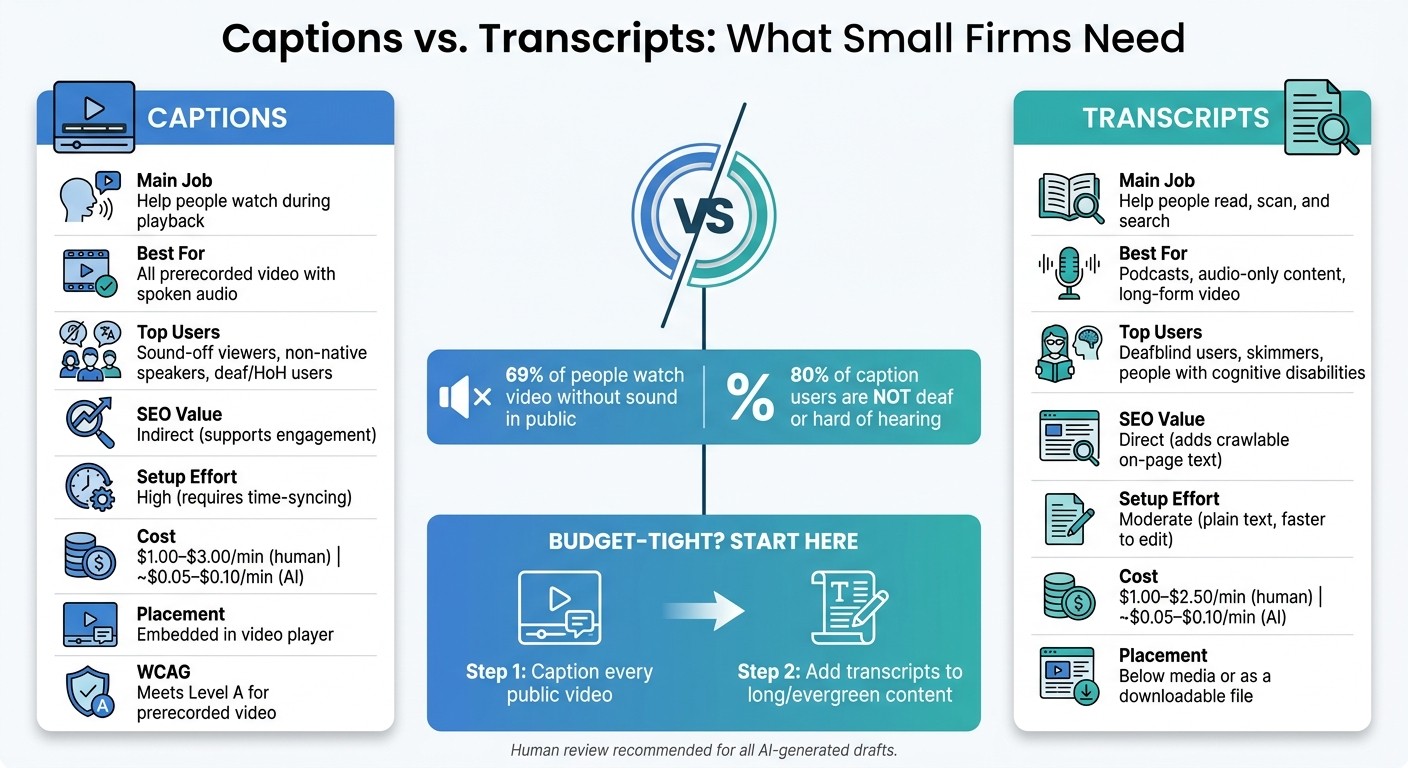
Captions vs Transcripts: Quick Comparison Guide for Small Firms
Why you should always caption & transcribe your videos & audio
Quick Comparison
Factor | Captions | Transcripts |
|---|---|---|
Main job | Help people watch | Help people read |
Best for | Video playback | Audio-only, long content, skimming |
SEO | Indirect | Direct |
Accessibility use | Synced text during video | Static text for reading and assistive tech |
Best page placement | In the video player | Below the media or as a file |
Cost range | $1.00–$3.00/min | $1.00–$2.50/min |
My takeaway: if a small firm has a tight budget, captions come first for video. Then I add transcripts where search, scanning, or long-form content matter more.
2. Key Differences Small Firms Need to Know
Captions help people watch. Transcripts help people read.
That sounds simple, but the gap matters. If you're a small firm deciding what belongs on a page, this side-by-side view makes the choice a lot easier.
Factor | Captions | Transcripts |
|---|---|---|
Best Fit | Prerecorded video, webinars, social media clips | Podcasts, interviews, long-form video, audio-only content |
Primary Purpose | Accessibility during playback | Reading, skimming, searching, and documentation |
Best For | Deaf and hard-of-hearing users, sound-off viewers, non-native speakers | Deafblind users, people with cognitive disabilities, skimmers |
SEO Value | Indirect - supports engagement | Direct - adds crawlable, indexable on-page text |
Setup Effort | High - requires precise time-syncing | Moderate - plain text, faster to edit and format |
Cost Level | $1.00–$3.00 per minute | $1.00–$2.50 per minute |
Best Placement | Embedded in the video player | Below the media or as a download |
Use case and visitor needs
Use captions on videos people are likely to play right on the page, like a homepage intro, a service explainer, or a booking walkthrough. They help during playback, which is the whole point. About 80% of people who use captions are not deaf or hard of hearing. Many are watching with the sound off. Others just like reading along. Non-native English speakers can also find written text easier to follow than spoken dialogue.
Transcripts help a different group of visitors. Deafblind users can access them with braille displays. People with cognitive disabilities can move at their own pace instead of trying to keep up with a video timeline. And for skimmers, transcripts are just plain useful. Someone who wants one detail fast can scan the page instead of replaying audio over and over.
They also matter more when the content is audio-only. For a podcast episode, for example, a transcript is the main accessibility tool because there's no video to caption. On pages with a clear job, like introducing a service or helping someone book, that distinction can shape what works best.
SEO value, setup time, and cost
From an SEO angle, transcripts do more direct work. They add indexable text to the page. Captions mostly help through engagement, which may support SEO in an indirect way.
There’s also a setup gap. Captions take more work because they need precise time-syncing and sound cues. Transcripts are plain text, so they’re usually faster to edit and format.
Cost follows the same pattern. Human captioning usually runs $1.00 to $3.00 per minute. Human transcription is a bit lower at $1.00 to $2.50 per minute. AI can cut the price for both, but it’s not a set-it-and-forget-it deal. Every draft still needs review.
A lean workflow is to caption first, then reuse the corrected text for the transcript. That way, you're not starting from scratch twice. Next, match each format to the page type where it does the most work.
3. Where Each Format Fits on Your Website Pages
Once you know that captions support playback and transcripts support reading, the next step is page intent. That’s what tells you which format should take the lead.
Homepage and service page media
Page intent shapes where captions or transcripts do the most good. On homepage videos, captions should be on by default. Your brand message needs to come through whether the sound is on or off.
Service pages are a strong place for both formats. Captions help visitors follow a demo as it plays. A transcript under the video adds crawlable text, which helps search engines understand the page. It also gives visitors written quotes you can reuse as proof points.
Booking flows and task-based videos
For booking videos, captions come first. They keep step-by-step guidance clear when visitors are moving fast or browsing with the sound off. If the video covers longer policies or instructions, a transcript helps people scan for one detail without having to watch the whole thing again.
On Gatsboy booking and Stripe Payment pages, captions should come first. Add transcripts to longer policy or instruction videos.
Page Type | Captions | Transcript |
|---|---|---|
Homepage intro video | ✅ Essential | Optional |
Service page demo | ✅ Essential | ✅ Recommended |
Customer testimonial clip | ✅ Essential | Reusable quotes |
Booking or payment guidance | ✅ Essential | ✅ For longer videos |
Audio-only podcast/interview | - | ✅ Essential |
Use these page rules to choose the leanest rollout in the next section.
4. A Simple Decision Framework for Small Firms
Here’s the fast rule: captions help during playback; transcripts help with search and skimming. So when you’re looking at a new video and the budget is tight, the goal is simple. Pick the lightest format that still does the job.
When captions alone are enough
Use captions for every prerecorded video with sound. If the video is short, sales-focused, or task-focused - like a homepage intro or a booking walkthrough - captions are often all you need.
They help your message land for the 69% of viewers who watch with the sound off in public environments. They also meet the WCAG 2.2 Level A rule for prerecorded video with audio.
When to add transcripts too
Transcripts make more sense when the content is long, evergreen, or high-value. Add them when you want more search visibility, easier scanning, and copy you can reuse later.
That usually applies to content like:
founder interviews
webinars
training recordings
detailed demos
In those cases, captions handle playback, while transcripts make the page easier to scan and quote.
Use the table below to pick the lightest option that still matches the page’s job.
Content Situation | Recommended Choice | Primary Reason |
|---|---|---|
Homepage hero video | Captions only | Core brand message must land on mute |
Podcast or audio-only file | Transcript only | No visual to sync; required for accessibility |
Founder interview or webinar | Both | Captions for playback; transcript for SEO and quoting |
Service explainer or product demo | Both | Captions for viewing engagement; transcript for SEO and repurposing |
Booking or instructional video | Captions first; transcript if long | Short, task-based videos usually only need on-screen guidance |
For small firms, the goal isn’t to caption everything. It’s to match the format to what the page needs to do.
A lean rollout plan for limited budgets
Start with your essential website elements and conversion pages first. These are the pages that bring in leads, bookings, and payments. Caption every video on those pages before you work on anything else.
After that, move to your longer or higher-value content and add transcripts there. AI transcription can give you a draft for about $0.05 to $0.10 per minute, compared with $1.00 to $3.00 per minute for human services.
A simple workflow works well here:
use AI to create the first draft
do a quick manual review
fix brand names, technical terms, and speaker labels
For Gatsboy-managed sites, keep captions on booking and payment pages so updates stay in sync with online bookings and Stripe Payments.
5. Conclusion: What Small Firms Actually Need
Small firms need captions for playback and transcripts for reading.
If your budget is tight, start with the pages that bring in leads and bookings. Caption every public video with spoken audio before it goes live. That covers the WCAG baseline for prerecorded video and helps keep your message clear for people watching with the sound off.
After that, add transcripts to longer or evergreen content where search visibility and reference use matter most. This is especially useful for product demos and training materials.
The cost is lower than many small firms expect. AI transcription brings the price down to about $0.05 to $0.10 per minute, and a short human review can catch brand names and technical terms.
For Gatsboy sites, use captions on Online Bookings and Stripe Payments pages to reduce friction during scheduling and checkout.
FAQs
Do captions help with SEO?
Captions help SEO indirectly. They can improve accessibility and keep people watching longer, which may help with watch time and bounce rate. But in most cases, search engines do not treat captions as dependable, crawlable text.
Transcripts deliver the direct SEO gain because they turn spoken words into indexable text on the page. For the best outcome, use transcripts for search visibility and captions for accessibility.
Can I use AI for captions and transcripts?
Yes. AI can generate captions and transcripts fast and at a low cost, and many current tools do a good job when the audio is clear.
For the best outcome, use AI for the first draft, then review and edit for accuracy, punctuation, and sound descriptions. If you're a small business, the Gatsboy dashboard can help you manage website content and updates.
What’s the best option for short videos?
For short videos, the best move is to include both closed captions and a transcript.
Closed captions show time-synced text on screen. They help with accessibility and can keep people watching when their sound is off.
A full transcript gives search engines plain text they can crawl and index, which can help support SEO.
Related Blog Posts
Join our community of 15,000+ business owners
Popular articles
Popular articles about your website and marketing your small business


