


YouTube SEO Tips for Local Businesses
Small Business Marketing
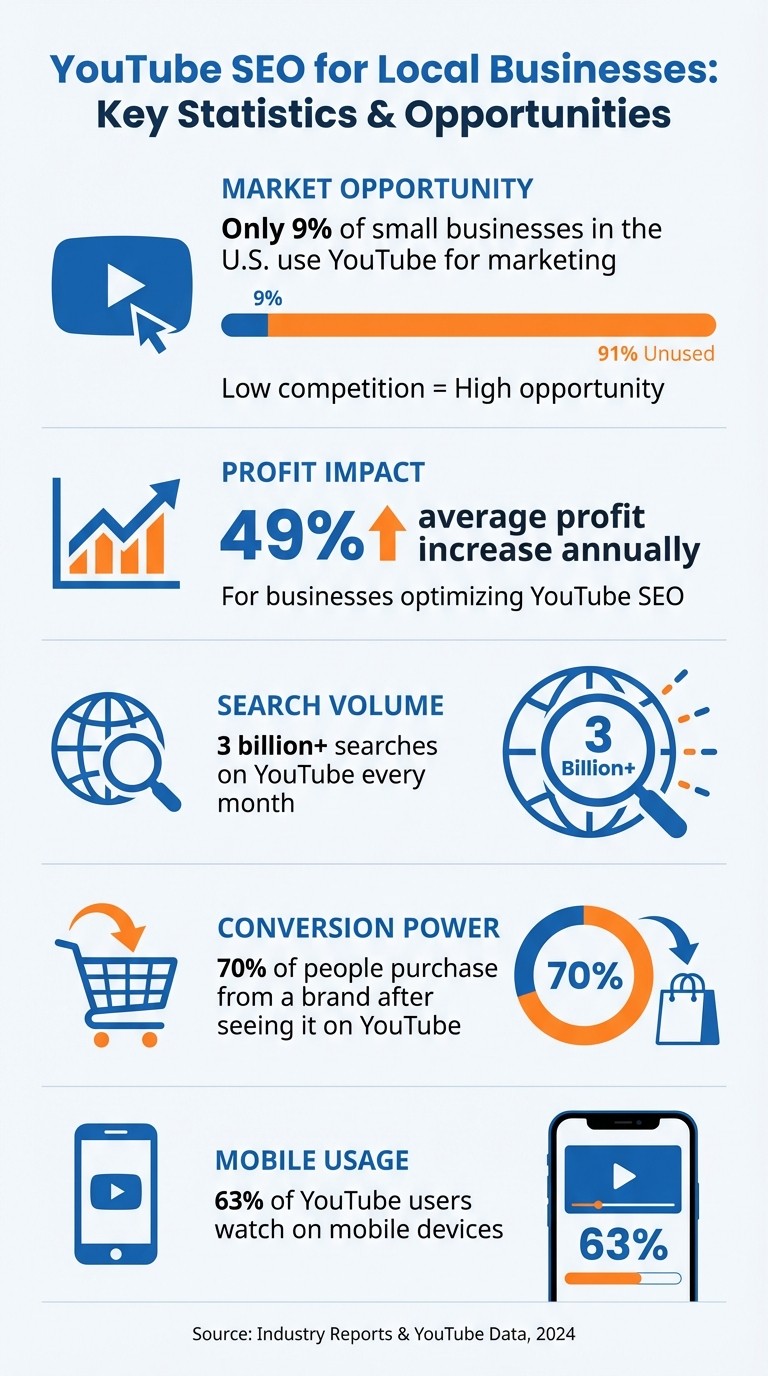
YouTube is a powerful tool for local businesses to increase visibility. With only 9% of small businesses in the U.S. using YouTube for marketing, the competition is low, and the potential rewards are high - businesses optimizing for YouTube SEO see an average 49% profit increase annually. Here's how to make YouTube work for you:
Target Local Keywords: Use location-specific terms like "plumber in Austin" to attract nearby customers.
Optimize Metadata: Include keywords in video titles, descriptions, and tags. Add your business name, address, and phone number (NAP) to descriptions for local relevance.
Leverage Tools: Use TubeBuddy or vidIQ for keyword research and competitor insights.
Use Geotagging: Link videos to specific locations to boost local search rankings.
Engage Viewers: Create authentic thumbnails, use playlists to organize content by service or location, and embed videos on your website to improve engagement and SEO.
Focus on creating videos that address local customer needs, monitor performance using YouTube analytics, and refine your strategy based on data. Start small, optimize for local SEO, and grow your presence effectively.
YouTube SEO Statistics and Benefits for Local Businesses
Researching Local Keywords for YouTube Videos
Targeting the right keywords is the backbone of local YouTube SEO. By understanding the specific phrases your local audience uses, you can significantly improve your visibility. Did you know YouTube handles over 3 billion searches every month? That’s a massive pool of data to tap into for precise keyword targeting.
To stand out, include your city, state, or neighborhood in your keywords. For example, instead of going after a broad term like "plumbing tips", focus on location-specific phrases like "emergency plumbing in Austin" or "Austin 24-hour plumber." These long-tail keywords not only face less competition but also attract users who are ready to take action. Now, let’s dive into how specialized tools can simplify this process.
Using TubeBuddy and vidIQ for Keyword Research
Keyword research tools like TubeBuddy and vidIQ are game-changers for refining your strategy. These browser extensions integrate seamlessly with YouTube, offering real-time insights as you plan your videos. Both tools have free versions, with paid plans starting at just $7.50 per month.
Here’s how they work: Open TubeBuddy’s Keyword Explorer and type in a broad term alongside your city, like "plumber in Denver." The tool analyzes search trends, showing metrics like search volume, competition levels, and a "Keyword Score." Aim for keywords with high search volume but low competition.
TubeBuddy also reveals competitors’ tags, helping you uncover untapped opportunities. As TubeBuddy user Karl Oftebro shared:
"Once it got my videos ranking #1 in search I was hooked".
Similarly, vidIQ provides a "Keyword Score" that balances demand with competition. It shines in competitor analysis, showing which local businesses are gaining traction and the keywords they’re using. Armed with this data, you can fine-tune your video content to target the right local audience.
Adding Location-Based Keywords
Once you’ve identified promising keywords, refine them further with location-specific terms. YouTube’s search bar autocomplete can be incredibly useful here. Start typing your service along with your city - like "roofing contractor Chicago" - and note the suggestions. These reflect actual queries from users in your area.
Don’t overlook neighborhood-specific keywords, especially if your services span multiple areas. For instance, "wedding photographer in Brooklyn Heights" will likely perform better locally than the broader "wedding photographer in New York".
You can also use tools like Google Trends to filter search popularity by city or region. For example, compare terms like "HVAC repair" and "air conditioning service" to see which resonates more in your market. This approach ensures your videos are tailored to your community, strengthening your local SEO strategy.
Carla Marshall, Content Marketing Manager at TubeBuddy, underscores the value of this research:
"Keywords are also important in helping YouTube's algorithms and your target audience understand the context of your video".
Optimizing Videos for Local Search Visibility
After pinpointing your local keywords, the next step is integrating them into your video's metadata. Elements like your title, description, and tags work together to inform YouTube's algorithm about your video's geographic relevance. When done correctly, this optimization increases visibility on both YouTube and Google for local searches.
In fact, small businesses that optimize their YouTube videos see an average profit increase of 49% year-over-year. A great place to start is by refining your video titles to emphasize local relevance.
Creating Location-Optimized Titles
Your video's title is the most important indicator of its geographic relevance for both search engines and viewers. Titles act as the main signal for YouTube and Google to determine your video's local context. To make your title effective, combine your service with your location. For example, "Emergency Plumber in Dallas" communicates more relevance than a general title like "Plumbing Tips."
Keep titles short and focused, especially since many users watch videos on mobile devices. Write for people first - address common issues your community searches for using the exact phrases they type into search bars.
Connor Wilkins, CMO at Direction.com, highlights the broader benefits:
"When businesses implement the right YouTube video strategies, they don't just increase visibility - they build trust, authority, and engagement in ways traditional SEO alone can't match."
Make sure your title flows naturally while still including location markers, such as city or state names. For instance, "Best HVAC Maintenance Tips for Phoenix Homeowners" works better than a title overloaded with keywords like "Phoenix HVAC Services Maintenance Repairs."
Writing Descriptions with Local Keywords
Your video description gives you more room to provide context, but the first 100–150 characters are crucial. This "above the fold" section appears in search results before viewers click "show more." Use this space to hook viewers with a clear benefit and include your primary local keyword.
After the opening, include your verified NAP (Name, Address, Phone) details for consistency, as this helps search engines confirm your local presence. Naturally weave in related local terms throughout the description - mention service areas, nearby landmarks, or community-specific details that will resonate with viewers.
Katie Stone, SEO Lead at Leadhub, emphasizes this opportunity:
"Small businesses can leverage YouTube SEO to stand out locally and reach an engaged audience without a huge advertising budget."
In addition, include clear calls-to-action (CTAs) that direct viewers to your website or service pages for more information. For videos longer than 10 minutes, use timestamps to improve navigation. Wrap up with 2–3 relevant hashtags to help your video appear on topic pages. Keep it concise - informative but not overwhelming. Once your description is set, focus on targeted tags to reach local audiences.
Using Tags to Target Local Audiences
Tags are another way to reinforce your local SEO efforts. They help YouTube categorize your content and recommend it to viewers looking for services in your area. Use a mix of broad and specific tags that combine industry terms with location identifiers, like "Roofing Services Austin" or "Brooklyn Dental Care".
Tag Category | Objective | Examples |
|---|---|---|
Geographic Tags | Targets specific locations | Dallas, Oak Cliff, Dallas County, Texas |
Service + Location | Captures local intent | Emergency Plumber Dallas, Best Pizza Brooklyn |
Industry Tags | Defines business niche | Residential Plumbing, Dental Care, Roofing Services |
Brand Tags | Builds recognition | [Your Business Name], [Owner Name] |
Focus on your specific city, county, or state instead of trying to appeal to a global audience. Tools like TubeBuddy and vidIQ can help you identify which local tags your competitors are using effectively, giving you insight into areas you might be overlooking. Lastly, make use of YouTube's geo-tagging feature in your video settings to associate your content with your physical location. This strengthens the geographic signals in your metadata.
Making Videos More Appealing to Local Audiences
Fine-tuning your visual strategy is key to connecting with local audiences. With 70% of people purchasing from a brand after seeing it on YouTube, your thumbnails and playlists aren't just for show - they're tools to drive conversions. Local viewers often browse through countless options, so your videos need to instantly communicate relevance to their location.
Designing Thumbnails with Local Appeal
Thumbnails are your video's handshake - your first chance to catch someone's attention. Instead of relying on generic stock images, use real photos of your team, storefront, or work to show authenticity and build trust right away. People connect faster with genuine visuals than with overly polished but impersonal graphics.
Adding local imagery can also make a big impact. For instance, a Dallas plumber might use a recognizable neighborhood backdrop, while a Brooklyn bakery could feature its iconic street corner. To ensure your thumbnails stand out on mobile (where 63% of YouTube users watch videos), opt for bold, high-contrast, sans-serif text that’s easy to read.
For service-focused businesses, before-and-after visuals can be especially compelling. These kinds of images clearly show what customers can expect, whether it’s a remodeled kitchen, a freshly detailed car, or a transformed lawn. Take, for example, Pawlik Automotive in Vancouver. By creating a "Car Repair of the Week" series with clear, process-focused thumbnails, they achieved 5x growth over nine years. According to owner Bernie Still, specific videos, like one about Range Rover repairs, led to a noticeable increase in those vehicles at their shop within just weeks.
When creating thumbnails, aim for a resolution of 1280x720 pixels (or 1920x1080 for higher quality) and save them as PNG files to preserve clarity after YouTube’s compression. Consistency is also key - stick to the same colors, fonts, and logo across your thumbnails so viewers immediately recognize your brand as they scroll. For added insight, tools like TubeBuddy allow you to A/B test thumbnail designs to determine what resonates most with your local audience.
While thumbnails grab attention, playlists help guide viewers to more of your locally relevant content.
Creating Playlists to Showcase Local Services
Playlists make it easier for local customers to find the services they need while also boosting your local SEO. Group your videos into service-specific categories, such as "Emergency Plumbing Repairs in Phoenix" or "Seasonal HVAC Maintenance for Austin Homeowners". This organization ensures that nearby viewers can quickly locate the information they’re looking for.
Incorporate location-specific keywords into your playlist titles and descriptions, just as you would for individual videos. Be sure to include your NAP (Name, Address, Phone) details in the descriptions to reinforce your local presence. You can also create playlists centered around local themes, such as customer testimonials from your area, highlights of community events you’ve sponsored, or even tours of landmarks near your business.
Connor Wilkins, CMO at Direction.com, emphasizes the broader benefits:
"When businesses implement the right YouTube video strategies, they don't just increase visibility - they build trust, authority, and engagement in ways traditional SEO alone can't match."
To further boost your local reach, geo-tag each video in your playlists. This links your content to a specific location, helping YouTube recommend your videos to local searchers. With only 9% of small businesses in the U.S. using YouTube videos to attract new customers, having a well-organized video strategy can give you a massive edge in your local market.
Embedding YouTube Videos on Gatsboy Website Pages

Once you've polished your video content, embedding it on your website can take your local engagement and SEO efforts to the next level. Adding videos to your site isn't just about aesthetics - it can make a noticeable difference in your search rankings, especially for local businesses aiming to stand out.
How Embedded Videos Boost Local SEO
When you embed videos on your Gatsboy pages, you're essentially giving your site two big advantages. First, it improves user engagement. Videos naturally increase dwell time and lower bounce rates, both of which signal to search engines that your content is engaging and relevant. This can lead to better local search rankings.
Second, it doubles your visibility. A single video can show up in YouTube search results and Google's universal search listings, including local packs and video carousels. As Connor Wilkins, CMO at Direction.com, puts it:
"A well-optimized video can rank on both Google and YouTube, putting your brand in front of local customers exactly when they need your services".
For the best results, embed videos on pages tailored to specific locations. For instance, a Denver roofer might feature a video titled "Roof Inspection Tips for Colorado Winters" on a Denver-focused service page. Pairing the video with keyword-rich text that elaborates on the same topic creates a powerful combination. To make it even more effective, consider using VideoObject schema markup, which helps Google better understand and index your content. This approach ties your video and page directly to your local market.
Gatsboy Plan Features for Video Embedding
Gatsboy makes embedding videos a breeze with its flexible plans, designed to help you harness these SEO benefits.
Website Only Plan: For a one-time fee of $500, you can embed videos on a 5-page Framer website using a no-code editor. This is perfect for businesses wanting a straightforward setup.
Website + Pro Plan: At $500 upfront and $47/month, this plan includes advanced lead-capture forms below your embedded videos - ideal for turning viewers into customers.
If you're looking to take things further, Gatsboy offers valuable add-ons:
AEO Add-On ($147/month): Optimizes your videos for AI-driven search engines, helping you reach customers using modern search tools.
Local Tracking Add-On ($99/month): Tracks how your videos impact local rankings and identifies which ones drive the most visibility. Considering that 68% of YouTube users report making a purchase after watching a video, this data can guide your strategy.
Monitoring and Improving Video Performance
Uploading videos is just the first step. To keep your local audience engaged and growing, you need to track how your content performs. Tools like YouTube Studio provide detailed analytics, helping you see what’s working and where there’s room for improvement. These insights let you fine-tune your strategy to better match local search trends.
Using YouTube Analytics for Insights
Pay close attention to watch time and audience retention - two metrics that heavily influence YouTube’s algorithm. The retention graph is especially useful, as it shows where viewers stop watching. If you notice a sharp drop in the first few seconds, your intro might not be delivering on the promises made in your title. Mid-video drop-offs often signal that the content isn’t holding interest.
Another critical metric is CTR (click-through rate), which measures how often viewers click on your thumbnail. A CTR around 10% is a strong indicator of success. However, as Clifford Chi from HubSpot explains:
"A high click-through rate is great, but if people are leaving right at the beginning of your video, your title or thumbnail could be misleading".
For local businesses, the Geography report is invaluable - it shows whether your content is reaching the right local audience. The Traffic Sources report reveals how viewers are finding your videos, while the YouTube Search terms report highlights the exact phrases people used to discover your content. If you notice search terms that don’t quite align with your video topic, consider updating your metadata or creating new videos to address those gaps.
Adjusting Strategies Based on Performance Data
Your analytics provide actionable insights for improving your content. For instance, if your CTR is low, consider redesigning your thumbnails with bolder colors or more readable text.
When a video performs well for a specific local keyword, build on that success. Create follow-up content to strengthen your authority in that niche. For example, if a video about "roof inspections in Denver" gains traction, follow it up with related topics like "Denver roof repair costs" or "best roofing materials for Colorado weather."
Use the 48-hour rule to evaluate your video’s initial performance. Check analytics 24 to 48 hours after publishing. If the video isn’t performing well, try updating the thumbnail or rewriting the title to make it more compelling. Adding keyword-rich chapters to your video description can also help highlight key moments and improve visibility.
Engagement metrics - likes, comments, and shares - offer deeper insights into how your audience feels about your content. Shares, in particular, show that viewers trust your brand enough to recommend it to others. If returning viewers aren’t engaging as much, it might be time to rethink your channel’s overall value and how it serves your local community.
Conclusion: Key Takeaways for Local YouTube SEO Success
To recap, local YouTube SEO can give businesses a real edge, especially since many competitors still overlook the platform for local marketing. In fact, businesses optimizing their videos for local search have seen profits grow by as much as 49% year-over-year.
Here’s what matters most: use location-specific keywords in your titles, descriptions, and tags. Pair that with geotagging to tie your videos to exact coordinates, and always include your NAP (Name, Address, Phone) in every video description. These simple yet powerful steps lay the groundwork for success.
Beyond keywords, focus on metrics that matter to YouTube’s algorithm - watch time, click-through rates (CTR), and retention. To achieve this, create content that hooks your audience, design eye-catching thumbnails, and write detailed descriptions of at least 300 words that incorporate related terms naturally.
Another effective tactic? Embed your videos on your website. This not only boosts your site’s dwell time but also enhances SEO for both your site and your videos. For those using platforms like Gatsboy, embedding videos is straightforward and amplifies these benefits.
Start small: create one video optimized for a specific local keyword, keep an eye on your analytics, and steadily expand your local reach by following these strategies.
FAQs
How many local keywords should I target per video?
When optimizing for local search, it's smart to focus on 3 to 5 local keywords per video. This approach helps you connect with nearby customers while boosting your visibility in local search results. Be sure to choose keywords that are closely tied to your business and specific location.
Should I create separate videos for each city or neighborhood I serve?
Creating individual videos for each city or neighborhood you serve is a smart move. It allows you to focus on location-specific keywords and geotags, making it easier for local customers to discover your business. By customizing your messaging and SEO tags for each area, you increase your chances of showing up in local search results and connecting with nearby customers.
What’s the fastest way to improve a video that isn’t getting local views?
To increase a video's local views, concentrate on local SEO strategies. Incorporate location-specific keywords into the title, description, and tags of your video. Adding geotags can also help YouTube and Google associate your content with your specific area. These efforts make your video easier to find for local audiences, potentially driving more views from nearby customers. Stick with these practices regularly to see consistent improvement in local search visibility.
Related Blog Posts
Join our community of 15,000+ business owners
Popular articles
Popular articles about your website and marketing your small business


