


How To Make Your Small Business Discoverable by AI
Small Business Marketing
AI is changing how customers find businesses. Instead of traditional search engines, people now use AI tools like ChatGPT and voice assistants to get direct recommendations. This shift means your small business needs to be optimized for AI visibility, not just search engines.
Here’s how you can ensure your business stands out to AI platforms:
Optimize Metadata: Use clear, concise title tags and meta descriptions that AI can easily interpret.
Use Structured Data: Add schema markup (like Business Info and FAQPage) to help AI understand your content.
Consistency Across Platforms: Ensure your business details (Name, Address, Phone) are uniform across directories like Google Business Profile and Yelp.
Leverage Tools: Platforms like Gatsboy offer tools like Smart Modules and AEO Add-ons to streamline AI optimization.
Track AI Performance: Use tools to monitor how often AI platforms mention your business and where improvements are needed.
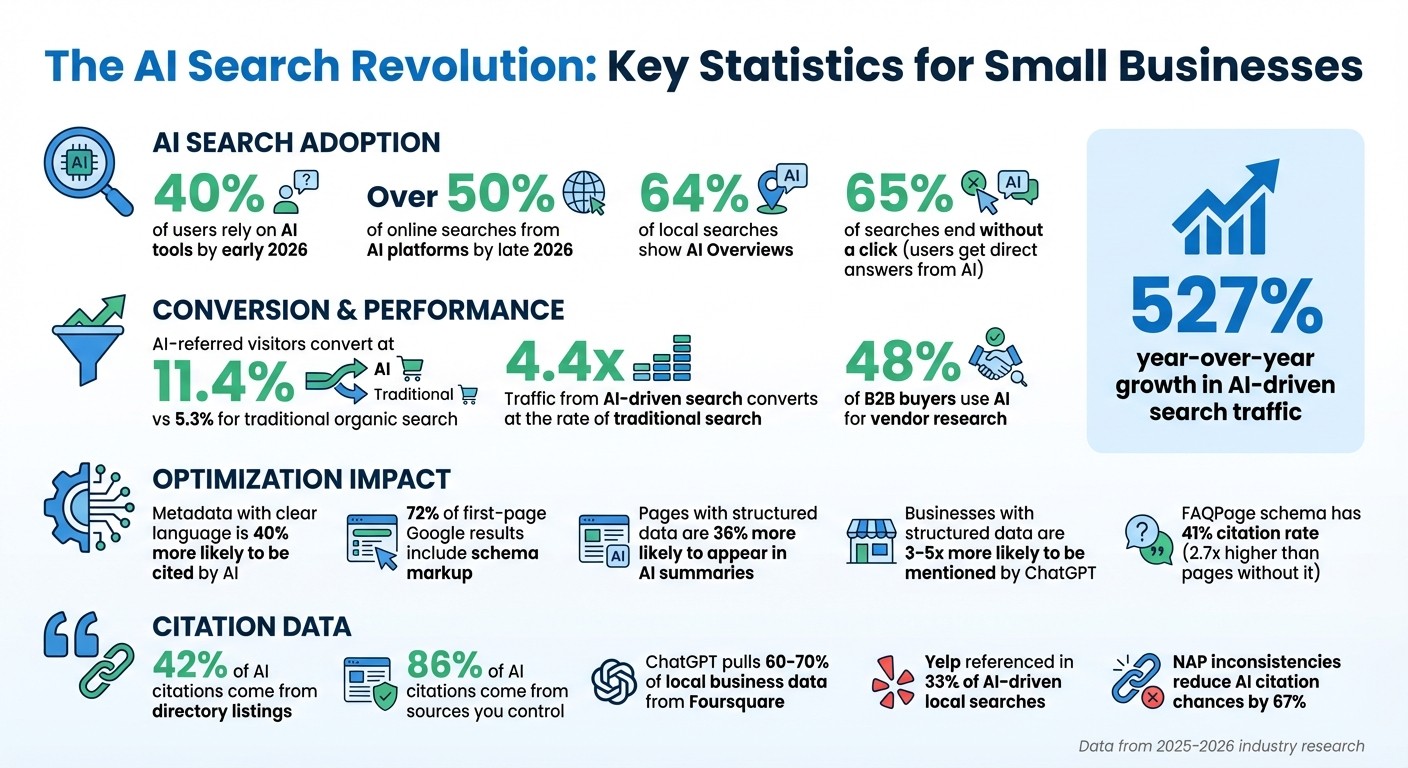
AI-driven searches are growing fast, with over 40% of users relying on them by early 2026. By following these steps, you can position your business to be included in AI recommendations, driving more leads and growth.
AI Search Statistics and Business Optimization Impact 2025-2026
5 Ways to Increase AI Visibility and Get Found in AI Search
How to Optimize Website Metadata for AI
Metadata is the first thing AI systems analyze. If your metadata doesn't clearly define your business or offerings, platforms like ChatGPT or Perplexity will bypass your content and move on to the next result. With 48% of B2B buyers now turning to AI for vendor research, and AI-referred visitors converting at 11.4%, compared to just 5.3% for traditional organic search, optimizing metadata has become a game-changer.
This shift marks a departure from traditional SEO strategies, which focused on clickbait-style titles to attract attention. AI optimization, on the other hand, demands precise, fact-based summaries that help machines immediately identify your business. Liam Dunne from Discovered Labs explains:
"AI search engines use metadata as a retrieval filter before processing your full page content".
So, metadata now needs to be more than just concise - it must deliver dense, meaningful information. AI systems favor content that explicitly defines your business as a distinct entity with clear attributes. For example, avoid vague phrases like "Welcome to Our Services." Instead, use specific descriptors such as "Marketing Automation: Lead Scoring for B2B SaaS" to make your offerings unmistakable.
Writing Clear Title Tags and Meta Descriptions
Your title tag acts as a digital business card for AI systems. A simple yet effective format is: [Primary Entity]: [Action/Outcome] for [Audience]. Start with the most critical information - your product, service, or company type - so AI can instantly recognize your focus.
Title Tags: Keep them under 60 characters and include the current year (e.g., "2026 Guide") to signal freshness.
Meta Descriptions: Aim for 150–160 characters and adopt a "Bottom Line Up Front" approach. Replace generic phrases like "Learn more here" with specific details. For example: "This guide covers SPF/DKIM setup and IP warming for teams managing 50K+ contacts".
This approach pays off. Metadata with clear, factual language is 40% more likely to be cited by AI engines. Plus, since Google rewrites 60–70% of meta descriptions to align with search intent, starting with precise language gives you more control over how your business appears in search results.
Element | Traditional SEO Goal | AI Optimization Goal |
|---|---|---|
Title Tag | Maximize click-through rate with curiosity | Validate relevance with clear entities |
Meta Description | Create emotional hooks for clicks | Provide a factual summary for AI |
Creating Better Alt Text for Images
Just as metadata helps AI understand your text, detailed alt text ensures your images contribute to your online visibility.
Alt text isn't just for accessibility - it’s a critical signal for AI to interpret visual content. While multimodal models like GPT-4o can analyze images, they still prioritize alt text as a reliable source of context. With Google Images accounting for 22.6% of all Google searches, and 63% of websites lacking proper alt text, this is an area ripe for improvement.
To write effective alt text, use this format: [Specific Descriptor] + [Subject] + [Context/Action] + [Relevant Detail]. Keep it between 80–140 characters. For example:
Instead of "a bar chart", write: "Bar chart showing 47% increase in organic traffic from January to June 2026".
For product images, try: "Red leather crossbody bag with gold chain strap on marble surface".
Include specific data points and brand names when applicable. For decorative images like borders or spacers, use an empty alt attribute (alt="") to signal AI and screen readers to skip them. Avoid starting with "Image of" or "Photo of" - AI already knows it's an image.
File names also play a role. Use hyphen-separated, keyword-rich names like blue-leather-handbag.webp to provide an extra layer of context. Additionally, ensure each image has unique alt text to avoid competition for generic queries.
Adding Structured Data with Gatsboy Tools
What Structured Data Is and Why You Need It
Structured data is like a universal translator for your website's content. It uses a standardized vocabulary - Schema.org - to help AI systems like ChatGPT, Perplexity, and Google understand what your content actually means. Think of it as labeling each piece of information on your site so AI knows whether a number is a phone number, a price, or even a calorie count.
Without structured data, your content can get lost in translation. AI might misinterpret your information or fail to use it altogether. By adding structured data, you’re essentially giving Knowledge Graphs - a massive database with over 500 billion facts about 5 billion entities - the clarity they need to generate accurate and conversational responses.
The stats back this up. Around 72% of first-page Google results now include schema markup, and pages with detailed structured data are 36% more likely to show up in AI-generated summaries. Even more impressive, large language models that rely on Knowledge Graphs are three times more accurate than those that depend solely on unstructured text. Austin LaRoche, CEO of ATAK Interactive, sums it up perfectly:
"Without structure, your content gets overlooked - even when it answers exactly what someone's searching for".
Using Gatsboy to Add Schema Markup
Gatsboy makes adding schema markup simple by eliminating the need for manual JSON-LD coding. Instead, it centralizes all your website's data into easy-to-use Smart Modules. These modules - like Business Information, Business Hours, and Google Reviews - automatically generate the structured data that AI platforms use to understand your business.
Here’s how to get started:
Business Information Module: Enter your name, address, and phone number (NAP) exactly as they appear on your Google Business Profile. Consistency here is crucial because AI cross-checks this data across directories to verify its accuracy.
Business Hours Module: Add your operating hours so voice assistants like Alexa and Siri can answer questions like "Is this place open now?".
Google Reviews Module: Import your customer reviews to create Review and AggregateRating schema. This not only displays star ratings in search results but also boosts AI trust in your business.
Restaurant Menu Module (for restaurants): Make your menu items and pricing accessible to AI-driven search engines.
Each module you complete gives AI better context about your business, making it easier for search engines to recommend you.
After filling out these modules, use Google's Rich Results Test to validate your structured data and ensure everything is being interpreted correctly. This step is key to tapping into the 527% year-over-year growth in AI-driven search traffic. Once your structured data is in place, the Gatsboy AEO Add-on can take your AI visibility even further.
Using the Gatsboy AEO Add-on
What the Gatsboy AEO Add-on Does
Answer Engine Optimization (AEO) takes a different approach from traditional SEO by focusing on making your site the go-to source that AI platforms reference when answering user queries. The Gatsboy AEO Add-on builds on your existing structured data to improve your site's compatibility with AI-driven search. It automatically configures machine-readable signals for AI platforms, implementing LocalBusiness, FAQPage, and HowTo schema markup in JSON-LD format. This gives AI tools a clear understanding of your services, location, and expertise. Additionally, it reformats your content into short Q&A blocks (40–60 words), which are the preferred format for AI responses.
AI-driven search is growing fast. By March 2025, AI Overviews accounted for 13.1% of all search queries, nearly doubling from 6.5% in January 2025. Over 65% of searches now end without a click because users get direct answers from AI tools. The AEO Add-on helps your business appear in these direct answers, particularly for "near me" searches, where your Google Business Profile often serves as the primary reference.
Now, let’s talk about how you can activate this tool through your Gatsby dashboard.
How to Activate the AEO Add-on
To take advantage of its AI optimization features, log in to your Gatsby dashboard, navigate to the add-ons section, and activate the AEO Add-on for $147 per month. Once activated, it pulls data from your Smart Modules - like Business Information, Business Hours, and Google Reviews - and generates the structured markup that AI platforms rely on.
The add-on also reformats your content into AI-friendly answer blocks. For example, if you have service pages or FAQ content, it applies the FAQPage schema, which has a 41% citation rate - about 2.7 times higher than pages without it. To maximize your chances of appearing in AI-generated summaries, ensure your Google Business Profile’s NAP (Name, Address, Phone) data matches your website exactly. This alignment can boost your visibility in AI summaries by 30%. Keep in mind, the add-on works best when your foundational structured data is already in place, making your Smart Modules setup a critical first step.
Building Citations with the Gatsboy Citations Add-on
Why Citations Matter for AI Visibility
Citations are a critical step in solidifying your business's credibility with AI platforms. These citations - mentions of your business's name, address, and phone number (NAP) across directories, map apps, and social platforms - act as "trust anchors" for AI systems like ChatGPT, Perplexity, and Gemini. They use this data to confirm your business's legitimacy before recommending it to users.
A significant portion of AI citations, around 42%, comes from directory listings. For example, ChatGPT pulls 60% to 70% of its local business data from Foursquare, while Yelp is referenced in 33% of AI-driven local searches. Consistency in your NAP data is vital - discrepancies such as writing "Street" in one listing and "St." in another can reduce your chances of being cited by AI systems by 67%. SEO consultant Fahad Raza highlights this importance, saying:
"One citation with perfect NAP data beats ten sloppy ones every time".
AI systems view conflicting information as a red flag, often excluding businesses with inconsistent data from their recommendations. Notably, 86% of AI citations come from sources you control, such as your website and verified listings. This makes it essential to ensure your business details are accurate and consistent on platforms trusted by AI, like Google Business Profile, Yelp, and Foursquare.
How to Use the Gatsboy Citations Add-on
The Gatsboy Citations Add-on simplifies the process of building accurate citations. For a one-time fee of $247, this tool distributes your NAP data to 50 top directories. Here's how to get started:
Log in to your Gatsboy dashboard.
Navigate to the add-ons section and activate the Citations Add-on.
Enter your standardized NAP information once. The tool will then distribute it across key platforms.
Before submitting, double-check that your NAP data is consistent across all listings - stick to one format without variation. The add-on prioritizes Tier 1 platforms like Google Business Profile, Yelp, Apple Maps, Bing Places, and Foursquare, which are primary data sources for major AI systems. It also pushes your information to data aggregators like Data Axle, whose data feeds into other directories and AI platforms.
This thorough approach boosts the trust signals AI platforms use. To maintain accuracy, audit your listings every three months to remove outdated or duplicate entries, as these can signal inactivity to AI systems.
Monitoring Performance with Gatsboy Local Tracking
Why You Should Track Local Rankings
Once your business website SEO checker and other optimization tools are in place, keeping tabs on your local performance is a must. Tracking local rankings helps you understand how AI platforms position your business when responding to customer queries. Unlike traditional SEO rankings, which tend to hold steady, AI-driven results change roughly every 2.15 days. This frequent fluctuation makes regular monitoring essential - you’ll want to catch when competitors nudge you out or when new opportunities pop up. This tracking works hand-in-hand with the structured data and AEO tactics you’ve already set up.
AI Overviews now appear in 64% of local searches, and for informational queries, they show up every single time. When these AI summaries are present, they can slash traditional click-through rates by up to 61%. That’s why securing visibility within the AI-generated response itself is so important for your business.
By monitoring your performance alongside your competitors, you can identify which third-party sources - like Yelp or Reddit - AI platforms rely on. Targeting these sources can help you strengthen your citation profile.
How to Use the Gatsboy Local Tracking Add-on
The Gatsboy Local Tracking Add-on, priced at $99/month, operates on a credit-based system to track your visibility across traditional platforms (like Google Business Profile and Apple Business Connect) and AI engines (including ChatGPT, Google AI Overviews, Gemini, and Grok). First-time users receive 100 free credits to explore the tool.
To get started, head to your dashboard and choose either "Quick Scan" for immediate tracking or "Campaign Scan" for ongoing monitoring. Select your data source from the menu - options for AI tracking include Google AI Overviews and ChatGPT. Input your target keywords using conversational phrasing (e.g., "Who’s the best-rated bakery near Main Street?"), set your grid size (from 3x3 to 21x21 data points) and radius, then click "Run Scan".
The results are displayed on a geo-grid heat map. Green pins show where your business was mentioned (with position numbers), red pins indicate areas where AI provided answers but left out your brand, and gray pins mark locations with no relevant results. The tool also tracks AI-specific metrics like:
Share of AI Voice (SAIV): Measures how often your brand appears in AI responses (a perfect score of 100 means your business was mentioned in every relevant result).
Buyer Persuasion Score (BPS): Rates how positively AI recommends your business, on a scale from -10 to +10.
Use the "Brand Mentions" section to compare your performance against competitors, and check the "Source Information" at the bottom of the report to see which directories or review sites AI platforms reference when mentioning businesses. This data can guide you in bolstering your presence where it matters most. To stay on top of changes, schedule scans weekly, bi-weekly, or monthly to track how your efforts are improving your rankings over time. If you want to save credits, you can disable data collection for areas outside your service range.
Using Smart Modules for AI-Friendly Content
What Smart Modules Are
Smart Modules on your Gatsboy website are tools designed to capture leads, manage bookings, and communicate with customers in a way that’s easy for AI systems to understand. These include features like Advanced Forms, Business Hours, Restaurant Menus, Live Chat, Calculators, Events, and Google Reviews integration. Their structured format helps AI pull accurate information when responding to user queries.
One standout feature of Smart Modules is content chunking. This means breaking down complex details into smaller, self-contained sections that AI can easily reference. For instance, if someone asks an AI assistant, "Who's the best bakery near downtown?" the system can quickly locate specific data blocks like business hours, menu items, and customer reviews. This approach works - traffic from AI-driven search results converts at 4.4 times the rate of traditional search traffic.
You can manage all Smart Modules through the Gatsboy Portal, ensuring your business information stays consistent and up-to-date. This consistency is critical because AI engines assess the accuracy of a business's details before recommending it to users.
How to Use Smart Modules Effectively
To stand out in AI-generated search results, it’s essential to optimize how your content is formatted. Avoid using image-based lists or pricing graphics, as AI crawlers can’t interpret information embedded in images.
"If your most important information is visual instead of textual, it simply does not exist to AI".
Instead, use HTML-based modules to ensure your content is accessible to AI. Frame content in a way that matches how people interact with conversational AI. For example, while traditional Google searches average about 4.2 words, users tend to phrase AI prompts closer to 23 words. Adjust your module content accordingly - format FAQ sections, form fields, and calculator labels as direct questions (e.g., "What’s your project timeline?") instead of generic labels.
Keep critical information in plain HTML rather than hiding it in JavaScript-heavy elements like accordions or interactive widgets. Some AI crawlers may not access content that requires user interaction.
Consistency is also key. Use the Business Information and Business Hours modules to maintain uniform NAP (Name, Address, Phone) data, as this strengthens AI trust signals. Pair these with the Google Reviews module to provide third-party validation directly on your site. Regularly updating modules like Events or Job Boards can further signal that your business is active and engaged.
Conclusion
Getting discovered by AI depends on providing well-structured, precise data that these tools can use to recommend your business. As outlined in this guide, the digital landscape is evolving rapidly: by early 2026, around 40% of users will rely on AI tools as their primary way to find businesses. By late 2026, over half of all online searches are expected to come from AI platforms instead of traditional search engines.
The strategies we’ve covered - like optimizing metadata, using structured data, leveraging Gatsboy's AEO and Citations add-ons, tracking local performance, and implementing Smart Modules - can elevate your business from simply being indexed to actually being quoted by AI. These approaches have already helped businesses see noticeable growth in AI-driven queries and leads.
"The businesses that get quoted will win the customers." - Danielle Sims
To succeed in this new era, consistent implementation is non-negotiable. Start by ensuring your NAP (Name, Address, Phone) data is accurate, apply schema markup using tools like Gatsboy’s, and structure your content as clear, direct answers. Use the Local Tracking add-on to measure how often your business is mentioned compared to competitors. Regular audits will help you maintain and improve your visibility in AI-generated recommendations.
The shift from traditional search engines to AI-powered tools is already underway. By aligning your metadata, structured data, and content strategies, you can position your business as a trusted resource for AI platforms. Full schema markup has been shown to increase click-through rates by an average of 30%, and businesses with structured data are 3–5 times more likely to be mentioned by ChatGPT. The tools are already within your reach - use them to secure long-term success in the AI-driven future.
FAQs
What should I do first to get found by AI?
To make your business more discoverable by AI, start with the basics: ensure your website and business details are clear, consistent, and easy for AI systems to understand. Double-check that your website is verified and confirm its hosting details. Most importantly, make sure your business name, address, and phone number (NAP) are accurate and match across your website, Google Business Profile, and any online directories. This consistency helps build trust with AI systems, boosting your chances of appearing in AI-driven search results.
How can I tell if AI tools mention my business?
To see if AI tools mention your business, try asking platforms like ChatGPT, Siri, or Alexa questions like: "What small businesses in [your city] do you recommend?" or "Tell me about [your business name]." If your business gets mentioned, it’s a sign that these tools recognize your presence.
You should also keep an eye on your visibility in structured data, local directories, and citations - these are crucial sources AI platforms rely on to gather information.
How do I fix inconsistent NAP across listings fast?
To address inconsistent NAP (Name, Address, Phone number) information, start by auditing all your business listings. Look for any discrepancies across platforms like your website, Google Business Profile, and online directories.
Make sure your NAP details match exactly everywhere - right down to formatting specifics like abbreviations or punctuation. For example, if you use "St." in one place, avoid spelling it out as "Street" elsewhere.
If your business has multiple locations, using a NAP management system can save time and help keep everything aligned. Don’t forget to regularly review your listings to ensure accuracy. This simple habit can go a long way in safeguarding your local SEO performance.
Related Blog Posts
Join our community of 15,000+ business owners
Popular articles
Popular articles about your website and marketing your small business


