



Checklist For Google Business Profile Optimization
Small Business Marketing
Your Google Business Profile is your online storefront and often the first thing potential customers see. A well-maintained profile can boost visibility, attract more clicks, and drive local traffic. Here's the essential checklist to optimize your profile for 2026:
Claim and Verify: Ensure your profile is verified to unlock full control and visibility.
Complete Business Info: Accurately list your name, address, phone number (NAP), hours, and service areas. Consistency across platforms is key.
Choose Relevant Categories: Select a precise primary category and up to nine secondary ones that reflect your services.
Add Photos and Videos: Include at least 3 high-quality images for your exterior, interior, products, and team. Regularly update visuals.
Manage Reviews: Actively request and respond to all reviews within 24–48 hours to build trust.
Post Weekly Updates: Use Google Posts to share offers, events, or updates to keep your profile active.
List Services and Products: Detail your offerings with keyword-rich descriptions and pricing.
Monitor Performance: Regularly audit your profile, track insights, and adjust your strategy based on analytics.
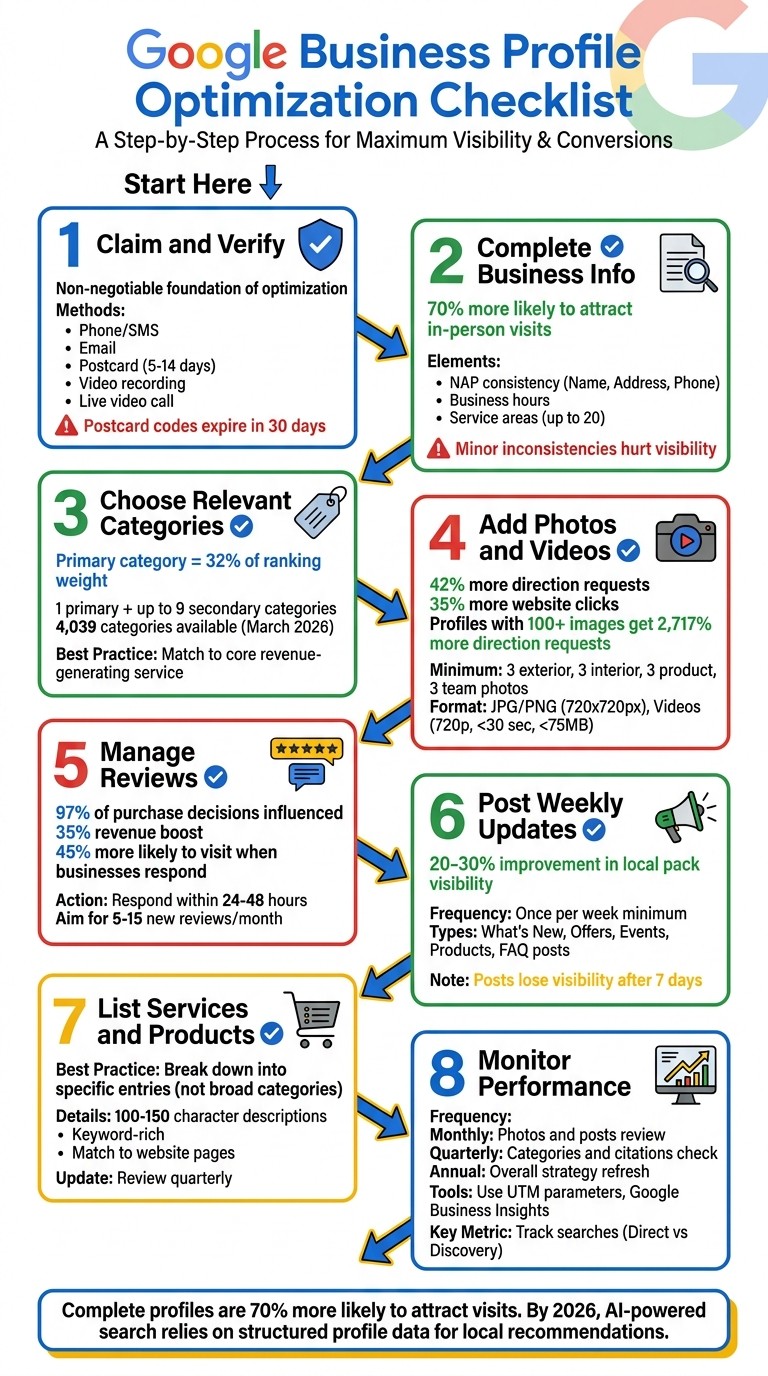
Google Business Profile Optimization Checklist: 8 Essential Steps
How To Optimize A Google Business Profile (Free Checklist For 2025)
Claim and Verify Your Profile
The first step to managing your Google Business Profile effectively is to claim and verify it. Without verification, you’re essentially locked out, unable to respond to reviews, update your hours, or access performance data. Even worse, unverified profiles often don’t show up in search results. Tanner McCarron from Dyad Marketing emphasizes this point:
"Claiming your profile is the non-negotiable foundation of every Google business page optimization strategy. Skip it, and nothing else in this checklist matters".
Here’s how to take control of your profile.
Start by signing in to the Google Business Profile manager with a business email tied to your domain. Search for your business name and city on Google Maps. If an unverified listing exists, click “Claim this business” and then “Manage now.” If there’s no listing, you’ll need to create one using your business details.
Google will present you with available verification methods, which might include:
Phone or SMS: Instant confirmation.
Email: Takes a few hours.
Postcard: Arrives in 5–14 days.
Video recording: Reviewed within 5 business days.
Live video call: Instant during business hours.
If your website is already verified in Google Search Console, you might qualify for instant verification.
A few important tips: Don’t edit your business name, address, or category while waiting for a postcard, as this will invalidate the code. Also, avoid adding words like “Best” or “#1” to your business name - Google’s policies for 2026 will flag these changes and could lead to suspension. For video verification, be ready to show your storefront signage, business equipment, and proof of your management role.
Once verified, you’ll unlock full control of your profile, along with insights into how customers discover and interact with your business. Keep in mind, postcard verification codes expire after 30 days, and the review process for other methods can take up to 5 business days.
Complete Your Business Information
Having a fully detailed Google Business Profile can directly influence how visible your business is in search results. Businesses with complete profiles are 70% more likely to attract in-person visits, while profiles with missing details tend to rank lower. As of 2026, Google’s algorithm views completeness as a trust indicator, so leaving out information could harm your rankings - even if everything else is optimized.
Enter Accurate Name, Address, and Phone Number
Your business name, address, and phone number (commonly referred to as NAP) need to be consistent across every platform where your business is listed. This includes your Google Business Profile, website, Yelp, Facebook, and other directories. Even minor differences, like using "Inc." on one platform and "Inc" on another, can confuse Google’s systems and hurt your visibility.
Stick to your official, legal business name - exactly as it appears on invoices or physical signage. Avoid adding extra words like "Best" or "Top" or including city names or keywords, as Google’s 2026 policies flag such practices, and they could lead to your profile being suspended. As Tanner McCarron from Dyad Marketing emphasizes:
"Your name has to match your real-world signage exactly. No exceptions".
When it comes to your address, ensure it matches postal records. Avoid using P.O. Boxes, virtual offices, or mailbox services. If your location includes a suite number, list it on the second address line. For phone numbers, use a local area code to strengthen your local relevance. If you rely on call tracking software, place the tracking number in the "Primary Phone" field and your actual local number in the "Additional Phone" field.
Make sure the contact details on your website (including LocalBusiness schema markup) align perfectly with your Google Business Profile. Tools like Smarty Streets can help you verify that your address formatting complies with postal standards. Additionally, audit at least 15 major directories every quarter to catch and fix any inconsistencies that could impact your rankings.
Once your NAP details are aligned, it’s time to focus on your business hours and service areas.
Add Business Hours and Service Areas
Accurate business hours don’t just help customers - they also affect when your business appears in search results. For example, if your business operates 24 hours while a competitor closes at 7:00 PM, you’re more likely to rank higher for searches made later in the evening.
Set your regular hours and make sure to include special hours for holidays or temporary closures. This demonstrates to Google that your profile is actively managed and trustworthy. Keep in mind that if customers report your business as closed when your profile says otherwise, Google may penalize your listing.
For service-area businesses, like contractors or plumbers, you can choose to hide your address and instead define a service radius. Be realistic about the areas you serve - Google allows up to 20 service areas, but exaggerating your coverage could lead to profile suspension. In 2026, AI-powered search tools use this service area data to justify recommending your business during conversational searches.
With your hours and service areas in place, the next step is to refine your business categories for maximum relevance.
Choose the Right Business Categories
Selecting the right business category is one of the most critical steps for improving local search rankings. Your primary category alone accounts for about 32% of the ranking weight related to service relevance, signaling to Google what your business does and when to display your profile. Always choose the most specific category available - "Plumbing Service" will perform better than a broader term like "Contractor."
As of March 2026, Google offers 4,039 categories, and new options are added regularly based on evolving search trends. Review your category choices quarterly to see if new options better match your business. For instance, "Hydrogen Station" was introduced in early 2026, giving businesses in that niche a chance to stand out early.
You can also add up to nine secondary categories to increase your visibility for related searches. However, only include categories for services you actually provide - adding irrelevant ones could lead to suspension. To reinforce your relevance, make sure you have corresponding service pages on your website for each category you select. As Justin Silverman, CEO of Merchynt, explains:
"Your primary category is one of the strongest signals for relevance and Map Pack visibility, while additional categories help you appear for closely related search terms".
Type | Limit | Ranking Impact | Best Practice |
|---|---|---|---|
Primary | 1 | High (approx. 32% weight) | Match to your core revenue-generating service |
Secondary | Up to 9 | Medium (expands reach) | Add only for services you actively provide |
Add High-Quality Photos and Videos
Once your business information is complete, it's time to step up your profile with eye-catching visuals. Think of these as your digital storefront - they're often the first impression potential customers will have. And the numbers don’t lie: profiles with optimized photo galleries see 42% more direction requests and 35% more website clicks. Even more impressive, businesses with over 100 images can get up to 2,717% more direction requests than average. Top-ranking profiles typically feature 250+ images, while those ranked lower (positions 11–20) average around 170 images. Adding authentic, high-quality visuals is key to answering customer questions before they even ask. As the Adwave Team puts it:
"Photos are the silent salespeople working 24/7, turning casual searchers into confident buyers."
When uploading, stick to JPG or PNG formats for images (10 KB to 5 MB, 720 x 720 pixels recommended) and videos in 720p resolution, under 30 seconds, and no larger than 75 MB. Stock photos are a no-go - every image should reflect your actual business location and offerings.
Upload Photos and Videos
To make your profile stand out, focus on uploading photos that set clear expectations for customers. Start with at least three exterior shots that highlight your storefront, signage, and entry points from different angles. Follow this with three interior photos that showcase your space’s atmosphere, decor, and layout. For the best lighting, aim to shoot exterior photos during the golden hour.
Next, include product and service photos. These give customers a clear view of what you offer, whether it’s menu highlights, popular items, or your team in action - like a plumber fixing a pipe or a chef preparing a signature dish. Team photos are another must-have. They help humanize your brand, whether through professional headshots or candid shots of your staff at work. For example, dental offices that feature before-and-after smile transformations have seen patient inquiries jump by as much as 40%.
Videos are another powerful tool. Short, auto-playing clips can grab attention in search results. Keep them simple and focused, whether it’s a quick tour of your space, a service demo, or an introduction to your team. Adding at least one new photo weekly signals to Google that your profile is active and up-to-date. You can also geotag your photos with your business coordinates to potentially improve local rankings.
Photo Category | Recommended Minimum | Purpose |
|---|---|---|
Exterior | 3 Photos | Help customers recognize your building |
Interior | 3 Photos | Highlight your space’s atmosphere |
Product | 3 Photos | Showcase popular items or services |
Team | 3 Photos | Add a personal touch with staff photos |
At Work | 3 Photos | Demonstrate expertise in action |
Add a Logo and Cover Photo
Your logo and cover photo are just as important as your general visuals. They act as your digital handshake, representing your brand across Google services. The logo appears in key areas like review replies and Q&A sections, making it easier for customers to identify your business. Use a logomark (icon) instead of a full horizontal logo since Google crops logos into square formats. For best results, upload at a resolution of 500 x 500 pixels.
Your cover photo, on the other hand, is the main image shown in the Local Map Pack and your Business Knowledge Panel. This image has a direct impact on click-through rates. Choose a high-resolution image (1,080 x 608 pixels) that reflects your brand’s personality and offerings. Be cautious - if your cover photo is low-quality, Google might replace it with a user-submitted one.
Both your logo and cover photo should be well-lit, in focus, and truly represent your business. Make sure your profile includes all basic details, like your phone number and hours of operation, so your logo displays correctly. After uploading, your media might show as "Pending" for 24–48 hours while Google reviews it for compliance. Keep in mind that photos and videos will only appear publicly once your business is verified.
Manage Customer Reviews
Customer reviews play a big role in building trust and improving local rankings. They influence 97% of purchase decisions and can boost revenue by up to 35%. Google’s local ranking algorithm weighs factors like review volume, how recent they are, and how quickly businesses respond. With tools like Google’s AI Overviews - introduced in 2026 - that analyze review trends to generate local search recommendations, managing reviews has become even more important.
Interestingly, a mix of feedback can make your profile seem more genuine. As Google Business Profile Help notes:
"A mix of positive and negative feedback often feels more trustworthy."
How you respond to reviews is just as critical. Engaging with feedback shows you care, which makes customers 45% more likely to visit your business.
Let’s dive into how to encourage more reviews and respond effectively.
Ask Customers for Reviews
Timing is everything when asking for reviews. The sweet spot? 1 to 4 hours after service, when satisfaction is at its peak. Use your Google Business Profile dashboard to create a direct link to your review form. Share this link through text messages, follow-up emails, or even in your email signature.
Don’t overlook physical reminders. Add QR codes to business cards, receipts, or table tents at checkout. Train your staff to request reviews after positive interactions. The goal is consistency - aim for 5 to 15 new reviews per month rather than a sudden flood, which could raise red flags with Google’s algorithms.
Keep it ethical. Offering incentives like discounts or gifts for reviews is a big no-no. The FTC can fine businesses up to $51,744 per instance for deceptive practices. Also, avoid "review gating" - only asking satisfied customers for feedback - as it violates Google’s policies and can lead to account suspension.
Strategy | Best Timing | Conversion Level |
|---|---|---|
Follow-up Text | 1–4 hours post-service | High |
Email Sequence | 2–6 hours post-service | Medium-High |
Verbal Ask | At conclusion of service | High (if personal) |
QR Code on Receipt | At checkout | Medium |
Email Signature | Ongoing/Passive | Low (but consistent) |
Once the reviews start rolling in, it’s essential to respond thoughtfully and consistently.
Respond to All Reviews
Replying to every review - whether it’s glowing, critical, or neutral - shows customers you’re engaged and value their opinions. In fact, 89% of consumers expect businesses to respond to reviews. Companies that follow best practices for review responses often see 33% more repeat customers and a 12% increase in their average star rating over time.
Here’s a quick guide for review responses:
Timing: Respond within 24–48 hours, and handle negative reviews within 24 hours.
Personalization: Use the customer’s name and refer to specific details in their review. For example, mention a favorite dish or a helpful staff member. This shows your reply isn’t a generic template.
When responding to negative reviews, try the HEAR Framework:
Humanize – Address the customer by name.
Empathize – Acknowledge their frustration.
Acknowledge – Take responsibility for the issue.
Resolve – Offer a clear solution or next step.
If the issue is complex, move the conversation offline by providing a direct phone number or email. As ReviewScout AI puts it:
"A professional, empathetic response to a complaint often builds more trust than a wall of 5-star reviews."
For positive reviews, keep your tone warm and sincere. Thank the customer by name, highlight what they appreciated, and invite them back. Including your business name and location in the response can also help Google associate the review with your local listing. Adding a personal touch, like signing off with your name or initials (e.g., "- Sarah, Manager"), makes your replies feel even more genuine.
To stay on top of reviews, set aside about 15 minutes each morning to check and respond to new feedback. This ensures no comment goes unnoticed.
Post Regular Updates
Once you've fine-tuned your profile, the next step is keeping it active with regular updates. Posting consistently shows both Google and potential customers that your business is engaged and thriving. With 70% of business profiles sitting idle, weekly updates can set you apart from the competition.
The sweet spot for posting is once per week. While posts are archived after six months, they often lose visibility after just seven days. If weekly updates feel like a stretch, aim for at least one or two posts each month to avoid appearing inactive.
"A profile that posts weekly looks alive. A profile that's been silent for months looks abandoned. Google notices." - Josh Krueger, Founder, 716 Co.
Consistent posting can even improve your local pack visibility by 20% to 30%. Looking ahead, by 2026, Google AI Overviews will pull information directly from your posts to answer detailed local queries. Sparse profiles may miss out on these AI-generated answers, even if they rank well in traditional Map Pack results.
Once you're ready to post, Google Posts offers a great way to keep your audience informed and engaged.
Publish Google Posts
Google Posts come in several formats, each tailored to different types of updates. Here are a few options:
"What's New" posts: Share general announcements, such as team achievements or community involvement.
Offer posts: Highlight limited-time promotions with a "View Offer" button and expiration dates. These posts can generate up to twice as many calls compared to standard updates.
Event posts: Promote events like workshops or open houses with specific dates.
Product posts: Showcase individual products, complete with prices, that stay visible until you remove them.
Two particularly effective post types are social proof spotlights and FAQ posts. Social proof posts combine glowing 5-star reviews with authentic photos of your work or customer interactions. FAQ posts answer common customer questions, helping you build trust while also ranking for informational searches. For service-based businesses, job spotlights featuring before-and-after photos of completed projects can also be highly persuasive.
When creating posts, keep these tips in mind:
Focus on the first 150 characters - Google often truncates text on mobile devices.
Use high-quality, original images sized at 1200×900px (4:3 aspect ratio) and tag them with your location for local relevance.
Include a clear call-to-action (CTA) like "Call Now", "Book", or "Learn More" to guide users.
Add local references - such as your city or neighborhood - within the post text to help Google associate your business with your area.
Avoid putting phone numbers in the description, as this could lead to Google rejecting your post. Instead, use the "Call Now" button for contact details.
List Your Services and Products
Regular updates work even better when paired with a detailed list of your services and products. These sections serve different purposes: Services describe what you do and showcase your expertise, while Products focus on specific items for sale with visuals and pricing.
Many businesses underutilize the Services section. Instead of grouping offerings into broad categories, break them down into specific entries. For example, an HVAC company should list "AC Repair", "Duct Cleaning", and "Furnace Installation" individually rather than lumping them all under "HVAC Services".
Each service entry should include a short, keyword-rich description (100–150 characters) that highlights key benefits. Make sure every service listed corresponds to a dedicated page or section on your website, as this alignment can enhance your visibility in AI-generated summaries, which you can monitor using a business website SEO checker.
For products, use high-quality, well-lit photos of the actual items. Avoid stock images, logos, or promotional banners, as these can reduce trust and visibility. Including exact prices or a price range can also help build trust and make it easier for customers to decide.
To stay competitive, review and update these sections quarterly. This ensures your profile reflects your current offerings and aligns with evolving search trends. Regular updates and detailed listings work together to keep your business visible and relevant in local search results.
Monitor Your Profile Performance
After updating your profile, keeping an eye on its performance is crucial for sustained growth. Regularly auditing your profile helps spot areas needing improvement. Aim for monthly reviews of sections like photos and posts, quarterly checks of categories and citations, and an annual refresh of your overall strategy to stay ahead.
Keep an eye out for gray "Add" buttons on your dashboard - they indicate incomplete sections. Also, search your business phone number in quotes on Google to ensure all first-page results match your profile listings exactly. Even small inconsistencies, like using "Inc." instead of "Inc", can confuse search algorithms and hurt your rankings.
"Your Google Business Profile is like any other marketing channel, so treat it accordingly. It needs a strategy and dedicated resources." - Tanner McCarron, Dyad Marketing
To track your profile's impact, use UTM parameters (e.g., ?utm_source=google&utm_medium=gbp) in your links. This allows Google Analytics to monitor traffic coming directly from your profile.
Use a Profile Audit Checklist
Once your profile is set up, regular audits help uncover opportunities to improve visibility. Use the checklist below to monitor key elements:
Element | Optimized Action | Impact on Visibility |
|---|---|---|
Primary Category | Choose a specific niche (e.g., "Italian Restaurant") | High; accounts for ~32% of ranking weight |
Business Description | Write up to 750 characters with natural keywords | Medium; aids AI in understanding relevance |
Photos | Add new photos every 2 weeks | High; leads to 42% more direction requests |
Google Posts | Publish at least one post weekly | Medium; signals freshness |
Review Response | Reply to all reviews within 24 hours | High; boosts customer engagement |
NAP Consistency | Verify consistent Name, Address, and Phone (NAP) info across directories | High; strengthens business credibility |
Pay special attention to your primary category - it’s the most influential factor for ranking, accounting for about 32% of service relevance. Be as specific as possible; for example, "Plumbing Service" is far better than the broader "Contractor".
"Primary category precision isn't a nice-to-have. It's the single biggest lever you can pull." - GMBMantra
Don’t overlook your Q&A section. Proactively post and answer common customer questions to shape the narrative and assist AI-driven search summaries. Additionally, audit your photo gallery, removing any stock images and ensuring you’ve uploaded high-resolution, fresh photos within the last two weeks.
After completing your audit, dive into detailed insights to refine your strategy further.
Review Insights and Analytics
Google Business Insights provides valuable data on how customers find and interact with your profile. For instance, the "Searches" report reveals whether users discovered you through your brand name (Direct) or by searching for a category or service (Discovery). Check the specific search terms used to find your business - if key terms are missing, incorporate them into your business description and services.
Compare your photo views with those of similar businesses in the Insights tab. If your numbers are lower, consider uploading more frequently. Analyze customer actions like calls, direction requests, and website clicks. If you’re getting high views but low actions, it might indicate weak calls-to-action or unappealing visuals.
Track how quickly you’re receiving new reviews. Google prioritizes the pace of review acquisition over the total number of reviews, so a slowdown in review frequency could hurt your local rankings.
Set benchmarks and revisit them monthly. Profiles with complete information are 70% more likely to drive location visits. Adding photos can lead to 42% more direction requests and 35% more website clicks compared to profiles without them. If your metrics fall short, you’ll know exactly where to focus your next efforts.
Conclusion
Managing your Google Business Profile isn’t a one-and-done task - it’s an ongoing process that directly influences how potential customers find and trust your business. By sticking to this checklist, you’re creating a dynamic asset that consistently boosts local visibility, drives calls and direction requests, and builds trust in today’s AI-driven search environment.
Every step matters. A complete, frequently updated profile draws in more visitors, generates more calls, and earns more clicks. By 2026, your profile will play a critical role in AI-powered search and local discovery. Google’s AI relies on structured data from profiles like yours to confidently recommend businesses. Neglecting your profile or leaving it incomplete can mean missing out on valuable opportunities.
Start by claiming your profile, verifying your NAP (Name, Address, Phone Number) information, and selecting accurate categories. Keep the momentum going by adding fresh photos every couple of weeks and posting updates weekly. Regular audits are essential to identify areas for improvement and maintain a competitive edge.
Make it a habit to review your efforts regularly to ensure your profile stays an effective tool for generating leads. Follow this checklist to transform your profile into a go-to resource that keeps your business visible, trustworthy, and top-of-mind for local customers.
FAQs
What should I do if my Google Business Profile verification fails?
If your Google Business Profile verification doesn't go through, start by reviewing all the details you submitted. Make sure your business name, address, and phone number are correct and align perfectly with the information on your website and other online listings. Even small inconsistencies can lead to problems.
You can also try different verification methods, such as postcard, phone, or email, if available. Consistency across platforms is critical, so double-check for any discrepancies.
Still stuck? Reach out to Google support or visit their help center for additional troubleshooting steps.
How can I fix NAP inconsistencies across directories quickly?
To fix NAP (Name, Address, Phone number) inconsistencies, start by auditing your business listings on major directories. Look for discrepancies in spelling, formatting, or contact details. Correct any errors to ensure everything matches across platforms. Using citation management tools can make this process faster and more efficient. After making updates, double-check your changes and review your NAP data regularly to keep it accurate and improve your local SEO performance.
Which Google Business Profile metrics matter most for leads?
When it comes to generating leads with your Google Business Profile, keep an eye on three main metrics: views, clicks, and customer interactions. These numbers reveal how effectively your profile is grabbing attention and engaging potential customers. By improving these metrics, you can increase your profile's visibility and bring in more leads.
Related Blog Posts
Join our community of 15,000+ business owners
Popular articles
Popular articles about your website and marketing your small business


