



7 Ways To Cross-Promote Website Content On Social Media
Small Business Marketing
Most small businesses already have enough website content to post on social media for weeks. The main job is to turn blog posts, service pages, FAQs, reviews, and offers into posts that fit each platform, go out at the right time, and lead people back to your site.
Here’s the short version:
Turn website content into native posts, not just link drops
Post when people are online to help first-hour engagement
Add share buttons and profile links so your site helps spread content
Cross-post with different wording and formats for each platform
Repurpose one page into many posts to save time
Push offers and updates with urgency when timing matters
Use tools like Gatsboy to connect social traffic to bookings, forms, payments, and reviews
A few numbers stand out:
Posts with 8+ slides can get 3x more impressions
Text posts without links can get 2–4x more reach
Peak-time posting can lift first-hour engagement by 38%
Repurposed content can lift engagement by 11%–25%
Spacing posts over 2–4 weeks can lead to up to 3x more engagement
If I had to boil the article down to one point, it’s this: don’t make new content first. Start with what’s already on your website, break it into smaller pieces, match each piece to the platform, and make the click path short.
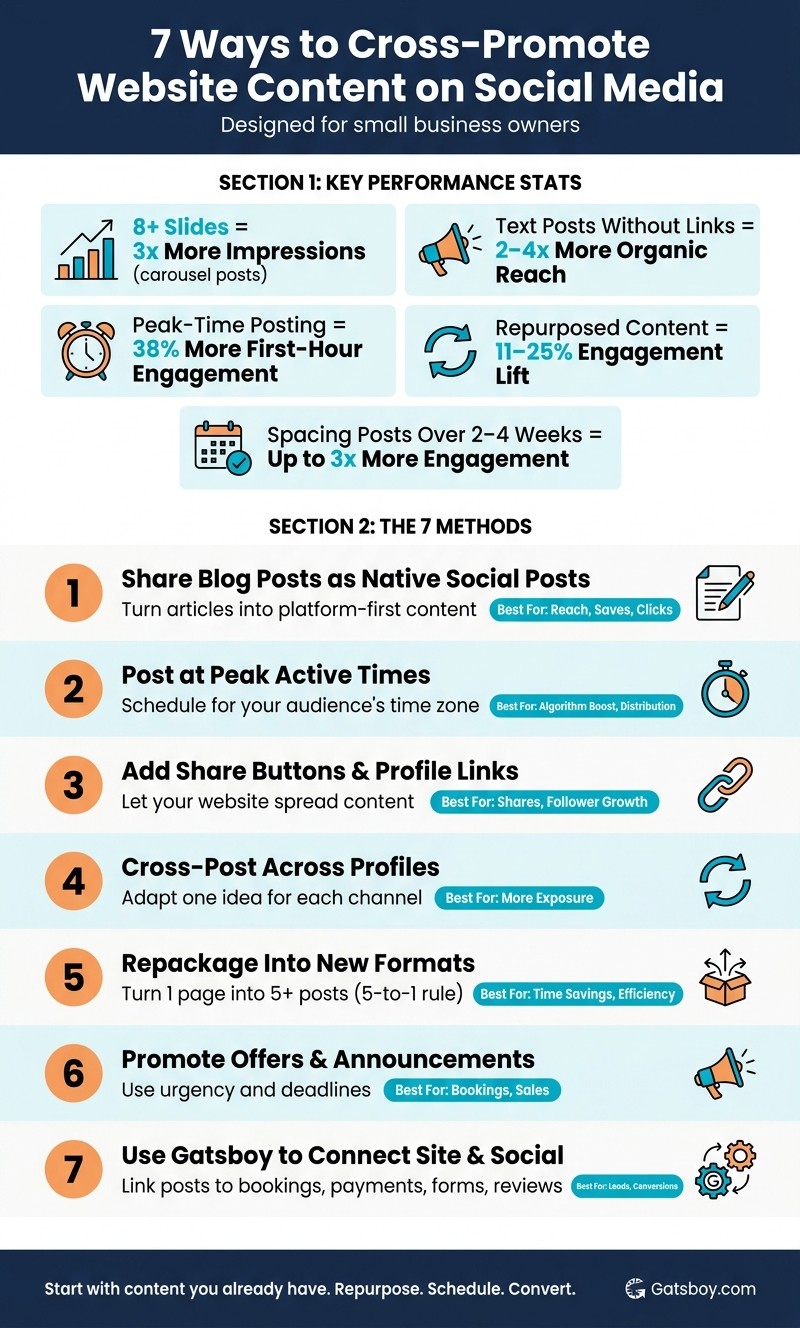
7 Ways to Cross-Promote Website Content on Social Media: Key Stats & Methods
How to Cross-Promote Content on Every Social Platform (TikTok, IG, YT, LinkedIn, FB in 2025)
Quick Comparison
Method | What it does | Best use |
|---|---|---|
Share blog posts as native posts | Turns articles into platform-first content | Reach, saves, clicks |
Post at active times | Helps early engagement | More distribution |
Add share buttons and profile links | Lets website visitors share or follow | Shares, follower growth |
Cross-post across profiles | Extends one idea across channels | More exposure |
Repackage into new formats | Turns one page into many assets | Time savings |
Promote offers and updates | Pushes time-sensitive pages | Bookings, sales |
Use Gatsboy | Connects social posts to actions on-site | Leads, payments, reviews |
In short, this article is about getting more mileage from content you already have - and making sure social traffic has a clear next step.
1. Share Blog Posts as Native Social Posts
Don’t share a naked link and call it a day. Turn each blog post into a native social post built around one clear takeaway. The packaging should shift by platform, but the main point should stay the same.
On Instagram, turn the main ideas from your blog into a 5–10 slide carousel or a short Reel focused on one specific tip. On LinkedIn, use a PDF carousel or a 150–300 word text post. Posts with 8 or more slides average 3x more impressions than single-image posts, and text posts without external links get 2–4x the organic reach of posts with links. Put the blog link in the first comment.
On X (Twitter), split the post into a 5–12 tweet thread, with one point or stat in each tweet. On Facebook, open with a short story tied to the topic, then close with a question that gets people talking.
A simple way to keep this process moving is to make a repeatable asset kit for every post:
Two quote cards
One 5–7 slide carousel
One 60-second video script
One checklist
Space reposts across platforms so people don’t feel like they’re seeing the same thing over and over.
Use the format that fits how people already interact on each platform.
Platform | Best Native Format | Primary Goal | Quick Tip |
|---|---|---|---|
Carousels (5–10 slides) or short Reels | Engagement & saves | Use Canva templates for consistent branding | |
Long-form story posts | Community interaction | End with a question to drive comments | |
Document carousels (PDF) or text posts | Authority & leads | Post the link in the first comment | |
X (Twitter) | Threads (5–12 tweets) | Real-time conversation | A/B test the hook in the first tweet |
Once the format fits the platform, the next step is posting it when your audience is active.
2. Post Content When Your Audience Is Most Active
Once you’ve picked the right format, timing does a lot of the heavy lifting. Strong content posted at the wrong hour can disappear fast. Posts that go live during peak platform windows get 38% more first-hour engagement, and that early spike helps tell the algorithm how far your content should spread.
The goal is simple: post when your audience is actually online. That means scheduling for their time zone, not yours.
The first hour matters most. If comments start coming in, reply within those first 60 minutes. That early back-and-forth can help push reach higher.
To make this easier, batch your captions and visuals once a month. It takes some pressure off and makes peak-time posting much easier to stick with. A solid rule of thumb: use 80% of your peak-time slots for helpful content and 20% for promotions.
Peak posting windows by platform:
Platform | Best Days | Peak Hours (ET) | Ideal Content Format |
|---|---|---|---|
Tues–Fri | 10 AM–1 PM, 7–9 PM | Reels & Carousels | |
Tues–Thurs | 7–10 AM, 12 PM | PDF Carousels & Text | |
Tues–Fri | 9–11 AM, 1–4 PM | Images & Native Video | |
X (Twitter) | Mon–Fri | 8–10 AM, 12–1 PM | Threads & Text |
TikTok | Mon–Fri | 10 AM–12 PM, 6–9 PM | Vertical Video (9:16) |
YouTube | Thurs–Sat | 2–4 PM, 8–10 PM | Shorts (under 60s) |
Treat these windows as your starting point, not a fixed rule. Then check your own engagement data and adjust from there. It also helps to stagger posts by 30–60 minutes so each platform has room to pick up its own engagement.
3. Add Social Share Buttons and Profile Links to Your Website
Getting more reach doesn’t always mean posting more. If you put share buttons and profile links in the right places, your site can help do the heavy lifting. Readers can pass your content along, and your website starts working like a distribution channel instead of just a content hub.
Placement makes a big difference. Share buttons tend to work best on high-value pages like blog posts, how-to guides, and service pages, where visitors are already engaged and more likely to share what they’re reading. Profile links belong on pages people use to learn about you or get in touch, like your homepage, footer, About page, and contact page. Use share buttons to help content spread. Use profile links to turn site traffic into followers. Their job is to turn visitors into followers.
Feature | Ideal Placement | Primary Content Type | Main Traffic Goal |
|---|---|---|---|
Share Buttons | Blog Posts, Service Pages, Case Studies | Educational guides, pillar content | Shares and referral clicks |
Profile Links | Header, Footer, About Page, Contact Page | Brand story, team intros, contact info | Follower growth and trust |
A simple setup works well: add inline share buttons to blog posts, and place profile links in the footer on your main pages.
Once your site is set up to earn shares, cross-post the same content across your social profiles.
4. Cross-Post Content Across Your Social Profiles
Once your website content is live, turn it into posts built for each social channel. That way, one asset can become several posts, and you can get more mileage from the same piece without starting over.
The key is simple: don't post the exact same copy everywhere. That usually falls flat because each platform favors a different style and format. Shape the message to fit the channel. Use Facebook for conversation, Instagram for visual storytelling, LinkedIn for smart takeaways, and X for short, fast updates.
It also helps to batch by format. Group your text posts, image posts, and video posts together so you're making one type of decision at a time. Then space the adapted versions out across different days. That keeps the content in circulation longer and gives each post more room to perform.
Use this quick guide to pick the right format before you publish:
Platform | Best-Fit Format | Primary Traffic Goal |
|---|---|---|
PDF Carousels, Text Posts | B2B Authority / Article Clicks | |
Reels, Carousels (3:4 ratio) | Community Building / Brand Awareness | |
Images with Links | Engagement / Direct Website Traffic | |
X (Twitter) | Threads, Short Text | Real-time Updates / Quick Clicks |
TikTok | Vertical Video (9:16) | Viral Discovery / Reach |
5. Repackage Website Content Into Different Social Formats
Cross-posting changes the channel. Repurposing changes the asset.
That’s the key difference. With cross-posting, you take one message and tweak it for each platform. With repurposing, you take the source content itself and turn it into new pieces.
A simple place to start is the 5-to-1 rule: try to pull at least five social posts from every long-form piece of website content. And you don’t need to look only at blog posts. Your homepage headlines, essential website features like service descriptions, customer reviews, and FAQs can all work as source material.
One blog post, for example, can turn into a LinkedIn PDF carousel, an X thread, a quote graphic, and a Facebook post. Same core idea. Different packaging.
Match each type of website content to the format that fits it best:
Website Content | Best Social Format | Primary Goal |
|---|---|---|
Blog Post / Article | Carousel (5–10 slides) | Education & Engagement |
How-To / Tutorial | Short Vertical Video (15–60s) | Viral Discovery |
Customer Review | Graphic Quote or Video Testimonial | Trust & Social Proof |
FAQ Section | Short Q&A Video or Story Poll | Engagement & Lead Gen |
Service Detail | Instagram Carousel or TikTok Tip | Brand Awareness |
Execution tip: Pick three website pages - your Services page, FAQ, and About page - and pull four ideas from each. Then rewrite each one in plain, customer-facing language and shape it for the platform you’re posting on. That gives you 12 posts without creating anything from scratch.
And that matters, because repurposing can increase engagement by 11–25%. It also helps keep your social calendar full without having to build every post from zero.
6. Promote Offers, Updates, and Announcements From Your Website
Not every page on your site is meant to sit there for months. Some content has a clear time limit: a flash sale, a new service launch, or a booking window that shuts soon. In those cases, you can reuse the same website content, but shift the angle around the deadline, launch, or limited-time deal.
The format should match the pace of the message. If you need people to act now, Instagram Stories with link stickers work well for sending traffic straight to a booking form or flash sale page. If you're rolling out a new service, a LinkedIn carousel or short-form video gives you more room to explain the value before you ask people to click, book, or buy.
A simple post structure helps here: start with the problem, show the benefit, then back it up with proof. That flow makes the post feel useful instead of sounding like a plain ad.
For bigger announcements, don't post once and hope for the best. Use a 7-day sharing plan instead. Change the angle across the week: teaser, key tip, proof, myth-bust, checklist, reminder, and recap. Same offer, different entry points. That's a smart way to keep the message from going stale before the deadline hits.
Pick the format that fits the timing, then build the post around one clear action.
Content Type | Best Social Format | Primary Goal |
|---|---|---|
Flash Sales | Instagram Reels / TikTok | Viral Discovery & Impulse Buy |
New Service Launch | LinkedIn Carousel / YouTube Shorts | Authority & Education |
Event Updates | Facebook Groups / Instagram Stories | Community Engagement |
Online Bookings | Direct messages or chatbot links | Immediate Conversion |
Business Announcements | Static image with keyword-rich caption | Information & Searchability |
Before you publish, add UTM tags so you can track which platform and which post drove each visit.
7. Use Gatsboy to Connect Your Website and Social Promotion
Gatsboy helps turn website assets into social posts that drive clicks, bookings, and leads. In plain English, it makes it easier to turn everyday actions on your site into posts people can use right away.
Its tools turn site actions into shareable social assets. Here’s how each one lines up with a social use case:
Gatsboy Tool | Social Media Application | Primary Business Goal |
|---|---|---|
Stripe Payments | Shareable checkout links for bios and DMs | Direct sales from social |
Online Bookings | Booking link for Stories, posts, and bios | Appointment and consultation growth |
Advanced Forms | Lead-generation links in social profiles | Lead generation |
Google Reviews | Quick testimonial posts | Trust and social proof |
Once you’ve picked the asset, pair it with the social format that tends to get the best response. The idea is simple: use the tool that matches your goal, then place it in the platform format that shows it off best.
Best Platform Format for Each Cross-Promotion Method
Once you’ve picked a method, the next step is simple: choose the format that fits the platform. Not every asset works the same way everywhere. A LinkedIn PDF carousel can do well, while that same idea may land better as an Instagram carousel or an X thread.
It also helps to space your posts out instead of dropping everything at once. Rolling content out over several days or weeks can help cut audience fatigue.
Use the table below as a quick format guide.
Method | Best Platform(s) | Best Format | Main Use Case |
|---|---|---|---|
1. Share Blog Posts as Native Social Posts | LinkedIn, Instagram, X | PDF carousel (LinkedIn), carousel (Instagram), thread (X) | Thought leadership and educational value |
2. Post Content When Your Audience Is Most Active | All platforms | Scheduled posts | Maximizing initial reach and engagement |
3. Add Social Share Buttons and Profile Links to Your Website | Website | Inline share buttons and profile links | Building trust through social proof |
4. Cross-Post Content Across Your Social Profiles | TikTok, Instagram Reels, YouTube Shorts | Vertical video (9:16) | Brand visibility and discovery |
5. Repackage Website Content Into Different Social Formats | Instagram, TikTok, Pinterest | Carousel (Instagram), 30-second clip (TikTok), infographic (Pinterest) | Content efficiency and platform-native storytelling |
6. Promote Offers, Updates, and Announcements From Your Website | Instagram, TikTok, Facebook | Stories, Reels, live video | Driving direct sales and conversions |
7. Use Gatsboy to Connect Your Website and Social Promotion | Website, DMs | Booking or payment links | Seamless checkout and lead generation |
One more thing: keep Reels and Shorts tight. If you’re reposting TikTok clips on other platforms, remove the TikTok watermark first so you don’t hurt reach.
Conclusion
Cross-promotion works better when you shape content for each platform instead of pasting the same caption everywhere. That one change can improve engagement. After that, timing plays a big part in how far the content goes.
Spread posts across a 2–4 week window instead of publishing everything at once. Repurposed content can generate up to 3x more engagement than single-platform publishing, because spacing helps keep content visible across the full campaign window. Once the content is out, the next job is simple: turn attention into action.
Keep the path from social to your site short and easy to follow. Gatsboy helps with online bookings, Stripe payments, advanced forms, and Google Reviews, so social traffic has a clear next step on your site.
Reuse website content, fit it to each platform, and make conversion easy.
FAQs
How often should I repost the same website content?
Space out reposts instead of pushing the same piece everywhere at the same time. A common rule of thumb is every 2 to 4 weeks, based on the platform and how the content is doing.
There isn't a fixed rule here. If a post keeps performing well and stays evergreen, repost it from time to time. It also helps to tweak it for each platform so you don't overwhelm your audience.
Which website pages should I repurpose first?
Start with high-performing, still-relevant pages. Put your attention on top content like your homepage headline, main service pages, and customer testimonials. Those pages are the ones most likely to drive engagement and traffic.
It also helps to line up your picks with your current goals. If brand awareness is the priority, lean into pages getting traction now. If you want to bring traffic back, go after older evergreen content that still has a solid topic and room to grow.
How can I track which social posts drive bookings or leads?
Tag your links with UTM parameters so you can tie bookings or inquiries to the right social platform and post. When your tags are set up the right way, tools like Google Analytics can track traffic and conversions.
You can also check social media analytics for click-through rates, shares, comments, and conversions. That gives you a clear view of which posts are driving the most leads or bookings.
Related Blog Posts
Join our community of 15,000+ business owners
Popular articles
Popular articles about your website and marketing your small business


