



How to Choose a Live Chat Tool for Your Business
Small Business Marketing
Live chat tools can transform how businesses interact with customers by offering instant support, increasing sales, and improving satisfaction. Here's how to pick the right one:
Set Clear Goals: Decide if you want to focus on lead generation, sales, support, or bookings.
Understand Your Audience: Analyze customer behavior, including when and how they contact you.
Budget Wisely: Live chat tools range from $2.99/month to $159/month. Watch for hidden fees.
Prioritize Features: Look for real-time messaging, AI automation, integrations, and mobile-friendly design.
Test Before Committing: Use free trials to evaluate performance, speed, and ease of use.
Quick Tip: Tools like tawk.to (free) are great for small businesses, while Intercom ($74/month) suits larger teams needing advanced features.
Choosing the right tool ensures smoother customer interactions and better results for your business.
6 Best Live Chat Software for Small Businesses(tawk.to vs Tidio vs Crisp vs LiveChat vs Zendesk)
Step 1: Define Your Business Needs and Goals
Before diving into comparisons of pricing pages or signing up for free trials, it’s important to clarify what you want live chat to actually do for your business. Don’t rush into evaluating tools without first setting clear goals.
Identify What You Want to Achieve
Start by selecting one primary goal and one secondary goal. This keeps your focus sharp and helps you avoid paying for features you’ll never use.
Goal | What It Looks Like in Practice | Key Metric to Track |
|---|---|---|
Lead Generation | Capturing names and emails on pricing or service pages | Lead capture rate (%) |
Sales Conversion | Answering checkout questions before a visitor leaves | Conversion rate on high-intent pages |
Customer Support | Resolving issues in real time instead of back-and-forth emails | First-chat resolution rate (target: 70%) |
Booking Management | Scheduling appointments or consultations directly in chat | Appointments booked via chat |
"The real value is not the chat bubble itself. The value is turning conversations into booked appointments, support answers, CRM records, and follow-up tasks." - TheProToolKit
For small businesses, lead capture and booking management often deliver the best returns. If your business depends on consultations, service calls, or appointments, prioritize a tool that integrates scheduling directly into the chat window.
Next, take a closer look at how your customers interact with your site to ensure the tool aligns with their needs.
Know Your Customers and How They Communicate
Think about when and how your customers typically reach out. Use tools like Google Analytics to check for after-hours traffic. If more than 30% of your site visits occur between 6 PM and 8 AM, you’ll need a tool with automated after-hours responses - it’s not just helpful, it’s necessary.
Also, assess your traffic volume. If you’re handling fewer than 100 customer inquiries per month across email, phone, and social media, a simple chat widget should suffice. But if you’re managing over 300 inquiries monthly, you’ll need something more advanced, like AI support and a knowledge base, to keep up.
Don’t forget how visitors browse your site. With over 60% of web traffic now coming from mobile devices, your live chat tool must deliver a seamless mobile experience. A clunky interface on small screens can quietly hurt your conversion rates.
Once you’ve mapped out your audience’s behavior, it’s time to set a budget and pinpoint the features you absolutely need.
Set a Budget and List Must-Have Features
Live chat pricing varies widely, from $2.99/month for basic tools to $159/month for advanced AI-powered solutions. Decide on your monthly budget and prioritize features that are non-negotiable for your business.
Be cautious of hidden fees. Some platforms charge extra for removing their branding, enabling AI-resolved conversations, or connecting to third-party tools. A plan that seems affordable at $25/month can quickly become expensive once you factor in add-ons or message volume limits.
Most small businesses need real-time messaging, saved replies for FAQs, an after-hours lead capture form, and at least one integration with their existing tools - whether that’s a CRM, calendar, or payment system. If you’re already using an all-in-one platform like Gatsboy, check if the live chat tool integrates with your current lead management, booking, or payment workflows before committing to it.
Step 2: Evaluate Key Features of Live Chat Tools
Now that you’ve nailed down your goals, audience, and budget, it’s time to focus on features that align with your specific needs. The features you prioritize should directly enhance customer interactions and help you meet your objectives. Let’s break down the essential features that can elevate your live chat tool’s performance.
Core Live Chat Features to Look For
At its core, every live chat tool should handle the basics seamlessly. Start by ensuring it offers a customizable chat widget that matches your brand’s colors and style. This keeps the tool visually consistent with your website. Additionally, a full conversation history is crucial so agents can pick up where previous chats left off without missing a beat. Make sure the tool supports your operating hours and includes a reliable mobile app - this is especially important for teams that need flexibility.
Another key consideration is how the widget loads. It should load asynchronously, meaning it runs in the background without slowing down your site. This not only improves user experience but also helps maintain strong SEO rankings.
Automation and AI Features
AI features are no longer just optional - they’re becoming indispensable, especially for small businesses. A well-set-up AI chatbot can handle over 60% of routine customer inquiries automatically, freeing up your team to focus on more meaningful conversations.
Look for features like predefined replies for FAQs and AI-assisted reply suggestions (sometimes called Copilot tools) that pull from your existing content to keep responses consistent with your brand voice. Basic text enhancement tools can also be helpful, allowing agents to adjust tone or condense lengthy replies. And don’t overlook the importance of a smooth handoff process - when a bot can’t resolve an issue, it should transfer the conversation to a human agent without forcing the customer to repeat themselves.
Integrations with Your Existing Business Tools
Your live chat tool should work seamlessly with the tools you already use. Integration with your CRM, booking system, and payment tools is essential for efficient lead management. For example, when a lead comes in through chat, their information should automatically flow into your CRM, eliminating manual data entry and reducing the chance of errors.
Speed matters here. Responding to a lead within 5 minutes makes your business 21x more likely to qualify that lead compared to responding within 30 minutes. This kind of speed is only achievable if your tools are interconnected. If you’re using a platform like Gatsboy, which combines lead management, online bookings, and Stripe Payments, choose a live chat tool that integrates natively. Native integrations are more reliable than relying on third-party connectors, which can cost between $16 and $49/month and add potential points of failure.
Lead Capture and Feedback Features
A good live chat tool should also help you capture leads and gather feedback. Features like pre-chat lead forms can collect a visitor’s name and email before the conversation even begins. Proactive chat triggers are another must-have, as they open a chat window when a visitor lingers on a high-value page. After the chat, post-chat surveys can quickly capture customer satisfaction ratings.
"With a mission to deliver first-class customer service, it was only natural for us to have the best live chat software. It allows our customers to book property showings instantly, which is perfect for their tight schedules." - Kamran Zand, Owner, Luxury Estates International
Another feature to consider is integration with Google Reviews. Some platforms allow you to prompt happy customers to leave a review right after a positive chat experience. This can turn a great support moment into lasting social proof. If your platform already manages reviews, like Gatsboy does for small business websites, ensure your live chat tool connects to that workflow instead of duplicating it.
Step 3: Test and Compare Your Shortlisted Tools
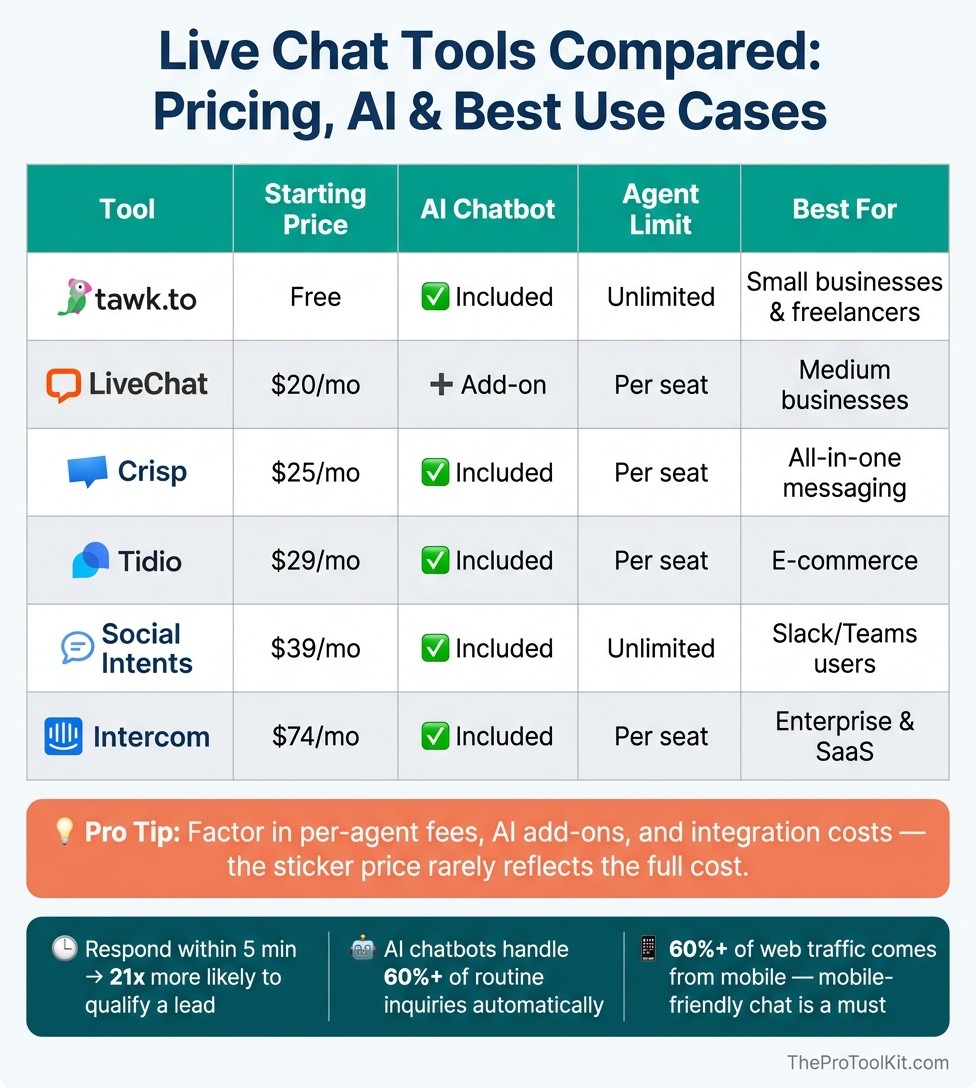
Live Chat Tools Compared: Pricing, AI & Best Use Cases
Build a Shortlist Based on Your Criteria
Now that you’ve defined your goals and must-have features, it’s time to narrow things down. Start by creating a shortlist of three to five tools that align with your priorities. The first filter? Your team’s available resources. For example, if your team can only dedicate two to four hours daily to live chat, look for a tool with strong AI or automation to fill in the gaps.
Next, check integration compatibility. If your business depends on Stripe for payments or a specific CRM for managing leads, focus on tools that offer native connections to those platforms. Finally, consider your budget. Options range from free (like tawk.to) to premium tools like Intercom, which starts at $74/month. This process ensures you’re focusing on tools that meet your needs before diving into tests.
Run Trials to See How Each Tool Performs
Testing is where you’ll see if a tool can deliver on its promises. Most live chat tools offer a 14-day free trial - use this time to evaluate performance in real-world scenarios. Pay close attention to how well the tool handles your top 20 most common customer inquiries. If handoffs between AI and agents are clunky or responses feel generic, it could frustrate users and hurt satisfaction.
Don’t forget to test the impact of the chat widget on your website’s speed. Use Google Lighthouse to measure page speed - lightweight widgets are typically around 10KB, while heavier ones (100KB–800KB) can slow down your site and hurt your SEO rankings. Finally, track the first 50–100 conversations to identify recurring issues and assess the level of ongoing maintenance required.
"Live chat is the highest-leverage support channel... faster than email, less disruptive than phone calls." - GhostChat
Compare Pricing and Features Side by Side
After testing, dive into a detailed comparison of pricing and features. Remember, the sticker price doesn’t always reflect the full cost. Factor in per-agent fees, AI add-ons, and integration costs. For instance, while Intercom charges $0.99 per resolved AI conversation, Social Intents offers unlimited agents on all plans starting at $39/month.
Here’s a quick breakdown of popular tools and their strengths:
Tool | Starting Price | AI Chatbot | Agent Limit | Best For |
|---|---|---|---|---|
tawk.to | Free | Included | Unlimited | Small businesses, freelancers |
LiveChat | $20/mo | Add-on | Per seat | Medium businesses |
Crisp | $25/mo | Included | Per seat | All-in-one messaging |
Tidio | $29/mo | Included | Per seat | E-commerce |
Social Intents | $39/mo | Included | Unlimited | Slack/Teams users |
Intercom | $74/mo | Included | Per seat | Enterprise/SaaS |
Use this comparison to weigh the total cost against the features you need, and choose the tool that offers the best balance for your business.
Step 4: Set Up and Get the Most Out of Your Live Chat Tool
With your live chat tool selected and configured, the next step is making sure it integrates smoothly with your business processes and delivers real results.
Configure and Customize Your Chat Tool
Before you go live, take the time to properly configure your tool. A few hours spent setting it up now can save you from headaches later.
Start with availability settings. Use clear messaging in your chat header to manage expectations, like "Online 10am–4pm PT". For after-hours, set up an automated response, such as "Leave your email, and I’ll reply by 10am tomorrow".
Then, make sure your widget feels like a natural extension of your brand. Match the colors, fonts, and messaging to your site’s style. A small team? Limit live chat concurrency to two active chats at a time to maintain quality. For mobile users - a group that accounts for 58% of web traffic as of 2026 - design your widget with button-based responses to make interactions easier on smaller screens.
Connect Live Chat to Your Business Processes
Once your widget is customized, integrate it into your existing systems. A live chat tool on its own won’t make much of an impact - its real power comes from syncing with your broader business operations.
Start by connecting your chat tool to your CRM. This ensures chat transcripts and lead data automatically update customer records, eliminating manual data entry and reducing the chance of missed leads. If your business handles bookings or payments, link those processes directly into the chat flow. For instance, Gatsboy combines online bookings, lead management, and Stripe Payments into one dashboard, allowing visitors to move seamlessly from inquiry to purchase.
When capturing leads, avoid starting with "What’s your email?". Chatbots that lead with this question experience 70–80% abandonment. Instead, open with a question about the visitor’s issue and ask for contact details only after offering value.
"The chatbot that converts leads asks about their problem first and earns contact details second. The one that fails opens with 'What's your email?'" - BotHero Team
Once you’ve integrated the tool, track how it performs to ensure it’s driving real business outcomes.
Track Performance and Use Feedback to Improve
Setting up live chat is just the beginning. Keeping it effective requires regular monitoring and updates.
Focus on meaningful metrics instead of just chat volume. Here are some key ones to track:
Metric | What It Measures | Target Benchmark |
|---|---|---|
First Response Time (FRT) | Time until the first reply is sent | <10s (AI) / <60s (Human) |
Containment Rate | % of chats resolved entirely by AI | 60–80% |
Lead Capture Rate | % of chats that result in contact info | >35% is excellent |
Resolution Rate | % of chats resolved in the first session | ~70% |
Dedicate 15 minutes each week to review your most common questions and update canned responses or FAQ pages as needed. If your lead capture rate is under 15%, adjust your chat flow to prioritize solving the visitor’s problem before requesting their details. Always set up a fallback option - if the bot can’t resolve an issue, it should escalate to a phone callback or email instead of leaving the visitor stuck.
"By smoothing over customer friction points in real time, live chat doesn't just solve problems - it actively generates revenue." - DocsBot AI
Post-chat surveys are a simple yet effective way to gather feedback. Send them immediately after a session while the experience is fresh. The industry standard for live chat customer satisfaction is 87%. Use this as a benchmark and aim to improve from there.
Conclusion: Picking the Right Live Chat Tool for Your Business
When it comes to choosing a live chat tool, it’s not about chasing every available feature - it’s about finding the tool that aligns with your business needs, both now and in the future.
"Score by outcomes, not capabilities. A tool with 50 features you'll never configure loses to a tool with 5 features that work on day one." - BotHero
Start by clearly defining your goals. Are you focused on generating more leads, decreasing support tickets, or speeding up your sales cycle? Your priorities will guide your decision-making process, from deciding if AI automation is essential to determining how to evaluate pricing models. For instance, a solo entrepreneur managing 50 inquiries a month will have vastly different requirements than a team handling 500+. Once your objectives are set, the next step is to assess costs.
Look beyond the surface price and understand the pricing structure. A seemingly affordable per-seat plan at $29/month can quickly balloon to $290/month as your team expands. On the other hand, tools with per-workspace pricing, like Crisp ($25/month for 4 agents), often prove to be much more budget-friendly for smaller teams - sometimes 2.5x to 4x cheaper compared to per-seat models. Be sure to factor in your expected growth and plan ahead for increased demand.
Scalability is another key consideration. With the live chat market expected to grow by $714.6 million between 2026 and 2030, and AI technology advancing rapidly, it’s crucial to choose a tool that can evolve with your business. Platforms offering only basic rule-based bots today may struggle to meet rising customer expectations in the future. Opt for a solution that can handle a significant increase in volume to avoid the headache of switching tools later.
Ultimately, the best live chat tool is one that your team finds easy to use, your customers actively engage with, and your business can grow into seamlessly.
FAQs
Which live chat pricing model is cheapest as my team grows?
For expanding teams, usage-based pricing can be a smarter option compared to per-seat models. Why? Because costs stay steady even as you add new agents. On the other hand, if you’re sticking with per-seat pricing, look for plans that bundle multiple users together. This way, you won’t end up paying the full fee for every single new team member. For instance, some pricing tiers charge per person annually, which can quickly add up as your team grows.
How do I know if I need AI chat or just live agents?
Choosing between AI chat and live agents comes down to what kind of support you need. For straightforward tasks like tracking orders or resetting passwords, AI chat offers quick, round-the-clock help that’s also budget-friendly. But when it comes to more complicated, emotional, or critical issues - like technical troubleshooting or sensitive billing concerns - live agents are a must.
A lot of small businesses find success with a hybrid approach. AI takes care of the simple questions and passes the tougher ones to human agents when necessary. This way, you get efficiency without sacrificing the personal touch.
What’s the best way to connect chat to bookings and payments?
To link live chat with bookings and payments, consider using an all-in-one platform like Gatsboy. Its intuitive tools allow you to transform live chats into leads or scheduled appointments effortlessly. By syncing your calendar, you can display real-time availability, and with Stripe integration, you can process secure payments at the time of booking. This setup streamlines customer interactions, scheduling, and transactions, keeping everything organized in one place.
Related Blog Posts
Join our community of 15,000+ business owners
Popular articles
Popular articles about your website and marketing your small business


