



10 Lead Form Examples for Service Business Sites
Small Business Marketing
Most service business forms fail for one simple reason: they ask too much, too soon. If I want more leads, I need a form that starts short, uses a clear CTA, shows trust near the form, and tells people what happens after they click.
Here’s the short version:
Urgent services do best with short forms
Higher-ticket jobs often need multi-step forms
Coaches and consultants need light screening
Specific CTA text like "Book My Call" often beats "Submit"
Fast follow-up can make a big difference in lead quality and close rate
Forms with more than 7 fields often convert worse than tighter forms
This article covers 10 form types:
Consultation request
Coach intake
Discovery call
Multi-step quote
Service booking
Simple contact
Free assessment
Lead magnet download
Interactive quiz
Integrated lead routing form
The core idea is simple: match the form to how the customer buys. If someone needs help now, keep it short. If the job needs pricing, routing, or screening, ask a bit more.
Quick Comparison
Form Type | Best Use | Length | Best Next Step |
|---|---|---|---|
Consultation request | Local service leads | Short | Call or text reply |
Coach intake | Coaching fit check | Medium | Calendar booking |
Discovery call | B2B screening | Medium | Booked call |
Multi-step quote | Large home projects | Longer | Estimate follow-up |
Service booking | Appointment-based services | Medium | Instant booking |
Simple contact | General inquiries | Short | Email or phone reply |
Free assessment | Offer-led services | Short to medium | Schedule review |
Lead magnet download | Early-stage leads | Very short | Email follow-up |
Interactive quiz | Low-pressure screening | Medium | Results + CTA |
Integrated routing form | Multi-service teams | Medium | Team routing |
If I had to sum it up in one line, it would be this: the best lead form is the one that gets the right person to the right next step with the least friction.
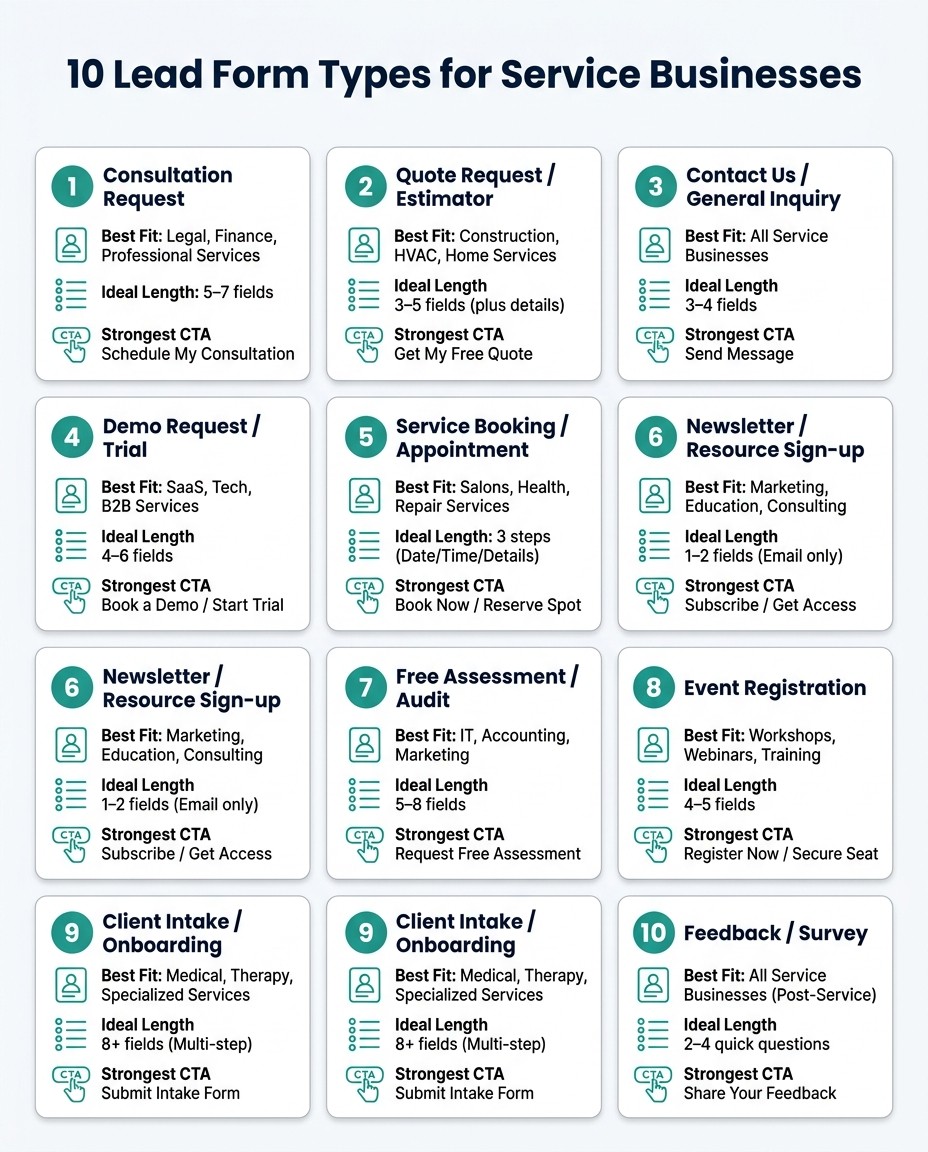
10 Lead Form Types for Service Businesses: Quick Comparison Guide
3 Proven Ways to Skyrocket Lead Gen Form Conversion Rates
10 Lead Form Examples for Service Business Sites
Using the five criteria above, here are 10 lead form types used by service businesses, coaches, and consultants. Each one shifts a bit based on how the service is sold and how the lead needs to move.
1. Consultation Request Form
A consultation request form works well for HVAC, plumbing, and electrical services because it gathers just enough information to route the lead fast. Start with the service type, then ask for ZIP code, preferred date, and contact details.
The CTA button should say something like "Request My Free Consultation" instead of a generic "Submit." Right below the button, add a short trust signal such as "We serve the greater Dallas area and usually respond within one business day." The confirmation page should confirm that the form was received and tell the lead when to expect a call or text.
2. Coach Intake Form
A coach intake form should screen for fit before the call ever happens. The best versions use 5 to 8 fields, usually in this order: coaching topic or goal, current challenge, availability, budget comfort level, and contact details last. Asking about goals before budget helps the form feel more like a conversation.
A short testimonial placed beside or just below the form can help. After someone submits, the confirmation should include a calendar booking link so the prospect can lock in a time right away instead of waiting for a reply email. An automated reminder 24 hours before the call can cut down on no-shows.
3. Discovery Call Form
A discovery call form is built for consultants and B2B service providers who need to screen serious inquiries before spending time on a call. The main fields should cover role, company size, project timeline, and budget range. These work best as multiple-choice options instead of open text boxes.
CTA text like "Book a Discovery Call" beats generic wording by 10% to 20%. Connect the form straight to a calendar tool so bookings happen on the spot. If a lead selects a timeline of "within 30 days" or a budget above a set threshold, that submission can be flagged for priority follow-up.
4. Multi-Step Quote Form
For bigger jobs like remodeling, landscaping, or HVAC replacement, a multi-step quote form can feel easier to complete because it breaks the process into smaller parts. Step one collects contact details and ZIP code. Step two asks about job type, scope, and timeline. Step three can be optional, with photo upload or extra notes.
A progress indicator like "Step 2 of 3" helps people keep going. Put a review snippet near the form or submit button to build trust at the right moment. The confirmation page should spell out the estimate window clearly, such as "You'll receive a quote within two business days."
5. Service Booking Form
A service booking form makes sense when the next step is scheduling, not quoting. It fits cleaning services, tutoring, wellness sessions, and repair appointments. The form should collect service selection, preferred date and time, and location or address in one flow, ideally with a live calendar so the customer can choose an open slot directly.
If the form connects to live booking, the appointment can be confirmed right away. The confirmation should include the appointment details, a cancellation or rescheduling link, and a short note about what to expect on the day of service.
6. Simple Contact Form
A simple contact form fits businesses with broad or mixed services where the inquiry type can vary a lot. Keep it short: three to five fields covering name, email or phone, and a brief message.
The CTA should set expectations. "Send My Message" is better than "Submit." Add a line below the button that tells visitors when they should hear back, like "We usually respond within one business day, Monday through Friday."
7. Free Assessment Form
A free assessment form works when the service provider can offer a clear upfront offer, such as a site inspection, an SEO audit, a financial review, or a home energy check. The form should ask for name, contact info, service address or ZIP code, and one qualifying question like "What's your biggest concern right now?"
The CTA should name the offer directly, such as "Request My Free Assessment" or "Schedule My Free Inspection." The confirmation page should give either a calendar link or a clear response window, for example, "We'll reach out within 24 hours to schedule your visit."
8. Lead Magnet Download Form
A lead magnet download form is useful for early-stage leads who are still researching and aren't ready to buy yet. A pricing guide, project checklist, or "what to expect" PDF can work well here. Ask only for name and email.
The follow-up email is where screening starts. Send the download right away, then follow up two to three days later with a soft CTA, such as "Ready to talk through your project? Book a free 15-minute call." That keeps the lead moving without making it feel pushy.
When you want a lighter first touch, an interactive quiz can do the job.
9. Interactive Quiz Form
An interactive quiz can pre-qualify prospects in a low-pressure way by asking useful questions before requesting contact details. A roofing company, for example, might ask: "How old is your roof?" "Have you noticed any leaks?" "Are you looking to repair or replace?"
Place the email gate after three to five questions, once the user wants to see the results. A short social proof note near the gate can help more people finish. The results page should give a specific recommendation and a clear next step, such as booking a free inspection.
10. Integrated Lead Form with Dashboard Routing
An integrated lead form sends submissions automatically based on service type, urgency, location, or booking intent. A multi-service business, like one that handles both residential cleaning and commercial janitorial contracts, can use conditional logic to send each lead to the right team member without manual sorting. Advanced forms can route leads automatically so the fastest possible response comes from the correct team member.
Gatsboy supports this setup with advanced forms, a business dashboard, online bookings, and Stripe Payments. When a high-intent lead submits a form by selecting something like "urgent repair" or "ready to book this week", the dashboard flags it for immediate follow-up. From there, the team can move that lead straight into a booking or deposit collection without jumping between tools.
That routing logic sets up the common patterns these forms share next.
What These Lead Form Examples Have in Common
Across all 10 examples, the same few patterns show up again and again in service-business forms.
Keep the First Step Short and the Next Step Clear
A short first step cuts friction. In plain English, the less work someone has to do upfront, the more likely they are to finish the form.
For most service businesses, asking for just a name, a contact method, and a service type is often enough to get the person in the door. After that, the confirmation page needs to be crystal clear about what happens next. That might be a calendar link. It might be a short checklist of what to have ready. Either way, people shouldn’t have to guess.
Once the first step feels easy, trust becomes the next thing they judge.
Place Trust Signals Next to the Form, Not Elsewhere on the Page
Trust signals like reviews, client logos, guarantees, or a response-time note tend to work best when they sit right beside the form or directly below the fields. That’s the moment when people pause and think, Should I do this?
A short line like "We reply within two business days" can calm that hesitation at the exact right time. Put the same message somewhere else on the page, and it loses a lot of its punch.
Specific CTA Text Works Better Than a Generic Submit Button
Generic button text like Submit doesn’t tell people much. Action-based CTA text does.
Buttons like Get My Quote, Book My Call, or Download the Checklist give the user a clear sense of what they’re about to get. That small wording shift can make the form feel more direct and easier to act on.
Of course, the button is only the start. What happens right after submission matters just as much.
Fast Follow-Up Increases Lead Value
Fast follow-up matters most. If possible, reply within five minutes and use an instant confirmation plus a calendar link to keep the lead moving.
That’s the part many teams miss. Follow-up isn’t separate from the form. It’s part of the same system. The form starts the lead. The follow-up helps turn that lead into a booked conversation.
For service businesses using Gatsboy, the dashboard can route leads and bookings in one place.
Comparison Table: Which Lead Form Type Fits Which Service Model
This table makes the match-up simple. It lines up form length, CTA, trust signals, review placement, and follow-up with the service model that tends to fit best. And yes, field count still matters: forms with more than 7 fields often convert worse than tightly scoped 7-field forms.
Form Type | Best Fit | Ideal Length | Strongest CTA | Key Trust Signal | Review Placement | Follow-Up |
|---|---|---|---|---|---|---|
1. Consultation Request | Legal, finance, professional services | 5–7 fields | "Book My Free Consultation" | Client logos | Next to form fields | Automated scheduling link |
2. Coach Intake | Life coaching, wellness | Multi-step (5–8 fields) | "Apply for Coaching" | Success stories | Sidebar of form page | Discovery call invite |
3. Discovery Call | Agencies, B2B consultants | 3–4 fields | "Schedule My Call" | "As Seen In" logos | Above the form | Calendar invite |
4. Multi-Step Quote | Roofing, HVAC, remodeling | 2–3 steps (8–12 fields) | "Get My Quote" | License/insurance badges | Top of each step | SMS quote or estimate |
5. Service Booking | Cleaning, lawn care, maintenance | 6–8 fields | "Book My Appointment" | Star ratings | Below the CTA button | SMS/email confirmation |
6. Simple Contact | Urgent repairs, general inquiries | 3–5 fields | "Send Message" | Office address/phone | Next to form | 24-hour email response |
7. Free Assessment | Marketing audits, financial, energy | 5–7 fields | "Get My Assessment" | Expert credentials | Header of form box | PDF report via email |
8. Lead Magnet Download Form | Top-of-funnel content | 1–3 fields | "Send Me the Guide" | Subscriber count | Above the email field | Immediate file delivery |
9. Interactive Quiz | Personalized recommendations | 5–10 questions | "See My Results" | "X People Took This" | Progress bar area | Personalized email nurture |
10. Integrated Lead Form | Large teams, specialized services | 6–7 fields | "Talk to a Specialist" | Industry awards | Next to routing logic | Dashboard routing |
Follow-up is where the conversion happens.
A form can look sharp and still fall flat if the next step is weak. The handoff matters just as much as the fields on the page. A fast scheduling link, instant file delivery, or a clear SMS confirmation often does more work than one extra trust badge.
These patterns also hint at a few rules that show up across almost every form type.
How to Pick the Right Form for Your Site
The examples above show what each form looks like. Here, the goal is to figure out when each one makes sense.
The best choice depends on a few simple things: how fast the buyer wants help, how long the sales cycle is, how complex the job is, and what should happen right after someone hits submit. In other words, picking a form is about fit, not just looks.
Use Short Forms for Fast Decisions
Start with short forms when visitors have high intent and need help now.
For urgent repairs, a 5-field callback-first form is a smart pick: service type, name, phone, ZIP code, and problem description. That gives you enough to respond fast without slowing people down.
For repeat services like cleaning or lawn care, a booking-first form usually works better than a generic contact form. The reason is simple: the next step is already clear, so the form should take people straight there.
Use Longer Forms Only When They Save Time Later
Add more fields only when those fields help with qualification, routing, or quoting.
A 2- or 3-step form can work well when extra details help you send the lead to the right person, price the job, or screen for fit. Start by collecting contact basics in Step 1 so you lock in the lead. Then ask for project details in Step 2.
For people who are still in research mode, asking for a full commitment can feel like too much, too soon. In that case, a quiz, free assessment, or lead magnet form can do a better job of getting the conversation started.
If you want this built into one system, Gatsboy can connect advanced forms to bookings and payments.
Conclusion: Choose the Form That Matches the Buying Process
The table makes the pattern clear. This section turns that pattern into a practical choice: pick the lead form that fits the way the customer buys.
If the service is urgent, speed matters most. If the service takes more thought, the form should do more qualifying.
The same rules show up across service types. No matter which form you use:
Keep the first step short
Make the CTA specific
Put trust signals next to the form
Form design is only part of the job. Fast follow-up matters just as much. Gatsboy connects advanced forms, online bookings, and lead management, so follow-up happens automatically.
Choose the form that fits the buying process, then connect it to booking or follow-up.
FAQs
How do I choose the right lead form?
Choose a lead form that gives you enough detail to qualify a prospect without asking for so much that people bail. For most small business websites, six to eight fields tends to be the sweet spot.
The form should match the job you need it to do. Fast-start forms are best for quick inquiries. Multi-step forms make more sense for complex projects where you need more detail. Either way, keep it mobile-friendly and make the first step short.
When should I use a multi-step form?
Use a multi-step form when you need more than 6 or 7 fields.
Instead of putting everything on one screen, split the form into 2 to 4 steps. That simple change can make the process feel much less overwhelming, which often helps more people finish it.
This approach works well when the ask is more involved, like:
complex inquiries
multiple service tiers
paid campaigns that need more prospect details
A smart way to set it up is to make the first step low-friction. Ask for the easiest details first, then gather the deeper info later. Also add a clear progress indicator so people can see where they are and how much is left.
What should happen after someone submits?
Confirm the request right away so there’s no doubt it came through. Be specific about the next step too, like a call or text within two business hours.
You can also make it easier for people to act on the spot:
Share a calendar link so they can book right away
Add one-tap call or text options for instant contact
Gatsboy can help you handle lead replies and bookings in one dashboard.
Related Blog Posts
Join our community of 15,000+ business owners
Popular articles
Popular articles about your website and marketing your small business


