



How CTA Buttons Improve Lead Forms
Website Tips
A weak CTA button can hurt form completions at the last click. I’d fix the button text first, make the button easy to see, make it easy to tap on mobile, and send people straight to the next step.
Here’s the short version:
Replace “Submit” with clear action text like “Get My Free Quote” or “Book a 15-Minute Call.”
Tell people what happens next so they don’t stop at the last second.
Add one short line under the button like “Takes less than 2 minutes” or “No credit card required.”
Put the button where people expect it: right after the last form field.
Make it stand out with contrast, space, and one main action.
Make mobile tapping easy with a button at least 44×44 pixels.
Match the CTA to the next step so a booking CTA opens a booking page and a payment CTA opens payment.
A few numbers make the point fast:
Specific CTA copy has improved click rates by 153%
Better CTA buttons have improved form completion by 60%
Adding short support text under a CTA lifted sign-ups by 12%
Above-the-fold CTAs have outperformed lower placement by 304%
Sticky mobile CTA bars have lifted conversions by 27%
Small wording changes can shift conversions by 10% to 30%
If I want more leads from the same traffic, the CTA button is one of the first things I’d change.
The rest of this article explains how to do that without making the form more complex.
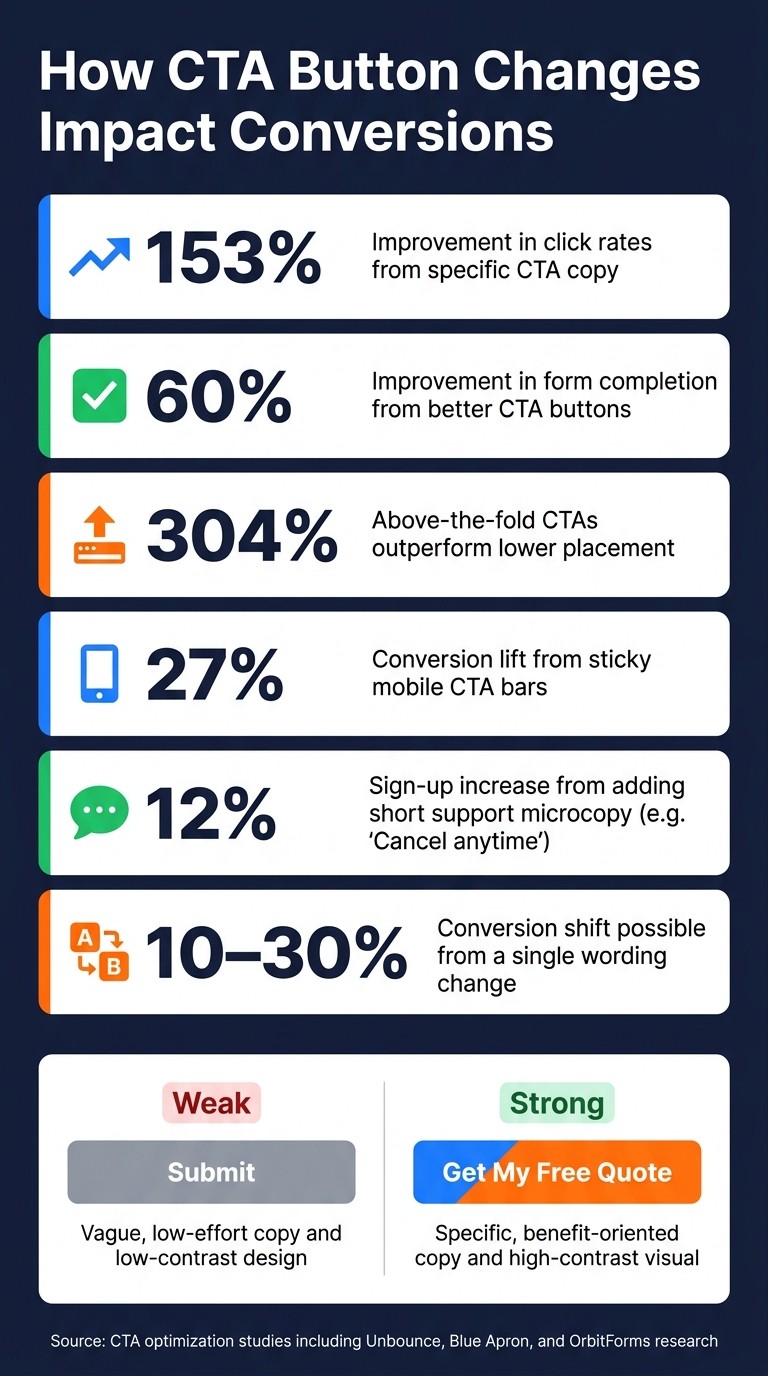
CTA Button Stats: How Small Changes Drive Big Conversion Gains
Call To Action Buttons: Crafting High Performing CTA Button Copy
Use Clear CTA Text to Reduce Hesitation
CTA button text is the last thing a visitor sees before they either complete your form or leave. And that small bit of copy can do a lot of work.
Generic labels like "Submit" don’t tell people what happens next. They feel vague, a little cold, and easy to skip. Better CTA copy does the opposite. It tells visitors what they get from the click. The goal is simple: make the button promise the result, not the task.
"The button text is the last piece of information the visitor processes before deciding to click or not. It needs to reinforce the value of clicking, reduce any remaining uncertainty, and make the action feel concrete."
Replace Generic Labels With Outcome-Focused Copy
One of the easiest fixes is to swap flat, procedural labels for action-driven copy—one of several must-have features for small business websites—tied to a clear result.
Instead of "Submit," use "Get My Free Estimate."
Instead of "Send," try "Schedule My Consultation" or "See Pricing."
That shift matters because it spells out the next step in plain English. Visitors don’t have to stop and think, What happens if I click this?
First-person wording can help even more. In one documented test, changing "Start your free trial" to "Start my free trial" lifted click-through rates by 90%. That small word - my - gives the action a sense of ownership before the click even happens. Unbounce saw something similar: a 104% increase in click-through rates after changing "Sign up" to "Start my free trial".
Clear button text can also filter for better-fit leads. If a CTA says "Book a Foundation Assessment," it speaks to people who are ready for that exact next step, not just browsing around.
Generic Label | Outcome-Focused Alternative | Why It Works |
|---|---|---|
Submit | Get My Free Estimate | Focuses on the benefit received |
Learn More | See the 3-Minute Demo | Sets clear time and content expectations |
Sign Up | Get My Free Guide | Uses first-person ownership |
Contact Us | Talk to a UX Expert | Defines exactly who the user will speak with |
Order Information | Get Your Free Quote | Increased clicks by 38% over the generic label |
Once the button text is doing its job, a short line under it can ease the last bit of doubt.
Add Short Microcopy Near the Button
Even a strong CTA can leave one small objection hanging in the air. That’s where microcopy helps.
A short line placed right below the button - like "Takes less than 2 minutes" or "No credit card required" - can answer the final concern before it turns into an exit.
Blue Apron tested this in a direct way. Adding "Cancel anytime" under their main CTA led to a 12% increase in total sign-ups.
"Specificity removes ambiguity, and ambiguity is conversion friction in its purest form." - OrbitForms
Keep this microcopy to one line. Its job is to remove one point of friction, not give people another block of text to read.
After the wording is clear, the button still needs to stand out and be easy to spot.
Fix Placement and Design So the CTA Is Easy to Find
Once the wording is clear, the next step is making sure people can actually see the button. Even strong copy falls flat when the CTA is tucked away or easy to overlook. Placement and visibility decide whether that text gets a shot at doing its job.
Place the Primary CTA at the Natural End of the Form
Put the button right after the last field people fill out. That’s where users expect the next move to be.
For short forms or simple offers, keep the button above the fold when you can. CTAs in that spot outperform ones placed below the fold by 304%. For longer forms, place the button at the natural stopping point so it feels like a clear finish line, not a scavenger hunt.
Centered CTAs often beat left-aligned buttons.
After placement, the next thing to check is visibility.
Use Contrast, Size, and Simplicity to Stand Out
Contrast matters more than color. A bright button doesn’t help much if everything around it is just as loud. Try the squint test: when you blur the page with your eyes, the CTA should still be the first control you notice.
Give the button enough whitespace and padding so it stands on its own and feels easy to tap or click.
Primary and secondary actions should never fight for attention. If your form includes a Reset or Cancel option, tone it down with a plain text link. When secondary actions look like the main action, people pause, second-guess themselves, and often do nothing.
A visible CTA is the starting point; next comes making it easy to use on smaller screens.
Make CTA Buttons Work Better on Mobile
Once a CTA is on screen, the next thing to check is simple: can someone on a phone tap it without fumbling?
A CTA can look clear and still underperform on mobile if the tap area is too small or crowded. That matters a lot for service businesses, because so much traffic now comes from phones. On a small screen, one clumsy tap can turn a ready-to-act visitor into a lost lead.
Use Thumb-Friendly Button Size and Spacing
Make the tap target big enough to hit cleanly. The minimum recommended touch target is 44×44 pixels, and many high-performing buttons are 48 to 60 pixels tall. Go smaller than that, and missed taps start to pile up. So do abandoned forms.
On mobile, full-width buttons are often the clearest option. They stand out, feel easier to hit, and remove guesswork. Give the button 20 to 30 pixels of space around it so nearby fields don't steal taps. In plain English: keep the button on its own little island.
Placement matters too. Use the thumb zone so the button stays easy to reach. A sticky CTA bar fixed to the bottom of the screen keeps the button within reach while people scroll, and it can increase conversions by 27%.
If taps still seem shaky after that, it's time to look at mobile data.
Check Mobile Form Performance Regularly
Once the button is easy to tap, watch where mobile users still drop off. Friction on phones can shift over time, so review completion rates and exit points on a regular basis. A lot of mobile problems show up right when someone is about to convert.
Pay close attention to the field where users leave most often. That's usually where the friction lives. And don't stop at desktop simulators. Test on real smartphones, or compare no-code builders vs custom development to see which platform handles mobile responsiveness best. Real devices show problems desktop testing misses, like hand position, thumb reach, and how cramped a form feels in actual use.
One more fix that helps right away: set phone fields to type="tel" so the numeric keypad opens automatically. It's a small detail, but on mobile, small details do a lot of heavy lifting.
Connect CTA Buttons to Bookings or Payments
Once a button is easy to tap, the next job is simple: make the click go straight to a booking or payment. A CTA should move the person to the next step right away - before they get distracted, second-guess it, or leave.
That starts with button text that says exactly what happens next.
Match the CTA to the Next Business Step
Your button should name the next step as plainly as possible. If the click opens a calendar, say that. Use "Book a 15-minute call" or "Schedule a foundation assessment." If the next step is a payment, be just as direct. "Pay the $50 deposit" tells people what to expect and helps them keep moving.
Specific labels beat vague ones because they line up with what the person wants to do.
Goal | Weak CTA | Stronger CTA |
|---|---|---|
Schedule Appointment | Contact Us | Book a 15-minute call |
Request Quote | Submit | Get my free quote |
Service Payment | Learn More | Pay the $50 deposit |
Secure Spot | Sign Up | Reserve your spot |
Use Tools That Connect Forms to the Next Action
Good button copy helps, but it won’t fix a broken handoff. If someone fills out a form and then has to wait for manual follow-up, leads can slip away fast.
Gatsboy connects advanced forms, online bookings, Stripe Payments, and a business dashboard so a lead can go straight from form submission to the next action. That means the person can book or pay while their intent is still there, not hours later after the moment has passed.
Conclusion: Better CTA Buttons Lead to Better Form Results
Most form drop-off happens at the click. And this same idea shows up across the rest of the form too: small CTA button changes can move conversion rates more than many business owners expect. In some cases, changing just one word can shift conversion rates by 10% to 30%.
Copy matters, but the button also needs to be easy to notice and tap. That means strong contrast, clear placement, and at least a 44×44 pixel touch target on mobile.
Then there’s the next step after the click. If a button says "Book a call" but sends people to a generic contact page, the message falls apart. It breaks the promise and loses the lead. Direct form-to-booking or form-to-payment handoffs keep people moving instead of making them stop and think.
Better CTA buttons cut friction, lift completions, and turn more visitors into leads.
FAQs
How do I choose the best CTA button text?
Use outcome-focused text that tells visitors what they’ll get, not what they need to do. Lead with a strong verb like "Get", "Start," or "Claim." Skip flat labels like "Submit" or "Click here."
Keep button text to 2–5 words. Make it specific, and line it up with where the visitor is in the journey. First-person wording can help people feel more invested.
If it helps, add a short line under the button to lower friction around commitment or price.
What CTA button color works best for conversions?
There’s no single best CTA button color for conversions.
The best color is the one that stands out the most against your page background. Put simply: contrast matters more than the color itself.
For better visibility, use a color that doesn’t appear elsewhere on the page. Also aim for at least a 7:1 contrast ratio so the button is easy to spot.
That said, color usually isn’t the main driver of conversions. In most cases, button copy and placement have a bigger effect, so test those first.
When should a form CTA lead to booking or payment?
Use a form CTA for booking or payment when the visitor is ready to take a specific, high-intent action - not when they just want to ask a general question.
A booking CTA works best when someone wants to schedule a consultation or assessment. A payment CTA fits when the person is ready to commit to a service and move forward.
The button text should match the next step with zero confusion. Phrases like Book My Assessment or Pay for Consultation make the action clear and can reduce drop-off.
Related Blog Posts
Join our community of 15,000+ business owners
Popular articles
Popular articles about your website and marketing your small business


