



5 Signs Your Business Needs a New Website
Website Tips
Your website is often the first thing potential customers see - and it speaks volumes about your business. If it’s slow, outdated, or hard to use, it’s likely costing you leads and sales. Here are five clear signs it’s time for an upgrade:
Slow Load Times: Over 53% of mobile users leave if a site takes more than 3 seconds to load.
Poor Mobile Experience: With 60% of web traffic coming from mobile, clunky layouts and unreadable text drive visitors away.
Outdated Design: 75% of users judge your credibility based on your website’s appearance.
Confusing Navigation: If users can’t find what they need quickly, 50% will leave.
Low Conversions: Weak calls-to-action, slow speeds, and missing trust signals hurt your ability to turn visitors into customers.
If your website struggles in any of these areas, it’s not just hurting your image - it’s hurting your bottom line. A modern design with essential small business website features can make all the difference.
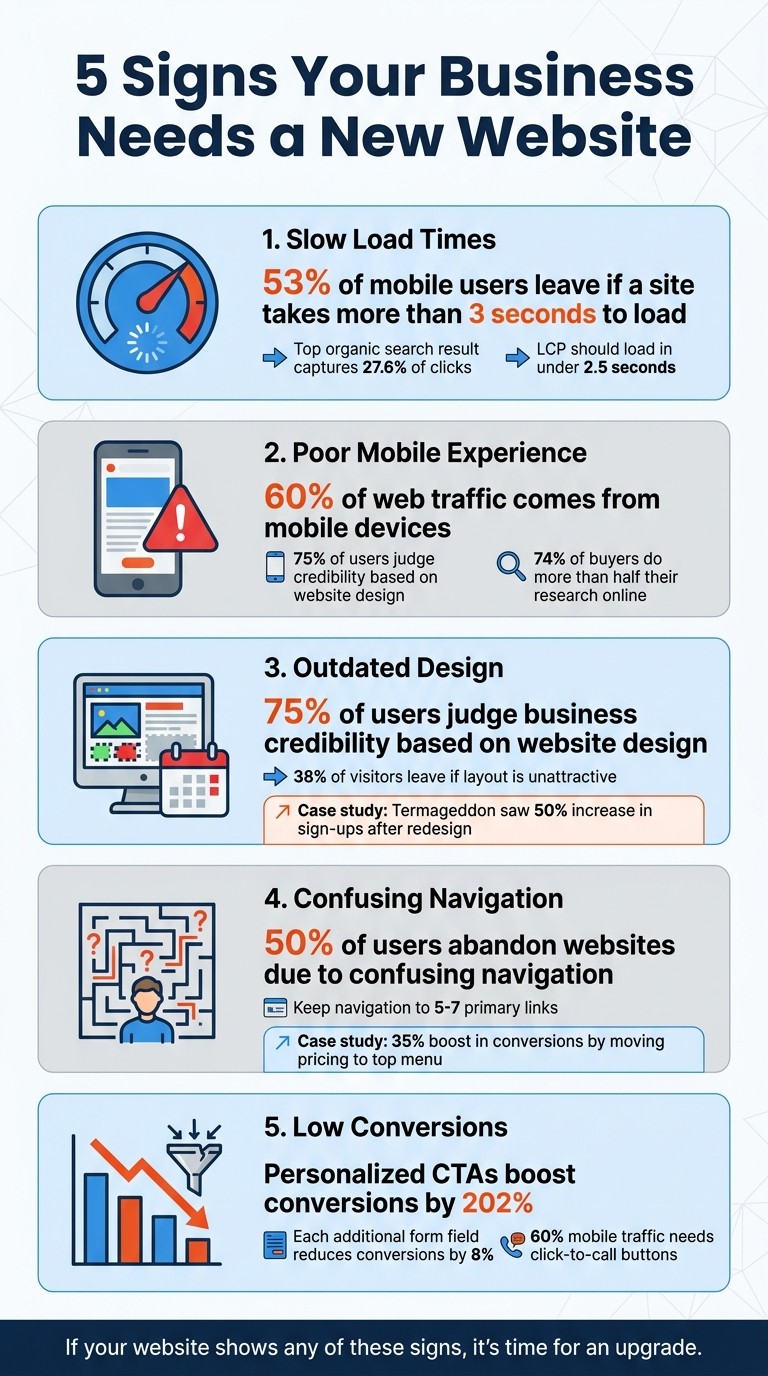
5 Signs Your Business Needs a New Website: Key Statistics and Impact
5 Signs It's Time To Redesign Your Website
Sign 1: Your Website Loads Too Slowly
When someone clicks on your website, they’re judging it within seconds - literally. If your site drags its feet, visitors will leave before you even get a chance to engage them. Speed isn’t just nice to have; it’s critical.
How Slow Loading Times Impact Your Business
Here’s a hard truth: 53% of mobile users will leave a site if it takes more than 3 seconds to load. That means over half of your potential audience could be gone before they even see what you offer.
And it’s not just about user patience. A sluggish website can make your business seem outdated. Every extra second of load time chips away at the trust and confidence people have in your brand. Plus, Google’s Core Web Vitals - key metrics for ranking - prioritize speed. For example, your Largest Contentful Paint (LCP) should load in under 2.5 seconds. Why does this matter? The top organic search result captures 27.6% of clicks, while page two results barely register.
If your site is slow, you’re losing customers, clicks, and credibility. But don’t worry - there are ways to fix it.
How to Speed Up Your Website
If your website’s slow, it’s time to take action. Start by diagnosing the problem. Use tools like Google PageSpeed Insights (pagespeed.web.dev) for a free performance check. If your mobile score is under 50, it’s a red flag.
Here are some common culprits and fixes:
Unoptimized Images: Large image files can drag your site down. Compress them with tools like TinyPNG and switch to modern formats like WebP, which are about 26% smaller than PNGs.
Too Many Plugins: If you’re using WordPress and have 20+ plugins, it’s time for a cleanup. Each plugin adds weight and slows things down.
Outdated Hosting: Cheap shared hosting might seem like a bargain, but it often struggles during peak times. Upgrading to a modern hosting platform with built-in performance tools can make a world of difference.
"Speed is king in 2026." - Off The Peg Design
A fast-loading website isn’t just about rankings - it’s about making a great first impression and keeping visitors engaged. If you’re lagging, now’s the time to step up.
Sign 2: Your Website Doesn't Work on Mobile Devices
Grab your phone and pull up your website. Is the text easy to read without zooming in? Can you tap on phone numbers or fill out forms without any hassle? If you answered "no", you're likely losing potential customers every single day.
Why Mobile Optimization Matters
Mobile devices now make up about 60% of global web traffic as of 2025. On top of that, Google uses mobile-first indexing, which means your website's ranking is based primarily on how well it performs on mobile devices - not desktops. If your mobile site is clunky or broken, your search rankings will take a hit, even for desktop users.
"A site that is not mobile-friendly is essentially invisible in search results." – Valley Digital
Your website also plays a huge role in how people perceive your business. A whopping 75% of users judge a company's credibility based on its website design. If visitors encounter tiny, unreadable text, awkward layouts, or buttons that are hard to press, they might assume your business is behind the times. And with 74% of buyers doing more than half of their research online before making a purchase, a poor mobile experience can cost you new customers at every stage of their journey.
So, how do you fix it? Let’s dive into some practical ways to make your site mobile-friendly.
How to Make Your Website Mobile-Friendly
Start by testing your site with tools like Google PageSpeed Insights. If your mobile score is below 50, it's a red flag - you’re likely losing business. Even scores under 70 suggest you're leaving money on the table.
Here are a few things to check on your phone:
Text readability: Is the text legible without zooming in? If not, increase the font size.
Button and link spacing: Are buttons and links easy to tap without accidentally hitting the wrong one? Make sure they're well-spaced and large enough to tap comfortably.
Forms and calls-to-action: Can users fill out forms easily? Is your phone number clickable so they can call you with one tap? These small details make a big difference.
The best solution? A responsive design. This ensures your site automatically adjusts its layout to fit any screen size, whether it's a phone, tablet, or desktop. And don’t forget - speed matters. A slow-loading mobile site can drive visitors away just as quickly as a poor layout.
If you're looking for a hassle-free option, consider Gatsboy's done-for-you websites. Built on Framer, these sites come mobile-optimized right out of the box. Features like tap-to-call buttons and mobile-friendly forms are included, making it easy to turn visitors into customers - no tech skills required.
Sign 3: Your Website Design Looks Outdated
If you’re reluctant to share your website link or feel the need to explain, “We’re working on updates,” it’s probably time for a design overhaul.
Why Outdated Design Hurts Your Business
Here’s a hard truth: 75% of users judge a business’s credibility based on its website design. Visitors don’t dive into your "About Us" page or price lists right away - they form their opinion in under three seconds, purely on visual appeal.
An outdated design can send the wrong message. Elements like hero image sliders, heavy drop shadows, tiny text, or overused stock photos can make your site feel dated and unprofessional. Even worse, 38% of visitors will leave if they find your layout unattractive. That means you could lose potential customers before they even explore your offerings.
"If you hesitate before sharing your URL - if you catch yourself adding a mental asterisk when someone says they'll look you up - that hesitation is telling you something real." – Kyle Van Deusen, Owner, OGAL Web Design
The impact goes beyond appearances. A dated site can make visitors question whether your business is active, financially stable, or secure enough for online transactions. For example, in March 2026, Termageddon revamped their outdated website, which had a poor performance score of 31/100. Within just 30 days of launching their sleek, performance-driven redesign, they saw a 50% increase in agency partner sign-ups and raised their performance score to 96/100.
Refreshing your website’s design can completely transform how people perceive your business. Here’s how to get started.
How to Update Your Website's Design
Start with a small business website checklist to cover the basics. Switch to clean, spacious layouts with plenty of whitespace. Use high-quality, authentic images that showcase your team or work to build trust. Upgrade to modern, easy-to-read typography that aligns with today’s standards.
Modern tools like Framer allow you to create professional layouts without needing technical expertise. Alternatively, services like Gatsboy offer ready-made websites built with current design principles, so you don’t have to handle coding or complex design work.
Simplicity is key. Focus on clear calls to action, user-friendly navigation, and responsive layouts that look great on any device. A refreshed design not only enhances your site’s appearance but also improves conversions and helps your business grow. If your website is more than two or three years old, it’s probably time to update it to stay in step with modern trends.
Sign 4: Visitors Can't Navigate Your Website Easily
Good navigation is just as important as speed, mobile-friendliness, and design when it comes to keeping visitors on your site. If users can't quickly find what they need, they'll leave. In fact, 50% of users abandon websites due to confusing navigation.
Common User Experience Problems
One major issue? Overloaded menus. When your navigation bar has more than seven options, it overwhelms users and makes decision-making harder. Another common mistake is using unclear labels. For example, calling your blog "The Lounge" instead of "Blog" might sound clever, but it often leaves visitors puzzled.
Broken links are another frustration point. Clicking on a link only to hit a dead end makes your site seem unprofessional or neglected. For example, in January 2026, Sahar from ReloadUX worked with a SaaS company whose pricing page was buried deep in the site’s navigation. By moving the pricing page to the top-level menu, the company saw a 35% boost in conversions within a month.
"Navigation isn't just a UX problem, it's a business problem. Every time a user gets lost on your site, they are one step closer to leaving." – Sahar, UX Specialist, ReloadUX
Mobile users face even more challenges. Menus with tiny text or buttons that are too close together frustrate the 60% of users browsing on mobile devices. On top of that, if users can't find clear calls to action, like a "Contact Us" or "Book Now" button, they won't go looking for it.
How to Fix User Experience Issues
Fixing navigation issues can make a huge difference in how users interact with your site. Start by simplifying your main navigation to 5–7 primary links. Use clear, straightforward labels that align with what people expect. For example, place your logo in the top-left corner and use familiar icons to meet user expectations.
Consider adding a sticky navigation bar that stays visible as users scroll, making it easier for them to access the menu at any time. Regularly check for broken links using tools like Google Search Console or Screaming Frog to ensure a smooth browsing experience.
For mobile users, design menus with large, well-spaced buttons to prevent accidental clicks. Make sure essential features, like a "Contact Us" button, are easy to find. Services such as Gatsboy offer built-in contact forms and live chat options to streamline communication. Place critical elements, like contact forms, "above the fold" - right at the top of the page, where users will see them immediately. When navigation is simple and intuitive, visitors are more likely to stick around, engage, and take action.
Sign 5: Your Website Isn't Generating Leads or Sales
An underperforming website doesn’t just frustrate visitors - it directly impacts your bottom line. If your phone isn’t ringing or your contact form submissions have dried up, your site might be the culprit. When visitors land on your page but fail to take action, it’s a clear sign that your website is struggling to convert traffic into leads or sales.
How Website Problems Reduce Conversions
Several common issues can sabotage your conversion rates:
Slow loading speeds: Even a delay of a few seconds can cause visitors to leave.
Weak calls-to-action (CTAs): Buttons or prompts that are hard to find or lack clear direction won’t guide users effectively.
Outdated design or security warnings: These erode trust and make your site look unreliable.
Missing trust signals: Features like customer reviews, testimonials, or security badges are critical to building confidence with potential customers.
"Your website isn't a digital brochure. It's a sales tool." – Forge Web
If your site feels more like an online brochure than a functional sales tool, it’s time for an upgrade.
How to Increase Conversions with Better Features
You can turn your website into a lead-generating powerhouse by focusing on features that encourage action. Start with these steps:
Secure your site: Adding an SSL certificate removes "Not Secure" warnings and reassures visitors.
Simplify contact forms: Stick to 3–4 fields. Research shows that every additional field can reduce conversions by up to 8%.
Upgrade your CTAs: Swap generic prompts for personalized, benefit-focused ones. For example, instead of "Submit", try "Get Your Free Quote" or "Book Your Appointment Now." Personalized CTAs can boost conversions by 202%.
Optimize for mobile users: With mobile traffic making up about 60% of global web traffic, features like click-to-call buttons are essential. These allow users to contact you with a single tap, increasing the likelihood they’ll take action.
Additionally, tools like Gatsboy's Website + Pro plan can help streamline the customer journey. Features such as Stripe Payments for online transactions, Google Reviews integration for trust-building, and automated online booking systems make it easier for visitors to convert into customers. By removing friction and making the process seamless, your website can go from being a passive presence to an active sales tool.
Comparison: Common Website Problems vs. Gatsboy Solutions
If you've noticed any of the five warning signs on your business website, you might be asking what a modern solution could bring to the table. Let’s break down how Gatsboy's cutting-edge features directly tackle these common issues and turn them into opportunities for growth.
At its core, Gatsboy addresses these challenges through static site generation and performance-driven features. By eliminating server-side delays, Gatsboy delivers your website instantly via a global Content Delivery Network (CDN). This means your site loads in milliseconds instead of seconds - a game-changer when speed is critical.
Common Website Problem | Gatsboy Solution |
|---|---|
Bloated Images – Large, uncompressed files that slow down mobile rendering | Automated Image Optimization – Ensures images load quickly and look great on any screen |
Server Latency – Delays caused by servers processing requests and generating HTML | Static Site Generation – Pre-renders pages into static files for instant delivery via CDN |
Render-Blocking Resources – CSS and JS files preventing content from displaying quickly | Inlining & Code Splitting – Prioritizes essential CSS while deferring nonessential JavaScript |
Slow Mobile Experience – Non-responsive designs that frustrate users with pinching and zooming | Mobile-First Optimization – A design approach that guarantees smooth performance on any device |
Poor Security – Vulnerabilities in CMS platforms and databases | High Security – Eliminates server-side and database risks for a safer website |
These features don’t just fix technical problems - they also streamline the customer experience, turning your website into a tool that works for you 24/7. By addressing these challenges, Gatsboy helps businesses stay competitive and poised for growth.
For those looking to go even further, the Website + Pro plan adds business-focused extras like Stripe Payments for easy transactions, Google Reviews integration to enhance credibility, and advanced forms to simplify capturing leads. Together, these tools remove barriers in the customer journey, transforming your website into a high-performance asset that drives conversions day and night.
Conclusion
Your website can either be your biggest asset or a major setback. If it’s slow to load, doesn’t work well on mobile, looks outdated, confuses visitors, or fails to generate leads, you’re likely losing potential customers within seconds. First impressions matter, and 75% of users determine your business's credibility based on your website design. Even more concerning, 53% of mobile users will abandon a site that takes over three seconds to load. Every moment these problems go unresolved means more missed opportunities and customers turning to competitors.
Thankfully, fixing these issues doesn’t have to be complicated. You don’t need to juggle multiple vendors, figure out hosting, or learn how to code. Gatsboy offers an all-in-one solution that takes care of everything - from fast-loading speeds and mobile-first design to built-in tools like Stripe Payments and Google Reviews integration. With the Website + Pro plan, starting at $500 plus $47/month, you can have a system designed to attract leads and drive growth.
"A website you're proud of changes how you market. You share it more... You stop making excuses for it."
– Kyle Van Deusen, Owner, OGAL Web Design
Don’t let a poorly performing website hold your business back. Even a small boost - like converting 3% of your traffic - can make a huge difference in growth. Your next customer is out there searching right now. Make sure they find a website that earns their trust and drives them to take action. With the right approach, you can turn your website into a powerful tool for growth and seize every digital opportunity.
FAQs
How can I tell if my website is too slow?
If your website takes longer than 3 seconds to load, it might be too slow. This can negatively impact both user experience and conversion rates, as visitors are less likely to stay on a sluggish site.
To check your site's speed, tools like Google’s PageSpeed Insights are incredibly helpful. A score below 70 often points to issues like outdated technology or subpar hosting. In such cases, you might need to consider a website redesign to improve performance.
What should I check first for mobile issues?
The first thing you need to do is ensure your website works seamlessly on mobile devices. A fully responsive site should load quickly and display properly, without users needing to pinch or zoom to navigate.
If your website was created before 2018, there's a chance it might not be optimized for mobile use. This could negatively impact user experience and even harm your search engine rankings. To stay ahead, use tools to test your site's loading speed and appearance on mobile. Fix any problems as soon as possible to keep both users and search engines happy.
How do I know if my website needs a redesign or just updates?
If your website takes over 3 seconds to load, isn’t mobile-friendly, or looks outdated, it’s probably time for a complete redesign. Other warning signs include dropping traffic numbers, poor search engine rankings, or security vulnerabilities. On the other hand, if your site performs well on mobile, loads quickly, and has a modern design but just needs a few content tweaks, simple updates might be all you need. Make it a habit to review these aspects regularly to keep your site in top shape.
Related Blog Posts
Join our community of 15,000+ business owners
Popular articles
Popular articles about your website and marketing your small business


