



Complete Guide to Business Website Domains
Website Tips
Your domain name is your online identity. It’s the first thing customers notice and plays a key role in building trust, credibility, and brand recognition. A good domain name is simple, memorable, and aligned with your business goals. Here's what you need to know:
Structure Matters: A domain consists of the second-level domain (your chosen name) and the top-level domain (.com, .net, etc.). Subdomains and subfolders help organize content effectively.
SEO Impact: While domain extensions don’t directly affect SEO, using relevant keywords and country-specific TLDs (.ca, .uk) can boost local search relevance.
Choosing the Right Name: Keep it short, easy to spell, and future-proof for growth. Avoid hyphens, numbers, and overly specific terms.
Extensions: .com is the most trusted, but industry-specific extensions like .tech or .shop can highlight your niche. Country-specific TLDs build local trust.
Registration Tips: Act quickly, secure multiple extensions, and choose a reliable registrar with features like WHOIS privacy and domain lock.
Your domain name is more than an address - it’s a vital part of your business identity. Choose wisely to support your long-term goals.
The Ultimate Guide to Securing Your Dream Domain Name | The Journey
Domain Name Structure Explained
Every domain name serves as your website's address. Breaking down its components can help you better organize your site and make smarter decisions about your online presence.
Components of a Domain Name
A domain name is more than just the Second-Level Domain (SLD) and Top-Level Domain (TLD). Additional elements like subdomains and the Domain Name System (DNS) also play crucial roles. The SLD is the unique name you register for your business - like “google” in google.com. This part reflects your brand identity. The TLD, which appears after the final dot, indicates the category or location of your website, such as .com, .org, or .net. Together, the SLD and TLD form the root domain, which acts as the foundation of your website's address.
Subdomains, which are optional, allow you to organize your site into specific sections. For instance, "blog" in blog.example.com or "help" in help.shopify.com directs users to dedicated areas without requiring a new domain. Meanwhile, the DNS translates these domain names into IP addresses, guiding browsers to your website.
Here’s a fun fact: By the end of 2024, there were 1,602 TLDs available globally. The .com extension remains the most popular, with 156.3 million registrations as of December 2024. It's used by 49.2% of all websites worldwide and is remembered by users 44% of the time - more than any other extension. Additionally, 88% of the 500 most valuable global brands rely on .com for their primary web presence.
These components and statistics highlight why domain structure is so crucial, especially when considering its impact on SEO.
How Domain Structure Affects SEO
When it comes to search rankings, Google treats all generic TLDs equally. According to the Google Webmaster Blog:
Overall, our systems treat new domain extensions like any other extensions (.com and .org). Keywords in a TLD do not give any advantage or disadvantage in search.
That said, domain structure can still play a role in SEO and local search relevance. For instance, country-code TLDs (ccTLDs), like .ca or .uk, are advantageous for region-specific searches. Shoppers in Canada, for example, are four times more likely to buy from a site with a .ca domain because it signals local shipping and currency options.
The way you organize your content also matters. Using subfolders (e.g., example.com/blog) instead of subdomains (e.g., blog.example.com) is generally better for SEO. Subfolders consolidate your site's authority and link equity under one domain. Additionally, while exact match domains (EMDs) once provided ranking boosts, Google’s algorithms now ensure that keyword-heavy names alone won’t help low-quality sites rank.
Domain Component | Example | SEO/Business Impact |
|---|---|---|
Top-Level Domain (TLD) | .com, .ca, .org | Builds trust, improves memorability, and aids in local search targeting |
Second-Level Domain (SLD) | google (in google.com) | Represents your brand identity and can include relevant keywords |
Subdomain | blog.example.com | Helps organize content but might dilute link authority |
Subfolder | example.com/blog | Preferred for SEO as it consolidates authority and link equity under a single domain |
How to Pick the Right Domain Name
Building on the basics of domain structure, selecting the perfect domain name is a crucial step in bringing your brand to life online. A strong domain not only makes a lasting impression but also supports your long-term goals.
What Makes a Good Domain Name
Keep it short and simple. A domain name with just 2–3 syllables is easier to type, share, and remember. Shorter names also reduce the risk of typos. Research shows that brand-aligned names are 2.3 times more effective than generic ones, while distinctive names can boost brand recall by 31%.
Avoid hyphens and numbers. These elements tend to confuse users and can make your domain seem less professional. They also increase the chance of visitors landing on the wrong site, which could hurt your credibility.
Make it pronounceable. A good test is to say the domain name out loud. It should be easy to pronounce and spell correctly on the first try. Ideally, about 90% of people should get it right when they hear it for the first time.
Think about future growth. Avoid names that tie you to a specific location or product. For instance, "BostonDogBaths.com" might work locally but limits your ability to expand into other cities or services. Take inspiration from Richard Branson's Virgin brand:
The name itself was thought up on the hoof. One night some friends and I were chatting and decided to call our group Virgin, as we were all new to business. The name stuck and had a certain ring to it.
A well-thought-out domain name builds trust and strengthens your online presence. Once you’ve chosen a memorable name, the next step is to balance your branding with keyword relevance.
Balancing Brand Names and Keywords
After nailing the basics, it’s time to refine your approach by incorporating keywords - without sacrificing your brand’s identity.
Focus on your brand first. Overloading your domain with keywords can backfire. Since Google’s 2012 update, keyword-heavy domains like "BuyCheapPhonesOnlineNow.com" are often penalized and may appear spammy.
Use the "Brand + Service" formula. Combine your unique brand name with a descriptive term to clarify your offering. Examples like "WatsonHomes.build" or "SnazzyGlam.makeup" pair a strong identity with immediate context about your business.
Leverage descriptive TLDs. Instead of stuffing keywords into your main domain name, consider using industry-specific extensions like .SHOP, .LEGAL, or .FITNESS. These not only signal your niche but also keep your primary domain clean and memorable.
While keywords can provide clarity, they should complement - not overpower - your brand identity. A balanced approach ensures your domain is both effective and professional.
Domain Extensions for Business Websites
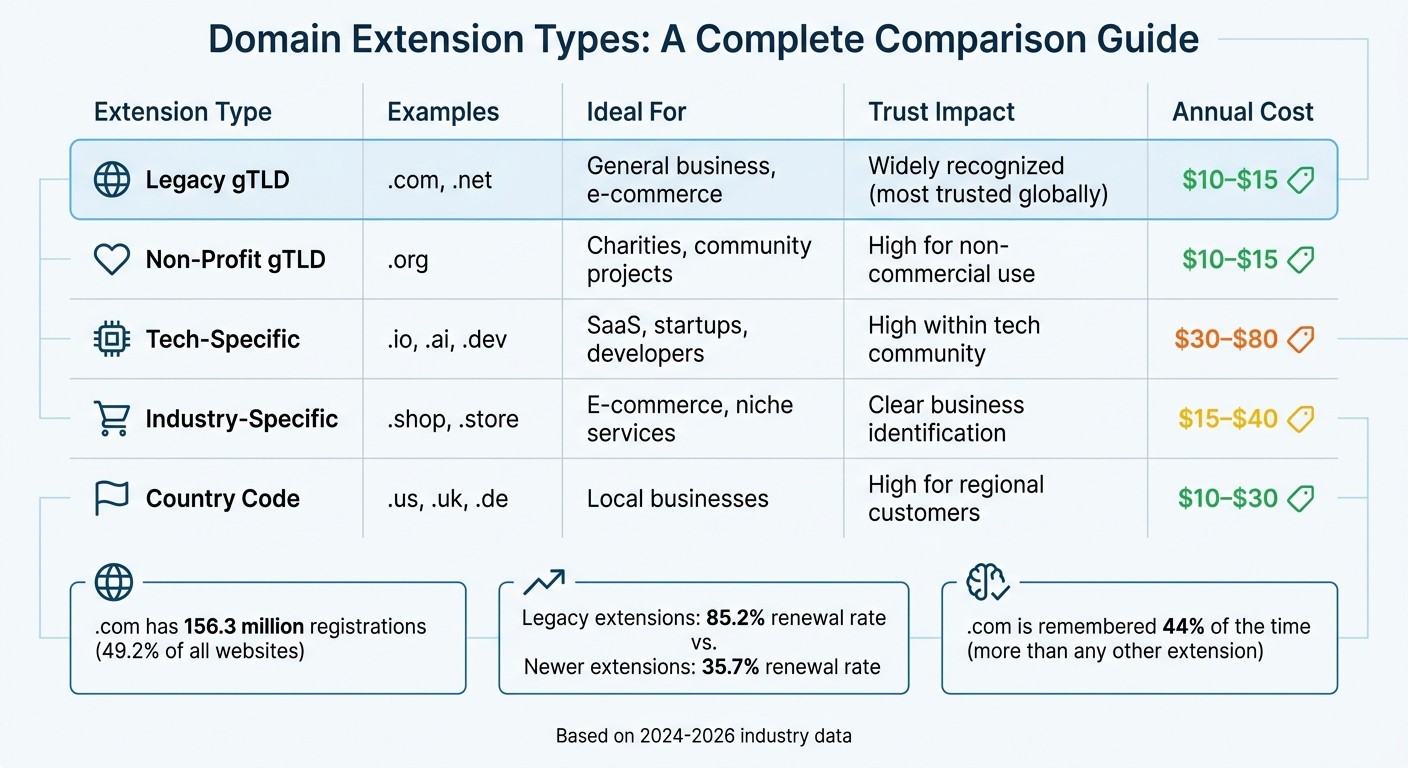
Domain Extension Types Comparison: Features, Costs, and Best Use Cases
Once you've secured a strong domain name, choosing the right extension can enhance your brand's credibility and help you connect with your target audience. With over 1,600 TLDs available, understanding which one aligns with your business is crucial for how customers perceive and locate you online. Let’s break down the most common, industry-specific, and regional domain extensions to help you define your online identity.
Common Domain Extensions
.com is the standard-bearer. As the most recognized and trusted extension globally, .com boasts over 160 million active registrations. Studies even suggest that users often view .com websites as more reliable than government (.gov) sites. If you can secure a clean, memorable .com domain for the typical $10–$15 annual fee, it’s almost always the best option.
"The .com domain extension is ubiquitous across the internet. The world's biggest websites, including Google, Facebook, and Amazon, all end in .com." – Dylan Ris, Shopify
.net offers a solid backup option. While originally created for network infrastructure providers, .net has evolved into a versatile extension with nearly 13 million registrations worldwide. If you opt for .net, consider also purchasing the corresponding .com to avoid losing traffic to competitors.
Industry-specific extensions highlight your niche. Extensions like .io, .ai, .shop, and .tech can communicate your business focus instantly. For instance, Netflix uses netflix.shop for its merchandise store.
"In tech circles, .io immediately communicates that you are a technology product or developer tool." – Ishan Karunaratne, Software Architect & Infrastructure Engineer
Be mindful of costs. While .com domains are relatively affordable at $10–$15 annually, specialized extensions often come with higher registration and renewal fees. Always check these costs before committing.
Avoid .org for commercial ventures. Since .org is primarily associated with non-profits and community initiatives, using it for a for-profit business can confuse potential customers and damage credibility.
Generic vs. Country-Specific Extensions
When deciding between generic and country-specific extensions, consider your business's audience and goals.
Generic TLDs are ideal for global reach. Extensions like .com are universally recognized and accessible to users worldwide, making them a great choice for businesses targeting international markets.
Country-code TLDs (ccTLDs) build local trust. These extensions, such as .us or .de, signal a strong regional presence and can improve local search rankings within their respective countries.
"A country-specific TLD signals local presence and accountability, making customers more comfortable." – GreenGeeks
Keep in mind that some ccTLDs, like .us, may require proof of local residency or citizenship, while generic TLDs are open to everyone. For businesses operating solely in one country - like a bakery in Germany - a ccTLD like .de can enhance local SEO and customer trust. However, avoid overly complex extensions like .consulting or .agency, as they can be difficult for customers to remember or type correctly when spoken aloud.
Domain Zone Types Compared
Here’s a quick comparison of different domain extension types:
Extension Type | Examples | Ideal For | Trust Impact | Annual Cost |
|---|---|---|---|---|
Legacy gTLD | .com, .net | General business, e-commerce | Widely recognized | $10–$15 |
Non-Profit gTLD | .org | Charities, community projects | High for non-commercial use | $10–$15 |
Tech-Specific | .io, .ai, .dev | SaaS, startups, developers | High within tech community | $30–$80 |
Industry-Specific | .shop, .store | E-commerce, niche services | Clear business identification | $15–$40 |
Country Code | .us, .uk, .de | Local businesses | High for regional customers | $10–$30 |
Newer gTLDs often have lower retention rates. While legacy extensions like .org enjoy an 85.2% renewal rate, newer options such as .store or .tech see only 35.7%.
Additionally, some TLDs, like .dev and .app, come with built-in security features. Being on the HSTS preload list, these domains require HTTPS connections, offering a slight boost in trust and security. On the other hand, emails from .com addresses are less likely to trigger spam filters compared to newer extensions like .xyz.
How to Register Your Domain
Domain Registration Steps
Start by checking if your domain is available. Use a trusted registrar's search tool to see if your desired domain name is up for grabs. Aim for a simple .com domain without hyphens or numbers. If your first choice isn’t available, brainstorm alternative names. Before finalizing, check the domain's history using the Wayback Machine to ensure it hasn’t been associated with spam or failed ventures.
Act quickly to register. Domain registration works on a first-come, first-served basis, so don’t wait too long - someone else might snatch it up. Typically, registration costs range between $10 and $20 per year, with renewal fees often around $35. For example, as of March 2026, .com domains on Wix start at $9.90, while .org and .net domains begin at $14.95.
Secure your brand across platforms. Once your domain is set, claim matching social media handles (like on Instagram, TikTok, and LinkedIn) to keep your branding consistent. You might also want to purchase alternative extensions - such as .net, .org, or .co - to prevent others from using similar names. For instance, if your domain is "cartershvac.com", it’s smart to also register "carterhvac.com" to cover common misspellings.
Pick your registrar wisely. With over 2,400 ICANN-accredited registrars available, choosing the right one is crucial. For example, GoDaddy manages over 84 million domains as of 2026, but some registrars are known for aggressive upselling tactics. Look for registrars that offer features like free WHOIS privacy, Two-Factor Authentication, and Domain Lock to protect against unauthorized transfers.
Once your domain is registered, it’s essential to follow best practices for managing and securing it.
Registration Tips and Best Practices
Here are some tips to help you protect your domain and maximize its value:
Check renewal fees upfront. A domain with an attractive low introductory price might come with steep renewal costs - often around $35 per year. Be sure to review the "Renewal" section before buying. After registering, enable Domain Lock to prevent unauthorized transfers. Keep in mind, ICANN requires a 60-day lock on newly registered domains.
Avoid overly specific domain names. Domains tied to a specific product or location can limit your future growth. Research shows startups that carefully select their domain names are 30% more likely to succeed. Since 80% of customers research brands online before purchasing, your domain plays a critical role in your online presence and business growth.
Streamline your tools. If you’re building a <a href="https://gatsboy.com">small business website</a> on Gatsboy, check if your domain registrar offers easy integration with website builders, email services, and SSL certificates. Managing everything under one roof simplifies operations and reduces the hassle of dealing with multiple vendors.
Domain Name Generator Tools
How to Use Domain Generators
Domain name generators use AI to suggest brand names based on your business description and keywords. These tools take the guesswork out of brainstorming by creating options like compound words (e.g., "Snapchat"), abstract but catchy terms, or descriptive names with unique twists. Many modern generators also include real-time availability checks, so you can instantly see if a .com domain or matching social media handles on platforms like Instagram, TikTok, and X are available.
The process is simple: enter your business details or keywords, browse the AI-generated suggestions, and register your chosen domain through the tool’s integrated registrar. Some generators even let you select naming styles - like professional, playful, or minimal - to better suit your brand’s personality. For instance, GoDaddy's domain generator, which draws on over 20 years of experience, has a 4.5 out of 5 stars rating based on 134,596 reviews.
For more precise results, use specific inputs. Instead of broad terms like "coffee shop", try something like "sustainable outdoor gear for millennials" to get more tailored suggestions. Once you have a potential name, apply the phone test - if people struggle to spell it after hearing it, it’s likely too complicated. Tools like Instant Domain Search provide instant availability checks for over 800 domain extensions as you type. Dharmesh Shah, Founder of HubSpot, shared:
I've used Instant Domain Search for years. It's the fastest way to find and check domain availability
Don’t forget to check social media handles early and claim them right after registering the domain to ensure your brand stays consistent. If you’re launching a <a href="https://gatsboy.com">small business website</a>, look for generators that integrate with website builders and email setup to make the process smoother.
With these tools speeding up the brainstorming process, the next step is to fine-tune the suggestions to ensure they reflect your brand’s identity.
Adapting Generated Names to Your Brand
Once you’ve gathered a list of potential names, refine them to better suit your brand. These generated names are just starting points - adjust them to resonate with your audience. Share your favorites with friends or colleagues to test how memorable they are after 48 hours. Use the "cafe test": if someone struggles to hear or spell the name in a noisy environment, it’s likely too complex.
When narrowing down your options, avoid names that might restrict future growth. Some experts suggest scoring names on a scale of 0–18, only considering those that score 14 or higher. Also, think about how the name will look in a logo - many generators now provide instant logo previews to help you visualize your brand before committing.
Before finalizing, check the domain’s history using tools like the Wayback Machine to ensure it hasn’t been tied to spam or failed ventures. If your top choice isn’t available, experiment with synonyms or related terms. For example, instead of "mechanic", try "repair" or "automotive" to uncover alternative options. To protect your brand, consider registering multiple extensions (like .com and .net) or common misspellings of your chosen name.
Domain Selection Mistakes to Avoid
Avoiding Complex Domain Names
Complicated domain names can hurt your traffic and drive potential customers away. If people struggle to remember or type your domain correctly, they'll likely move on to a competitor. Research indicates that domain names with just 2–3 syllables are easier to recall, achieving a 70% recall rate within 24–48 hours. If your domain doesn’t meet this standard, it’s probably too complicated. A great example of this is Netflix’s failed attempt with Qwikster in 2011. The name confused users, and the company didn’t secure the corresponding .com domain or social media handles. The result? Public backlash and the eventual shutdown of the service.
To avoid this, use the "radio test": say your domain out loud and ask others to spell it. If they struggle, it’s likely too complex. This is especially important for mobile and voice communication. Names that are hard to interpret can confuse voice assistants like Siri or Alexa, which may result in lost traffic. As .inc Domains puts it:
A name that's often misheard can easily translate into missed opportunities, whether it's potential customers, collaborators, or clients searching for you.
Clarity is key, and it ties directly to mobile usability, which is another critical factor.
Testing Mobile Readability
Simplicity also matters when typing your domain on mobile devices. With over half of web traffic coming from mobile users, your domain should be easy to type on a small screen. Long or complicated domains increase the chance of typos, frustrating users and causing them to abandon their visit. A short, intuitive domain is far more user-friendly.
To ensure this, test your domain on a mobile device. If it’s difficult to type quickly and accurately, it’s time to rethink your choice.
Selecting Available Extensions
Most people instinctively type .com when entering a web address. While there are over 1,000 domain extensions available today, .com remains the most familiar, with over 150 million registered domains. Opting for less common extensions like .biz or .info when the .com version is unavailable can lead to traffic being misdirected to someone else.
Protect your brand by securing multiple extensions. Registering the .com, .net, and .org versions of your domain - even if you only use one - helps safeguard your online identity. You can forward the extra domains to your primary site, ensuring consistency and reducing the risk of confusion. As GoDaddy explains:
A relevant domain name signals you've invested in your operation, unlike some fly-by-night operation that might disappear unexpectedly.
For small business websites, sticking with common extensions like .com makes it easier for customers to find and trust your site.
Key Takeaways for Your Domain Strategy
Your domain is more than just a web address - it's the foundation of your digital identity. A domain that aligns closely with your brand strengthens recognition and makes it easier for customers to remember and share. In fact, domains with 2–3 syllables boast a 70% recall rate within 24–48 hours, making them highly effective for building awareness.
When it comes to extensions, .com remains the gold standard due to its universal trust. However, industry-specific extensions like .ai for tech companies or .store for e-commerce can work well if they enhance your brand identity. To safeguard your brand, secure multiple extensions - such as .com, .net, and .org - even if you only plan to use one. This prevents competitors from hijacking your traffic and helps protect your digital presence.
Consistency across platforms is another critical piece of the puzzle. Before finalizing your domain, check its availability across the USPTO trademark database, state business registries, and social media platforms. This step may narrow your options, eliminating 50% to 70% of initial candidates, but it's crucial for long-term brand protection. And don’t wait - register your domain as soon as possible to avoid losing it to domain squatters.
A great domain is also easy to use and remember. Test its clarity with real users: it should have a 90% correct pronunciation rate on the first try and be simple to type on mobile devices. Avoid common pitfalls like hyphens, numbers, or overly specific geographic references. For instance, a name like "BostonDogBaths" might work for now, but it could limit your options if you expand to other cities or services.
Finally, think beyond today. Your domain should grow with your business, not hold it back. Choose one that's memorable, aligned with your brand, and flexible enough to support your vision for the next five years. A well-thought-out domain strategy sets the stage for long-term success.
FAQs
Should I buy more than one version of my domain?
Buying multiple versions of your domain can be a smart move. Grabbing different extensions like .com, .net, or .org, along with variations of your domain name, helps protect your brand and avoid potential issues.
Here’s why it’s worth considering:
Brand Protection: Owning multiple versions stops competitors or malicious actors from using similar domains that could harm your reputation.
Avoiding Confusion: It ensures visitors land on the correct website, even if they type in a slightly different address or use an alternate extension.
Long-Term Branding: Securing these domains supports your business's growth by keeping your online identity consistent and recognizable.
Think of it as a safety net for your online presence - it’s an investment that can save you headaches down the road.
Do I need a .com if I’m using a newer extension?
While .com remains the most familiar domain extension, newer options can also work effectively for your business. Many companies are thriving with extensions that better reflect their brand or industry. The key is to select a domain that aligns with your business goals and sticks in your customers' minds.
How can I tell if a domain’s past will hurt my site?
To ensure a domain's past won't negatively impact your site, dig into its history using tools like the Wayback Machine or domain history checkers. Watch for red flags like spammy content, evidence of misuse, or past penalties, as these could harm your SEO and reputation. Spotting these issues early can save you from future headaches.
Related Blog Posts
Únete a nuestra comunidad de 15,000+ propietarios de negocios
Artículos populares
Artículos populares sobre su sitio web y la comercialización de su pequeña empresa


