


Local SEO Checklist for Service-Based Businesses
Small Business Marketing
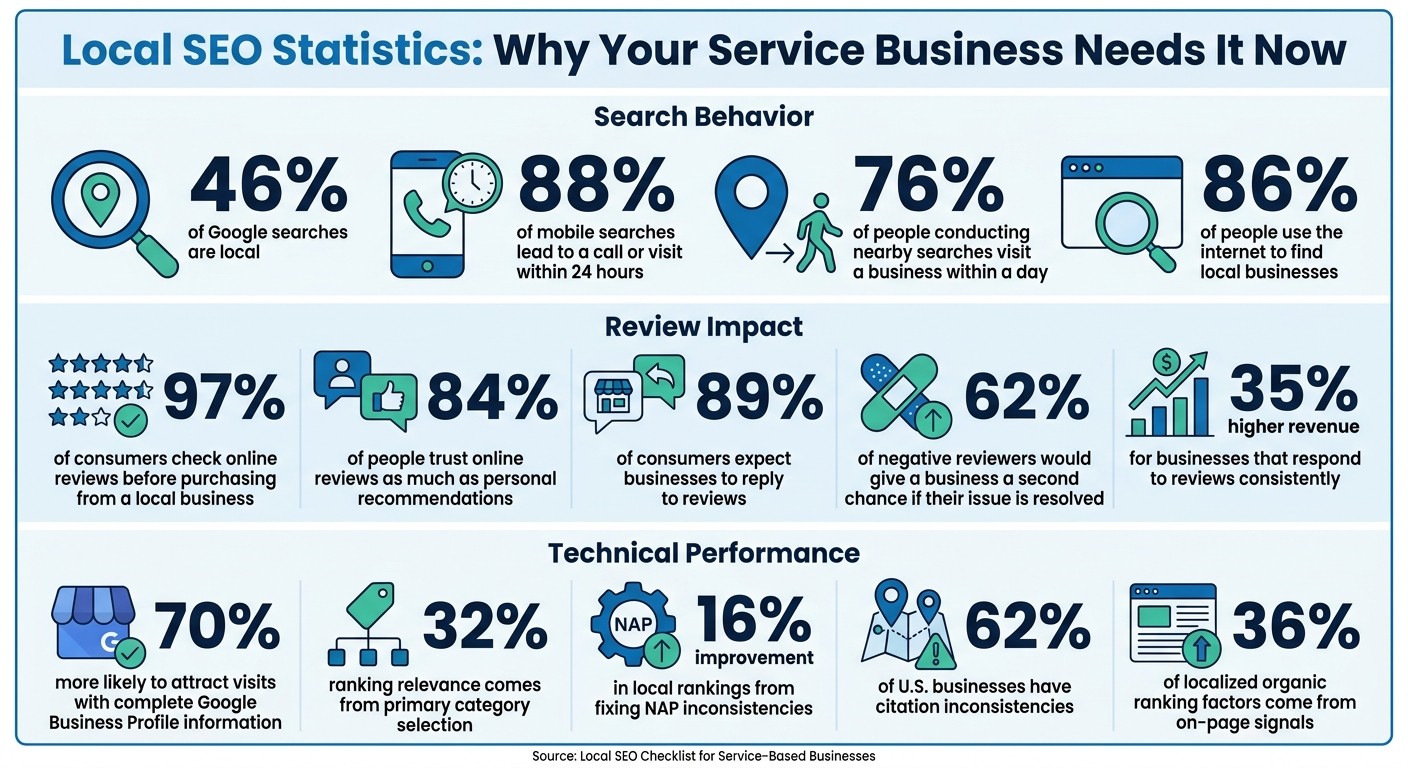
When people search for services like "plumber near me", your business needs to be visible in local search results. Why? Because 46% of Google searches are local, and 88% of mobile searches lead to a call or visit within 24 hours. If your business isn’t showing up, you’re losing potential customers to competitors.
This guide breaks down how to improve your local SEO step by step. Key areas include:
Google Business Profile: Claim, verify, and optimize your profile with accurate details, photos, and regular updates.
NAP Consistency: Ensure your Name, Address, and Phone number are identical across all platforms to boost trust and rankings.
Location-Specific Content: Use local keywords and create service area pages to target specific regions.
Customer Reviews: Collect, respond to, and showcase reviews to build credibility and improve rankings.
Citations: Fix inconsistencies in online directories and track performance regularly.
Local SEO isn’t a one-time task - it’s about maintaining accuracy, engaging with customers, and optimizing for local searches to drive more traffic and calls.
Local SEO Statistics and Impact for Service-Based Businesses
How To DOMINATE Local SEO For Home Service Companies in 2025
Set Up Your Google Business Profile
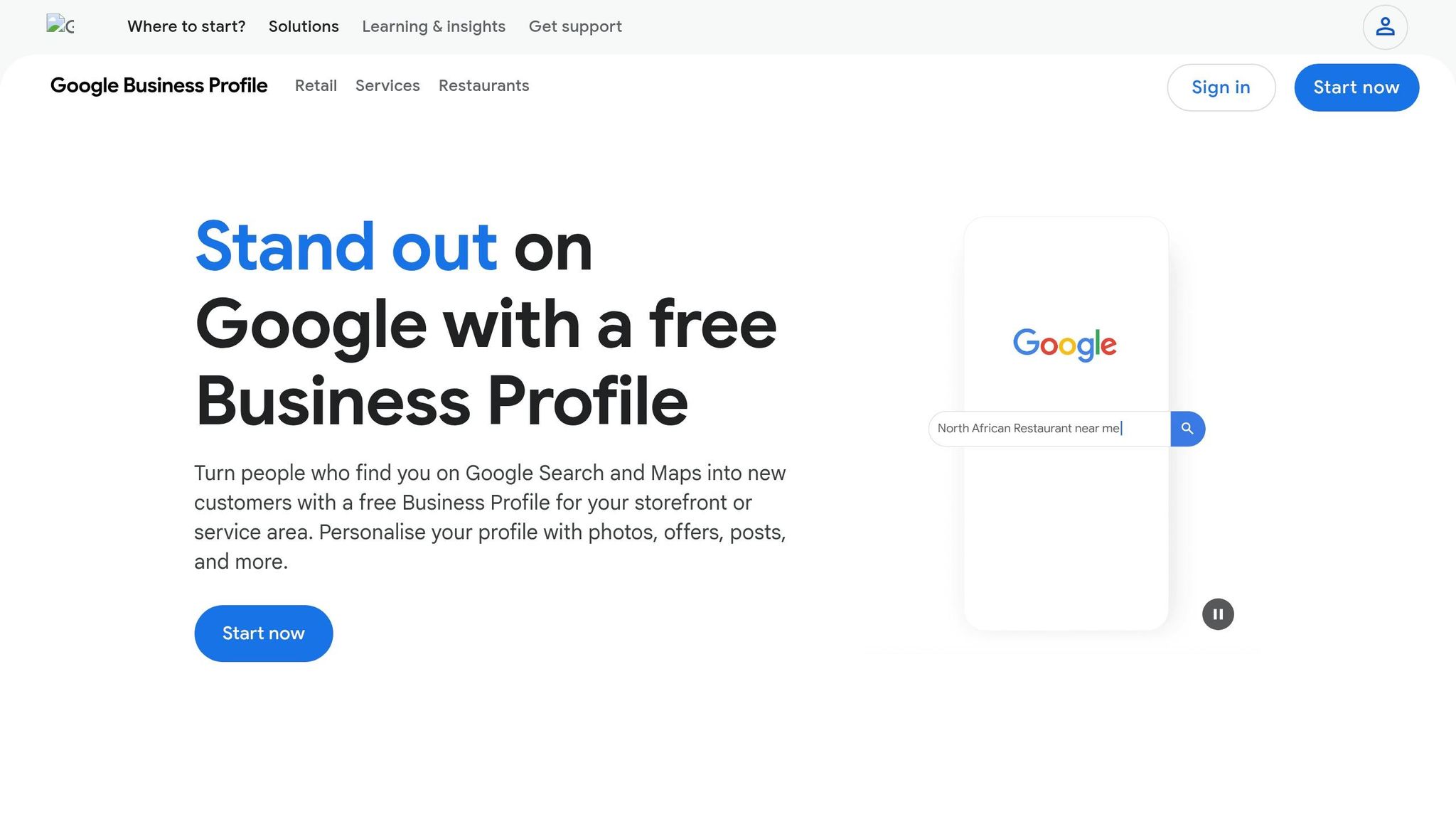
Your Google Business Profile is a critical tool for attracting local customers. It determines how your business appears on Google Search and Maps, and when set up correctly, it can turn searchers into callers or visitors.
Claim and Verify Your Profile
To get started, search for your business on Google Maps. If it’s already listed, click "Claim this business" or "Own this business?", then select "Manage now". If no listing exists, go to business.google.com/add to create one.
Verification is essential - your profile won’t appear in search results until it’s verified. Choose one of the available methods, such as postcard, phone, SMS, email, or video recording. Just don’t delay - verification codes expire after 30 days.
If you run a service-area business (like plumbing or house cleaning), select "No" when asked if customers visit your location. This allows you to hide your home address and instead define up to 20 service areas by city or zip code. Keep your service areas within a 2-hour drive.
Pro Tip: Avoid editing your business name, address, or category while waiting for your verification code. Changes can invalidate the process.
Add Correct Business Information
Accuracy is everything. Ensure your business name matches your real-world signage. Adding unnecessary keywords like "Best Plumber Denver" violates Google’s rules and could lead to suspension. Your primary category is equally important, as it contributes about 32% of your ranking relevance. Choose the most specific category available - think "Italian Restaurant" instead of just "Restaurant".
Keep your Name, Address, and Phone number (NAP) consistent across your website, social media, and directories. Using a local area code instead of a toll-free number can strengthen your local presence. Profiles with complete and accurate information are 70% more likely to attract visits.
Use the 750-character business description to highlight your services and service areas. Remember, the first 244 characters are the most visible, so make them count. The Services and Products section is another opportunity to detail offerings. This helps Google match your profile to specific searches, like "emergency roof repair".
Add Photos and Service Descriptions
Photos aren’t just for aesthetics - they’re ranking signals that show your business is active and trustworthy. Businesses with photos tend to see higher engagement and customer actions.
Upload at least one high-quality photo every week. Include exterior shots to help customers recognize your location, interior photos to showcase your workspace, and team images to create a personal connection.
Use Click-to-Call and Google Posts
Features like the Click-to-Call button and messaging make it easy for potential customers to reach out - especially on mobile devices. Ensure your phone number is up-to-date and staffed during business hours.
Google Posts let you share updates, promotions, or events directly on your profile. Since posts expire after 7 days, aim to publish one weekly. Add clear calls-to-action like "Book Now", "Call Today", or "Learn More" to encourage engagement.
"Neglecting your GBP is like having a shop on a busy street with the doors closed and the lights off." - MyGoProfile
Frequent updates, whether through photos, posts, or business details, signal to Google and customers alike that your business is active and ready to serve. Once your Google Business Profile is optimized, focus on keeping your NAP consistent across all platforms.
Keep NAP Consistent Across All Platforms
Once your Google Business Profile is set up, maintaining consistent NAP (Name, Address, Phone number) details across all platforms is key to building trust, improving your search ranking, and reinforcing your local search strategy.
Your business information must match exactly on every online platform. Google compares your details across multiple sources to confirm your business is legitimate. Any discrepancies can cause what experts call a "trust gap", which might hurt your rankings.
The numbers back this up: fixing inconsistent NAP data can improve local rankings by 16%. On the flip side, even small mismatches in three directories can harm your visibility. Even seemingly minor formatting differences, like abbreviations, can confuse search algorithms.
"NAP consistency means your business name, address, and phone number appear exactly the same everywhere your business shows up online. Not close enough. Not mostly right. Exact." – Shawn Hartley, Digital Marketing Consultant
Beyond rankings, inconsistent details can lead to missed opportunities. A wrong phone number means missed calls, and outdated addresses send customers to the wrong place. Considering that 86% of people use the internet to find local businesses, incorrect information could send potential customers straight to your competitors.
Review Your Current Business Listings
Start by creating a master document to serve as your "single source of truth." Include your exact business name (no keyword stuffing), your complete address in a standardized format, and your primary local phone number. This will act as your template for all online listings.
Next, search Google using your business name, phone number, and address in quotes. This will show where your business appears online and highlight any inconsistencies. Be thorough - look for outdated phone numbers or addresses listed on old directories.
Prioritize Tier 1 platforms like Google Business Profile, Apple Maps, Bing Places, Yelp, and Facebook. Once these are updated, tackle industry-specific directories like Angi for home services or legal directories if you're an attorney.
After identifying inconsistencies, update your profiles systematically.
Update Directories and Social Profiles
When updating, aim for 5–10 listings per week instead of trying to fix everything at once. Large-scale updates can appear suspicious to search engines. Start with platforms that generate the most traffic or have the most reviews.
For duplicate listings, keep the one with the most reviews and merge or suppress the others. Duplicate profiles can dilute your authority and confuse customers.
Pay close attention to data aggregators like Data Axle, Localeze, and Foursquare. These companies provide information to hundreds of smaller directories. Updating your NAP with these aggregators ensures accurate data flows across the web.
Here’s a quick guide for proper formatting:
Address Element | Correct Format | Avoid |
|---|---|---|
Street Type | 123 Main Street | 123 Main St, 123 Main St. |
Suite/Unit | Suite 200 | Ste 200, #200, Unit 200 |
Business Name | Hartley Marketing, LLC | Hartley Marketing |
Phone Number | (555) 123-4567 | 555-123-4567, 555.123.4567 |
Set a quarterly reminder to recheck your listings. Sometimes third-party aggregators overwrite accurate data with outdated information.
For larger updates, consider automating the process.
Use Gatsboy Citations Add-on
Manually updating dozens of directories is tedious and error-prone. Gatsboy's Citations Add-on simplifies this with a one-time fee of $247. It submits your standardized business information to 50 top directories instantly. This tool is especially helpful for service-based businesses aiming to establish local authority quickly. Pair this automation with quarterly manual audits to maintain long-term accuracy and improve your visibility - helping you attract more local customers while saving time.
Optimize Your Website for Local Search
On-page signals play a big role, accounting for 36% of localized organic ranking factors. With 46% of all Google searches having local intent, it's essential that your website clearly communicates with users in your service areas. Just as consistent NAP (Name, Address, Phone) data builds trust, strong local signals on your site can boost your local search visibility.
Since 76% of people conducting nearby searches visit a business within a day, capturing local traffic is vital. This is even more critical for emergency services, where conversion rates can reach 88%. But to tap into this traffic, your website must clearly signal to Google that you serve specific locations with well-defined services.
Add Location-Specific Keywords
Start by researching "service + location" keywords on Google, such as "Chicago plumber." Look at the Map Pack results, the "People Also Ask" section, and "People Also Search For" suggestions. These areas reveal how potential customers phrase their searches.
Group keywords based on intent. Use transactional keywords like "near me", "emergency", or "same day" on service pages aimed at ready-to-buy users. For blog content, focus on informational keywords like "cost", "average price", or "how to", which help establish trust.
Incorporate local keywords naturally into title tags, meta descriptions, URLs, H1 headers, and the opening paragraph. Many users search with a "location-first" pattern, such as "Austin Web Designer" instead of "Web Designer Austin TX", so write in a way that reflects these habits.
Keep keyword density under 5% to avoid penalties and ensure readability. With the rise of voice search, consider using conversational phrases like "Who is the best plumber near me?".
Create Service Area Pages
For businesses serving multiple locations or offering various services, create dedicated pages for each combination. For instance, a roofing company operating in three cities with two main services should have pages like "Roof Repair in City A", "Roof Installation in City A", and so on.
Each page should feature unique content to avoid duplicate content penalties. Include hyper-local details such as testimonials from specific neighborhoods, references to local landmarks, or mentions of regional challenges (e.g., "Preparing Your Roof for Texas Hailstorms"). This helps Google recognize your business as a legitimate local provider.
Craft unique title tags (under 60 characters) and meta descriptions (under 155 characters) for each page. Link these pages to your main contact page and relevant blog posts to distribute authority across your site.
Add Schema Markup and Google Maps
Schema markup offers search engines clear information about your business and its location. Using JSON-LD format, add LocalBusiness schema to your homepage and Service schema to service-specific pages.
"Adding LocalBusiness JSON-LD schema with your name, address, phone, and opening hours... directly affects how Google understands and presents your business in local search." – VisRank
Include details like your business name, address, phone number, opening hours, geo-coordinates, and service area. Ensure your NAP in the schema matches your Google Business Profile exactly. Use the most specific business type available - for example, PlumbingContractor instead of the broader LocalBusiness.
Embed a Google Map on your contact page or site footer to highlight your location or service area. Even businesses without storefronts can use maps to display the regions they serve. Validate your schema with Google's Structured Data Testing Tool to catch errors before they impact your rankings.
You can also enhance service pages with FAQPage schema to answer common queries like "Do you offer emergency services in [City]?" This not only helps capture voice search traffic but also improves your visibility in AI-driven search summaries, which now appear in 40.2% of local business searches.
Collect and Manage Customer Reviews
Online reviews play a major role in determining your local search ranking. They signal activity, relevance, and trust to search engines. In fact, 97% of consumers check online reviews before deciding to purchase from a local business. Positive reviews don’t just enhance your reputation - they also improve your visibility in local search results.
But it’s not just about gathering reviews. Consistency matters. Google prioritizes recent activity over the sheer number of reviews, so regularly requesting feedback is more effective than sending out mass review requests every few months.
Ask Customers to Leave Reviews
Timing is everything when asking for reviews. Reach out to customers immediately after a service is completed, preferably through SMS, which boasts a 98% open rate. Make it simple by including a direct link to leave a Google review. You can generate this link using the "Get more reviews" card in your Google Business Profile dashboard. For best results, send the link within two hours of service completion.
For in-person interactions, make the process even easier by placing QR codes on invoices, business cards, or at checkout counters. This allows customers to leave a review on the spot.
However, steer clear of review gating - only asking satisfied customers for feedback - or offering incentives like discounts or gifts. Both practices violate Google’s guidelines and could result in your profile being suspended.
Once you’ve collected reviews, the next step is responding to them effectively to strengthen your local presence.
Respond to All Reviews
Responding to reviews isn’t just polite - it’s a proven ranking factor. 89% of consumers expect businesses to reply to their reviews, and businesses that engage consistently see an average of 35% higher revenue than those that don’t. Speed matters too: 60% of consumers expect a reply within two days, and 40% expect one within 24 hours.
For positive reviews, personalize your responses to show appreciation and build loyalty. Mention specific details from the review and invite customers to return or try out new services.
Negative reviews require a careful approach. Follow the HEAR framework:
Humanize: Use the reviewer’s name.
Empathize: Acknowledge their frustration.
Acknowledge: Take responsibility where it’s due.
Resolve: Offer a clear next step.
Always include direct contact information, like a phone number or email, to take the conversation offline.
"A professional, empathetic response to a complaint often builds more trust than a wall of 5-star reviews." – ReviewScout AI
Remember, your response isn’t just for the person who left the review - it’s for everyone else who reads it. 62% of negative reviewers say they’d give a business a second chance if their issue is resolved, and 58% are more likely to choose a business that offers a specific solution.
Finally, take your review strategy a step further by showcasing them on your website.
Display Google Reviews with Gatsboy
Once you’ve collected and responded to reviews, displaying them on your website can help convert visitors into customers. 84% of people trust online reviews as much as personal recommendations, so showcasing recent, authentic feedback can reduce hesitation and speed up decision-making.
Gatsboy makes this process easy with its review widget. It automatically pulls your latest Google reviews onto your site, ensuring your content stays current and reflects customer satisfaction. This not only boosts credibility but also signals to search engines that your business is active and engaged with its customers.
Build Local Citations and Track Performance
Local citations play a key role in strengthening your business's online presence. These are mentions of your business’s name, address, and phone number (NAP) across directories and websites. They help Google confirm your business's authenticity, and their prominence impacts around 40% of Google Maps rankings. That makes citations a big deal for your local SEO efforts.
But here’s the catch: maintaining citations isn’t a one-time task. A whopping 62% of U.S. businesses deal with citation inconsistencies, leading to potential traffic losses of around 25%. This makes it essential to not only build citations but also keep an eye on their accuracy and performance.
Submit to Local Directories
Start with a citation audit to check for existing listings, duplicates, and any NAP inconsistencies. Before diving into new submissions, fix errors on high-visibility platforms.
To stay organized, create a master NAP document with your exact business details. Use this as your go-to reference for all directory submissions.
Adopt a tiered approach for submissions:
Tier 1 Directories: Platforms like Google Business Profile, Apple Maps, Bing Places, and Yelp should be your first stop.
General Directories: Sites like Yellow Pages and the Better Business Bureau come next.
Industry-Specific Directories: Focus on niche platforms such as Angi for home services, Avvo for legal practices, or Healthgrades for medical professionals.
Don’t forget about data aggregators like Data Axle, Neustar Localeze, and Foursquare. These platforms push your business info to multiple other directories. While submitting, go beyond just NAP details - include keyword-rich descriptions, high-quality images, accurate business categories, and links to your social media profiles.
Use Gatsboy's Local Tracking Add-On
Once your directory listings are in order, tracking their performance becomes critical. Tools like Gatsboy's Local Tracking Add-On can help. For $99/month, it offers geo-specific rank tracking across multiple zip codes - a valuable feature since proximity plays a big role in local search rankings. The tool also identifies NAP errors across 50+ directories and tracks metrics like map pack rankings, direction requests, and review trends. Fixing NAP issues alone can improve rankings by an average of 16%.
Track Rankings and Adjust Your Strategy
Citations directly affect your local search visibility, so it’s important to monitor their impact. Pay attention to conversion metrics like direction requests, phone calls, and website visits from your Google Business Profile. Experts often highlight direction requests as one of the most reliable indicators of performance.
Aim for at least 95% NAP consistency across directories, and conduct citation audits every quarter. Businesses that do quarterly audits often experience up to 47% more growth in organic traffic.
Keep an eye on your review velocity and response rates, too. A steady flow of one new review per week is more effective than a flood of older reviews. If your map pack ranking starts slipping, revisit your citations and consider updating your Google Business Profile with fresh photos and weekly posts.
For instance, one business saw a 280% jump in patient revenue just by improving citation consistency. That’s proof of how much a little attention to detail can pay off.
Conclusion
This checklist has covered the essential steps for achieving success with local SEO - everything from fine-tuning your Google Business Profile to optimizing on-page signals. Local SEO requires ongoing effort across various areas, such as keeping your Google Business Profile updated, ensuring consistent NAP (Name, Address, Phone number) data, collecting fresh reviews, targeting location-specific keywords, and managing accurate citations. As Joy Hawkins, Owner of Sterling Sky, wisely notes:
"Small changes can sometimes make big differences in our corner of SEO".
Beyond the initial setup, regular audits are crucial for maintaining long-term success. Businesses that consistently review and adapt their strategies tend to see the best results. Even minor updates - like listing your business as open 24/7 with a call answering service - can have a significant impact, such as doubling first-time callers in just one month. Additionally, maintaining a steady stream of new reviews signals to Google that your business is active and reliable. Frequent citation checks and content updates further enhance your local search visibility.
Tools like Gatsboy make these tasks easier by automating directory submissions and tracking rankings. This automation allows you to focus on strategic improvements rather than getting bogged down in repetitive manual updates.
FAQs
How long does local SEO take to work?
Local SEO efforts generally take 3 to 6 months to produce visible improvements. The timeline can vary based on factors like the level of competition and the work put in. By focusing on key strategies - such as optimizing your Google Business Profile, building local citations, and managing customer reviews - you can often see measurable progress within the first 90 days. That said, for highly competitive markets, reaching top rankings and maintaining steady results usually demands consistent effort over a period of 6 months or more.
What should I do if my Google Business Profile won’t verify?
If your Google Business Profile (GBP) isn’t verifying, start by confirming you're using the correct owner-level account credentials. Follow Google's verification steps, which might include a postcard, phone call, or email. Make sure your business details - like name, address, and phone number - match perfectly across your website and other online listings. Even small inconsistencies can cause problems. If you’re still facing issues, consider requesting a manual review or reaching out to Google support for assistance. Keeping your information consistent and precise is key to both verification and profile success.
Do I need separate pages for each city I serve?
Creating dedicated pages for each city you serve can be a smart move, especially if your business operates across multiple locations. These pages help boost your local SEO by targeting specific geographic search terms. They also make it easier for search engines to understand the areas you cover, increasing the likelihood of appearing in local search results for each city.
Related Blog Posts
Únete a nuestra comunidad de 15,000+ propietarios de negocios
Artículos populares
Artículos populares sobre su sitio web y la comercialización de su pequeña empresa


