



Website Launch Checklist for Small Business
Small Business Marketing
A small business website should do one job on day one: turn visitors into calls, form fills, bookings, or payments. If people can’t tell what you do, where you work, and how to contact you in a few seconds, the launch is not done.
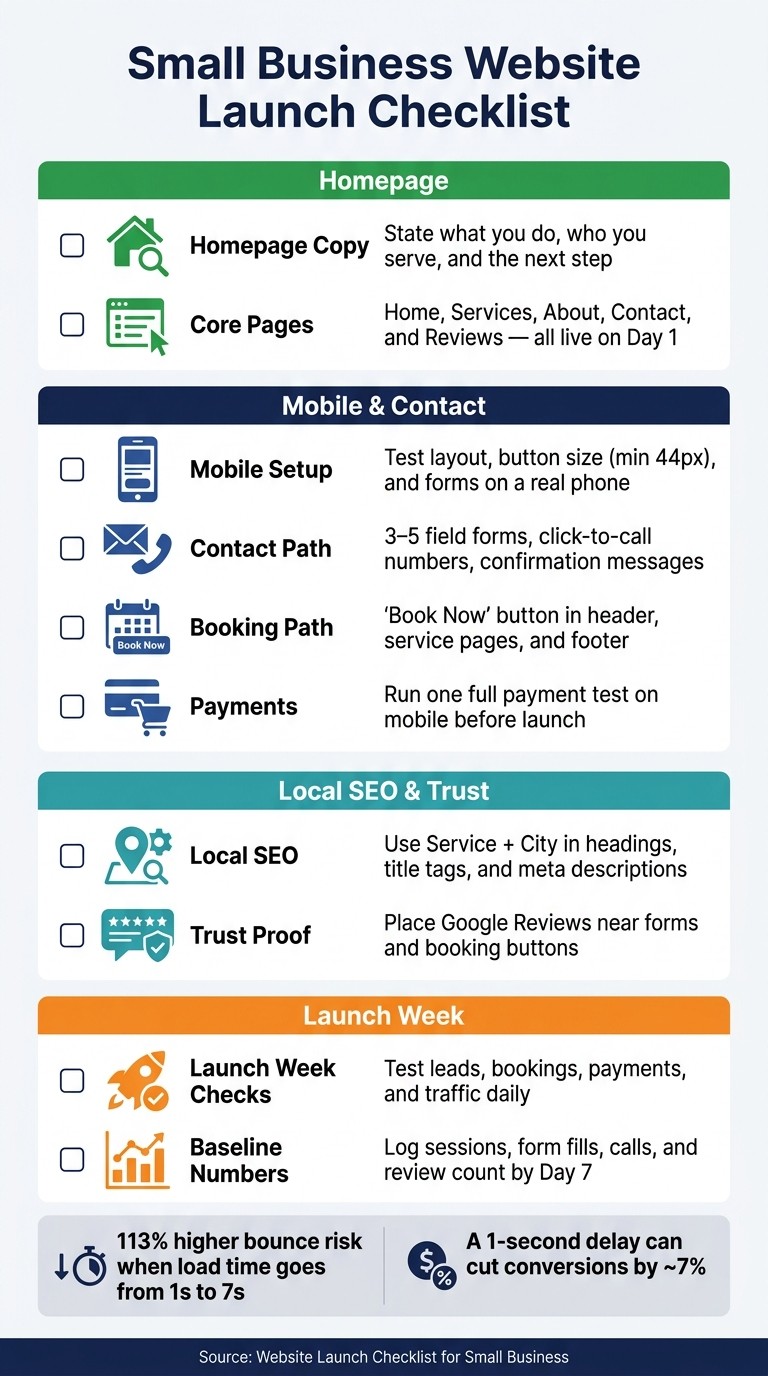
I’d boil this checklist down to four things: clear homepage copy, working contact and booking paths, local search setup, and day-one testing. That means using a clean domain and HTTPS, making the site easy to use on a phone, keeping forms to 3–5 fields, adding click-to-call numbers, matching your business details across your site and Google Business Profile, and checking forms, bookings, and payments after launch. The stats in the article make the point: mobile bounce risk can jump 113% as load time goes from 1 to 7 seconds, and a 1-second delay can cut conversions by about 7%.
Before launch, I’d make sure these items are done:
Homepage: say what you do, who you serve, and the next step
Core pages: home, services, about, contact, and reviews
Mobile setup: test layout, button size, and form use on a real phone
Contact path: short forms, click-to-call, and clear confirmation messages
Booking path: working booking buttons in the header, service pages, and footer
Payments: test one full payment flow on mobile
Local SEO: use service + city in key headings and page elements
Trust proof: place Google Reviews near forms and booking buttons
Launch week checks: test leads, bookings, payments, and traffic each day
Baseline numbers: log sessions, form fills, calls, and review count by Day 7 or use a business website SEO checker to audit your visibility.
This is less about “going live” and more about making sure the site is ready to produce leads right away.
Small Business Website Launch Checklist: 10 Must-Do Items Before Going Live
The 2026 Website Checklist Every Small Business Needs (Before It's Too Late)
Pre-launch checklist: technical setup and core pages
Before launch, lock down the basics that drive trust and conversions. Your site should look polished, work well on every device, and make the next step obvious.
Check domain, SSL, mobile layout, and page speed
Use a clean .com domain that matches your business name. Skip hyphens, numbers, and free subdomains. Those small details can make a business look less established. A professional domain usually costs $10–$20 per year.
Make sure your site loads over HTTPS. HTTPS helps protect visitors, adds trust, and is also a Google ranking factor.
Mobile speed matters more than most owners think. When mobile page load time goes from 1 second to 7 seconds, the chance of a bounce jumps by 113%. Check the site on an actual phone, not just a desktop preview. Buttons should be easy to tap, and forms shouldn't feel like a chore.
Launch with homepage, services, about, contact, and reviews pages
Your core pages should be live and finished on day one. No half-done placeholders.
Write each service page around outcomes and customer gains, not just a list of features. On the About page, add team photos, years in business, and certifications. For reviews, use a dedicated page and group feedback by service so people can find the proof that fits what they need.
Write homepage copy that states what you do, who you serve, and what to do next
For local businesses, set up the H1 as Service + City. A simple example is "HVAC Repair in Austin." That helps match what visitors want and supports local SEO.
Then add a short sentence that explains what you do, who you help, and why someone should pick you. Put one main CTA above the fold, like "Book Now" or "Request a Quote." Keep the button large enough to tap without frustration - at least 44px.
Trust signals should sit close to that CTA, not hidden halfway down the page. Your Google rating or years in business can do a lot of heavy lifting here.
Homepage Element | Purpose | Placement |
|---|---|---|
H1 Headline | State service + location | Top of page, above the fold |
Sub-headline | Define value prop and audience | Directly under H1 |
Primary CTA | Trigger the next step | Above the fold and repeated in footer |
Trust Signals | Build immediate credibility | Near CTA or within first scroll |
Service Area | Confirm geographic fit | Footer or dedicated section |
Once the homepage is clear, move to forms, bookings, and payments so visitors can take action right away.
Lead capture checklist: contact forms, bookings, and payments
After the homepage CTA is clear, make your contact, booking, and payment paths just as easy.
Set up contact forms and contact details that work on every device
Keep contact forms short: 3 to 5 fields is usually enough. Place them above the fold so people don't have to hunt for them. Send form alerts to a branded domain email like hello@yourbusiness.com. And don't rely on email alone - store submissions in your site's dashboard too, so you have a backup if anything goes sideways.
Test every form on a real phone, not just on a desktop preview. Buttons should be easy to tap. Error messages should be plain and easy to spot. And after someone submits the form, show a confirmation message right away. Every phone number on your site should also be coded as a click-to-call link. More than 60% of mobile searchers prefer to call a business directly from search results. Your Name, Address, and Phone (NAP) details should match in the header, footer, and contact page.
Add booking links where customers are ready to act
Place a "Book Now" button in the header, on service pages, and in the footer. Add a short note next to it about response time so people know what to expect.
Use Gatsboy's booking dashboard to keep appointment requests in one place. Before launch, run a full test booking from start to finish. Check that the alert lands in your inbox, the confirmation message shows up, and the system doesn't create duplicate entries.
Connect online payments for deposits, invoices, or service purchases
Connect payments before launch, then run a full test transaction on mobile. Go through the whole checkout flow and make sure confirmation emails are sent and delivered after each transaction.
Gatsboy's Stripe Payments integration lets you collect secure online payments right on your site. Make sure SSL is active so the site runs on HTTPS. Place trusted payment logos and trust badges near the checkout button.
Once these paths work, add proof and local signals that support the sale.
Trust and local visibility checklist: Google Reviews and local SEO basics
Once your lead capture is set up, the next step is trust and local search. You want people to feel confident enough to reach out, and you want Google to understand exactly where you work and what you do.
Display Google Reviews near your contact and booking options
Put Google Reviews next to your form or booking button. That way, people see proof right when they’re deciding whether to contact you.
Your total number of reviews matters, but review velocity matters more. In plain English, that means how often new reviews come in and how recent they are. A steady stream of new reviews sends a stronger signal than a big review count that hasn’t changed in months.
If you use Gatsboy, its Google Reviews module can show reviews on your site without manual copying.
Next, tighten up the business details that local search depends on.
Keep your website and Google Business Profile identical

Use the same format for your business name, address, phone number, service areas, and website URL everywhere. No small differences. No alternate versions. Keep your structured data aligned exactly with your Google Business Profile and directory listings.
Hours matter too. If your holiday schedule changes or you adjust your regular hours, update them right away. Google uses real-time operating hours as a ranking signal.
Add local SEO signals to service pages and headings
Use city and neighborhood terms in title tags, headings, and meta descriptions in a natural way. This helps both visitors and search engines understand where the page applies.
For example, a heading like "Plumbing Repairs in Austin, TX" makes the location clear right away. Do the same across individual service pages, not just on the homepage.
Launch week checklist: promotion, tracking, and next steps
Once the site is live, the job changes. You're no longer setting things up. Now you're making sure people see the site and that everything works the way it should.
Promote your new site in the first 7 days
The first 7 days set the pace. Start with the people who already know your business.
Send a launch email to your current customer list. Post on your main social channels and link straight to your booking page or main service page. Update your Google Business Profile with the new URL, add fresh photos, and reach out to your best customers by text or phone to ask them to share the link.
Launch week is also a good time to ask for reviews. That helps you get your review count moving early, which can make a difference when new people check you out.
Check forms, bookings, payments, and traffic every day
Once promotion starts, watch the site closely for the first week. This is where small issues can slip through the cracks if no one is paying attention.
Test every contact form once a day. Make sure the thank-you message shows up and that the alert lands in your inbox. If bookings or payments matter to your business, run one live booking or payment test each day too. Even a small slowdown can hurt results. A 1-second delay in load time can reduce conversions by approximately 7%, so keep an eye on your PageSpeed score as well.
Gatsboy's dashboard keeps leads, bookings, payments, and review activity in one place.
By Day 7, record your baseline numbers:
Total sessions
Form submissions
Click-to-call actions
Your Google Review count
These become your benchmark for the 30-, 60-, and 90-day marks.
Conclusion: the small business website launch essentials
Use those Day 7 baseline numbers as your starting point, and measure every decision against them from here.
FAQs
How fast should my site load at launch?
Aim for your website to load in under 3 seconds. That gives visitors a better shot at staying on the page and helps support your search rankings.
A Largest Contentful Paint (LCP) of less than 2.5 seconds is a solid goal. That matters even more on mobile, where many users leave if a site takes more than 3 seconds to load.
Since speed affects both retention and SEO, check your site on a regular basis with Google PageSpeed Insights.
What should I test during launch week?
During launch week, test the basics that shape trust and conversions.
Submit every contact, booking, and payment form yourself
Confirm on-site messages and back-end notifications work
Verify your SSL certificate is active
Check mobile speed, button tapability, and text readability
Make sure analytics are recording traffic and your Google Business Profile is synced
This part matters more than most teams expect. A site can look polished on the surface and still lose leads if a form breaks, a payment fails, or a mobile button is hard to tap. Small issues can cost you sales fast.
Go through the site like a customer would. Fill out the forms. Book the appointment. Test the payment flow. Then check what happens behind the scenes. Did the message show up on the page? Did the email or CRM alert come through? If not, you’ve got a problem worth fixing before traffic starts rolling in.
Security and mobile use need a close look too. An active SSL certificate helps people feel safe, and browsers now flag sites that don’t have one. On mobile, pay attention to the stuff that frustrates people in seconds: slow load times, cramped buttons, and text that’s too small to read without zooming.
Last piece: make sure your tracking is alive. If analytics isn’t recording visits, or your Google Business Profile isn’t synced, you’re flying blind from day one.
How do I track leads after launch?
Set up Google Analytics before launch so you can track traffic sources and conversions from day one. Then test every contact, quote, and booking form with a real submission to make sure it lands in your inbox or CRM.
For simpler follow-up, use an all-in-one dashboard like Gatsboy to keep leads, bookings, and customer interactions in one place. That way, fewer inquiries slip through the cracks.
Related Blog Posts
Únete a nuestra comunidad de 15,000+ propietarios de negocios
Artículos populares
Artículos populares sobre su sitio web y la comercialización de su pequeña empresa


