



Google Business Profile Optimization: Ultimate Guide 2026
Small Business Marketing
Want more customers from local searches? Start with your Google Business Profile (GBP).
In 2026, 46% of Google’s 8.5 billion daily searches are local. GBP is no longer just a listing - it’s your business’s digital storefront and a key driver of local SEO. Profiles with accurate, detailed information rank higher in local searches, attract more clicks, and even influence AI-generated answers in Google results.
Key Takeaways:
Why GBP Matters: It’s tied to 40% of local search ranking factors and powers features like the Local Pack.
Setup Essentials: Choose the right category, verify your business, and ensure your Name, Address, and Phone (NAP) are consistent everywhere.
Optimization Tips:
Add photos weekly (profiles with 100+ photos get 520% more calls).
Use detailed service descriptions to align with search terms.
Regularly post updates and respond to reviews within 24–72 hours.
Advanced Features: Enable messaging, booking links, and Q&A to boost engagement.
This guide will walk you through creating, verifying, and optimizing your profile to attract more customers and increase visibility in local searches.
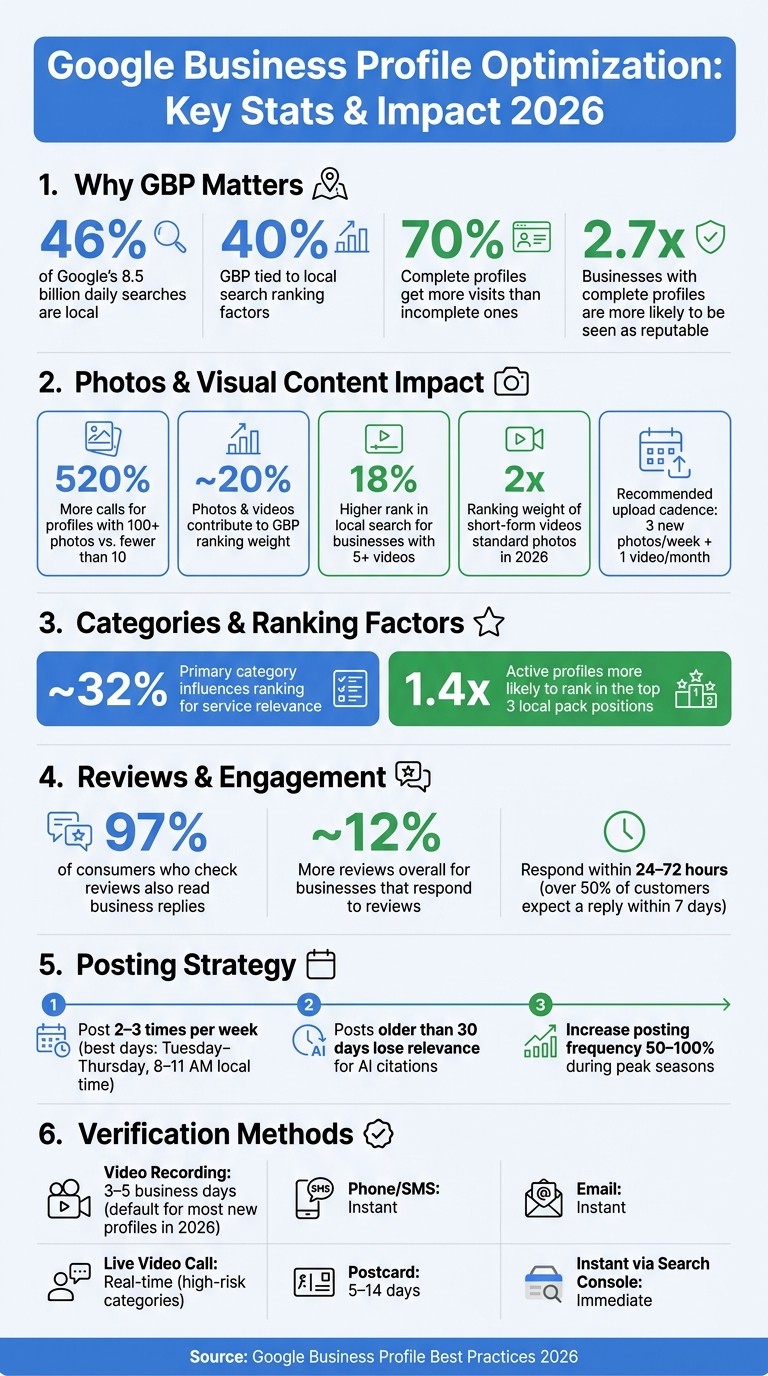
Google Business Profile Optimization: Key Stats & Impact 2026
Setting Up and Verifying Your Google Business Profile
Eligibility and Compliance Rules
To qualify for a Google Business Profile, your business must interact with customers in person - either at a physical location or by traveling to them. This excludes online-only brands, lead generation companies, and rental properties like vacation homes.
Home-based businesses can qualify if they meet customers face-to-face or travel to them. In such cases, you should hide the physical address and configure the profile as a service-area business (SAB). Virtual offices and co-working spaces are eligible only if they are staffed by your employees during business hours and have permanent signage on-site.
Your business name on the profile must match what’s on your signage and legal documents. Avoid adding taglines, location keywords, or words like "Best" or "#1."
"Google now enforces much stricter business name policies, so adding words like 'best,' '#1,' or stuffing keywords into your business name will get you flagged and potentially suspended." - Tanner McCarron, Founder, Dyad Marketing
Once you confirm eligibility, focus on entering your profile details accurately.
How to Set Up Your Profile
Start by visiting google.com/business, sign in with a business email, and search for your business to claim an existing profile if it already exists.
Choosing the primary category is a critical step - it influences about 32% of your ranking for service relevance. Be specific: for instance, "Pizza Restaurant" will rank better than the broader "Restaurant." You can add up to 9 subcategories to reflect additional services, but the primary category should highlight your main offering.
If you’re setting up a service-area business, list the specific cities or ZIP codes you serve. Keep your service area within a two-hour drive from your base - going beyond that could negatively affect your rankings.
Other important details to get right:
Use a local area code for your phone number instead of a toll-free number.
Ensure your address matches postal records exactly. P.O. boxes aren’t allowed for storefronts.
Once everything is set up, you’ll need to verify your ownership using one of Google’s methods.
Verification Methods and Profile Access
Google determines your verification method based on factors like your business type, category, location, and account history.
Verification Method | Speed | Best For |
|---|---|---|
Video Recording | 3–5 business days | Most new businesses |
Phone / SMS | Instant | Established businesses |
Instant | Domain-verified businesses | |
Live Video Call | Real-time | High-risk categories (e.g., locksmiths, plumbers) |
Postcard | 5–14 days | Rare/legacy cases |
Instant (Search Console) | Immediate | Businesses already verified in Google Search Console |
Starting in 2026, video verification is the default for most new profiles. You’ll need to record a continuous video (under 2 minutes) showing your storefront signage, interior, and evidence of management, like unlocking a door or accessing a point-of-sale system.
"Verification is now a compliance process, not just a setup step." - Ian Bowne, JXT Group
While your profile is under verification, avoid making changes to your business name, address, or category, as this could reset the process or lead to suspension. If a former employee or third party has control of your profile, Google’s recovery process requires documentation to prove ownership and may take 1–2 weeks.
For businesses with 10 or more locations, you can opt for bulk verification by submitting a spreadsheet that Google reviews directly.
Boost your Google Business Profile (2026 Masterclass)
How to Optimize Your Google Business Profile
Once your Google Business Profile (GBP) is verified, the next step is fine-tuning it to maximize your impact in local search results.
Selecting Your Business Name, Categories, and Attributes
Your GBP name should exactly match what’s on your storefront, receipts, and legal documents. For categories, choose one that closely represents your core business. For instance, "Pediatric Dentist" will outperform a general "Dentist" for relevant searches. You can add secondary categories, but make sure they’re directly tied to your services to avoid diluting your profile’s focus.
Attributes are another key detail. These are checkboxes that provide potential customers with useful information, such as whether you accept credit cards, have wheelchair-accessible entrances, or offer free Wi-Fi. Including these details can help your profile match specific search queries.
Don’t forget the Q&A section. Populate it with 10–15 common customer questions and answers. This content is indexed by Google, which can improve how your business appears in AI-generated search summaries.
Matching Your GBP with Your Website and NAP Data
Consistency is crucial. Your Name, Address, and Phone number (NAP) must be the same across your GBP, website, and directory listings. Even small differences - like using "Street" on your website but "St." on your GBP - can confuse search engines and hurt your local ranking.
Beyond NAP consistency, your GBP and website should align in other areas too. Nearly 46% of Google searches in 2026 are expected to have local intent. Google cross-checks the services listed on your GBP against your website to confirm your expertise. For example, if your GBP lists 12 services but your website only has a generic "Services" page, it can create a mismatch that reduces your visibility.
"A GBP with 12 service entries and a website with a single generic 'Services' page creates a misalignment that suppresses both GBP ranking and AI Overview visibility." - PinPoint Promote
Google’s AI Overviews in 2026 will pull data from both your GBP and website to answer conversational queries. If there are inconsistencies - like different hours, descriptions, or phone numbers - you risk being excluded from AI-generated recommendations. Every service on your GBP should have a corresponding page or section on your website to avoid this.
Using Gatsboy to Strengthen Your Local Presence
Keeping your GBP and website aligned can be a challenge, but tools like Gatsboy make it easier. Gatsboy offers done-for-you websites specifically designed for small businesses with SEO-friendly structures to boost local search visibility from the start.
Gatsboy also integrates features like Google Reviews, online booking, and Stripe Payments, which automatically sync your GBP with your website. Businesses with complete and active profiles are 2.7 times more likely to be seen as reputable and receive 70% more visits than those with incomplete profiles.
Advanced GBP Features and Content for Local Search
Listing Services, Products, and Descriptions
Make full use of the 750-character limit in your business description. Start strong by incorporating your primary keyword in the first sentence, then follow up with precise details like how long you’ve been in business, your response times, or your success rates. Why does this matter? Google’s AI Overviews pull structured data from GBP profiles to answer local queries, and vague descriptions are often ignored.
"Specificity is the new keyword density." - Fuel Online Editorial Team
For each service, write a description that’s aligned with relevant keywords. Explain what the service involves and the results customers can expect. Don’t stop there - fill out the products section with price ranges and detailed descriptions. This approach helps your profile capture long-tail searches you might otherwise miss. Keep in mind, active profiles are 1.4 times more likely to rank in the top three local pack positions compared to inactive ones. These detailed descriptions are essential for improving your visibility.
Photos, Videos, and Visual Content
Visuals play a bigger role in rankings than many business owners realize. Photos and videos contribute about 20% of your GBP ranking weight. Even more compelling, profiles with over 100 photos generate 520% more calls than those with fewer than 10. That’s a huge difference.
Aim to upload at least three new photos each week and one video per month. When it comes to photos, variety is key. Include 3–5 exterior shots, 5–10 interior shots, 3–5 team photos, and 5–10 images showing your products or services in action. Use real, authentic photos - stock images can actually harm your trust signals with Google’s AI. Before uploading, rename files descriptively (e.g., hvac-repair-chicago.jpg instead of IMG_4872.jpg) to help Google understand the image context.
Looking ahead to 2026, short-form videos will carry twice the ranking weight of standard photos. Keep your videos short and engaging - 30 to 60 seconds is ideal. Stick to MP4 format, limit file sizes to under 100MB, and focus on content like office walkthroughs, service demos, or team introductions. This kind of visual content strengthens E-E-A-T signals and provides Google’s AI with visual proof to include in search summaries. Businesses with at least five videos on their profile tend to rank 18% higher in local search results. Combining compelling visuals with accurate information is a winning strategy for boosting your local search presence.
Messaging, Bookings, and Appointment Links
Interactive features are just as important as visuals when it comes to driving engagement. These tools not only enhance user experience but also play a direct role in conversions.
"When someone searches for a local service and calls from the map pack result, that conversion never touches your website. GBP is the conversion point." - Local SEO Skills
Since Google phased out its native chat in late 2024, messaging now integrates with WhatsApp or SMS. To set it up, navigate to Edit profile > Contact > Chat, then add either a WhatsApp click-to-chat URL or an SMS-capable phone number. If you include both, Google typically prioritizes the SMS option. For service-based businesses, Reserve with Google lets customers book and pay directly from your profile, reducing friction that often leads to drop-offs.
High engagement through messaging and appointment links sends prominence signals to Google’s algorithm, showing that your business is active and trustworthy. If you’re using Gatsboy, its built-in booking and lead management tools can help you stay organized as your GBP traffic increases, ensuring no potential customer slips through the cracks.
Managing Your Google Business Profile Over Time
Getting and Responding to Reviews
Reviews play a huge role in building trust on your Google Business Profile (GBP). But here’s the kicker: how you respond to those reviews can be just as impactful as the reviews themselves.
"Your response to a negative review is more important than the negative review itself. Future customers are watching how you handle problems." - Jonathan Page, Local Search Expert, LocalSEO.org
Here’s the reality: 97% of consumers who check reviews also read how businesses reply. That makes your response a public message to every potential customer. Aim to respond within 24–72 hours since over half of customers expect a reply within seven days, and nearly a third want even faster responses. When replying, personalize it - use the reviewer’s first name and reference something specific they mentioned. This adds a personal touch and shows you’re paying attention.
For negative reviews, own up to mistakes and include direct contact info to move the conversation offline. Interestingly, businesses that consistently respond to reviews tend to get about 12% more reviews overall. A pro tip: If a customer mentions a specific employee by name, have that team member sign the reply with their initials. It adds a human element that resonates with readers.
When you consistently engage with reviews, you’re not just building trust - you’re keeping your profile active and approachable.
Posting Updates and Seasonal Offers
Google Posts are more than just updates - they signal activity to Google’s algorithm and provide data for AI tools, like Gemini, to generate answers for local searches.
"The post is no longer just a Google ranking signal - it's potential training data for the answer engine that decides whether to recommend your business." - Drew Johnson, CEO, Renew Local
Here’s the thing: posts older than 30 days lose their relevance for AI citations and summaries. That means you need to stay consistent. Shoot for 2–3 posts per week, ideally scheduled between Tuesday and Thursday mornings from 8 to 11 AM local time for maximum engagement. During busy seasons, like the holidays or peak service times, increase your posting frequency by 50–100%.
There are four main types of posts you can use:
Updates: Share general news or team milestones.
Offers: Highlight discounts or promotions.
Events: Promote workshops, sales, or community activities.
Products: Showcase specific items, complete with pricing and details.
Avoid being vague. AI tools prioritize posts with specifics - think exact prices, service details, neighborhood mentions, or even team member shoutouts.
By keeping your posts fresh and detailed, you’ll not only engage customers but also gather valuable insights through GBP metrics.
Tracking Performance and Fixing Profile Issues
Keeping your GBP in top shape requires ongoing attention to reviews, posts, and profile details. GBP Insights is your go-to tool for tracking how people interact with your profile - whether it’s views, search queries, calls, or website clicks. Checking these metrics monthly helps you catch trends and fix issues before they snowball, reinforcing your local search visibility.
One commonly overlooked issue is that Google occasionally adds new attributes to your profile category without notifying you. Attributes like "emergency service", "outdoor seating", or "women-led" can affect how your business shows up in filtered searches. Make it a habit to review and enable any relevant attributes each month. Also, keep your Q&A section updated with accurate information to avoid misinformation from competitors or random users.
Every 30–60 days, audit your profile for consistency. Check your NAP (Name, Address, Phone) data, photos, hours, and service descriptions to ensure everything is current and optimized.
Element | Optimized Action | Impact on Visibility |
|---|---|---|
Primary Category | Choose a specific niche (e.g., "Plumbing Service") | High (~32% of ranking weight) |
Business Description | Use 750 characters with natural keywords | Medium (aids AI relevance) |
Photos | Add new photos every 2 weeks | High (42% more direction requests) |
Google Posts | Publish at least one post weekly | Medium (signals freshness) |
Review Response | Reply to all reviews within 24–48 hours | High (boosts engagement) |
NAP Consistency | Match info across all major directories | High (strengthens credibility) |
Conclusion and Key Takeaways
Optimizing your Google Business Profile (GBP) in 2026 is a powerful, cost-free way to boost your local visibility. According to data, complete profiles attract 70% more visits than incomplete ones. That’s often the difference between appearing in the Local Pack (top three results) or being virtually invisible to potential customers.
As highlighted by the GBP Rank Tracker Team:
"The difference between a fully optimized profile and a bare-minimum listing can be the difference between ranking in the Local Pack (top 3) and being invisible." - GBP Rank Tracker Team
Your GBP is no longer just a listing - it's now a structured data source for AI tools like Google’s Gemini. This means everything you add - descriptions, service details, Q&A, photos - feeds directly into the AI responses users see before they even click. Specificity matters here: detailed service areas, precise numbers, and clear descriptions consistently outperform generic content. When done right, this integration turns your GBP into a vital local SEO tool.
In 2026, the businesses that dominate local search treat their GBP as a dynamic, evolving asset. For instance, profiles with 100+ photos see significantly more calls and direction requests. Regular updates - like adding timely posts, uploading fresh photos, and responding to reviews - can make a big difference in maintaining a strong profile.
Key takeaway: Consistency over perfection. Start by auditing your profile, ensuring your NAP (Name, Address, Phone number) data is accurate, crafting a specific 750-character description, and building a weekly routine for updates. These steady efforts will help your GBP remain an active driver of local growth and visibility.
FAQs
What can get my GBP suspended in 2026?
In 2026, your Google Business Profile (GBP) might face suspension due to concerns about trust or credibility. This typically happens when your profile contains inaccurate information, outdated details, or violates Google's policies.
Even small mistakes, like inconsistencies in your listed address or business details, can trigger a suspension. To avoid this, double-check that all the information on your profile is accurate, current, and fully aligned with Google's guidelines. Taking these steps can help maintain your profile's visibility and trustworthiness.
How do I keep my GBP and website from conflicting?
To keep your Google Business Profile (GBP) and website in sync, make sure your business name, address, and phone number (NAP) are identical on both. This consistency is key. Take the time to verify your GBP to confirm ownership and avoid any potential conflicts. Keep both platforms updated with accurate information, such as operating hours, photos, and the services you offer. Staying consistent not only boosts your local SEO but also helps build trust with your customers by presenting a unified online presence.
What should I include in video verification?
To get your video verification ready for your Google Business Profile, make sure it follows these steps:
Record a continuous, unedited video lasting between 30 seconds and 2 minutes.
Include clear footage of your business location, name, category, signage, interior, and day-to-day operations.
Avoid showing any sensitive information (like bank details) or the faces of other people.
Stick to these rules to ensure your video meets Google's verification standards.
Related Blog Posts
Join our community of 15,000+ business owners
Popular articles
Popular articles about your website and marketing your small business


