


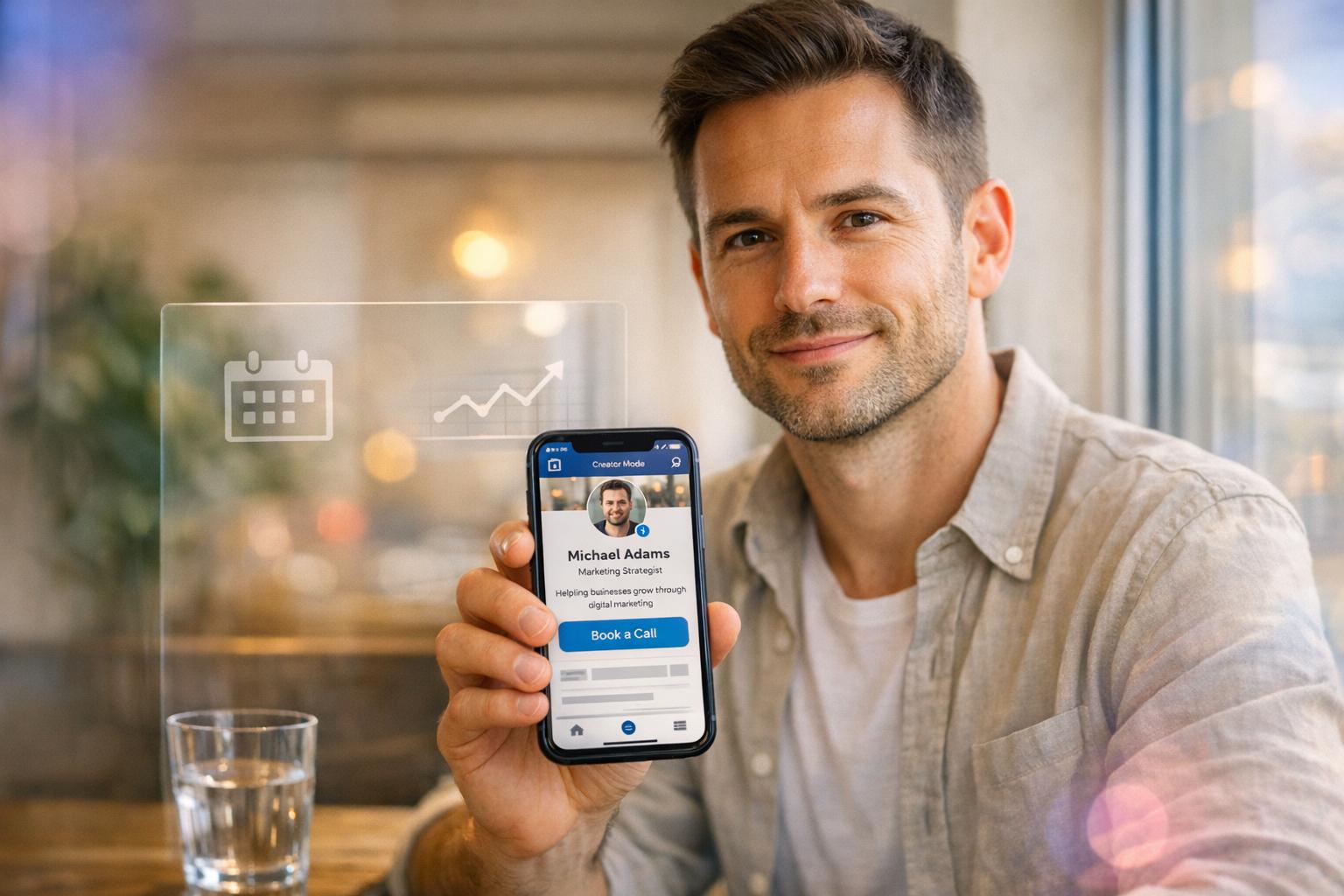
A Step-by-Step Guide to Optimising Your LinkedIn Profile for Lead Generation in 2026
Small Business Marketing
LinkedIn in 2026 is a powerful tool for generating leads, with over 1 billion members and advanced features like an AI-powered matching engine and "active authority scoring." To stand out and attract the right prospects, your profile must go beyond being a digital resume - it should function as a dynamic sales funnel. Here's a quick summary of how to optimize your LinkedIn profile for lead generation:
Define Your Audience: Be precise about who you help and the problems you solve. Use clear, specific targeting to attract the right people.
Set Clear Goals: Use measurable objectives, like securing a set number of consultation requests within a specific timeframe.
Optimize Key Profile Elements:
Headline: Use keywords and a clear value statement to improve search visibility.
About Section: Focus on your audience's needs, include results you've delivered, and add a call-to-action.
Visuals: Use a professional photo and a banner image that reinforces your message.
Leverage LinkedIn Features:
Enable Creator Mode for better visibility and access to tools like LinkedIn Live.
Use the Services Section to list specific offerings.
Add a direct booking link in your contact info.
Align with Your Website: Ensure consistency between your LinkedIn profile and your website to build trust and improve conversions.
Track and Update Regularly: Monitor metrics like search appearances, profile views, and inbound leads. Make small, consistent updates to stay relevant.
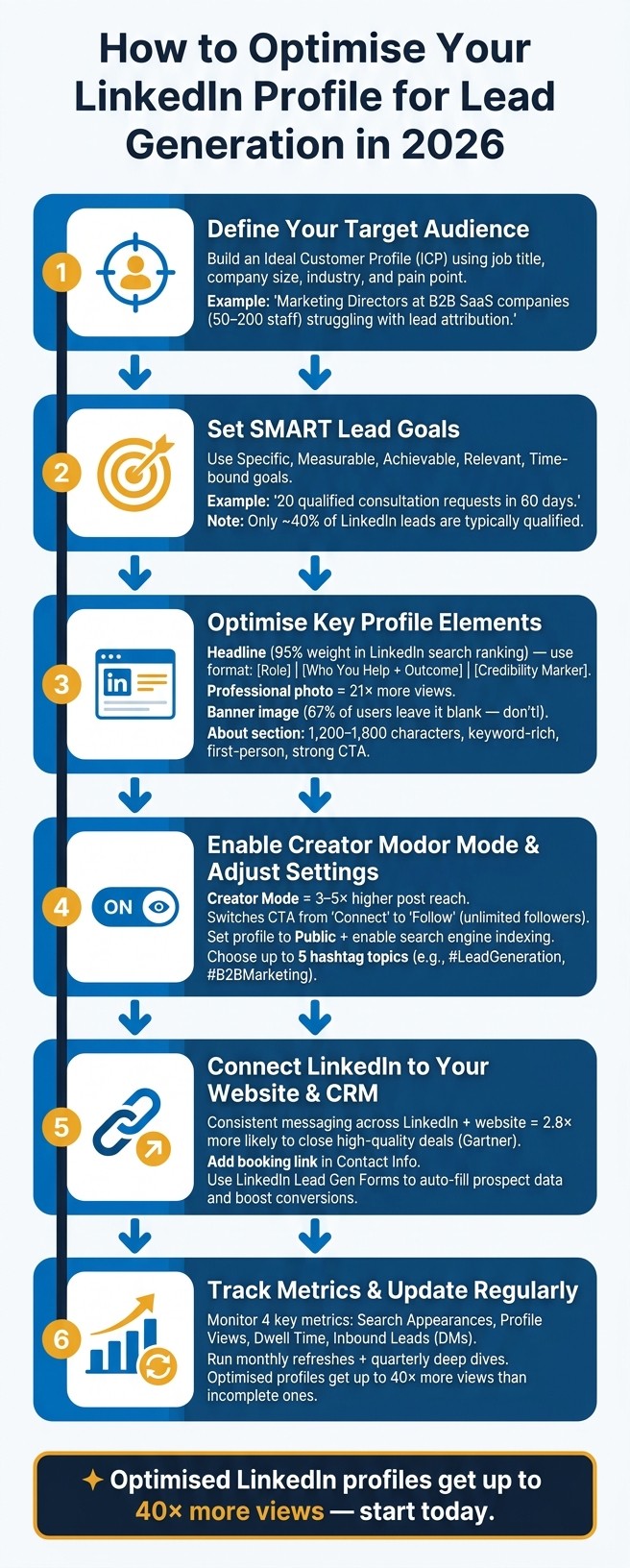
How to Optimise Your LinkedIn Profile for Lead Generation in 2026
The Best LinkedIn Lead Generation Strategy for 2026
Define Your LinkedIn Lead Generation Strategy
Optimizing your LinkedIn profile is just the first step. To truly attract high-quality prospects, you need a clear, actionable lead generation strategy. Without it, even the most polished profile might either draw the wrong audience - or worse, no one at all.
Identify Your Target Audience
Vague audience definitions won’t help you stand out. Phrases like "I work with small businesses" or "I help marketing professionals" might sound reasonable, but they’re too broad to be effective. The more precise you are, the more likely you’ll attract the right people.
Start by creating an Ideal Customer Profile (ICP). Go beyond job titles and consider factors like company size, industry, location, and - most critically - the problem you solve. For instance, instead of targeting "marketing professionals", focus on "Marketing Directors at B2B SaaS companies with 50–200 employees struggling with lead attribution."
Here’s how clarity can make a difference:
Targeting Level | Example |
|---|---|
Vague | "I target marketing professionals." |
Clear | "Marketing Directors at B2B SaaS companies (50–200 staff) struggling with lead attribution." |
Intent-Based | "Decision-makers at companies that recently announced Series B funding researching automation tools." |
Also, watch for trigger events, such as job changes, funding rounds, or company expansions. For example, someone who recently started a new role is likely eager to make an impact, making them more open to outreach.
Once you’ve defined your audience, set measurable objectives to track your success.
Set Your Lead Goals
Your lead goals should align with the needs of your target audience. Once you’ve identified who you’re trying to reach, decide what counts as a successful conversion for your business. Is it a scheduled discovery call? A request for a quote? Or maybe a download from your profile’s Featured section? Without clear metrics, it’s impossible to gauge your performance.
Use the SMART framework to create actionable goals: Specific, Measurable, Achievable, Relevant, and Time-bound. For example: "Secure 20 qualified consultation requests from independent HR consultants in the US within 60 days." This type of goal is easy to track and adjust as needed.
"One quality lead generates more revenue than 50 unqualified prospects. Period." - LeadsMonky
It’s worth noting that only about 40% of LinkedIn leads are typically qualified. Instead of feeling discouraged, let this motivate you to focus on attracting the right prospects from the start.
Map Out Your Lead Capture Process
With a clear audience and defined goals in place, the next step is to design a seamless process for capturing leads. It’s not enough to attract visitors to your profile - you need a clear path to convert their interest into action.
An effective profile guides prospects effortlessly: a compelling headline, a trust-building About section, and a strong call-to-action. To maximize conversions, connect your LinkedIn profile with tools like your Gatsboy website, using lead capture forms or booking links. Consistency in your messaging across platforms helps reinforce your value proposition and build trust.
Make your most enticing resource - whether it’s a free guide, a booking link, or a case study - the first item in your Featured section. Many visitors won’t scroll further, so this prime spot should showcase what’s most likely to engage them. Finally, remove any barriers to contacting you by including a direct calendar link in your Contact Info. This eliminates unnecessary back-and-forth emails and makes it easy for potential clients to take the next step.
Optimize Your LinkedIn Profile for Lead Generation
Your LinkedIn profile isn't just a digital resume - it's a powerful tool to attract and convert leads. Think of it as a landing page designed to guide potential prospects toward taking action.
Write a Strong Headline
The headline is arguably the most critical part of your LinkedIn profile. Why? Because LinkedIn's search algorithm gives headline keywords a 95% weight in determining your ranking in search results. Unlike traditional keyword systems, LinkedIn uses a matching engine that evaluates the meaning behind your words, not just exact matches. This means your headline plays a huge role in who discovers you.
With 220 characters to work with, you need to make every word count - especially the first 40 characters, as mobile search previews cut off anything longer. A proven formula for crafting a compelling headline is: [Primary Role] | [Who You Help + Outcome] | [Credibility Marker]. For example: "B2B Sales Consultant | Helping SaaS Founders Build $500K+ Pipelines | 200+ Clients Served." Headlines like this generate a 78% higher response rate compared to generic job titles.
Avoid overused buzzwords like "guru" or "results-driven." They take up space without adding value or helping with search visibility.
Once your headline is optimized, it's time to focus on your profile's visual appeal and accessibility.
Update Your Visuals and Contact Details
Strong visuals and accessible contact information can make or break your profile. Profiles with professional photos get 21 times more views and 9 times more connection requests. Use a high-quality headshot (at least 400x400px) where your face takes up about 60% of the frame. Make direct eye contact, and opt for a neutral background for a polished look.
Your banner image is another valuable asset, yet 67% of users leave it blank. That’s a missed chance to make a strong impression.
"Your LinkedIn banner occupies 1584 x 396 pixels of prime positioning space... Leaving it blank signals lack of intentionality." - Malay Gupta, Founder, Growleads
Use this space wisely. Include a value-driven statement like "Helping HR Consultants Fill Roles 40% Faster" alongside your brand colors to reinforce your message.
Don’t forget to clean up your LinkedIn URL. A format like linkedin.com/in/firstname-lastname not only looks more professional but also performs better in Google search rankings. Add a direct booking link or your website to the Featured section to make it easy for prospects to take the next step.
Rewrite Your About Section for Prospects
Your About section isn’t a career timeline - it’s your pitch. It should align with your headline and visuals, creating a cohesive message that speaks directly to your target audience. LinkedIn’s algorithm uses this section to calculate an "Expertise" score, so strategic keyword placement is key.
The first 300 characters are especially important because that’s all mobile users see before clicking "see more". Start strong by explaining who you help, the problem you solve, and the results you deliver. Follow up with proof - use specific numbers, like "+180% organic traffic for a 12-person fintech team in 6 months." Wrap up with a clear call to action, such as a calendar link, direct message invitation, or connection request.
Keep your About section between 1,200 and 1,800 characters for the best balance of detail and engagement. Write in the first person to make it feel personal and approachable.
Set Up LinkedIn for Maximum Visibility
After perfecting your headline and visuals, it's time to adjust your settings to make your profile as visible as possible. A polished profile is only effective if the right people can find it. Your settings and features play a big role in how often your profile shows up in LinkedIn and Google searches. Here's how to fine-tune your profile for better reach.
Enable Creator Mode and Adjust Privacy Settings
Creator Mode is a game-changer on LinkedIn. It rearranges your profile layout, prioritizing sections like Featured and Activity above the About section. This ensures visitors see your expertise right away. Another major benefit? It changes your primary call-to-action from "Connect" to "Follow", removing the 30,000-connection limit and allowing unlimited followers.
"Followers outperform connections for visibility. A follower relationship tells LinkedIn: this person wants to see this content." - LinkedIn Creator Mode: The Complete 2026 Guide
Creator Mode also signals to LinkedIn that you're consistently sharing valuable content. Profiles using this feature often see 3–5× higher reach on their posts. Plus, it unlocks tools like LinkedIn Live, Audio Events, and Newsletters, which can help you engage a larger audience. When setting it up, choose up to five hashtag topics (like #LeadGeneration or #B2BMarketing) to guide LinkedIn's algorithm in sharing your content with the right people.
Next, adjust your privacy settings. Go to Settings > Visibility > Profile viewing options, set your profile to "Public", and enable search engine indexing to boost your visibility on both LinkedIn and Google. Also, set your location to a major metropolitan area rather than a smaller suburb. Many searches filter by city, so this tweak ensures you're included in broader search results.
Use LinkedIn's Services Section and Contact Features
Once your visibility settings are optimized, take advantage of LinkedIn's tools to connect directly with prospects. The Services section is particularly effective - it allows you to list specific services you offer and activates LinkedIn's "Find an Expert" feature, which many users overlook. Use clear, keyword-rich descriptions for your services. For instance, instead of listing "Marketing", try something more specific like "B2B Email Strategy for SaaS Companies".
Another quick win? Customize your LinkedIn URL to look professional (e.g., linkedin.com/in/firstname-lastname). A clean URL not only enhances your profile's appearance but can also improve your Google ranking.
In your Contact Info section, make sure to include a direct booking link or website URL. This makes it easy for prospects to reach out without needing to send a message first.
Lastly, keep your Featured section fresh by updating it monthly. Highlight current case studies, lead magnets, or other content that will grab attention and keep your profile engaging.
Connect LinkedIn to Your Lead Management Tools
Now that your LinkedIn profile is fine-tuned for maximum visibility, the next step is to connect it with your lead management tools. Attracting leads on LinkedIn is just the beginning. The real challenge lies in ensuring those leads seamlessly flow into your business systems, so no potential opportunity falls through the cracks. This involves aligning your LinkedIn profile with your Gatsboy website and creating a smooth process for lead follow-ups.
Link LinkedIn to Your Gatsboy Website
Your LinkedIn profile and Gatsboy website should complement each other, creating a unified experience for potential buyers. A Gartner B2B Buying Report highlights that buyers are 2.8 times more likely to close a high-quality deal when they see consistent information between a supplier's website and its representatives. In other words, the tone, messaging, and value propositions on your LinkedIn profile should match what visitors find on your Gatsboy website.
To strengthen this connection, make sure your Featured section showcases your top-performing asset, like a lead magnet or case study. In your About section, include a soft call-to-action (CTA) that directs visitors to a specific landing page - such as a booking form or inquiry page - instead of your homepage. This consistency builds trust and encourages conversions by providing a clear and cohesive experience across platforms.
Set Up Lead Follow-Up and Data Capture
Once prospects transition from LinkedIn to your website, capturing their information becomes the priority. Use essential website features like lead capture tools that automatically collect and organize data, making it easier to track and follow up with potential clients.
For prospects engaging with your LinkedIn content but not yet visiting your website, LinkedIn's native Lead Gen Forms can be a game-changer. These forms auto-fill with a user's profile details, streamlining the submission process and boosting conversion rates. After submission, direct users to a targeted booking page and follow up within 24 hours to keep your brand fresh in their minds.
When reaching out via LinkedIn InMail, focus on crafting short, personalized messages that build genuine connections rather than diving straight into a sales pitch. Keep your messages under 400 characters to improve response rates. By integrating these tools and strategies, you can ensure every lead is nurtured effectively, guiding them smoothly from discovery to conversion.
Keep Your LinkedIn Profile Up to Date
Keeping your LinkedIn profile polished isn’t a one-and-done task. The platform’s 2026 algorithm rewards recency and consistency, meaning that an outdated profile can hurt your visibility in search results.
"The biggest mistake I see candidates make is treating LinkedIn like a static resume. LinkedIn is a living document. The algorithm rewards recency, consistency, and depth." - Lou Adler, CEO, The Adler Group
Run Regular Profile Audits
Make profile maintenance a habit by setting up a monthly routine and quarterly deep dives. Each month, dedicate a week to refreshing a specific section. For example:
Add a new achievement or project to your Featured section in Week 1.
Update an Experience entry with measurable outcomes in Week 2.
Reorder your skills and request a fresh recommendation in Week 3.
Refine your headline and About section for better keyword alignment in Week 4.
This approach keeps your profile dynamic without overwhelming you.
Every quarter, go deeper. Review your visuals, messaging, and links to ensure they align with your current goals and audience. Update your banner every 6 to 12 months to reflect your latest value proposition. Why? Because first impressions matter - 92% of recruiters and prospects check LinkedIn profiles before reaching out. Stale visuals or outdated messaging can send the wrong signal, so regular audits ensure your profile stays sharp.
Track Key Metrics and Refine Your Approach
Your audit findings should guide you toward the metrics that need immediate attention. Without data, optimizing your profile is a guessing game. Use LinkedIn’s analytics to track these four key metrics:
Metric | What It Tells You | When to Act |
|---|---|---|
Search Appearances | If your keywords align with what prospects are searching | Drop in appearances = revisit headline and skills |
Profile Views | How effective your headline and photo are at attracting clicks | Stagnant views = refresh visuals or headline |
Dwell Time | How long visitors stay on your profile | Low dwell = rewrite About section with stronger hooks |
Inbound Leads (DMs) | If your profile converts views into conversations | Few DMs = improve your call-to-action |
For example, in Q2 2025, a VP of Sales at a $90M ARR cybersecurity firm partnered with Growleads to overhaul their profile. They revamped their headline, banner, About section, and Featured content. Over 90 days, their visitor-to-conversation rate jumped from 0.8% to 2.9%, leading to eight additional qualified sales conversations per month - all without increasing profile traffic.
"A strategically optimized LinkedIn profile isn't about appearing impressive to everyone, it's about instantly communicating value to the right people." - Malay Gupta, Growleads
The key is to focus on small, consistent changes. Track your metrics monthly, make one improvement at a time, and measure the impact. This feedback loop is what transforms a static profile into a lead-generating tool.
Conclusion
Creating a LinkedIn profile that generates leads in 2026 takes effort, but the process is straightforward. The key is to make yourself discoverable, build trust, and make it easy for prospects to take action.
Every element of your profile plays a role in boosting credibility and driving conversions. LinkedIn data shows that optimized profiles can get up to 40 times more views than incomplete ones. Even small tweaks can lead to big results over time. When all parts of your profile work together, they create a powerful lead-generation system.
As mentioned earlier, pairing your LinkedIn profile with a professional website strengthens the trust you’ve built. A smooth transition from your LinkedIn profile to your website increases both trust and conversions. For example, a small business website from Gatsboy, equipped with lead capture tools, booking features, and advanced forms, can help turn LinkedIn visitors into qualified leads seamlessly.
The most important mindset shift is this: your LinkedIn profile isn’t just a resume anymore. It’s a dynamic sales funnel. This conclusion ties together the strategies covered earlier, giving you a clear path from profile updates to converting leads. Regular updates, tracking metrics, and aligning your messaging with your audience’s needs are essential. Start today: update your headline, add a lead magnet, or link your website in the Featured section. Consistency is what sets apart profiles that truly drive results.
FAQs
Which keywords should I use in my LinkedIn headline for 2026 search?
To make your LinkedIn headline stand out in 2026, prioritize using keywords that resonate with your industry, attract your target audience, and align with LinkedIn's search algorithm. Highlight industry-relevant job titles, essential skills, and key benefits you bring - the kind of terms decision-makers and potential clients are actively searching for. For better visibility, position these keywords at the start of your headline, ensuring it performs well both on LinkedIn and in external search engine results.
What should I put first in my Featured section to get more leads?
To bring in more leads in 2026, make sure to feature a high-impact asset - like a case study, lead magnet, or top-performing post - right at the start of your Featured section. Since this section appears immediately after your About section, it’s a prime spot to showcase your expertise, build trust, and encourage interaction. Placing your best-performing content here can lead to noticeable increases in clicks and inbound opportunities.
How can I track if my LinkedIn profile is converting visitors into leads?
To evaluate how well your LinkedIn profile is converting, pay attention to specific metrics. Start with Lead Gen Form performance, looking at how many leads are downloading or completing forms. Next, track engagement metrics like profile views, connection requests, and direct messages.
For more detailed insights, leverage LinkedIn analytics or connect marketing tools to trace how interactions translate into leads or sales. Don't forget to routinely analyze data like click-through rates and conversion rates to gauge your profile's effectiveness.
Related Blog Posts
Join our community of 15,000+ business owners
Popular articles
Popular articles about your website and marketing your small business


