



Small Business Cancellation Policy Guide
Small Business Advice
If you take appointments, I’d put your cancellation policy in writing before the next booking. A last-minute cancellation can wipe out a full hour of income, and for many U.S. small businesses, that means a direct hit to cash flow.
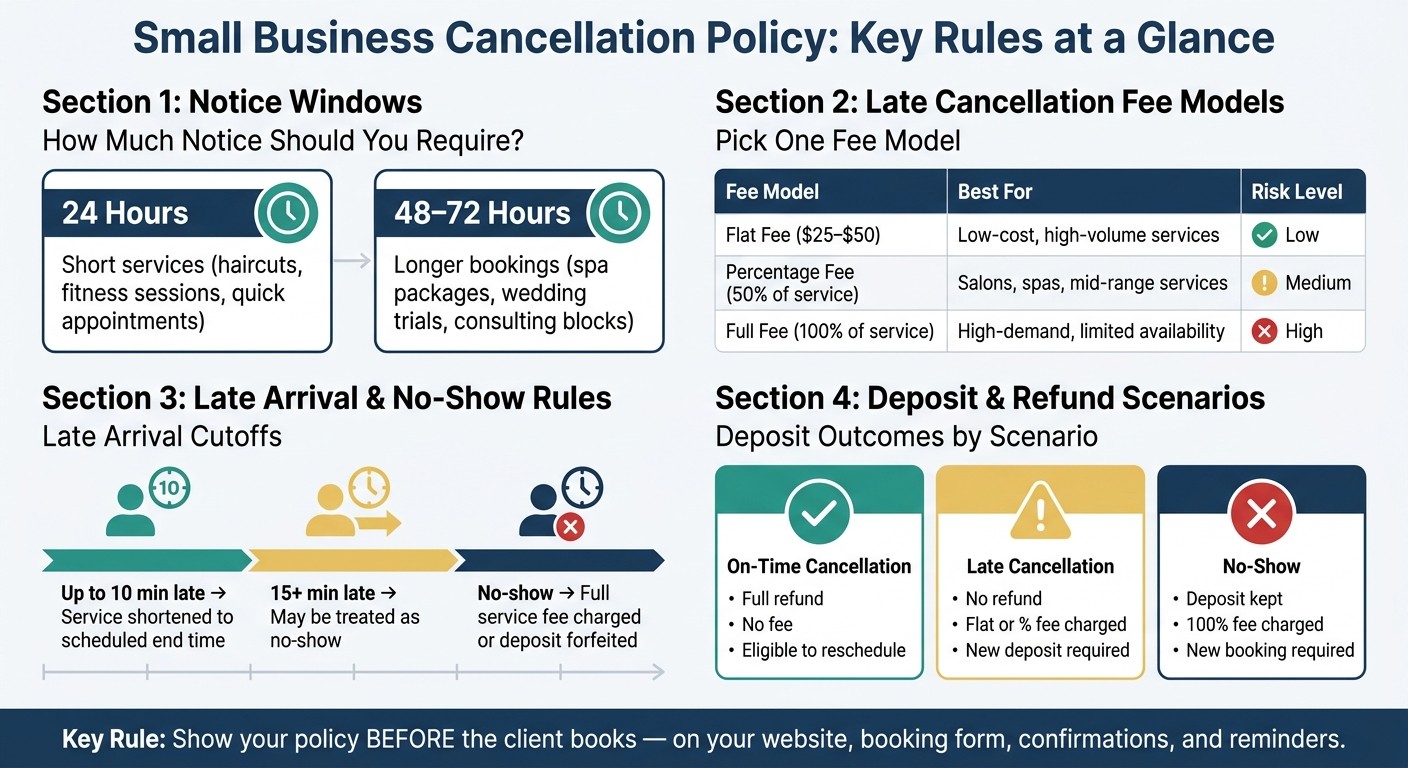
Here’s the short version: I’d set a clear notice window, spell out rescheduling and late-arrival rules, pick one fee method, explain deposit and refund terms, and show the policy everywhere a client books, including on essential website features like your booking form and confirmation page. Common notice windows are 24 hours for short services and 48 to 72 hours for longer or higher-prep bookings. Late cancellations often lead to a $25 to $50 fee, 50% of the service price, or, in some cases, the full fee.
At a glance, the article covers:
Who needs a policy: any appointment-based business, especially solo owners
What the policy should include: notice windows, reschedules, late arrivals, no-shows, fees, deposits, refunds, and exceptions
How to word deadlines: use exact cutoff times, not vague phrases
How to collect consent: add a required checkbox before booking
Where to show the policy: website page, booking form, confirmations, reminders, and payment step
A few points matter most:
If a client cancels after the cutoff, the policy should say what fee applies
If a client arrives late, the policy should say whether the service is shortened or treated as a no-show
If a deposit is taken, the policy should say when it is refunded, transferred, or kept
If you allow exceptions, the rule should be narrow and written in plain terms
Item | Common setup |
|---|---|
Notice window | 24 hours for short services; 48 to 72 hours for longer bookings |
Late cancellation fee | $25 to $50, 50% of service price, or 100% |
No-show rule | Full charge or loss of deposit/prepayment |
Rescheduling | One free change before the cutoff |
Late arrival | Up to 10 minutes late may shorten service; 15+ minutes may count as no-show |
Bottom line: I’d keep the policy short, specific, and visible before the client books, so there is less confusion and fewer fee disputes later.
Small Business Cancellation Policy: Fee Models & Notice Windows at a Glance
How to set notice windows, rescheduling rules, and late arrival cutoffs
Choose a notice window that fits your service
The notice window is the cutoff for canceling or rescheduling before fees kick in. Set it based on the length of the appointment, how much prep is involved, staffing needs, and how hard it is to fill that time slot again.
For shorter services with less prep, like haircuts or fitness sessions, 24 hours is a common choice. For longer bookings with more setup, like spa packages, wedding trials, or consulting blocks, 48 to 72 hours usually makes more sense.
Be specific about the deadline. Don’t just say “two days before.” Say exactly when the window closes. If an appointment is at 3:00 PM on Friday, June 12, the cancellation deadline is 3:00 PM on Wednesday, June 10. If rescheduling follows the same timing, say that plainly. If not, list a separate rule.
Write rescheduling rules in the same section
Put rescheduling rules right beside your cancellation terms. That way, clients don’t have to hunt for the difference.
A common setup is one penalty-free reschedule per booking, as long as the request comes in before the notice window closes.
Spell out what counts as a reschedule. If the client asks to change the appointment before the deadline, it’s a reschedule. If they ask after the deadline, it counts as a late cancellation and the late cancellation fee may apply.
You should also say how clients need to send the request, such as:
Phone
Email
Your online booking portal
Make it clear that a change is not final until the client gets written or automated confirmation.
Once the appointment start time passes, late arrival and no-show rules apply instead.
Define late arrival and no-show cutoffs
Late arrival rules help protect your calendar without coming off as harsh. A simple setup like this works well:
Arrival Timing | What Happens |
|---|---|
5–10 minutes early | Arrive for check-in, paperwork, or setup |
Up to 10 minutes late | Service ends at the scheduled time |
15+ minutes late | May be treated as a no-show; full fee may apply |
A no-show means the client does not arrive or contact you by the scheduled start time. In most cases, that leads to a charge for the full service fee or loss of any deposit or prepayment. That time was held for them, and you usually can’t fill it at the last minute.
Next, connect these cutoffs to your fee and refund terms.
How to set fees, deposits, and refund terms
Pick a late cancellation and no-show fee model
Start by choosing one fee model and saying it in plain English: a flat fee, a percentage fee, or the full fee.
Policy Model | Pros | Cons | Best Fit |
|---|---|---|---|
Flat Fee ($25–$50) | Predictable for the client; easy to communicate | May not cover costs for high-value services | Low-cost, high-volume service businesses |
Percentage Fee (50% of the service price) | Scales with the value of the service; covers labor | Can feel expensive to clients for premium services | Salons, spas, and mid-range professional services |
Full Fee (100% of the service price) | Maximum protection against lost revenue | Highest risk of client friction or negative reviews | High-demand businesses with limited availability |
A flat fee usually works best for lower-cost services. A percentage fee makes more sense for higher-priced services when you need to recover staff time and labor. The full-fee model fits cases where a missed appointment should lead to a charge equal to the full service price.
Also spell out how the fee is handled. Will it be charged automatically? Taken from a deposit? Billed after the appointment? Say that up front so there’s no confusion later.
If a time slot is hard to fill after the cutoff, a higher fee may make sense. The fee model should line up with how much time you need to refill that slot.
Explain deposits, prepayments, and refunds by scenario
Deposits should support the same deadlines you already set. If a client cancels within the notice window, refund the deposit or apply it to a new booking. If they cancel late or don’t show up, keep the deposit as the fee.
Here’s a simple rule set:
Scenario | Refund Amount | Fee Charged | Reschedule Eligibility |
|---|---|---|---|
On-Time Cancellation | Full refund | None | Fully eligible |
Late Cancellation | No refund; deposit kept | Flat or percentage fee | Eligible with a new deposit |
No-Show | Deposit kept | 100% of service price | Requires new booking and payment |
Be direct about whether a deposit can transfer to a rescheduled appointment. If it can, explain when that applies. If it can’t, say so clearly.
Once you set your fees and exceptions, put those same rules anywhere clients book. That means your booking page, intake form, and confirmation messages should all match.
Add grace periods and exceptions
Keep the grace period rule short, then spell out the exceptions.
For example, you might say that clients who cancel within one hour of booking and more than 48 hours before the appointment get a full refund and pay no fee. That gives people a little room to fix an honest mistake without turning the policy into a free-for-all.
Then add a short exception clause for events outside the client’s control, such as natural disasters, acts of war or terrorism, riots, strikes or work stoppages, governmental actions, and internet disturbances. Define those exceptions once so your staff handle them the same way every time.
Where to place your cancellation policy on your website and booking form
Once your rules are set, don't tuck them away. Put the policy where people will see it before they book, then repeat the main terms in each follow-up message.
Place the full policy on your website and a short summary near booking buttons
Your full policy should live on a dedicated page with a clear label like Cancellation Policy or Booking Policies. Link to it from your main navigation and footer. It also helps to add a short mention on your Contact and FAQ pages, so people can find it fast instead of hunting around.
Then place a short summary on your services or appointments page, right above or close to the Book Now button. It should be visible without scrolling. Keep the wording plain and direct.
For example: cancel or reschedule at least 24 hours before your appointment to avoid a fee.
Require agreement on the booking form
Add a short policy reminder near the date and time selection on your booking form. Right after that, include a required checkbox that blocks submission until the customer checks it.
The checkbox label should state the main terms in simple English.
For example: I agree to the Cancellation Policy and understand that late cancellations and no-shows will be charged a $50 fee.
Leave the checkbox unchecked by default. Also, save the timestamp and consent details with the booking record. If someone later disputes a fee, you'll have a clear paper trail.
Repeat the policy in confirmations, reminders, and payment steps
Use the same terms in every automated message. Include the cutoff deadline in confirmation emails, reminders, and rescheduling flows so clients have time to act before the window closes.
At the payment step, tie the deposit straight to the policy.
A $30 deposit is required and applies to your service. Deposits are non-refundable after 5:00 PM on the day before the appointment or for no-shows.
Notification Type | Recommended Timing | Content Focus |
|---|---|---|
Confirmation Email | Immediately after booking | Full policy details, date/time, and rescheduling link |
Reminder Email or SMS | Before the cancellation cutoff | Cancellation deadline and fee warning |
Payment Step | During booking | Deposit terms and refund eligibility scenarios |
Conclusion: Keep your cancellation policy short, visible, and easy to enforce
A good cancellation policy should be short, specific, and easy to find before booking. If it's buried in fine print or written in fuzzy language, it doesn't do its job.
Key points to carry into your final draft
Use the table below as a final draft checklist.
When you write the final version, keep sentences short and stick to plain English. Swap vague lines like fees may apply or emergencies will be considered for exact wording. For example: we'll waive one late cancellation fee for documented emergencies reported before the appointment starts. That kind of detail makes the policy easier for clients to understand and easier for staff to apply the same way every time.
Gatsboy's Online Bookings can show the policy on your booking page, collect checkbox consent, and repeat the rules in confirmations and reminders. When the same terms show up everywhere, there's a lot less room for mix-ups.
Use this checklist to tighten your final draft.
Policy Element | Plain-English Example |
|---|---|
Notice window | Cancel or reschedule at least 24 hours before your appointment |
Late cancellation fee | Cancellations within 24 hours are charged a $25 fee |
No-show charge | No-shows are charged 50% of the service price |
Deposit refund rule | $50 deposit refunded in full if canceled 48+ hours in advance |
Rescheduling rule | One free reschedule allowed with 24+ hours' notice; $25 fee applies after that |
Exception rule | One fee waiver per client per year for documented emergencies |
FAQs
How strict should my cancellation policy be?
Your cancellation policy should protect your time and revenue without feeling harsh. The sweet spot is a policy that fits how your business actually runs.
Start with your appointment types and scheduling needs. A 15-minute check-in doesn’t need the same rules as a half-day service block. When your policy matches the time and effort each booking takes, it’s much easier for clients to understand.
It also helps to spell out payment and refund terms in plain English. If someone cancels late, what happens? Do they lose their deposit, pay a fee, or get credit for a future visit? Clear terms remove guesswork and cut down on awkward back-and-forth.
Automated reminders can do a lot of the heavy lifting too. A simple text or email reminder gives clients a nudge before their appointment, which can help lower no-shows and make the booking process run more smoothly.
Can I legally charge for no-shows?
Yes - as long as clients agree to a clear, enforceable cancellation policy when they book.
The key is simple: show the terms upfront during scheduling. That way, clients know the rules before they confirm the appointment, which helps avoid disputes later.
A booking system with Online Payments, like Gatsboy, can also make this much easier. You can collect deposits or securely hold payment information at the time of booking. That sets clear expectations and helps protect your revenue when a client misses an appointment.
What if a client disputes a cancellation fee?
Point the client to the cancellation policy they agreed to when they booked. That gives you a clear, professional way to respond and helps you stay consistent in how you run your business.
It also helps to keep the policy easy to find on your website and booking forms. And if you use the Gatsboy business dashboard to track booking status and client communication, you can cut down on mix-ups before they turn into back-and-forth.
Related Blog Posts
Join our community of 15,000+ business owners
Popular articles
Popular articles about your website and marketing your small business


