



Small Business Email Marketing Guide for 2026
Small Business Marketing
Email can still be one of the lowest-cost ways to get more bookings, repeat sales, and quote requests. The article’s main point is simple: start with a permission-based list, send your first email right away, keep your messages short, and track a few key numbers like opens, clicks, bounces, unsubscribes, and spam complaints.
If I had to sum it up in plain English, it would be this:
I only email people who asked to hear from me
I use signup forms, booking forms, checkout, and in-store prompts to collect emails
I send the promised deal or freebie immediately
I follow with a 4-email welcome sequence over about 7–9 days
I keep a simple send rhythm: weekly or every other week
I split people into basic groups like new leads and existing customers
I watch list health, keep bounce rate under 2%, and remove dead addresses
I focus on business outcomes, not just vanity metrics
The article also points out that email still works because I control the list and message, unlike social platforms. And with email often cited at about $36 back for every $1 spent, even a small list can produce sales if the people on it fit the business well.
A few details stand out right away:
74% of subscribers expect the first email immediately after signup
A list can lose about 25% of contacts each year
A starting open rate of 20%–30% is a fair range for a permission-based list
Midweek sends, especially Tuesday through Thursday in the late morning, are a solid starting point
What I like about the article is that it keeps the plan simple: collect permission, tag leads by form type, send one clear message at a time, and connect each email to one goal like book now, shop now, or request a quote. That is the whole system in a nutshell.
A beginner's guide to email marketing (for small businesses)
How to Build a Permission-Based Email List From Scratch
A permission-based email list includes only people who said yes. They opted in through a form, a checkbox, or a confirmation click. And every email you send needs an easy unsubscribe link that you honor fast.
Where to Collect Email Addresses
Once you're clear on what a proper opt-in looks like, the next move is simple: put signup opportunities where people already interact with your business.
Start with your website. Add a short signup form and make one clear promise. For example, say subscribers will get monthly tips and 1–2 emails a month. If you need more space to explain the offer, a dedicated subscribe page can work well too.
Then look at the touchpoints you already have. An appointment booking flow can include an optional checkbox like "send reminders and offers." A checkout flow can do the same. If you have an in-person location, a counter tablet or a QR code on receipts can help you collect emails from walk-in customers.
At each signup point, be direct. Tell people what they'll get, how often you'll email them, and that they can unsubscribe anytime. That small bit of clarity goes a long way.
Give People a Reason to Sign Up
People are more likely to join your list when the offer is specific. A vague "join our newsletter" usually isn't enough. A clear deal or useful freebie gives them a reason to act now.
Business Type | Effective Incentive | Example |
|---|---|---|
Service business | First-visit discount or local guide | $15 off your first cleaning or a free home maintenance checklist |
Retail shop | Percentage or spend-based discount | 10% off your next purchase or $10 off when you spend $50+ |
Café or restaurant | Welcome deal or local guide | Free dessert, up to an $8 value, with your next entrée or a neighborhood dining guide |
Send the offer right away in your first welcome email. If your website forms can trigger automations, use that setup so the offer lands in their inbox as soon as they sign up. Timing matters here. If someone joins for a deal, they shouldn't have to wait for it.
Keep Your List Clean and Active
Email lists shrink over time. About a quarter go inactive each year, so list cleaning isn't a one-time task. It's part of the job.
Start with hard bounces. Remove them right away. If you keep sending to bad addresses, your sender reputation can take a hit. It's smart to keep your total bounce rate under 2%.
For subscribers who haven't opened or clicked in 6–12 months, send one re-engagement email. If they still don't respond after 2–3 tries over 2–3 sends, remove them from the list. A smaller list with active readers beats a bigger list full of dead weight every time.
After that, focus on what happens right after signup. Send the promised offer at once, then move the subscriber into your welcome sequence. That's where you start turning new signups into paying customers.
Write a Welcome Email and a Simple Starter Sequence
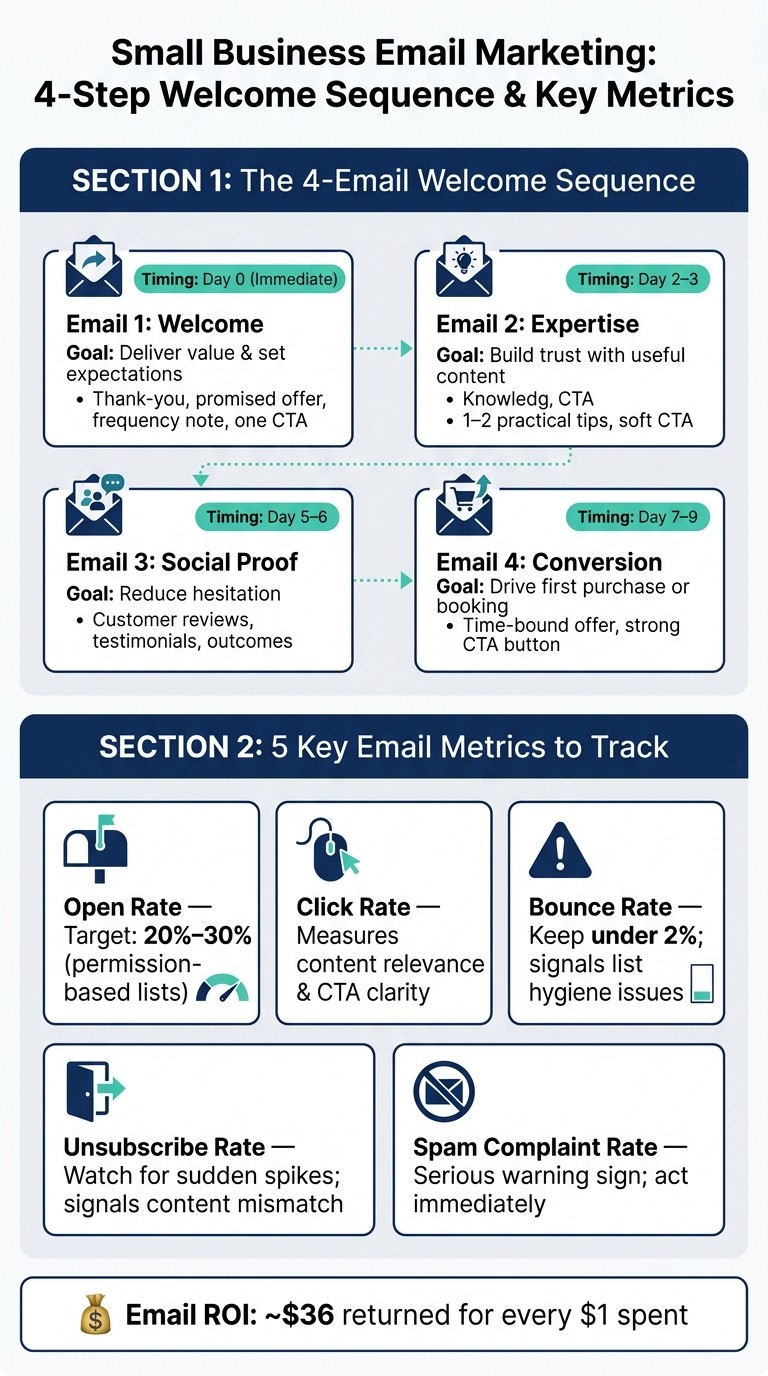
Small Business Email Marketing: 4-Step Welcome Sequence & Key Metrics
A signup is your best shot at making a strong first impression. The moment someone joins your list, your welcome email should go out automatically. That timing matters more than most people think. In one ecommerce guide, 74% of subscribers expect the first email immediately after signup.
So send it right away.
This first email is where you deliver the offer you promised on the form. If someone signed up for a discount, give them the discount. If they asked for a download, put that download front and center. Simple, clear, no hunting around.
What to Put in Your First Welcome Email
Your welcome email should do a few basic jobs well. Thank the subscriber. Confirm what they signed up for. Put the promised offer or resource near the top. Tell them how often you'll email. Then give them one clear next step.
Start with a short thank-you and a quick reminder of what they'll get from you. If you promised a discount code or a free download, place it near the top so it's easy to spot. After that, end with one main call to action. That could be:
Book an appointment
Shop a featured item
Reply with a question
If your site includes essential small business website features, link straight to booking or payment. The fewer taps, the better.
A 4-Email Sequence Any Beginner Can Follow
A simple 4-email sequence sent over 7–9 days helps build trust before you make your first sales ask.
Timing | Goal | What to Include | |
|---|---|---|---|
Email 1: Welcome | Day 0 (immediate) | Deliver value and set expectations | Thank-you, promised offer, frequency note, one CTA |
Email 2: Expertise | Day 2–3 | Build trust with useful content | One or two practical tips, soft CTA |
Email 3: Social Proof | Day 5–6 | Reduce hesitation | Customer reviews, testimonials, or outcomes |
Email 4: Conversion | Day 7–9 | Drive a first purchase or booking | Time-bound offer, strong CTA button |
Email 2 should help solve one real customer problem. Don’t cram in too much. One or two useful tips are enough.
Email 3 is where you ease doubt. Reviews, testimonials, and short outcome-based examples can help people feel more comfortable taking the next step. If you manage Google Reviews, a few strong snippets can fit well here.
Email 4 is the ask. Make it direct. Give a deadline. Use a specific dollar amount if you're offering a discount. That kind of detail tends to work better than vague wording.
After Email 4, move subscribers into your regular weekly or every-other-week campaigns.
Write Short, Mobile-Friendly Emails With One Clear Action
Keep your emails short and easy to scan. Most people will read them on a phone, not at a desk with coffee and spare time. That means brief paragraphs, plain language, and one main button per email.
Stay focused. Make the next step easy to tap.
If you collected a first name, use it. Match the offer or example to the signup source so the email feels connected to what the person just did. Use a direct tone, test your personalization fields, and keep each email centered on a single action.
One email. One message. One action.
When to Send, How to Structure Campaigns, and How Website Forms Feed Your List
Start With a Weekly or Every-Other-Week Send Schedule
After your welcome sequence ends, move people into a regular email rhythm. For most beginners, the easiest place to start is once a week or once every other week. That cadence keeps your list warm without flooding inboxes.
As for timing, begin with Tuesday through Thursday, midmorning in the subscriber's local time zone. Think of that as your baseline, not a hard rule. From there, test one variable at a time so you can see what changes move the needle.
Tie Each Email to One Business Goal
Every email should support one business goal. Maybe you want to fill open appointment slots, drive quote requests, sell a product, or bring past customers back for a second visit.
Keep the email simple: a short subject line, one main message, and one clear call-to-action button. That tends to work better than trying to cram in five ideas at once.
For example:
A local salon could send a midweek email about open slots for the next week with a direct link to book online.
A home services company could send a Thursday email with a seasonal estimate offer and one Request a Quote button.
Basic segmentation helps a lot here. Start with just two groups: new leads and existing customers. New leads need more context and trust-building. Existing customers already know who you are, so they're often more ready to act on offers, updates, and loyalty perks.
How Website Forms Send New Leads Into Your Campaigns
Every form on your website can feed your email list. A newsletter signup, contact form, quote request, or booking form can collect a visitor's details and send that person into the right list on its own.
The big idea is simple: tag contacts based on where they signed up and what they wanted. Someone filling out a booking form has a different goal than someone joining a newsletter. They shouldn't get the same follow-up.
Form Type | Recommended Fields | Tag |
|---|---|---|
Newsletter Signup | Email, First Name | Website Signup |
Quote Request | Name, Email, Service Interest, Phone | Quote Request |
Booking Form | Name, Email, Date/Time, Service | Booking Lead |
Contact Form | Name, Email, Message | General Inquiry |
This setup works best when each form sends contacts into the right follow-up path. A platform like Gatsboy can route website leads into the right campaign, connect bookings and Stripe payments, and trigger follow-up emails automatically.
A visitor fills out a form, gets tagged the right way, and enters the right sequence.
Track the Right Metrics and Improve Over Time
The 5 Numbers to Watch: Opens, Clicks, Bounces, Unsubscribes, and Spam Complaint Rate
Once your welcome sequence and regular emails are up and running, these numbers show you what's landing and what's missing the mark.
Metric | What It Tells You | Watch For |
|---|---|---|
Open Rate | How many recipients opened your email | Subject line strength, list quality |
Click Rate | How many people clicked a link or button | Content relevance, CTA clarity |
Bounce Rate | How many emails couldn't be delivered | List hygiene, invalid addresses |
Unsubscribe Rate | How many people opted out after a send | Content fit, send frequency |
Spam Complaint Rate | How many recipients reported your email as spam | Serious list or content problems |
For permission-based lists, a 20–30% open rate is a solid place to start. Keep your bounce rate under 2%. If it climbs above that, your list likely has quality issues. Unsubscribes in small amounts are normal, but a sudden jump often means the content didn't fit or you emailed too often.
Run Small Tests to Get Better Results
Use these numbers to make one small change at a time. Start with subject lines. If people don't open the email, nothing else matters much.
After that, test your call-to-action button text. Then test send time. This step-by-step approach keeps things simple and makes it easier to spot what changed the result.
Look at patterns across 3–5 sends before you decide anything. One campaign can be a fluke. But if several emails in a row show low click rates, that's a sign you should act on. Small lists can bounce around a lot, so pay attention to direction over time, not one lucky win.
Conclusion: Start Simple, Stay Consistent, and Connect Email to Business Results
The businesses that get the most from email connect each send to a clear result: more bookings, repeat sales, online payments, and stronger trust.
FAQs
How many emails should I send each month?
For small businesses, consistency matters more than volume. A good starting point is 2 to 4 emails per month.
That pace keeps you in front of subscribers without flooding their inboxes. It also gives each email space to do its job, whether you're sharing a promotion, a business update, or a customer success story.
What should I do if my open rates are low?
If your email open rates are low, start with the first thing people see: the subject line. A small tweak there can make a big difference. Then look at your list segmentation. If the content lines up more closely with what each subscriber cares about, more people are likely to open and read.
It also helps to use more than one channel. Email open rates often average around 20%, while SMS can reach 98%, with most messages read within three minutes. That gap matters, especially when timing is tight.
For time-sensitive alerts or follow-ups, the Gatsboy dashboard can send automated SMS. In plain terms, if a message can't wait, text may be the better bet.
How do I connect website forms to email follow-ups?
Connect your website forms to your business dashboard. With Gatsboy, you can add a newsletter signup or a more advanced form to your site, and visitor details like names and email addresses flow straight into your dashboard as new leads.
Once they’re in, you can manage contacts, message leads, and set up automated email follow-ups like welcome emails or feedback requests - without writing code by hand.
Related Blog Posts
Join our community of 15,000+ business owners
Popular articles
Popular articles about your website and marketing your small business


