



Wix vs Squarespace vs No-Code Editors: Full Comparison
Website Tips
Looking to build a website but unsure which platform to choose? Here's a quick breakdown of three popular options: Wix, Squarespace, and Gatsboy. These platforms cater to different needs, budgets, and skill levels, making it easier for small business owners to create professional websites without coding.
Wix: Offers unmatched flexibility with over 2,000 templates, drag-and-drop editing, and powerful eCommerce tools. Pricing starts at $29/month for small online stores.
Squarespace: Known for sleek, design-forward templates and reliability. Great for visual-heavy businesses, with plans starting at $23/month.
Gatsboy: A done-for-you, 5-page custom website built on Framer. Perfect for business owners who want a professional site without DIY hassle. Starts at $500 upfront + optional $47/month for advanced features.
Quick Comparison:
Platform | Best For | Starting Price | Key Features |
|---|---|---|---|
Wix | Customization & scalability | $29/month | 2,000+ templates, AI tools, eCommerce |
Squarespace | Design-focused businesses | $23/month | Premium templates, faster load times |
Gatsboy | Ready-to-launch websites | $500 (one-time) | Custom design, lead management tools |
Each platform has its strengths. Choose Wix for flexibility, Squarespace for polished designs, or Gatsboy for a hands-off, professional setup. Let’s dive deeper into their features, pricing, and limitations.
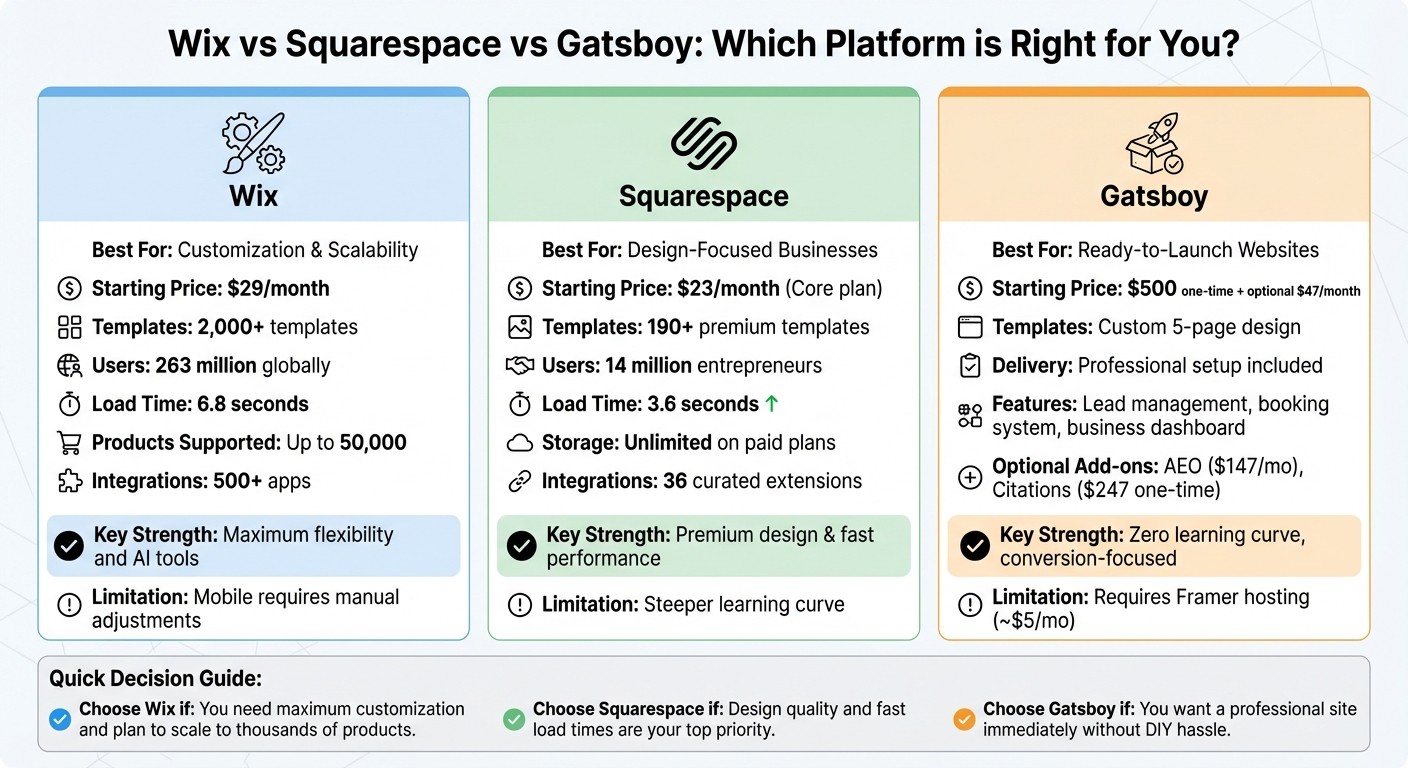
Wix vs Squarespace vs Gatsboy: Platform Comparison Chart
Squarespace vs Wix: Complete Comparison 2026
1. Wix
Wix’s drag-and-drop editor gives you the freedom to place elements wherever you want on the page. This flexibility allows for pixel-perfect control, making it a favorite among small businesses looking to create a distinct online presence without hiring a professional designer. With over 263 million users in 190 countries, Wix has established itself as one of the most widely-used website builders globally.
Customization
Wix takes customization to the next level with its AI-powered tools. Its chatbot can design your site - complete with text, images, and layouts - based on your business goals. For those who want more control, Wix Studio offers advanced design tools and CSS editing, while Velo by Wix enables full JavaScript customization. On top of that, Wix includes an AI marketing assistant to automate email campaigns and social media posts. There’s also a direct integration with Semrush for keyword research.
However, one limitation is that once your site is live, you can’t switch templates without starting over. Additionally, the freeform editor can sometimes result in inconsistent mobile layouts, so you may need to make manual adjustments to ensure your site looks polished on smaller screens. These tools and features allow small business owners to create a tailored, professional online presence.
Next, let’s dive into Wix’s extensive range of templates.
Templates
Wix offers a staggering selection of over 2,000 templates, far outpacing platforms that only provide around 180 options. These templates cater to a variety of industries and niches. While the sheer number of choices is impressive, some of the older templates may feel outdated. The open-ended design options give you flexibility, but they might require extra effort to maintain a cohesive, professional appearance.
"Giving someone Wix is like giving someone a blank canvas with all the colors, the paintbrushes, and all other painting supplies."
Steve Benjamins, Founder, Site Builder Report
Beyond aesthetics, Wix strengthens functionality with its robust integration options.
Integrations
The Wix App Market features over 500 apps, both native and third-party, to enhance your site’s capabilities. These include lead-generation tools like Wix Forms and a unified inbox that consolidates Facebook messages and live chats. The platform also supports AI-driven marketing automation. For eCommerce, Wix enables multichannel selling on platforms like Amazon, eBay, and Facebook, and it includes built-in dropshipping capabilities. It can handle up to 50,000 physical or digital products and supports over 80 payment processors worldwide.
Pricing
Wix’s pricing starts at $29 per month for plans that include eCommerce and booking tools. The platform boasts a 99.99% uptime rate, and performance tests show that sites load their main content in an average of 6.8 seconds.
Plan | Monthly Price | Best For | Key Features |
|---|---|---|---|
Free | $0 | Testing the platform | Wix branding, 500MB storage |
Light | $17 | Simple professional sites | Custom domain, 2GB storage |
Core | $29 | Small online stores | eCommerce, 50GB storage |
Business | $39 | Growing brands | Advanced eCommerce, 100GB storage |
Business Elite | $159 | Scaling businesses | Unlimited storage |
Enterprise | Custom | Large-scale solutions | Tailored features |
This pricing structure makes Wix an attractive option for businesses seeking a scalable and cost-effective way to grow online.
2. Squarespace
Squarespace relies on a structured grid system to ensure consistent and polished designs. Its Fluid Engine uses this grid-based format to snap elements into rows and columns, making it easier to achieve a professional look across devices. With over 14 million entrepreneurs using the platform globally, Squarespace has earned a reputation for its clean and visually appealing designs.
This approach also simplifies customization while maintaining a cohesive aesthetic.
Customization
The Fluid Engine offers flexibility within a framework that ensures designs remain clean and mobile-friendly. Users can tweak fonts, colors, and layouts, and add features like section dividers, scrolling text blocks, and background art. For a more personalized touch, Blueprint AI generates starting points with tailored images and copy based on your brand's description. Advanced users can dive deeper with CSS editing and JavaScript injection available in the Core and Business plans.
"Squarespace makes it easy to adjust layouts, colors, fonts, and logos." - Esther Pak, Floral Designer, FLRL by Esther
Key features like block pinning allow important elements, such as contact forms, to remain visible as users scroll. Plus, the ability to redesign your site without losing content makes it simple to refresh your brand as your business evolves.
These tools are complemented by Squarespace's carefully crafted template library.
Templates
Squarespace offers over 190 templates tailored for industries like photography, restaurants, and service-based businesses. While this is fewer than Wix's 2,000+ options, Squarespace focuses on quality and design precision over sheer volume. On average, Squarespace sites load main content in 3.6 seconds, significantly faster than Wix's 6.8 seconds. Additionally, 95.85% of Squarespace sites score well for responsiveness to user interactions.
"Squarespace is curated and design-y while Wix is occasionally chaotic but allows for a lot of freedom to customize." - Steve Benjamins, Founder, Site Builder Report
All templates come with unlimited storage and bandwidth on paid plans, a big plus for businesses with large product catalogs or high-resolution visuals.
Integrations
Squarespace supports 36 curated Extensions to meet essential business needs. For eCommerce, it integrates with Stripe, PayPal, and Square, as well as tools like TaxJar for automated sales tax and ShipStation for order fulfillment. Marketing tools include native Email Campaigns, social media syncing with Instagram and Facebook, and the Unfold app for creating social media content.
"The seamless flow from client inquiry forms straight into proposals and contracts, and finally to invoicing, has eliminated the hassle of juggling multiple platforms." - Diane Whiddon, Brand and Web Agency Owner, Sway Rise Creative
Service-based businesses can take advantage of Acuity Scheduling, which automates appointment bookings, calendar syncing, and client reminders. Squarespace also stands out as the only website builder that natively supports podcast syndication to platforms like Apple Podcasts and Spotify.
Pricing
Squarespace combines sleek design with strong functionality, reflected in its pricing options. Plans start at $16 per month for the Basic plan, which includes unlimited storage and a free custom domain. For businesses looking to avoid the 2% transaction fee on eCommerce sales, the Core plan is available at $23 per month.
Plan | Monthly Price | Best For | Key Features |
|---|---|---|---|
Basic | $16 | Simple websites | Unlimited storage, mobile-optimized |
Core | $23 | Small businesses | 0% transaction fees, CSS/JavaScript options |
Plus | $39 | Growing businesses | Lower processing fees, 50 hours video storage |
Advanced | $99 | High-volume sellers | Abandoned cart recovery, subscriptions |
Squarespace also boasts a 99.9% uptime rate and includes built-in SSL encryption on all plans. This combination of performance, design quality, and all-in-one features makes it a compelling choice for businesses where visual appeal is a top priority.
3. Gatsboy
Gatsboy offers a professional, ready-to-go 5-page website built with Framer, taking the hassle out of website creation. With this service, you’ll get a custom-designed site featuring a modern aesthetic, built-in SEO-friendly structure, and a business dashboard to manage leads and customer interactions - all without any steep learning curve.
The platform takes care of the heavy lifting, from design to technical setup, and includes integrated tools for lead capture, bookings, and messaging. It also supports helpful integrations like Google Reviews, Stripe Payments, and advanced forms. This setup not only saves time but also provides flexibility, allowing your business to grow and adapt easily.
Customization
Once your site is up and running, Gatsboy makes it simple to personalize it further. Using an intuitive dashboard and Framer’s no-code editor, you can update your live site with ease. The centralized dashboard also lets you manage customer interactions efficiently. Want to add extra functionality? Gatsboy offers modules for features like social media feeds, event management, job boards, calculators, and live chat.
For businesses aiming to boost their local reach, there’s an optional AEO add-on priced at $147 per month. This feature optimizes your site for AI-driven local searches, connecting you with customers who rely on AI tools to find services. Additionally, the Citations package ($247 one-time) submits your business to 50 major directories, strengthening your online visibility and improving local search rankings.
Pricing
Gatsboy’s pricing is straightforward and designed with small businesses in mind.
The Website Only plan comes with a one-time fee of $500. This includes a custom 5-page website, two rounds of revisions, and access to the business dashboard. Note that you’ll need a Framer hosting account, which starts at approximately $5 per month for basic sites.
The Website + Pro plan costs $500 upfront, plus $47 per month. This tier unlocks advanced forms and professional modules, making it ideal for businesses looking to scale their operations and automate customer interactions.
Plan | Price | Best For | Key Features |
|---|---|---|---|
Website Only | $500 (one-time) | New businesses | Custom 5-page site, dashboard, 2 revisions |
Website + Pro | $500 + $47/month | Growing businesses | Advanced forms, pro modules, all Website Only features |
AEO | $147/month | Local visibility | AI search optimization for local services |
Citations | $247 (one-time) | Directory presence | Submission to 50 top business directories |
This setup is perfect for business owners who prioritize their time and want a polished website without the trial-and-error of DIY platforms. Gatsboy delivers expert design and setup, while still giving you the tools to manage and update your site easily - no technical expertise required.
Pros and Cons
Here’s a breakdown of the strengths and limitations of each platform, highlighting how they align with different small business needs - whether it’s scalability, design quality, or ease of use.
Wix is known for its flexibility and speed. Supporting up to 50,000 products and offering access to over 500 third-party integrations through its App Market, it’s a great choice for businesses with specific needs like forums or multilingual capabilities. That said, desktop edits don’t always translate seamlessly to mobile, often requiring manual adjustments.
Squarespace is all about polished design and reliability. Its templates are celebrated for their high-end aesthetics, with 95.85% of sites achieving strong interaction scores. Features like unlimited storage and bandwidth on all paid plans make it a solid option for media-heavy portfolios or service-oriented businesses. However, its structured grid system can make customization trickier, and the extension marketplace is limited to just 36 apps. Additionally, the Basic plan comes with a 2% transaction fee unless you upgrade to the Core plan at $23 per month.
Gatsboy takes a different approach, offering a ready-to-launch, professionally designed 5-page website instead of a DIY setup. It includes integrated tools like lead management, booking systems, and optional AEO optimization for AI-driven local searches, all tailored for small business growth. The downside? You start with a custom design rather than a broad selection of templates. However, the Framer-based editor allows for full customization once your site is live.
Platform | Key Strengths | Main Limitations |
|---|---|---|
Wix | 900+ templates, 500+ app integrations, AI site builder (60 seconds), supports 50,000 products | Slower load times (6.8s), mobile requires manual tweaks |
Squarespace | Premium design templates, fast load times (3.6s), unlimited storage/bandwidth, robust blogging tools | Steeper learning curve, limited extensions (36 apps), 2% transaction fee on Basic plan |
Gatsboy | Professional design, zero learning curve, integrated dashboard, AEO optimization | Fewer initial templates, requires Framer hosting |
Wix shines with its extensive integrations and adaptable design options, though mobile optimization may need extra effort. Squarespace is ideal for those who value premium design and consistent performance without manual adjustments. Meanwhile, Gatsboy is perfect for anyone looking to skip the DIY process and launch with a professional, ready-to-go site that still offers room for customization. These overviews can help you zero in on the platform that best fits your business goals.
Conclusion
Pick the platform that aligns with your business goals.
Wix offers rapid scalability with over 500 app integrations and support for up to 50,000 products, making it a solid choice for businesses aiming to grow quickly.
Squarespace stands out for its sleek, premium designs and faster load times, with main content loading in just 3.6 seconds - almost twice as fast as Wix. This ensures a smooth and polished experience for your visitors.
Gatsboy provides a ready-to-launch, professionally designed 5-page website built on Framer. It includes tools like lead management, booking systems, and optional AI-powered local search optimization. With no learning curve, this option is perfect for business owners who need a conversion-focused site without delays.
Each platform offers distinct strengths, so your decision should reflect your budget and growth stage.
Wix: Powerful e-commerce tools starting at $29/month.
Squarespace: High-performing, design-forward sites from $23/month.
Gatsboy: A done-for-you, conversion-optimized solution for immediate results.
Whether you need flexibility, standout design, or a pre-built solution, choose the platform that best supports your business's growth.
FAQs
Which option is best for my business stage?
When deciding on the best platform, it all comes down to your specific needs and future goals. If you're just starting out and looking for an affordable, straightforward way to establish a professional online presence, Wix and Squarespace are excellent choices.
Wix stands out with its flexible drag-and-drop templates, making it easy to customize your site without any technical skills. On the other hand, Squarespace shines with its clean, streamlined designs that are perfect for showcasing a polished look.
If you think you'll eventually need more advanced customization or room for growth, these platforms are a great starting point. You can always transition to more robust solutions as your business expands.
How hard is it to edit my site later?
Editing your website later is hassle-free with no-code platforms like Wix and Squarespace. Both feature intuitive drag-and-drop editors, so you can make changes without needing to dive into coding.
With Wix, you get a flexible editor that allows you to move elements around freely, giving you more creative control. On the other hand, Squarespace offers a structured editor, which keeps things tidy and organized as you update your site. These platforms are built to be user-friendly, making it easy for small business owners to keep their websites updated as their businesses evolve.
What hidden costs should I budget for?
When planning your budget for website builders like Wix or Squarespace, it’s important to think beyond the advertised subscription prices. There are often additional costs that can creep in, such as premium plugins, app integrations, or even custom design work - especially if you end up hiring a designer to achieve a specific look.
You might also encounter expenses like transaction fees on some of the lower-tier e-commerce plans, domain registration, email hosting, or access to advanced analytics tools. These extras can add up quickly, so make sure to carefully review the details of each plan. Taking the time to understand all potential costs upfront can help you avoid surprises and stick to your budget.
Related Blog Posts
Join our community of 15,000+ business owners
Popular articles
Popular articles about your website and marketing your small business


