



How To Ask Customers For Reviews Without Being Pushy
Small Business Marketing
Customer reviews are essential for building trust, improving visibility in local search results, and driving revenue. Yet, many businesses hesitate to ask for reviews, fearing they'll seem pushy. The good news? 77% of customers are willing to leave a review when asked, and the right approach can make all the difference.
Key Points:
When to Ask: Timing is crucial. Aim to ask within 1–2 hours of service or delivery for the best results.
How to Ask: Use friendly, casual language and frame it as a request for honest feedback - not a favor.
Make It Easy: Provide direct links or QR codes to simplify the process.
Follow Up: A gentle reminder 2–5 days later can increase response rates significantly.
Avoid Pitfalls: Don’t offer incentives or ask at inconvenient times.
By creating a clear, repeatable system, you can collect reviews consistently while respecting your customers’ time and preferences.
How to Ask for Google Reviews (Without Being Pushy)
Timing: When to Ask for a Review
Timing matters just as much as how you ask. Even the most well-crafted request can fall flat if it’s sent at the wrong moment.
Find the Right Moment
The best time to ask for a review is usually within 1–2 hours of completing a service or delivering a product. This is when the experience is still fresh, and customers are most likely to feel satisfied. Wait too long, and the chances of getting a response drop significantly - after 48 hours, conversion rates are cut in half, and after a week, they’re almost nonexistent.
The ideal timing can vary depending on the type of business:
Business Type | Best Time to Ask |
|---|---|
Home services | Within 2 hours of completing the job |
Salons & barbers | Within a few hours, while the results are fresh |
Restaurants | The next morning, around coffee time |
Healthcare & clinics | Later the same day, once any discomfort subsides |
Retail & e-commerce | 1–3 days after delivery |
Pay attention to what customers say. If someone praises your service or mentions how happy they are, take that as a cue to ask for a review. Catching them in these moments can make your request feel natural and well-timed.
When Not to Ask
Timing isn’t just about finding the right moment - it’s also about avoiding the wrong ones. Don’t ask for reviews while customers are dealing with unresolved issues, are visibly stressed, or seem to be in a hurry. These situations can lead to frustration or even negative feedback.
Also, avoid sending requests at inconvenient times, like late at night or before 9 AM. And if a customer has explicitly asked you not to contact them again, respect their wishes immediately.
Send a Gentle Follow-Up
Not everyone will respond to your first request, and that’s okay. A polite follow-up sent 2–5 days later can make a big difference - up to 80% of reviews come from follow-up messages.
Keep your follow-ups limited to one or two additional messages beyond the initial ask. Overdoing it can irritate customers and undo any goodwill. Tools like Gatsboy can help you automate these reminders, ensuring they’re sent at the right time without becoming overbearing. This approach keeps your engagement respectful and effective.
How to Ask for Reviews Without Feeling Pushy
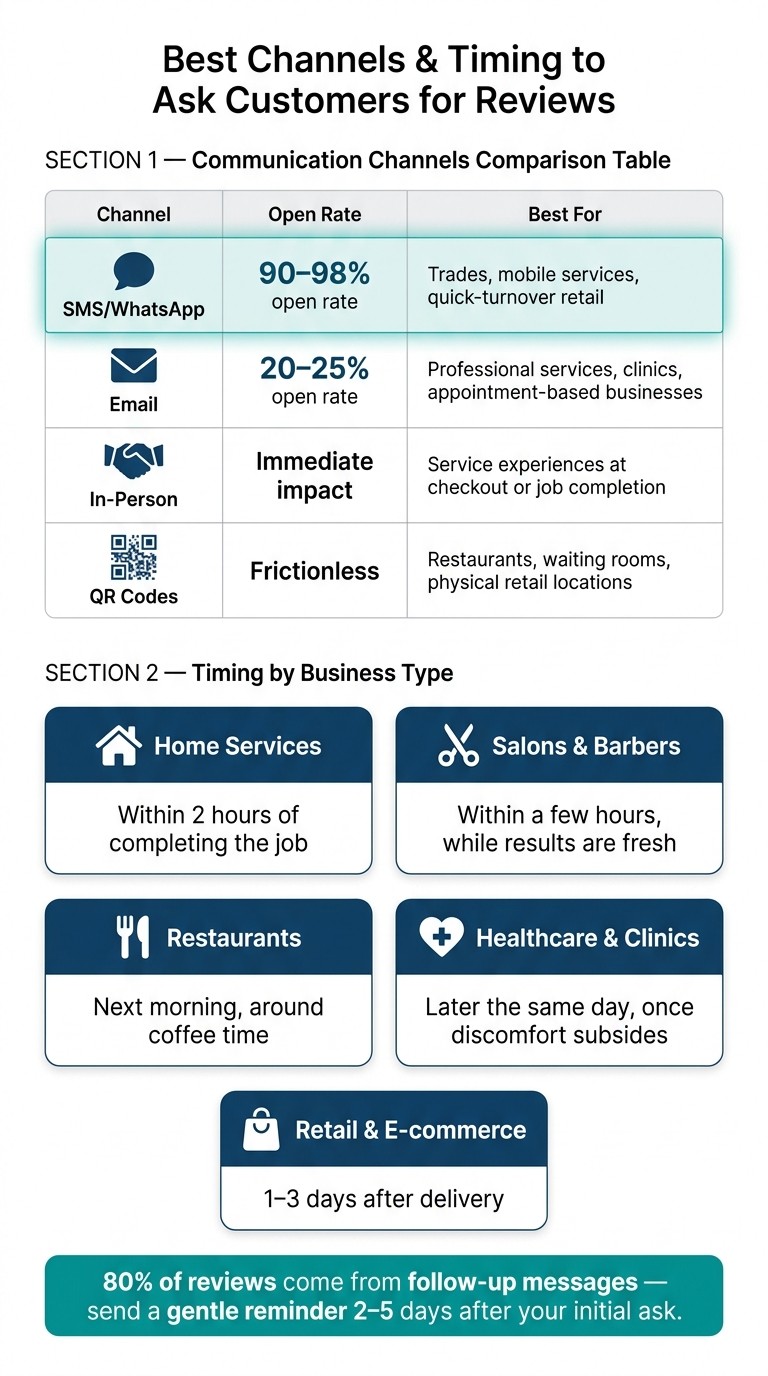
Best Channels & Timing to Ask Customers for Reviews
Asking for reviews can feel tricky, but with the right approach, you can do it confidently without coming across as overbearing.
Keep It Conversational
Ditch the overly formal tone. Instead of saying, "We kindly request that you take a moment to submit a review", go with something like, "We’d love to hear about your experience!" This kind of friendly, casual language feels more natural and less like a scripted request.
Start by expressing gratitude, then ask for feedback. Make it clear there’s no pressure by including phrases like "No worries if you’re busy" or "Only if you’ve got a spare moment." Ironically, giving people an easy way to decline often makes them more likely to say yes.
"People are more likely to do something when they feel free not to." - TrustMint
Ask for Honest Feedback
How you frame your request matters. Instead of asking for a "favor", invite customers to share their experience or offer their opinion. This signals you genuinely value their input, rather than just chasing a perfect score.
Avoid offering incentives like discounts or freebies in exchange for reviews. Not only can this violate review platform policies, but it also undermines the authenticity of the feedback. Worse, it could even lead to your profile being suspended.
Personalize the Request
Generic messages don’t cut it. Addressing customers by name and referencing the specific service or product they received makes your request feel personal. For example, "Hi Marcus, I hope you’re loving the new hardwood floors! If you have a moment, we’d love to hear your thoughts on the installation" is far more effective than a bland, one-size-fits-all template.
Personalization works. Using a customer’s name and details about their experience significantly increases response rates.
If you’re juggling customer data across different platforms, tools like Gatsboy’s business dashboard can help. It centralizes customer information and interaction history, making it easier to craft tailored review requests without sifting through endless spreadsheets.
Once you’ve personalized your message, choose a communication channel that fits your customer’s preferences.
Pick the Right Channel
The best way to ask for reviews is through channels your customers already use - and have agreed to receive messages on. Here’s a quick guide:
Channel | Open Rate | Best For |
|---|---|---|
SMS/WhatsApp | 90–98% | Trades, mobile services, quick-turnover retail |
20–25% | Professional services, clinics, appointment-based businesses | |
In-Person | N/A | Immediate service experiences at checkout or job completion |
QR Codes | N/A | Restaurants, waiting rooms, physical retail locations |
Text messages are incredibly effective - most are read within minutes. However, sending a text without consent or outside of business hours can feel invasive. Emails, while less immediate, are less intrusive and work well for professional settings. If you’re asking in person, handing over a small card with a QR code can take the pressure off, letting customers leave a review on their own time.
Making It Easy for Customers to Leave a Review
Once you've politely asked for a review, the next step is to make the process as simple as possible. Even the most satisfied customer might skip leaving a review if it feels like a hassle. The idea is to streamline the process, making it quick and effortless.
Remove Barriers
One of the easiest ways to encourage reviews is by providing a direct review link - a URL that takes customers straight to Google's review form, with the star rating selector ready to go. The fewer clicks required, the better. You can generate this link directly from your Google Business Profile dashboard in seconds or manually create it using the format: https://search.google.com/local/writereview?placeid=YOUR_PLACE_ID.
For businesses with physical locations, consider displaying a QR code on receipts, invoices, or even business cards. Customers can scan it with their phones and be directed straight to the review page. If you manage ongoing client relationships, including a review link in your email signature is a subtle way to gather reviews without any additional effort.
"The businesses that collect the most reviews are the ones that make leaving a review effortless for their customers, and a direct link does exactly that." - Jake Randall, Endorsa
Give Clear Instructions
Not every customer is comfortable navigating Google, and that’s perfectly fine. For those less familiar with the process, a simple three-step guide can work wonders. For example: 1. Open your camera app. 2. Point it at this code. 3. Tap the link that appears. Straightforward and easy to follow.
If you’re sending a link via text or email, shorten it to make it look cleaner and less intimidating. A simple URL like yourbusiness.com/review is far more approachable than a long string of characters. Google also offers short links (g.page/r/) through your Business Profile for free. Always test your link in an incognito browser to ensure it takes users directly to the star-rating selector and not just your business listing.
Use Your Website to Collect Reviews
To make the process even smoother, embed review requests directly into your website. Adding a "Leave a Review" button on your thank-you page - right after a customer completes a purchase or booking - can be incredibly effective. This timing captures them when their satisfaction is at its peak.
If your site is built using platforms like Gatsboy, you can integrate Google Reviews into your website. This allows you to display existing reviews and include a "Leave a Review" button, all in one place. It’s a simple way to manage reviews without needing additional tools, which is especially helpful when you’re juggling the demands of running a business.
Building a Review Request System That Respects Customers
Build It Into Your Workflow
A personalized and thoughtful approach to requesting reviews can make all the difference. To make it seamless, integrate review requests into your workflow as a standard step tied to key moments - like "service completed", "appointment closed", or "order delivered." This ensures your requests are timely and consistent. For physical products, give your customers some time to experience the item before asking for feedback: around 7–14 days for clothing and 14–30 days for electronics or durable goods.
Use Automation Without Overdoing It
Automation can simplify the process while keeping it customer-friendly. Lightly automated emails or SMS messages that include the customer’s name and reference their specific service can significantly improve response rates. In fact, automated messages can achieve conversion rates of 15–25%, compared to just 5% for manual efforts. Keep it simple: send an initial request, followed by a gentle reminder 3–7 days later. Sending too many follow-ups, however, might strain the relationship.
If your business uses tools like Gatsboy, you can take advantage of their built-in Google Reviews integration. It centralizes your review management, sparing you from juggling multiple platforms.
"A one-minute flow beats a five-minute form." - Growave
Once your system is running, regularly evaluate its performance to ensure it’s working as intended.
Track Results and Adjust
To improve your review strategy, keep an eye on key metrics like request-to-review conversion rates - the percentage of requests that turn into actual reviews. If this number is low, it might be time to tweak your approach. Check the timing of your messages, ensure the content is concise, and verify that the review links work properly.
Another important metric is your average star rating over time. A steady decline in ratings could point to an underlying issue within your business that needs attention, not just a reason to send more review requests. For instance, ComfortCool HVAC in Dallas managed to grow their Google reviews by 340% and boost their star rating in just four months by adjusting their timing triggers.
With Gatsboy’s business dashboard, you can easily track customer interactions and review trends in one place. This makes it simpler to identify patterns and adjust your strategy to keep things running smoothly.
How to Handle Negative or Mixed Reviews
Addressing negative reviews isn't just about damage control - it’s an opportunity to showcase your dedication to customer service and turn challenges into trust-building moments.
Respond With Respect
A negative review doesn’t have to spell disaster. In fact, it’s a chance to demonstrate how your business resolves issues. Did you know that 73% of unhappy customers are willing to give a business another shot if their complaint is handled well? That’s a huge opportunity hiding behind a one-star review.
Start by verifying the reviewer’s account to ensure the feedback is legitimate. Then, craft a thoughtful response. Begin with a genuine apology, acknowledge their concerns, and outline the steps you’ll take to address the issue. Use their name, maintain a calm tone, and avoid generic, copy-paste replies that feel impersonal. If the review is fake or includes hate speech, don’t hesitate to report it through the platform’s tools.
"People treat reviews like decoration. They're not. They are the content. They're your brand." - Mike Blumenthal, Local SEO Expert
Sometimes, a public response isn’t enough. When that’s the case, shift the conversation to a private channel.
Take Issues Offline When Needed
Some problems - like refund disputes or account-specific concerns - are too complex to handle in a public forum. In your public reply, acknowledge the issue briefly and provide your name along with direct contact information. This ensures the customer knows exactly who to reach out to and how.
Timing matters. Aim to post your initial public response within 48 hours. This shows both the reviewer and potential customers that you take feedback seriously. Once the issue is resolved privately, you can politely ask the customer if they’d consider updating their review. Just be cautious - offering discounts or gifts in exchange for updates is against most platforms’ rules. Interestingly, 54% of customers revise their negative reviews after a positive resolution.
Use Feedback to Improve
Negative reviews aren’t just complaints - they’re a treasure trove of insights. Treat them like free market research. Group similar complaints into categories, such as "long wait times", "product issues", or "communication gaps", and look for recurring patterns. If multiple customers flag the same problem within a short time, it’s a clear signal to make changes.
When you act on feedback, let your customers know. A simple message like, "We’ve improved our scheduling process based on your feedback", not only closes the loop with the original reviewer but also reassures future customers that you’re committed to continuous improvement. As Jake Miller, Founder of Fellow, wisely notes:
"Customer reviews are pure gold. Every entrepreneur and any employee should obsess over what feedback you're getting from your customers."
Conclusion: Key Takeaways for Asking for Reviews the Right Way
Getting reviews is all about being consistent, choosing the right moments, and approaching customers authentically. Businesses that make review collection a habit tend to fare better, as Google's algorithm values both the number and freshness of reviews.
Here’s what works: ask soon after a positive interaction, make your request personal, and provide a direct review link to keep things simple. According to BrightLocal, 76% of customers who are asked to leave a review actually follow through. These small, thoughtful actions can build up to create a big impact over time.
"The businesses that show up every day - on social and in reviews - are the ones that win. Not because any single post or review changes everything, but because the accumulation is impossible to compete with." - Kathleen Celmins, Founder of Glow Social
Avoid offering discounts or gifts in exchange for reviews - this not only violates Google's policies but also risks eroding customer trust.
For an easier way to manage reviews, Gatsboy includes a Google Reviews integration in its all-in-one website platform. This feature helps you handle feedback effortlessly, creating a straightforward, repeatable system for gathering reviews. By using tools like this, you can simplify your process and support long-term business growth.
FAQs
What if a customer was happy but doesn’t respond to my first review request?
If a satisfied customer doesn’t reply to your initial review request, consider sending a gentle follow-up after another positive interaction. A polite reminder highlighting how much their feedback means can encourage them to respond. To keep things genuine, ask for reviews from all customers, not just those who appear happy. This approach not only boosts your chances of getting responses but also helps create a well-rounded review profile.
How do I ask for a review if the experience was only “okay”?
If a customer’s experience was just “okay,” it's best to ask for honest feedback without pushing for a glowing review. A polite and straightforward approach works well, such as: “We’d love to hear about your experience.” Keep the message short, sincere, and include a direct link to the review platform to make it easy for them to share their thoughts. By framing it as a request for feedback, you encourage honesty and demonstrate that you value their opinion.
What should I do if I suspect a review is fake or from someone who wasn’t a customer?
If you suspect a review is fake or written by someone who wasn’t an actual customer, you should report it to the platform (like Google). Reviews that break platform rules - such as including staff names or displaying suspicious patterns - can often be flagged and removed. Platforms like Google keep an eye out for these kinds of violations and take appropriate action when needed.
Related Blog Posts
Únete a nuestra comunidad de 15,000+ propietarios de negocios
Artículos populares
Artículos populares sobre su sitio web y la comercialización de su pequeña empresa


