



How to Build a Business Website in Under 2 Hours
Web Development
Building a business website no longer requires coding skills or weeks of effort. With tools like Gatsboy and Framer, you can create a professional, mobile-friendly website in less than two hours. Here's how:
Step 1: Sign up for Gatsboy's $500 Website Only Plan and complete a simple questionnaire.
Step 2: Customize your 5-page website using Framer's drag-and-drop editor.
Step 3: Add features like Stripe payments, Google Reviews, and live chat for customer interaction.
Step 4: Set up hosting, connect your domain, and optimize for SEO.
Step 5: Upgrade with optional add-ons like advanced forms, local tracking, and directory listings.
You'll get a sleek, functional site that works across devices, integrates payment processing, and helps you manage leads - all without needing technical expertise.
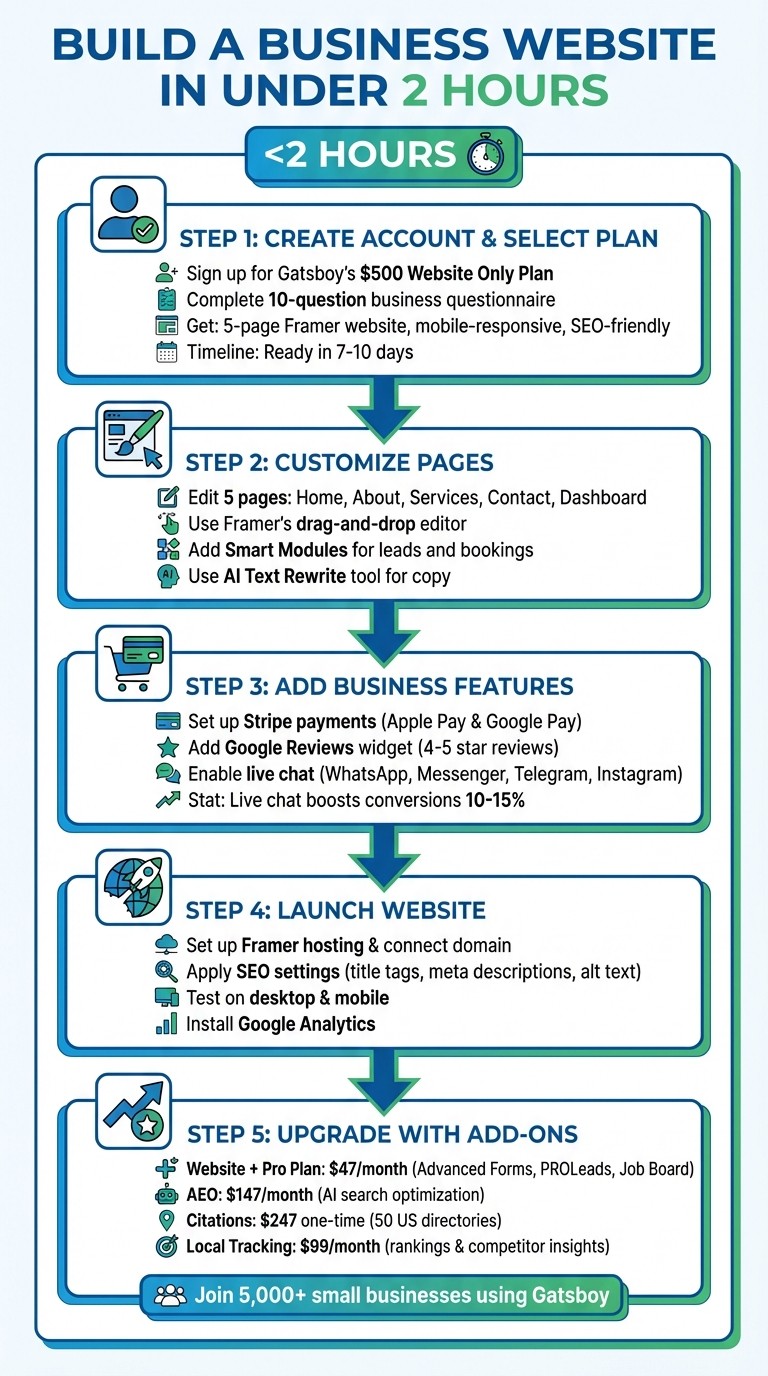
5-Step Process to Build a Business Website in Under 2 Hours
Step 1: Create Your Gatsboy Account and Select the Website Only Plan
Create an Account
Head over to the Gatsboy website and click on "Get my website". From there, you can either place your order directly or schedule a discovery call to discuss your needs.
Once you’ve placed your order, you’ll need to fill out a short 10-question business questionnaire. This form asks for details like your name, the services you offer, your contact information, and your goals for the website. To make the process smoother, have the following ready: your business address, phone number, email, 3–5 photos, and a one-sentence description of your services.
It’s important to note that you’ll need a Framer account since Gatsboy transfers full ownership of the website to you once it’s completed. Don’t worry if you don’t have one yet - you’ll be prompted to create it during the setup process.
Once your account is ready and the questionnaire is completed, you’re all set to pick your plan.
Choose the Website Only Plan
The next step is selecting the Website Only plan, which is ideal for creating a fully functional and professional website. The one-time cost for this plan is $500. Here’s what you’ll get: a 5-page Framer website designed to look great on desktops, tablets, and mobile devices. The design includes an SEO-friendly structure, business schema integration, a contact form, and access to the Gatsboy business dashboard.
Your website will be ready within 7–10 days, and the plan includes two rounds of revisions to make sure everything meets your expectations. Simon W. from Bowburn Travel shared his experience, saying:
"an outstanding website that we are proud to call our new home. They made the process... effortless and delivered well beyond our expectations"
Keep in mind, the $500 covers the website build itself, but you’ll need to purchase a separate Framer hosting plan to keep your site live.
Step 2: Customize Your Pages with the Framer Editor
Edit Your Main Pages (Home, About, Services, Contact, Dashboard)
Once your account is ready, it's time to personalize your website's pages. Using the Framer editor - a design tool with a Figma-like interface - you can easily tweak your site when it's delivered. The drag-and-drop functionality gives you full control over your layout. Your website starts with five pre-configured pages.
Begin with the Home page. Pay close attention to the "above the fold" section, which is the first thing visitors see before scrolling. Make sure your main value proposition and call-to-action (CTA) are front and center, especially for mobile users. Use the responsive design tools to preview how your page looks across different screen sizes, focusing on the 1200px desktop breakpoint.
For the About and Services pages, simplify things by removing any unnecessary template blocks. This keeps the design clean and helps you stay within the two-hour setup window. On the Services page, emphasize key results using concise bullet points (3–5 per service) and include a clear CTA, like "Request a Quote". On the Contact page, streamline the form to encourage more submissions.
Framer’s AI Text Rewrite tool can help polish your copy, ensuring a consistent tone across all pages. Ayush S., a Product Designer, highlighted the ease of use:
"Design and publish websites in minutes! And for free!"
These quick adjustments will keep you on track to launch your site in under two hours.
Add Smart Modules for Leads and Bookings
To take your website to the next level, integrate smart features. Gatsboy's Smart Modules let you handle inquiries and bookings without needing any coding skills. These modules connect directly to your business dashboard, allowing you to manage leads, reply to messages, and track bookings all in one place.
Adding a module is simple - just drag it onto the desired spot on your page. Popular options include placing it on the Contact page or creating a "Book Now" section on your Services page. Mark Reynolds from Reynolds & Co shared his experience:
"The speed I can now update and manage my website is unreal. It's become a core part of our workflow"
You can also add a newsletter signup module to start growing your email list. Framer's built-in CMS makes it easy to manage dynamic content like blog posts or service listings, keeping your website fresh without needing to touch any code.
Step 3: Add Business Features to Your Website
Set Up Stripe Payments
By enabling payment processing on your website, you allow customers to pay you directly online. Gatsboy integrates seamlessly with Stripe, which acts as both a payment gateway and a merchant account. This setup is straightforward and doesn't involve monthly fees or long-term commitments.
To get started, create a Stripe account and provide your business and bank details. Then, retrieve your API keys from the Developers section. Before going live, use Stripe's test mode to simulate transactions and ensure everything runs smoothly. Once you're ready, activate live mode with your production API keys. You can also enable digital wallets like Apple Pay and Google Pay, which accounted for nearly half of all online transactions in 2021. As Stripe emphasizes:
"Integrating a payment gateway into your business website can create a smooth and secure checkout process and build customer trust, enthusiasm and loyalty."
Make sure your website uses HTTPS to encrypt payment data during transmission. To further build credibility, consider adding customer reviews and interactive forms to your site.
Add Google Reviews and Advanced Forms
Showcasing Google Reviews on your website helps potential customers see real-life testimonials. Use the Google Reviews widget to display only 4- and 5-star reviews, and include a "Write a Review" button. Place this widget on high-traffic pages like your homepage or services page to influence decision-making. As Ajay Prasad, Founder and President of GMR Web Team, puts it:
"Putting Google reviews on the website is like spotlighting these real stories and showing evidence that they are great at what they do."
Take it a step further with advanced forms that automatically email customers a few days after their purchase, encouraging them to leave feedback while their experience is still fresh. Respond to all reviews - positive or negative - to show you value customer input. This practice not only builds trust but also signals to future clients that their opinions matter. Pairing reviews with real-time engagement tools like live chat can further enhance customer experience.
Enable Live Chat for Customer Support
After setting up payment and review systems, focus on real-time customer interaction with live chat support. Live chat has been shown to boost conversions and increase customer spending by 10–15%. Gatsboy’s live chat feature integrates multiple messaging platforms, including WhatsApp, Facebook Messenger, Telegram, and Instagram, into a single widget.
Customize the chat bubble to reflect your brand by adding your logo and colors. Use automated triggers to display the chat window based on visitor behavior, such as time spent on a page or how far they’ve scrolled. Keep your welcome message short and inviting to encourage interaction. Clearly communicate your operating hours so customers know when to expect a response. Also, test the chat widget on mobile devices to ensure it doesn’t obstruct navigation or content.
Live chat is a proven tool for improving customer satisfaction. In fact, 79% of businesses report that it positively impacts revenue, sales, and loyalty. If you're not available 24/7, set up canned responses to address common questions instantly, even when you're offline.
Step 4: Prepare and Launch Your Website
With your website features ready, it’s time to finalize hosting and make sure your site is optimized for its big debut.
Set Up Framer Hosting and Connect Your Domain
Click "Publish" in the top-right corner to generate a temporary framer.app domain. From there, you can connect your custom business domain. After publishing, navigate to your domain settings to link your personalized domain.
If you’re using registrars like Google Domains, GoDaddy, or IONOS, Framer provides an "Auto Connect" feature. This tool simplifies the DNS configuration process by leveraging the Domain Connect open standard. For registrars like Namecheap or Bluehost, you’ll need to manually update your DNS records. Framer will supply the necessary values in your Gatsboy project settings for easy setup.
Keep an eye on the optimization indicator: blue or purple means your site is in good shape, while red signals areas that need attention. Use the "View Changes" feature to review all updates before publishing.
Apply Basic SEO Settings
Pay attention to SEO basics to ensure your site is search-engine friendly. Start by adding unique, keyword-focused title tags (aim for 50–60 characters) and meta descriptions (up to 155 characters) for each page.
Use clear and descriptive URL slugs, such as "yourbusiness.com/services", instead of random strings. Add alt text to all images with keyword-rich descriptions to improve both accessibility and image search rankings. Structure your content with proper header tags - H1 for main titles, and H2 through H6 for subheadings - to help search engines understand your content’s hierarchy. As SEO expert Shaun Hinklein puts it:
"Headers and site navigation are incredibly important for SEO. It allows search engines to very quickly identify what the most important content is on a page."
Additionally, compress your images before uploading to maintain fast load speeds, and make sure your site uses HTTPS for added security.
Once these SEO settings are in place, you’ll be ready to move forward with the final launch.
Publish Your Website
With your custom pages and features complete, the last steps ensure your site looks polished and works seamlessly online.
Use Preview mode to check how your site appears on both desktop and mobile. Test all interactive elements and confirm that the site displays correctly across different browsers.
When you’re ready, hit the "Publish" or "Go Live" button in your Gatsboy editor. Fun fact: over 69% of websites today are built using a website builder or CMS, and Framer’s publishing tool allows for instant updates even after your site is live. After launch, don’t forget to install Google Analytics and submit your sitemap to Google Search Console for better tracking and indexing.
Once live, explore Gatsboy’s additional tools and add-ons to enhance your site’s functionality and support your business growth.
Step 5: Upgrade Your Website with Gatsboy Add-Ons
Your website is live and running smoothly - great start! Now, it's time to take things to the next level. Gatsboy offers add-ons designed to expand your website's capabilities, helping your business grow and adapt. These upgrades focus on improving customer engagement and boosting your local visibility. Let’s dive into the two main upgrade options.
Website + Pro Plan for Advanced Tools
For $47 per month (plus a $500 one-time fee), the Website + Pro Plan gives you access to tools that can sharpen your customer management and boost conversions. Here’s what you get:
Advanced Forms: Organize customer messages by sorting them into specific lead or contact categories, making it easier to manage inquiries.
PROLeads: Collect, filter, and export leads directly from your dashboard for streamlined follow-up.
Job Board: Simplify recruitment by listing open positions on your site.
Google Reviews Integration: Display customer reviews to build trust and credibility.
PROCalculator: Offer dynamic pricing options for services like loans or customizable packages.
Over 5,000 small businesses already use Gatsboy's smart modules to enhance their operations. Everything is managed through the Gatsboy Portal, so you can handle upgrades with just one login.
AEO, Citations, and Local Tracking Add-Ons
Need more visibility in local search results? These add-ons are designed to help you stand out in your community:
AEO (Answer Engine Optimization): For $147 per month, this feature optimizes your site for AI-driven search tools, making it easier for customers to find your services.
Citations: A one-time fee of $247 ensures your business information is submitted to 50 top US directories, improving consistency and authority across the web.
Local Tracking: At $99 per month, this tool monitors your local search rankings and provides competitor insights, allowing you to fine-tune your strategy.
Add-on Service | Price | Key Benefit |
|---|---|---|
AEO (AI Search) | $147/mo | Helps customers find your business using AI tools. |
Citations | $247 (one-time) | Lists your business in 50 major US directories. |
Local Tracking | $99/mo | Tracks rankings and competitor data for insights. |
These tools are designed to keep your business competitive and visible, no matter how the market evolves.
Conclusion
Get your business online with a fully functional website in less than two hours - no coding required. Say goodbye to technical hassles, as the platform handles everything from design and hosting to lead capture and customer communication, all from one convenient login.
With smart tools like Stripe payments, Google Reviews, live chat, and advanced modules, your website becomes more than just a digital presence. It turns into a powerful hub for capturing leads, managing bookings, and staying organized.
Start with the Website Only Plan for $500, and as your business grows, you can upgrade to the Website + Pro Plan for $47 per month or add features like AEO and Citations. Join over 5,000 small businesses already using Gatsboy's tools to streamline their operations.
Your website will integrate your social media, customer reviews, and search engine visibility into one central hub. The tools are ready, the process is simple, and potential customers are already looking for you online. Build your Gatsboy website today and create a 24/7 digital storefront for your business.
FAQs
What do I need ready before I start?
Before you start building your business website, make sure you have a few key details ready to go. You'll need your business name, address, phone number, email, 3-5 photos (even ones taken with your phone will work), and a one-sentence description of your business. Having this information on hand will make the setup process much easier and let you quickly fill in the essential details as you create your site.
What ongoing costs will I have after the $500 build?
After the initial $500 build, there are ongoing costs to consider. These include hosting, domain renewal, security, maintenance, and updates. Depending on your provider and the services you select, these expenses can range from $36 to $4,000 per year.
How do I track leads and bookings from my website?
To keep tabs on leads and bookings, use tools like contact forms or booking systems that gather visitor details and appointment information. Many no-code platforms come with built-in options or allow for third-party integrations to help you manage these processes. For added convenience, you can enable email notifications or link your website to a CRM. This way, you can easily track submissions, schedules, and inquiries without any hassle.
Related Blog Posts
Únete a nuestra comunidad de 15,000+ propietarios de negocios
Artículos populares
Artículos populares sobre su sitio web y la comercialización de su pequeña empresa


