



How to Create Drip Campaigns for Small Business
Small Business Marketing
A small business drip campaign should do one thing well: move one person to one next step. I’d start with one goal, tie it to one trigger, send the first email in under 5 minutes, and keep the full sequence to 3 to 7 emails.
Here’s the short version:
Pick one goal: booking, payment, review, or reply
Use one trigger: form fill, purchase, booking start, or service completion
Segment contacts: new leads, current customers, high-intent leads, casual subscribers
Map the sequence: welcome, educate, proof, then ask
Keep one CTA per email: no mixed asks
Track results that matter: clicks, replies, bookings, payments, and reviews
Remove people after they convert: don’t keep sending the same follow-up
A few numbers stand out. The first email should go out within 5 minutes. Many campaigns get the most movement by email 3 or 4. And if your CTR drops below 1%, I’d trim extra links and make the CTA more direct. As a starting benchmark, a goal completion rate around 15% to 25% is a solid target, while under 10% usually means the audience, timing, or offer needs work.
The main idea is simple: I wouldn’t build a long, complicated system first. I’d launch a short sequence, connect it to a form, booking page, or payment page, then watch what gets clicks, replies, and sales.
That’s the whole playbook in plain English: one goal, one trigger, short sequence, direct CTA, then measure and fix.
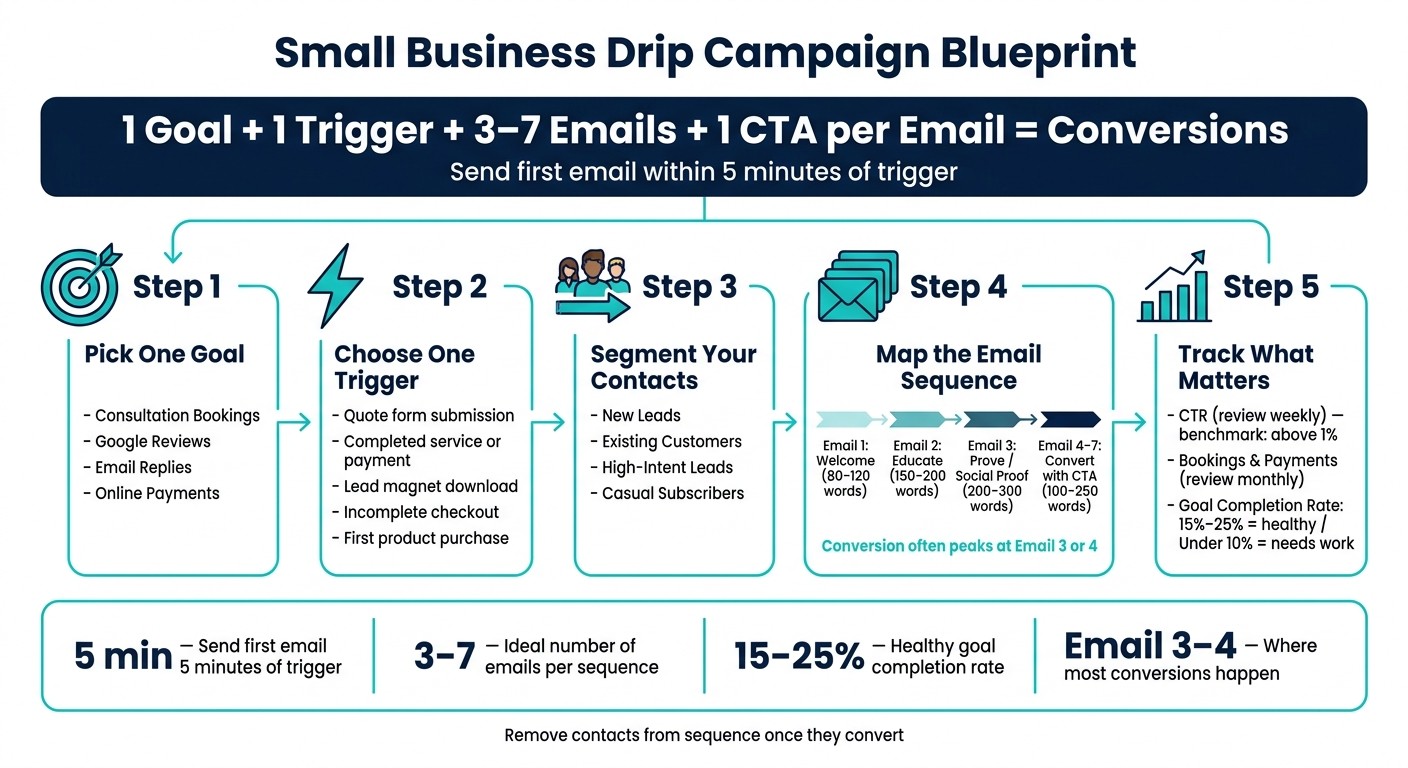
Small Business Drip Campaign Blueprint: One Goal to One Conversion
How to setup drip email campaigns with real-world examples (step-by-step)
Set One Goal and Choose the Right Trigger
Before you write a single email, decide what you want the sequence to do. A drip campaign works best when it has one clear, measurable goal. If you try to push two or three goals at the same time, the sequence usually loses focus.
Pick a Goal You Can Measure
A good campaign goal is specific and easy to track. Vague goals are tough to measure and even tougher to improve.
Use one primary goal and one primary CTA per email. When you stack multiple offers into the same message, people are less likely to act.
A few goals work especially well for small businesses because they’re simple to track:
Consultation bookings - Did the contact schedule a call or appointment?
Google Reviews - Did the contact leave a review after a completed job?
Email replies - Did the contact respond and start a conversation?
Online payments - Did the contact pay a deposit or purchase a package?
Once someone converts, remove them from the sequence.
Match the Goal to a Trigger
The trigger should fit the goal. That match keeps the email relevant from the first send instead of feeling random or late.
Trigger Event | Campaign Goal | Best For |
|---|---|---|
Quote request form submission | Book a consultation | Service businesses |
Completed service or payment | Collect a Google Review | Local businesses |
Lead magnet download | Get email replies | Solo operators, personal brands |
Incomplete checkout | Recover a payment | High-intent shoppers |
First product purchase | Onboarding / upsell | New customers |
Behavior-based triggers often beat fixed schedules because they line up with what the customer just did.
If you use a tool like Gatsboy to manage bookings, lead forms, and online payments, those actions can become natural trigger points for your sequence. A completed booking or a new form submission gives you a clean, time-stamped event to build around.
Send the first email within 5 minutes of form submission, while interest is still high.
With the goal and trigger set, segment the list and map the sequence.
Segment Contacts and Plan the Email Sequence
Segmentation keeps each email relevant. The trigger shows who gets in. The segment decides what they get next. Use the trigger from the last step to decide which segment should enter which sequence.
Use Simple Audience Segments
Start small. A few segments are enough:
New leads
Existing customers
High-intent leads
Casual subscribers
Not every contact should get the same follow-up. A high-intent lead, like someone who requested a quote or visited your pricing page, needs a different sequence than a casual subscriber who downloaded a guide or signed up for your newsletter.
Your form fields should do the sorting for you. Fields like service type, budget, and appointment time can send contacts into the right sequence automatically, without forcing you to split people into separate lists. Gatsboy's advanced forms can tag contacts automatically. That matters because segmentation lifts clicks and opens, so even a simple tagging setup can improve results fast.
Tailor each segment to the contact's industry and where they are in the buyer journey.
Map 3 to 7 Emails with Clear Timing
Once your audience is segmented, choose a sequence length that fits the goal. In many cases, shorter works better. Conversion often peaks around email 3 or 4, while sequences longer than 7 emails tend to bring more unsubscribes.
Timing matters too. Send the first email within 5 minutes of the trigger. After that, space educational emails 2 to 3 days apart and promotional emails 3 to 5 days apart. For send times, weekday mornings in the recipient's local time zone are a solid place to start.
Sequence Type | Number of Emails | Timing | Main Goal |
|---|---|---|---|
Welcome Series | 3 emails | Over 7 days | Introduce brand and deliver promised resources |
Lead Nurture | 5 to 7 emails | Over 2 to 3 weeks | Educate, build trust, and address pain points |
Service Inquiry | 5 to 7 emails | 10 to 21 days | Explain process, provide proof, and close sale |
Cart/Form Recovery | 3 emails | Over 3 days | Recover lost interest and drive the next step |
Re-engagement | 3 emails | Over 2 weeks | Win back inactive users or clean the list |
Match the sequence to the goal. Give each email one job: welcome, educate, build trust, or convert. Then map the emails in order so the sequence moves step by step toward your CTA.
Next, write each email so it has one clear job and one CTA.
Write Emails That Get Clicks, Replies, and Bookings
Keep every email aimed at one action by using the goal and trigger you picked earlier. Simple wins here. Each email should have one job, one clear CTA, and one next step for the reader. The point isn't to sound clever. It's to make the next action obvious.
Each message should move the contact a little closer to the goal you already set.
Give Each Email One Job
Build each email around one action only. If you ask someone to book a call, don't also ask them to read a guide, follow you on social media, and fill out a form. That's how clicks disappear.
Use this phase-based structure to shape both the message and the length:
Email Phase | What to Write | Ideal Length |
|---|---|---|
Welcome | Confirm the action, deliver what you promised, set expectations | 80–120 words |
Educate | One practical tip or a common mistake to avoid | 150–200 words |
Prove | A customer success story, testimonial, or case study; use social proof here, before the final ask | 200–300 words |
Convert | A specific offer with a direct CTA | 100–250 words |
Go past the first name when you personalize. Speak to the reader's industry and the action they just took. Someone who downloaded a guide may need a different message than someone who started a booking and stopped halfway.
Write Clear Calls to Action
Your CTA should match the job of the email. A welcome email can send someone to a download page or invite them to reply with questions. The last email in the sequence should ask for the booking, payment, or review.
Use direct language that tells people exactly what to do:
Booking: "Book your consultation" → links directly to your booking page
Payment: "Complete your payment" → links to your payment portal
Review: "Leave a review" → links to your review request page
Reply: "Reply with your questions" → no link needed; keeps it personal
Send each link to a specific page, not your homepage. If you use Gatsboy's online bookings or online payments, link the CTA straight to that page so people can act without extra clicks.
Also, test every email on mobile and keep subject lines between 35–50 characters.
Next, connect each CTA to your forms, booking page, or payment page so the sequence can run automatically.
Connect Forms, Launch the Campaign, and Track Results
Once your emails are ready, the next step is simple: connect the trigger, launch the sequence, and watch how people respond.
Use Forms, Bookings, and Payments as Campaign Inputs
Each action should lead to the right follow-up. If someone fills out a consultation form, they should get a different sequence than someone who downloads a guide. That way, the message matches what they just did.
If you use Gatsboy, you can connect advanced forms, online bookings, Stripe Payments, and the dashboard to send leads into the right sequence and track follow-up in one place.
Set an exit condition every time. Once a contact converts, remove them from the sequence so they don't keep getting emails that no longer fit.
Track Clicks, Replies, Bookings, and Revenue
Track the numbers that point to the goal. Skip vanity metrics.
Metric | What It Shows | Review Frequency |
|---|---|---|
Click-Through Rate (CTR) | Engagement with the email content and CTA | Weekly |
Direct Replies | High-intent interest and personal engagement | Weekly |
Number of Bookings | How well the sequence moves leads forward | Monthly |
Completed Payments | Direct revenue generated by the campaign | Monthly |
Reviews Collected | Impact on social proof and online reputation | Monthly |
Give the sequence a little room before you judge it. Wait until at least 50 contacts finish the sequence before reviewing results. If CTR falls below 1%, tighten the CTA and cut extra links. For a small business drip campaign, a healthy goal completion rate is 15% to 25%. If you're under 10%, look again at your targeting, timing, or offer.
Conclusion: Start Small, Then Improve
After launch, check the data and tighten the sequence. Start with a 3-email sequence, measure what happens, and improve from there.
FAQs
What’s the best drip campaign for a service business?
The most effective drip campaign for a service business usually includes 4 to 7 emails sent over 10 to 21 days. Send the first email within five minutes of a form submission. That’s when interest is highest, and timing matters.
Start with a warm welcome. Then use the next emails to teach, answer common questions, and build trust. After that, add proof like case studies or reviews so people can see the results for themselves. Wrap up with a clear call to action, such as booking a consultation.
How do I know which trigger to use?
Choose the trigger based on the action you want to respond to in your sales journey. It needs to line up with your campaign goal and the event that kicks off your automated sequence.
For most small businesses, a form submission is a strong place to start. That can be a newsletter signup, service inquiry, or quote request. Content downloads fit well for education-focused workflows. And purchases are a smart trigger for onboarding or upsell campaigns.
What should I change if no one clicks?
If click-through rates are low, tighten your copy and sharpen your call-to-action buttons. Look at your metrics to find emails that aren’t pulling their weight, then test changes to subject lines, body copy, and send times.
Your call to action should lead to one clear next step, like online booking or a resource download. If you use Gatsboy, its dashboard can help you manage these interactions and see what performs best.
Related Blog Posts
Únete a nuestra comunidad de 15,000+ propietarios de negocios
Artículos populares
Artículos populares sobre su sitio web y la comercialización de su pequeña empresa


