



Ethical Email Marketing: 7 Rules for Small Business
Small Business Marketing
If people did not clearly ask for your emails, your list is a problem, not an asset.
I’d sum up the article like this: ethical email marketing comes down to 7 simple rules that protect trust, cut spam complaints, and help bring in better leads. The core ideas are clear: get direct permission, say exactly what people will get, write subject lines that match the email, protect subscriber data, don’t email too often, make unsubscribing easy, and keep follow-ups tied to real actions.
A few numbers make the case fast:
Permission-based email can reach 30%–40% open rates
Non-permission lists can drop to about 2%
54% of users may mark an email as spam if they never gave permission
A 5% lift in retention can increase profits by 25%–95%
CAN-SPAM penalties can reach $53,088 per email
71% of consumers may stop buying from companies that misuse their data
Here’s the full checklist I’d want in front of me before sending anything:
Clear consent: people must actively choose marketing emails
Plain opt-ins: signup wording should say what, how often, and from whom
Honest subject lines: no fake urgency, no bait-and-switch
Strong data care: collect only what you need and keep it safe
Respectful send limits: don’t flood inboxes
Simple unsubscribes: one clear step, no friction
Respectful follow-up: short sequences, spaced out, based on real actions
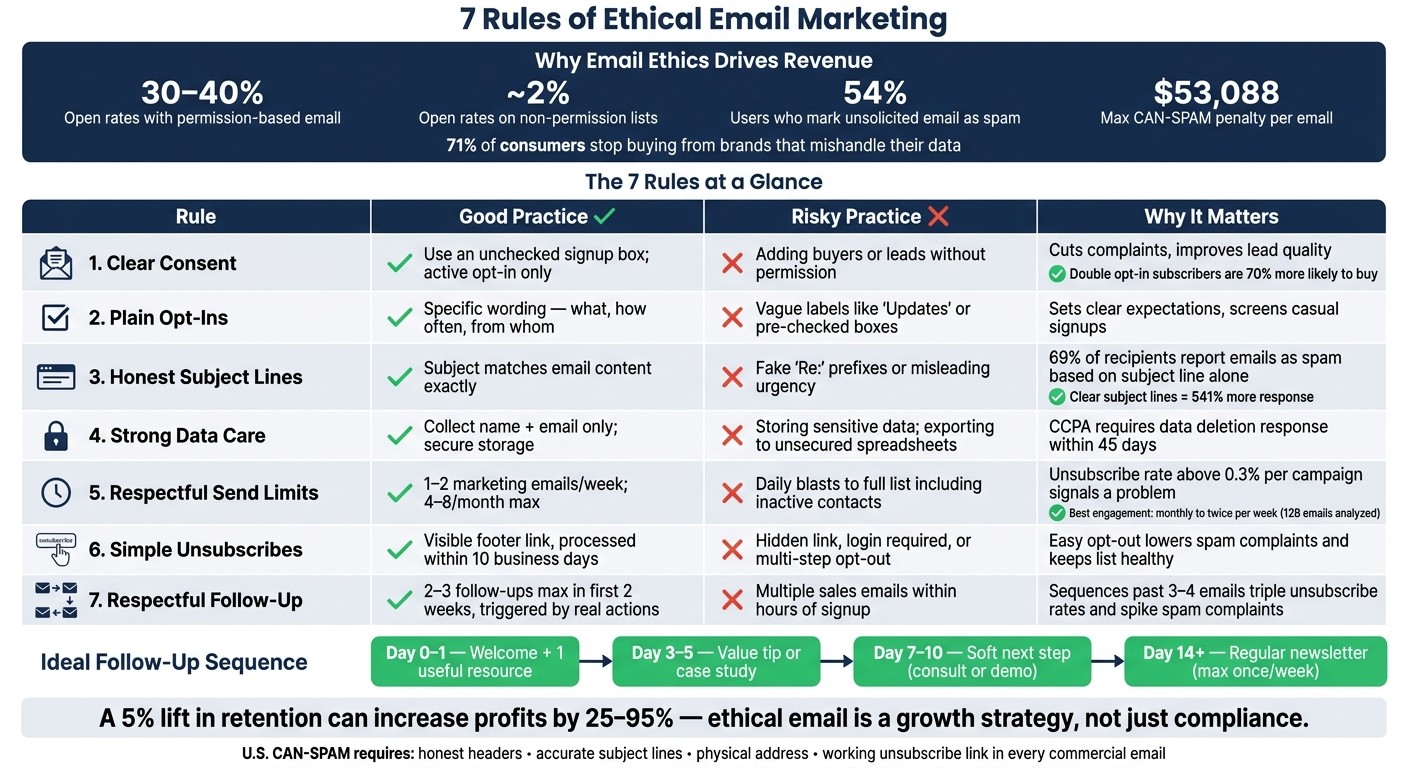
7 Rules of Ethical Email Marketing: Good vs. Risky Practices
6 Legal Requirements You NEED to Comply With to Send Marketing Emails | CAN-SPAM Act Explained!
Quick Comparison
Rule | What I’d do | What I’d avoid | Why it matters |
|---|---|---|---|
Clear consent | Use an unchecked signup box | Add buyers or leads without permission | Cuts complaints and improves lead quality |
Plain opt-ins | Say what emails people will get | Vague wording like “updates” | Sets clear expectations |
Honest subject lines | Match the email content | Fake “Re:” or fake account alerts | Lowers spam reports |
Strong data care | Collect name + email only when possible | Store extra or sensitive data in forms | Protects trust and lowers risk |
Respectful send limits | Start with 1–2 emails per week | Blast the full list every day | Helps engagement and inbox placement |
Simple unsubscribes | Add a clear footer link | Hide the opt-out or require extra steps | Keeps spam complaints down |
Respectful follow-up | Send 2–3 follow-ups max in 2 weeks | Push repeated sales emails | Keeps contact useful, not pushy |
If I were auditing a small-business email setup, I’d start with the form, the footer, and the follow-up flow first. That’s where most trust problems start.
Why Email Ethics Matters for Small Business Growth
For a small business, reputation can make or break growth. Repeat sales and word-of-mouth often matter more than a big email list, which is why subscriber trust matters more than list size.
The numbers back that up. Existing customers tend to spend more, and improving retention by just 5% can boost profits by 25%–95%. That’s a huge swing. Ethical email practices help because they bring in the right people from the start. When people trust your business, they stick around longer, open more emails, buy more often, and add more to customer lifetime value (CLV).
There’s also a clear downside when trust gets ignored. Under the CAN-SPAM Act, each non-compliant commercial email can lead to civil penalties of up to $53,088. That’s not a small mistake. On top of that, weak consent and poor data handling can hurt inbox placement, increase complaint risk, and chip away at trust fast.
Trust also shows up in spending behavior. 71% of consumers will stop doing business with companies that mishandle their data, while 60% say they’d spend more with brands they trust to handle personal information responsibly. For a small business, handling subscriber data with care isn’t just about staying out of trouble. It’s a direct investment in growth.
That starts with clear consent.
1. Clear Consent
Clear consent means someone actively chose to get your marketing emails. That usually happens when they check an unchecked box, click "Subscribe," or fill out a form built for email signups.
What it does not mean: assuming permission because the person made a purchase, sent an inquiry, or had a one-time interaction with your business.
Trust impact
When people know they signed up on purpose, your emails feel expected. That simple difference can lower complaint risk and help build loyalty.
Lead quality effect
A smaller list made up of people who clearly opted in often does better than a bigger passive list. In plain English, 500 people who meant to join can beat 5,000 who barely remember how they got there.
Double opt-in can cut signups by 20%–30%, but those subscribers are about 70% more likely to buy.
Compliance risk
CAN-SPAM does not require prior consent. Still, explicit consent matters for EU contacts and helps lower complaint risk.
Keep a consent log with:
the timestamp
the source form
the IP address
the exact wording shown at signup
That gives you an audit trail if a complaint comes up.
Practical small-business action
Use a separate, unchecked marketing checkbox with plain wording on every email-capture form. Don't hide consent inside terms of service, and don't preselect the box.
If you want the cleanest list, use double opt-in. The flow is simple: the subscriber enters an email, confirms it, and joins only after clicking the verification link.
Once consent is clear, make the opt-in itself just as simple.
2. Plain Opt-Ins
A plain opt-in uses signup language that people can read and understand right away. No buried text. No fuzzy promises. No pre-checked boxes. Clear consent is the starting point, and plain wording is what makes that consent mean something.
Trust impact
When people can see exactly what they’re saying yes to, the whole interaction feels honest. A form that says I agree to receive monthly marketing emails and special offers from [Business Name] leaves little room for guesswork. That kind of clarity sets a professional tone and shows respect for the subscriber’s choice.
Lead quality effect
Specific opt-ins tend to screen out casual signups. And that often leads to higher opens, clicks, and sales.
Compliance risk
Pre-checked boxes can cause problems because consent has to come from a clear affirmative action, not silence or inaction. Once the opt-in is plain, the subject line needs to be just as honest.
Practical small-business action
Review every signup form on your site. If the consent language is vague or prefilled, swap it out for a short, specific line like: You'll get 1–2 emails per week with product updates and special offers. Leave the checkbox unchecked. Keep marketing consent separate from privacy policy acceptance. And make sure your business name is clearly listed as the sender.
If you use Gatsboy, its advanced forms and lead management tools can help keep opt-ins organized across your site. Once the signup promise is clear, the email itself has to match it.
3. Honest Subject Lines
If the opt-in sets the expectation, the subject line needs to follow through. Under CAN-SPAM, the subject line has to match what’s actually in the email.
Trust impact
A misleading subject line feels like a bait-and-switch. People notice that fast.
When your subject lines line up with the message inside - booking confirmations, reminders, or plain updates - subscribers start to learn something simple: opening your emails is worth their time.
Lead quality effect
Honest subject lines help filter for the right people, too. A line like "Reserve your free 15-minute consult" speaks to people who want that session. A fuzzy line like "You won't believe this offer" may pull in more curiosity opens, but those clicks often go nowhere.
Research summarized by MarketingSherpa and AWeber across 45,000 subscribers found that clear, direct subject lines generated an average of 541% more response than obscure alternatives. Specific wording pulls in the people most likely to care.
Compliance risk
Misleading subject lines chip away at trust long before legal trouble shows up. Data compiled by Invesp found that 69% of recipients report emails as spam based solely on the subject line. And if violations end up in front of the FTC, penalties can reach six figures.
A few common mistakes show up again and again:
Fake "Re:" or "Fwd:" prefixes
Subject lines that hint at an invoice or account issue when the email is just a promotion
Prize wording like "You've won!" tied to a generic offer
Practical small-business action
Before you send, ask one plain question: would a reasonable subscriber feel accurately informed by this subject line after opening the email?
If the answer is no, rewrite it.
Keep subject lines clear and specific. Skip ALL CAPS and spammy formatting. All-caps subject lines can get 30% fewer replies.
For transactional emails like booking confirmations or payment receipts, use direct subjects such as "Booking confirmed: July 29 at 2:30 PM" or "Your receipt from Oakwood Auto Repair." If you use Gatsboy bookings or advanced forms, trigger emails from actual user actions so the subject line stays accurate.
Once the message is honest, the next step is protecting the data behind it.
4. Strong Data Care
Once your subject line is honest, the next thing people notice is how you treat their data.
Strong data care means you collect only what you need, keep it secure, and use it only for the reason the subscriber agreed to. That sounds simple. But it says a lot about how you run your business.
Trust impact
When email data is used only for the stated purpose, subscribers trust the business more.
People can tell when a company is being careful and when it’s getting a little too loose with the rules. If someone gives you their email to get updates or book a service, they expect that data to stay in that lane.
Compliance risk
CAN-SPAM applies broadly to commercial email no matter the size of the business, and it requires opt-out requests to be honored within 10 business days. On top of that, state privacy laws such as California's CCPA require businesses to tell customers how their email addresses will be used at or before collection and to respond to data deletion requests within 45 days.
And one rule should be non-negotiable: never collect sensitive data such as race, health, or religion through email forms.
Here’s the plain-English version:
Name and email address - collect; needed for delivery
Financial or payment data - send through a secure payment processor; risky to store on your own
Race, health, religion - do not collect
Practical small-business action
Collect only the data you need. For most small-business email lists, a first name and email address are enough.
Then keep access tight. Limit your email list to staff who actually need it, turn on two-factor authentication in your email platform, and don’t export contacts into unsecured spreadsheets or personal devices. That’s where small mistakes turn into big headaches.
If you use Gatsboy's advanced forms or Online Bookings, keep subscriber data in one dashboard so access stays controlled and booking emails stay separate from marketing.
Once data is protected, the next rule is limiting how often you send.
5. Respectful Send Limits
Protecting trust also means not crowding the inbox of someone who chose to hear from you.
Trust impact
Send too often, and people leave. An unsubscribe rate above 0.3% per campaign points to a frequency or content issue. Even strong emails can start to feel pushy when they show up too often. A steady rhythm - weekly or every other week - helps people know what to expect without feeling pressured.
Lead quality effect
MailerLite reviewed more than 12 billion emails across 1.4 million campaigns and found that sending anywhere from monthly to twice per week led to the best engagement, with higher opens and clicks and fewer unsubscribes.
For most small businesses, that usually means starting with 4–8 emails per month and adjusting based on response. Not every subscriber wants the same pace. Some are happy to hear from you more often. Others need more space. Highly engaged contacts can usually handle more emails, while dormant contacts should get far fewer - maybe once or twice a month - until they start engaging again. And when people can set their own frequency, unsubscribing becomes more of a last step than a first reaction.
Compliance risk
U.S. CAN-SPAM doesn't limit how many emails you can send, but sending too often can drive up spam complaints. That hurts deliverability, which means even your best emails may miss the inbox.
Practical small-business action
Start with a simple audit: how many emails does each segment get each week?
A good starting cap looks like this:
No more than 1–2 marketing emails per week for general subscribers
About 2 emails per month for B2B contacts
Then add an email preferences link in your footer so subscribers can pick the frequency that works for them. That small step can help keep engaged people on your list and slow list decay.
If you use Gatsboy's advanced forms or Online Bookings, collect those preferences at signup and keep booking confirmations separate from marketing emails. A clear preference link also makes the next step - unsubscribing - simple instead of frustrating.
6. Simple Unsubscribes
When email frequency feels off or the content just doesn't land, unsubscribing should be easy. No hoops. No friction.
A simple unsubscribe works as a trust signal. If people know they can leave in one step, they're less likely to click "Report spam." That matters. A clear opt-out shows respect for the subscriber's choice and helps lower complaint risk. It also clears out people who aren't engaged, which leaves you with a list that's more likely to open, click, and convert.
Compliance risk
Under U.S. CAN-SPAM, commercial marketing emails must include a clear, conspicuous, working opt-out method. You have to honor requests within 10 business days, and the mechanism must stay functional for at least 30 days after the email is sent. The opt-out cannot require a fee, extra details, or more than one reply email or one web page.
Practical small-business action
Put a plain "Unsubscribe" or "Manage email preferences" link in every email footer, right where people expect to see it. You can ask why they're leaving, but keep that part optional. If they skip it, the unsubscribe should still go through.
Also, block the address right away. Don't add it back unless that person signs up again and gives clear consent.
Once unsubscribing is easy, the next test is how you follow up without crossing the line.
7. Respectful Follow-Up
Follow-up emails should respond to a real action, at the right time, and at a reasonable pace. When the message fits what the subscriber just did, the next email feels expected instead of pushy. That matters. A follow-up that names the action and gives one useful next step feels personal, not random. It keeps the sequence tied to the subscriber's behavior instead of turning into a sales shove.
Trust impact
Short emails - about 75–150 words - are usually more respectful of the reader's time. That length forces you to get to the point. And that’s usually a good thing.
Each email should add something new. A tip. A resource. A clear answer to a common question. If every follow-up repeats the same ask, people notice fast.
Lead quality effect
Short, spaced sequences help sort out who’s interested without wearing people down. Research across 16.5 million emails found that when follow-up sequences go past 3–4 emails, unsubscribe rates triple and spam complaints jump. Starting within 24–72 hours, then spacing messages out, helps you stay visible without crowding the inbox.
Here’s what a short sequence can look like:
Day | Email Focus |
|---|---|
Day 0–1 | Welcome + one useful resource |
Day 3–5 | Value-focused tip or case study |
Day 7–10 | Soft next step (consult, demo, or booking) |
Day 14+ | Transition to regular newsletter (max once/week) |
Clicks, replies, and bookings are strong signs of interest. If someone doesn’t engage, move them to a lower-frequency list. Put simply: each message should earn the next one.
Compliance risk
CAN-SPAM applies to follow-up emails. Every email needs your physical mailing address, a working unsubscribe link, and honest sender identification. If someone opts out, remove them from every sequence right away.
Use the same unsubscribe process in each follow-up. It also helps to sync opt-outs across your email tool, CRM, and any booking system. That cuts down on accidental re-contact, which is one of the most common compliance mistakes small businesses make.
Practical small-business action
Write a one-page policy: allow 2–3 follow-ups max in the first two weeks, then move people to your regular email list. Keep the rule simple enough that your team can follow it without guessing.
If you use Gatsboy, trigger follow-ups from real actions like bookings or form fills so each email stays relevant. For example, after a booking, one post-visit feedback request makes sense. A sales pitch the next morning does not. That makes the line between helpful follow-up and too much contact pretty easy to spot.
Good Practice vs. Risky Practice at a Glance
This table turns the seven rules into fast, practical choices: what to say, what to skip, and why it shapes trust and lead quality. Use it as a final check before you publish a campaign or set up automation.
Area | Good Practice | Risky Practice | Why It Matters |
|---|---|---|---|
Signup Wording | "Sign up to receive weekly marketing tips and occasional offers by email. You can unsubscribe with one click at any time." | Pre-checked boxes, a vague "Updates" label, or bundling marketing consent with a download | Clear wording brings in people who actually want your emails. |
Subject Lines | "Summer AC Tune-Up: $50 Off This Week Only" when the offer is real | "RE: Your account" or "Urgent: Safety Recall" for a generic promotion | Accurate subject lines protect trust and cut complaint risk. |
Unsubscribe Handling | A visible "Unsubscribe from marketing emails" link, with requests processed within 10 business days | A tiny hidden link, requiring a login, or asking people to email support to opt out | Easy opt-out handling helps you stay compliant and lowers spam reports. |
Send Frequency | A modest weekly cadence, with fewer messages for low-engagement subscribers | Daily emails to your full list, including inactive contacts | Controlled frequency helps prevent fatigue and inbox damage. |
Follow-Up Timing | An immediate welcome email, a helpful tip a few days later, and a soft next step after that | Multiple sales emails within hours of signup | Spaced follow-up keeps interest high without crowding the inbox. |
In the U.S., the legal baseline is still simple: commercial email law requires honest headers, accurate subject lines, a physical address, and a working unsubscribe link in every commercial email.
And this is where website forms do a lot of the heavy lifting. They set the first expectation around consent, timing, and what kind of email a person is agreeing to get.
How Your Website and Forms Can Support Ethical Email Capture
Your website form sets the tone from the start. If someone hits Submit and gets dropped onto a marketing list without a clear choice, trust can take a hit right away. That’s why the form needs to spell out the difference.
Keep separate paths for marketing emails and transactional emails. A booking confirmation or appointment reminder is part of the service people expect. A promo newsletter is different - they should opt into that on purpose. One simple way to do this is with an unchecked checkbox near the email field and above the submit button, such as "Yes, email me updates and offers". You can make it even clearer by adding a note like "About 2–3 emails per month on new services and special offers." That small bit of context helps people know what they’re saying yes to.
You can also go beyond one plain “subscribe” box. Let people pick what they want, like topic interests such as "Seasonal promotions", "Service tips," or "New arrivals," or choose how often they want to hear from you, like "Once a month" or "Only when there's a special offer." When your lead system stores those choices with the opt-in, each email can line up with what the person selected.
Just as important: log every opt-in. That record should include the timestamp, consent wording, source page, and selected preferences. Store it with the contact record so your team can check consent fast, without digging through old notes or cleaning up data by hand.
Gatsboy's PRO Advanced Forms and Email Collector modules can help small businesses set this up. You can use them to add clear consent checkboxes, collect subscriber preferences, and send form submissions into a lead management dashboard so consent stays tied to the contact record. Gatsboy's PRO Advanced Forms and Online Bookings can also keep marketing consent separate from transactional emails while storing the opt-in with the contact record.
Conclusion
When your forms make a promise, your email system needs to live up to it. That’s what ethical email marketing comes down to: sending the right emails to the right people. These seven rules help turn email from a loud broadcast tool into a channel people trust: clear consent, plain opt-ins, honest subject lines, strong data care, respectful send limits, simple unsubscribes, and respectful follow-up.
Done well, ethical email practices bring in better leads, keep subscribers involved, and help protect deliverability. A consent-based list may grow more slowly, but it often leads to better open rates, fewer complaints, and stronger conversions.
The best next move is a quick audit. Look at every signup, send, and unsubscribe step, and make sure each one lines up with the promise on your forms. Then fix one weak spot this month. That’s how an email list brings in more revenue and more repeat business.
FAQs
Do transactional emails need consent?
Generally, no. Transactional emails aren’t the same as promotional marketing, and they usually don’t depend on the same consent you’d need for newsletters.
That said, you still have to handle customer data with care. And you should only send emails tied to the transaction the customer asked for, like booking reminders or confirmation details.
Should I use double opt-in?
Yes. Double opt-in helps confirm that subscribers are genuinely interested in your emails.
It also helps keep your list clean and high quality. On top of that, it fits ethical marketing standards by checking consent before someone joins. As your audience grows, Gatsboy’s smart modules can help you manage leads and customer interactions.
How often should I email subscribers?
Start with two to four newsletters per month. That’s often enough to stay in touch without crowding someone’s inbox.
The goal is simple: show up on a steady schedule and make each email worth opening. Quality matters more than volume. When your newsletters are useful, clear, and well-timed, people are more likely to trust you and keep reading.
Gatsboy can help you keep things on track with smart modules for lead management and communication, all from one dashboard.
Related Blog Posts
Únete a nuestra comunidad de 15,000+ propietarios de negocios
Artículos populares
Artículos populares sobre su sitio web y la comercialización de su pequeña empresa


