



How to Map Content to Each Lead Stage
Small Business Marketing
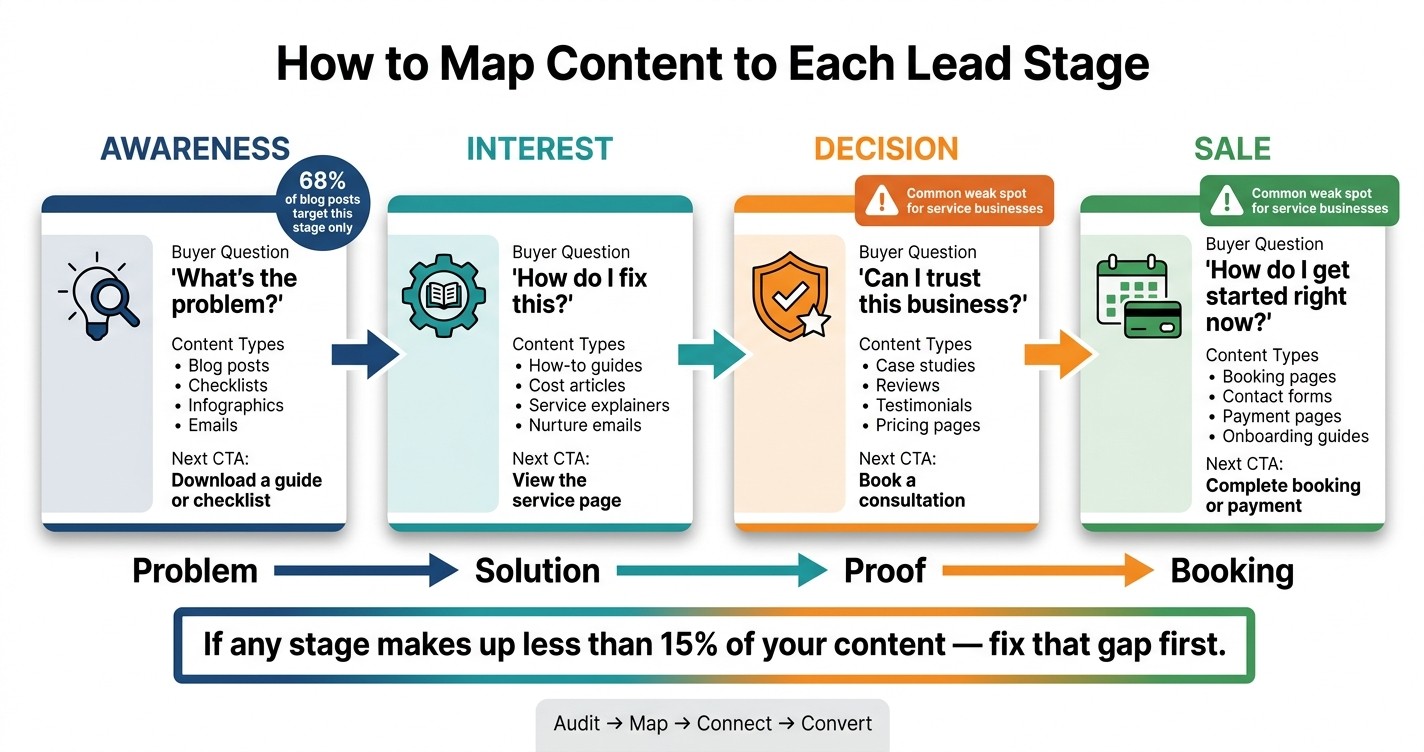
Most business content fails for one simple reason: it asks for the sale too early or gives readers no next step. If 68% of blog posts target awareness only, then a lot of traffic stops cold before it turns into leads.
Here’s the short version: I map each piece of content to one of four lead stages - awareness, interest, decision, and sale - then I make sure every piece points to the next action. That means a blog post should lead to an email signup, an email should lead to a service or pricing page, and that page should lead to a booking or payment step.
If I want a simple path from traffic to inquiries, I focus on this:
Awareness: explain the problem
Interest: show the options and process
Decision: prove why someone should choose me
Sale: make booking or payment easy
I also audit what I already have and tag each asset by:
content type
buyer question
call to action
lead stage
Then I look for two problems:
Too much top-of-funnel content
Dead-end pages with no next step
A simple rule helps: if any stage makes up less than 15% of my content, I fix that gap first. For many service businesses, the weak spots are usually decision-stage proof and the final booking step.
Here’s the core idea in one view:
Lead stage | What the reader wants | What the content should do |
|---|---|---|
Awareness | Understand the problem | Teach and offer a small next step |
Interest | Learn how to fix it | Explain options, cost, or process |
Decision | Compare providers | Give proof, reviews, and answers |
Sale | Get started now | Remove friction and ask for the booking |
So instead of posting random blogs, emails, and pages, I build a straight line: problem → solution → proof → booking.
That’s the whole job of content mapping.
Content Mapping: From Awareness to Booking
What Is Content Mapping And How To Use It 🧭✍🏽✅📈 Become The Best Content Creator #DigitalMarketing
Step 1: Audit Your Current Content
Before you make anything new, look at what you already have. A content audit is just a list of every asset you own, tagged by format, stage, and purpose. For small businesses, that usually means blog posts, emails, service pages, landing pages, customer reviews, booking pages, and contact forms. As you review each item, mark it keep, update, merge, or retire. Start with your current library, then sort each asset by stage.
List Each Asset by Format and Purpose
Open a spreadsheet and give each piece of content its own row. Keep the setup simple with five columns: Content Type, Page Name or URL, Audience Question Answered, Call to Action, and Likely Lead Stage. Every asset goes in the sheet: blog posts, service pages, landing pages, emails, customer reviews, booking pages, and contact forms.
This makes weak spots much easier to see. You can spot missing topics, soft CTAs, and pages that don’t give people a clear next move.
Content Type | Page Name | Question Answered | Call to Action | Lead Stage |
|---|---|---|---|---|
Blog Post | "Why Is My Drain Gurgling?" | What's causing this problem? | Download DIY Drain Guide | Awareness |
Service Page | Emergency Plumbing Services | Who handles this fast? | Call Now | Decision |
Gallery Page | Wedding Portfolio: Summer 2025 | What's your photography style? | Check Availability | Interest |
Booking Page | Schedule a Consultation | How do we get started? | Book Now | Sale |
Cost Guide | HVAC Installation Price Breakdown | What will this cost me? | Get a Free Quote | Interest |
Each asset should do one job. If you can’t say what question it answers or what action it should drive, that page likely needs work - or it needs to go.
Sort Assets by Buyer Intent
After every asset is logged, sort the spreadsheet by the Lead Stage column. At this point, you’re looking for two problems: imbalance and dead ends.
Imbalance tends to jump off the page. Maybe you have lots of awareness posts, but only a handful of decision-stage pages. That means you’re good at getting attention, but not as good at helping people choose.
Dead ends take a little more digging. A dead end is any asset that leaves the reader hanging with no clear next step.
Once the audit is done, you’ll have a much better view of what each stage already covers - and what content is still missing.
Step 2: Match Content to Each Lead Stage
For each asset, ask a simple question: What should the reader do next? The answer tells you where that piece belongs. In plain English, the next step reveals the stage.
Awareness and Interest Content
Awareness content answers: "What's the problem?" This is where educational blog posts, checklists, infographics, and awareness-stage emails fit. They reach people at the moment they start to notice a problem. The goal here is to confirm that problem and build trust.
Interest content answers: "How do I fix this?" This stage includes how-to guides, service explainer pages, comparison guides, cost articles, nurture emails, and lead-capture landing pages. This is where you show your know-how and help leads weigh their options.
Decision and Sale Content
Decision content helps leads pick you. Case studies, reviews, testimonials, pricing pages, and product demos belong here. This is the part that does the heavy lifting before a sales call. It cuts doubt with proof and clear answers to common objections.
Sale content has one job: remove friction. Booking pages, contact forms, payment pages, onboarding guides, and implementation plans fit here. If your contact form is vague, swap it for a booking page that clearly states the next step.
Use the table below to sort each asset fast.
Content-to-Stage Mapping Table
Lead Stage | Content Types | Buyer Question Answered | Next Call to Action |
|---|---|---|---|
Awareness | Blog posts, checklists, infographics, awareness-stage emails | "What's the problem?" | Download a guide or checklist |
Interest | How-to guides, service explainer pages, comparison guides, cost articles, nurture emails, lead-capture landing pages | "How do I solve this? What should I expect?" | View the service page |
Decision | Case studies, reviews, testimonials, pricing pages, product demos | "Can I trust this business? Is it worth the cost?" | Book a consultation |
Sale | Booking pages, contact forms, payment pages, onboarding guides, implementation plans | "How do I get started right now?" | Complete booking or payment |
Here’s what that can look like in practice: a plumbing blog post leads into a nurture email, which sends readers to a pricing page, then to a booking page. If any stage makes up less than 15% of your content, fix that gap first. Once the map is in place, you can shape a clear path from the first click to the booking.
Step 3: Build a Simple Content Path for a Service Business
A map only helps when each piece leads to the next step. Use the stage labels from Step 2 to connect every asset to the next best action.
Example Path: Blog Post to Booking Page
Start with the shortest path that still answers the buyer's next question.
A visitor lands on an educational blog post that names the problem and ends with a clear next step, like downloading a checklist. That checklist works as the lead magnet and collects the email for follow-up. The follow-up email then links to your service landing page, where people can see your process, pricing, and customer reviews. From there, send leads to a booking page with a simple form, a short FAQ, and clear next steps.
Each step should do one job and have one CTA. If you pile on too much content, people stall out.
Then make the path longer or shorter based on how much trust the sale needs.
Adjust the Path for Different Services
Some services need speed. Others need proof.
Urgent services - like emergency plumbing or pest control - should move fast. A problem-aware blog post can link straight to a booking page, with little need for a long email sequence.
Trust-based services - like coaching, consulting, or wellness - need more support in the middle. After the lead magnet, a few nurture emails that point to a case study can do a lot of the work before the lead reaches a booking page. Reviews on your landing page carry more weight here because the buyer is judging you head-on.
High-investment services often need a decision-stage asset close to the booking button. A cost guide or a “what happens in your first 30 days” explainer can ease doubt and cut drop-off.
Match the number of nurture steps to the amount of proof each service type needs before someone is ready to book.
Step 4: Find Gaps and Fix the Path to the Sale
Spot Missing Content and Fix Weak Links
Once you’ve mapped each asset, look for places where the path breaks between stages. For every piece of content, ask: “What would a reader do next after finishing this?” If the answer is nothing, that page has no next step.
That’s the problem in plain English. A reader may be interested, but the page gives them nowhere to go. Use your audit labels to find the pages that still block the path to the sale, then fix the part that helps the reader move forward.
This quick checklist helps you patch the most common stage gaps fast.
Stage | Gap | Fix |
|---|---|---|
Awareness | Blog traffic with no email capture | Add a checklist or guide download |
Interest | No clear path to service pages | Link to a cost guide or process page |
Decision | Service page missing reviews or proof | Add client reviews and a short FAQ |
Sale | No booking step or payment option | Add a booking form and clear next steps |
Use Gatsboy Tools to Move Leads from Decision to Sale

The decision stage is where many leads drop off. The buyer is ready, but the page is missing booking, proof, or payment. That creates friction at the exact moment someone is close to taking action.
Gatsboy helps fix that for small business websites. Its Online Bookings, Reviews Management, Advanced Forms, and Stripe Payments let a lead schedule, check proof, and pay without leaving your site.
Conclusion: Keep the Map Simple and Actionable
The goal is simple: move each lead to the next stage. Audit the gaps, fix the links, and make sure every stage points to the next step - from the first blog post to a smooth booking or payment.
FAQs
How do I know which lead stage a page belongs to?
Match the page to the buyer’s main question and to the next thing they need to buy into. Each asset should have one main job based on where that buyer is mentally.
Awareness: define the problem
Consideration: walk through options and tradeoffs
Decision: show proof that clears the last bit of doubt
Here’s the simple test: if you can’t explain what uncertainty the page removes or when to send it, the stage still isn’t clear.
What should I fix first if most of my content is top-of-funnel?
If most of your content sits at the top of the funnel, don't rush to publish more. Fix the funnel first.
Start by auditing what you already have. Look for gaps in the consideration and decision stages, then fill those before you create more awareness content.
Each piece should lead people to a clear next step that makes business sense. That could be booking a consultation or using an online booking tool. The point is simple: your content shouldn't just attract attention. It should move people forward.
How many steps should my content path have before booking?
There’s no fixed number of steps before someone books. What matters is the path. It should feel logical and easy to follow, moving people from “I think I have a problem” to “I’m ready to book.”
Each piece of content should point to a clear next step. No dead ends. No loose pages that leave people hanging. Use as many steps as you need to build trust and help the reader move toward booking in a natural way.
Related Blog Posts
Únete a nuestra comunidad de 15,000+ propietarios de negocios
Artículos populares
Artículos populares sobre su sitio web y la comercialización de su pequeña empresa


