


How to use Downloads to grow your Email List
Marketing
Want to grow your email list fast? Offer free downloads.
Here's how it works: Visitors exchange their email for a helpful resource like a guide, template, or checklist. This simple strategy turns casual visitors into leads, builds trust, and boosts email engagement.
Key points:
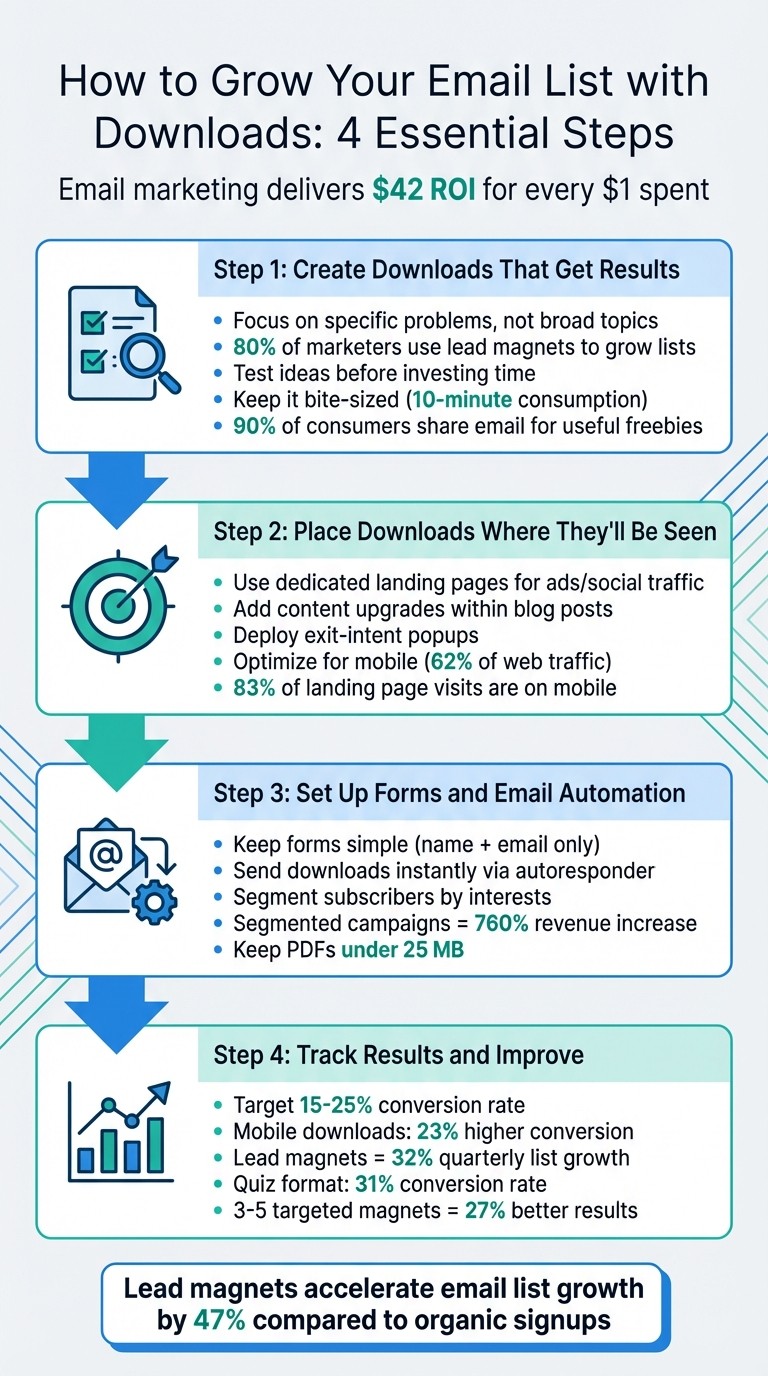
Why it works: Email marketing delivers $42 for every $1 spent, far outperforming other channels.
What to offer: Create specific, easy-to-use downloads that solve a problem (e.g., "10-Minute Social Media Checklist").
Where to place them: Use landing pages, popups, and content upgrades to make your downloads visible.
Optimize for mobile: Ensure forms and downloads work seamlessly on smartphones.
Follow up: Use email automation to deliver downloads instantly and segment subscribers by their interests.
Start small: Pick one topic, create a quick resource, and test it. With the right approach, downloads can grow your email list and drive long-term success.
4-Step Process to Grow Your Email List with Downloads
How To Grow Your Email List With Freebies
Step 1: Create Downloads That Get Results
When crafting downloads, specificity is key. Broad titles like "Ultimate Guide to Marketing" tend to fall flat because they lack focus. Your audience is looking for targeted solutions to specific problems, not an overwhelming resource.
Find Out What Your Audience Needs
Start by digging into your website analytics to uncover high-traffic topics. Dive deeper by analyzing customer support tickets, sales calls, and industry forums - these are goldmines for identifying recurring questions and pain points .
Consider segmenting your audience based on their awareness levels. For instance, someone unaware of a problem might appreciate an educational checklist, while someone actively seeking a solution will likely prefer a template or a step-by-step guide. Statistics back this up: nearly 80% of marketers use lead magnets to grow their email lists, and the most successful ones focus on solving specific problems - think along the lines of "Fixing Shopping Cart Abandonment" instead of offering generic advice.
Before investing significant time into creating your download, test your idea. Share a draft with loyal customers for feedback or run a small opt-in campaign on social media to gauge interest. This approach ensures you're meeting actual audience needs without wasting resources .
Use these insights to tailor your content and ensure it resonates with your audience.
Design and Format Your Download
Your download should be easy to consume, especially for first-time visitors. Bite-sized content - like a one-page worksheet or checklist - often outperforms lengthy ebooks. Checklists, in particular, excel because they deliver immediate, actionable value.
Presentation matters. Use professional visuals and clear formatting to enhance the perceived value of your download. Even small touches, like attractive 3D mock-ups on landing pages, can significantly influence how people view your digital product .
Simplify your opt-in forms. Stick to the essentials, like an email address and first name. And make sure your download offers a quick win - something that addresses a specific problem and can be consumed in about 10 minutes .
Focus on clarity in design before diving into advanced tools.
Tools for Creating Professional Downloads
Platforms like Gatsboy make it easy to create polished, high-converting lead magnets that look great across devices. Whether you're working on a checklist, template, or another format, prioritize content that solves real problems over technical details.
Here's why this approach works: 90% of consumers are willing to share their email in exchange for a genuinely useful freebie. With a well-designed download in hand, you're ready to strategically place it for maximum impact, which we'll cover in the next steps.
Step 2: Place Downloads Where They'll Be Seen
Once you've created downloads worth grabbing, the next step is making sure they're impossible to miss. Where you place them on your website can make all the difference in turning casual visitors into loyal subscribers.
Where to Put Downloads on Your Website
Dedicated landing pages are your go-to for traffic coming from ads, emails, or social media. These pages are all about focus - no distractions, just one resource and one goal: getting visitors to sign up. Keep the design clean and simple, with a strong headline, a short description of the benefits, and a signup form that’s quick and easy to fill out.
Content upgrades are another powerful tool because they’re tailored to what your visitors are already interested in. For example, if someone is reading a blog post about email marketing, offering a downloadable checklist that dives deeper into the topic feels like a natural next step. Place these offers within the content or at the end of the article to keep the momentum going.
These placements lay the foundation for more advanced strategies, which we’ll dive into next.
Use Popups and Exit-Intent Forms
Popups, when timed right, can be highly effective without feeling pushy. Exit-intent popups, for instance, appear just as someone’s about to leave your site - when their mouse hovers near the close button. This last-minute nudge can make all the difference.
Two-step opt-ins are another clever approach. Instead of hitting visitors with a form right away, you first offer a button or link - like “Send Me the Free Template.” Clicking it brings up the signup form, and because the visitor has already shown interest, they’re more likely to complete the process.
To make these tactics even stronger, match the popup offer to the content the visitor is currently viewing. If they’re reading about social media strategy, for example, offer a related resource to keep things relevant and engaging.
Make Downloads Work on Mobile Devices
With over 62% of web traffic coming from mobile devices, your download process needs to be seamless on smartphones and tablets. Use large, easy-to-tap buttons and keep forms simple - ideally, just ask for an email address. Anything more could lead to drop-offs.
"There's the added issue of Google's mobile-first attitude, meaning non-mobile ready websites are unlikely to rank well and, therefore, sacrifice valuable traffic." - Shane McEvoy, Flycast Media
Fast load times are a must, so use responsive images and test everything - forms, buttons, and downloads - on various mobile devices and browsers. A slow or clunky experience can drive potential subscribers away.
Step 3: Set Up Forms and Email Automation
You've got your downloads ready and positioned perfectly - now it's time to connect the dots. Setting up forms and email automation ensures your audience gets their download immediately while you stay ready to follow up with tailored messages.
Create Simple Signup Forms
Keep your forms straightforward. Only ask for the essentials - usually just a name and email address. The more fields you add, the more likely it is that someone will abandon the form before hitting "submit".
"The more information you ask for in exchange for your lead magnet, the less likely your target audience is to take action." - Leadpages
Position your call-to-action and signup form prominently, ideally above the fold. Use action-driven text like "Get My Free Template" or "Send Me the Checklist" instead of generic phrases like "Submit". To keep visitors focused, remove navigation links and other distractions from your landing pages.
Build trust by including a link to your privacy policy and using visual elements like arrows or images to draw attention to your form. Since 83% of landing page visits happen on mobile devices, make sure your forms are mobile-friendly with large, easy-to-tap buttons and fast-loading pages. Keep in mind that 70% of consumers say page speed impacts their decision to convert.
A streamlined form ensures a smooth signup experience, setting the stage for effective engagement.
Automatically Send Downloads to New Subscribers
Delivering downloads instantly reinforces the value of your offer. Set up an autoresponder to send the download link or file immediately after someone submits your form. Tools like Gatsboy’s advanced forms module can simplify this process by integrating directly with your email platform.
"Lead should be able to look at the email, and within 5 seconds know the value it provides. Timely and helpful is the key." - Katie Cort, HubSpot Employee
Keep your PDF files under 25 MB to avoid issues with email providers like Gmail blocking larger attachments. Test the entire process yourself - submit the form, check that the email arrives quickly, and confirm the download link works on both desktop and mobile devices. If possible, use a double opt-in process where subscribers confirm their email address by clicking a link. This not only improves the quality of your list but also helps maintain your sender reputation.
Organize Subscribers by Their Interests
Every download reveals something about your subscriber's preferences. For example, someone downloading a social media checklist likely has different priorities than someone interested in an SEO guide. Use this information to tag subscribers automatically based on their download choice.
Your email platform should allow you to tag profiles as soon as someone submits a form. This enables you to send personalized follow-up campaigns tailored to their interests rather than generic emails to your entire list. Segmented email campaigns can lead to a 760% increase in revenue compared to non-segmented ones.
"Good list hygiene might be one of the things everybody forgets about, but it is so key to your success, and it's something that can easily be done." - Ashley Rodriguez, Deliverability Engineer II, Sinch
Set up workflows to flag contacts that hard bounce or unsubscribe as non-marketing, which helps protect your sender reputation. Organizing your subscribers this way ensures you're ready to nurture relationships and convert them into loyal customers.
Step 4: Track Results and Improve Your Approach
Once your downloads are live, it’s time to focus on tracking key metrics. This will help you fine-tune your efforts and grow your email list more effectively. By keeping an eye on the right numbers, you’ll discover which downloads resonate with your audience and where to make adjustments.
Numbers to Track
Start by monitoring your conversion rate - this is the percentage of visitors who download your content after landing on the page. For lead magnets, conversion rates typically range between 15–25%. If your rate is falling short, it’s a sign that something - like your messaging, design, or call-to-action - might need tweaking. With 68% of lead magnet downloads happening on mobile devices, it’s also essential to compare mobile and desktop conversion rates. Mobile-friendly downloads tend to perform better, achieving 23% higher conversion rates.
Next, track the download volume to see which topics are drawing the most interest. Pay attention to where your traffic originates and which search terms are driving visitors to your pages.
Beyond downloads, measure your email list growth rate. Businesses using lead magnets strategically report an average growth of 32% per quarter, compared to just 12% for those without. Keep an eye on how many of these new subscribers engage with follow-up emails and eventually convert into paying customers. With email marketing delivering an average ROI of $42 for every dollar spent, connecting your downloads to actual revenue can justify the time and resources you’ve invested.
By analyzing these metrics, you can identify which downloads connect most effectively with your audience.
Find Your Best-Performing Downloads
Not every download will perform equally. Use tools like Google Analytics 4 to pinpoint your top-performing pages. Look for pages with high "Average Engagement Time" and strong conversion rates - these are clear indicators of content that resonates with your audience. Navigate to Reports > Engagement > Pages and Screens in GA4, then sort by engagement time to find your most compelling downloads.
"In only 7 months, we added more than 95,654 names to our email list using OptinMonster's Exit Intent™ technology." - Michael Stelzner, Founder, Social Media Examiner
You can also use Enhanced Measurement in GA4 or Google Tag Manager to track which download buttons or links are getting the most clicks. This data reveals what grabs your audience’s attention, even before they fill out a form. Additionally, review "view_search_results" events to identify gaps in your content - these are topics your audience is searching for but you haven’t yet covered.
Some formats naturally perform better than others. For example, quizzes convert at 31%, PDF guides at 15%, and checklists at 12%. If one format consistently outshines the rest, focus on creating more of that type. Businesses with 3–5 targeted lead magnets see 27% higher conversion rates than those relying on just one.
This data helps you refine your strategy and focus on what works best.
Use Your Data to Get Better Results
A/B testing is your best friend when it comes to improving performance. Experiment with headlines, call-to-actions (CTAs), and form placements to see what drives higher conversions. Test different formats too - if a blog post performs well, consider turning it into a checklist or a downloadable PDF. Reviewing your metrics weekly allows you to spot trends early and act on them quickly.
Tailor your downloads to different stages of the customer journey. For example, use checklists for those just starting to explore their problem and case studies for those evaluating solutions. If a download has performed well in the past, give it a refresh by adding updated stats or bonus content to keep it relevant.
Lead magnets can accelerate email list growth by 47% compared to organic signups. On average, businesses see a payback on their lead magnet investment within 3–6 months, with many breaking even in just 90 days through email-driven revenue. By doubling down on what’s working and cutting what isn’t, you’ll build a more engaged email list and see better results.
Consistently monitoring and refining your approach ensures that every download contributes meaningfully to your email list’s growth and overall success.
Conclusion: Build Your Email List with Downloads
Let’s break it down: turning downloads into a thriving email list comes down to three key steps - creating focused content, placing it where it matters, and tracking what works best. The best downloads address a specific problem, offering real value in exchange for contact details. Instead of trying to solve everything at once, keep it simple and targeted.
Where you position your downloads is just as important. Use tools like exit-intent popups, inline forms, and dedicated landing pages to maximize visibility. And don’t forget to optimize for mobile users - your audience is everywhere.
"A strong lead magnet isn't just free content; it's a valuable resource that addresses a real need, making people eager to exchange their contact information for it." - WPBeginner
Once someone downloads your content, deliver it immediately. Follow up with personalized emails to build trust and guide them toward becoming loyal subscribers. Segmenting your audience based on the downloads they’ve accessed allows you to send more relevant and engaging follow-ups.
To make this process seamless, tools like Gatsboy can be a game-changer. Its advanced forms, integrated email collection, and business dashboard simplify lead management. Use real-time data to refine your strategy and prioritize your audience’s needs. Stick with these steps, and you’ll see your email list grow into a strong, engaged community.
FAQs
What’s the best first download to create?
The best initial download is something straightforward and useful, like a checklist, a guide, or free training tailored to your niche. These options work well for attracting email sign-ups and are relatively quick to put together. Aim to deliver actionable content that solves a specific problem or meets a clear need for your audience. This approach not only encourages engagement but also helps expand your email list effectively.
How do I deliver the download right after signup?
To provide a download instantly after someone signs up, set up an automated email using your Email Service Provider (ESP). Start by uploading the file to a secure hosting platform, then include the download link in the email triggered when someone subscribes. This approach ensures that only genuine subscribers get access to the file. Before going live, test the entire process to make sure the email is sent quickly and the link works without any issues.
Which metrics prove my download is working?
When assessing the performance of your downloadable content, focus on a few essential metrics:
Number of downloads: This shows how many people found your content appealing enough to download.
Conversion rates: Keep an eye on how effectively your downloads are turning casual visitors into leads or subscribers.
Engagement data: Metrics like click-through rates and follow-up actions reveal how users interact with your content after downloading.
To dig deeper, implement tagging frameworks. These help track user click behavior and what actions they take next. By analyzing these insights, you can determine how well your downloadable content is driving email list growth.
Related Blog Posts
Únete a nuestra comunidad de 15,000+ propietarios de negocios
Artículos populares
Artículos populares sobre su sitio web y la comercialización de su pequeña empresa


