



Mobile Speed Optimization for Small Businesses
Website Tips
A slow mobile site can cost you leads, bookings, and sales fast. If your page takes more than 3 seconds to load, many phone users leave. And even a 1-second delay can cut conversions by 20%.
If I had to boil this article down to the main point, it’s this: start with the fixes that cut the most weight and delay first. For most small business sites, that means:
Compress and resize images
Use a mobile-first layout
Trim JavaScript and third-party widgets
Set up browser caching and a CDN
Improve hosting if TTFB is high
Test on an actual phone, not just desktop tools
The article also looks at Gatsboy as an all-in-one option for owners who want a mobile-ready site with bookings, Stripe payments, reviews, and forms in one setup.
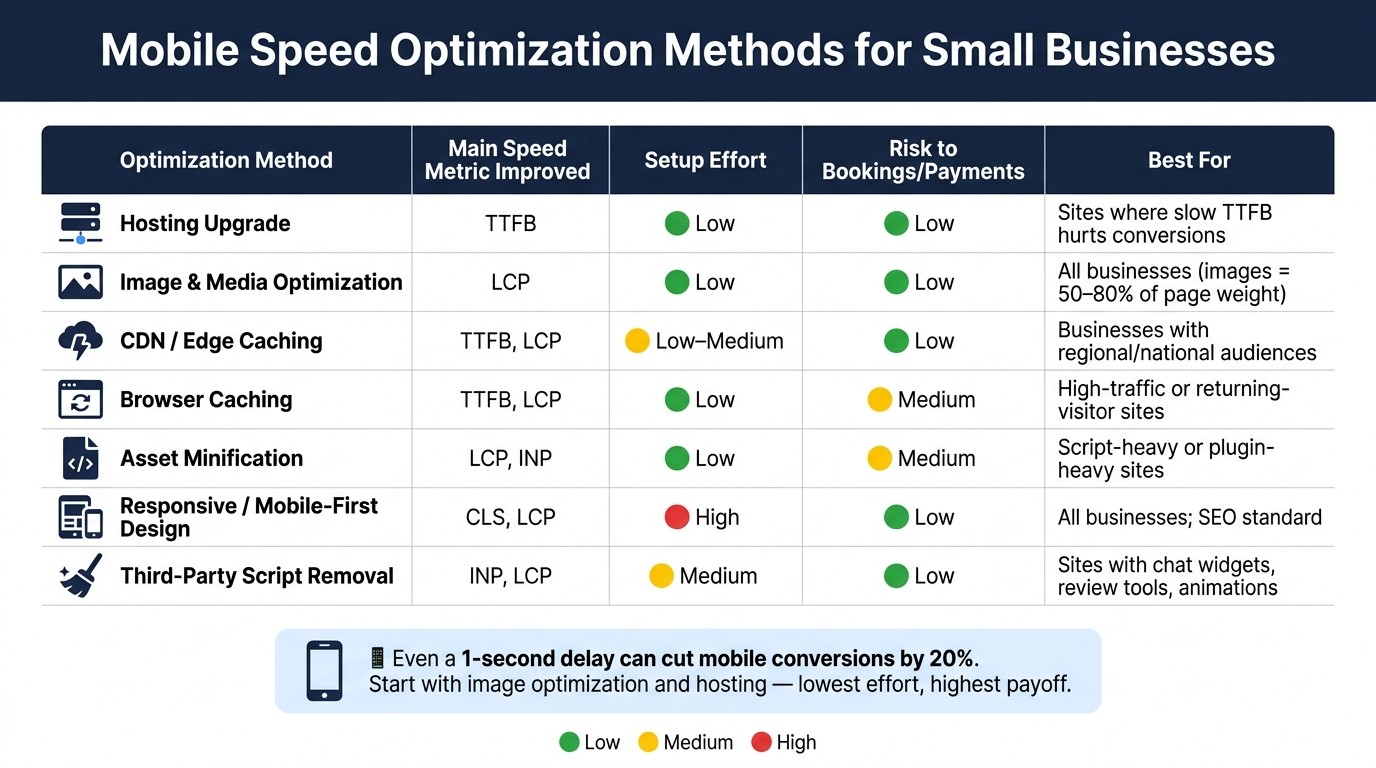
Mobile Speed Optimization Methods: Effort, Impact & Risk at a Glance
Optimize Mobile SEO: Key Tips & Common Mistakes!
Quick Comparison
Option | Best For | Main Metric Helped | Effort | Main Watchout |
|---|---|---|---|---|
Gatsboy | Owners who want a done-for-you setup | LCP, TTFB | Low | Less control over custom changes |
Mobile-first design | Leaner phone experience | LCP, CLS, INP | High | Layout work can take time |
Image optimization | Fastest early wins | LCP, CLS | Low | Must keep image sizes in check on every upload |
Code cleanup | Heavy script pages | INP, LCP | Medium | Can break forms, bookings, or payments |
Browser caching | Repeat visitors | LCP, INP | Low | Wrong rules can show stale content |
CDN / edge caching | First-time visitors across regions | TTFB, LCP | Low to Medium | Do not cache checkout or booking pages |
Hosting upgrade | Slow server response | TTFB | Low | Monthly cost can go up |
Device testing | Confirming what users feel | All Core Web Vitals | Medium | Lab scores alone can miss phone issues |
In short, image fixes, hosting, and CDN setup usually give the fastest payoff, while design and code changes take more work but can help more over time. The rest of the article breaks down where each option fits, what it helps, and what to test before you push changes live.
1. Gatsboy
Gatsboy gives business owners a done-for-you, mobile-ready site built in Framer, a no-code editor. The process starts with a 10-question questionnaire, and the finished site is usually ready in 7 to 10 days. The owner doesn’t need to touch code at any point.
LCP/INP/CLS Impact
Framer flags performance issues before launch, which helps Gatsboy catch mobile speed problems early. The build also includes above-the-fold homepage optimization. That helps improve LCP (Largest Contentful Paint) for mobile visitors, especially on the first screen where people decide fast whether to stay or leave.
TTFB and Network Efficiency
Gatsboy sites run on Framer's infrastructure, which supports fast TTFB on mobile. Sites also use HTTPS by default and support auto-connect setup for major DNS providers, so setup stays secure and simple. Once the page responds fast, the next step is keeping the content on top of it as light as possible.
Implementation Effort
Gatsboy takes the setup work off the owner’s plate by handling the build directly. The team manages the project while the owner reviews and approves key parts. That keeps the path from short brief to live site moving without much friction.
Feature Compatibility
Site speed still needs to work alongside customer-facing tools. Built-in bookings, payments, reviews, and forms cut down on the need for extra add-ons, which can help keep the site lighter. A single dashboard also keeps those tools in one place.
2. Responsive and Mobile-First Design
Responsive design adjusts to the screen size. Mobile-first design starts with the phone view and strips back the rest. On mobile, that gap matters because it changes how much loads right away and how fast the page becomes usable. A mobile-first setup cuts down what the browser has to load, render, and reposition. And that hits load time directly.
LCP/INP/CLS Impact
Desktop-first sites often push heavy extras to mobile users that they don't need, like sliders and video backgrounds. A static hero image loads faster than a slider or video background and better protects mobile LCP.
For CLS, desktop-first layouts can shift around when large elements reflow on smaller screens. The fix is simple: set explicit width and height attributes on every image to stop that jumping.
INP can also take a hit when too many third-party scripts pile up. The usual culprits are chat widgets, animation libraries, and duplicate analytics tags. A leaner mobile-first build tends to ship with fewer of those from the start.
TTFB and Network Efficiency
Desktop-first pages often make mobile devices download desktop-only assets. That's wasted bandwidth before the first meaningful paint. Use srcset or <picture> so each device pulls the right image size instead of the biggest one by default. That cuts total page weight.
Implementation Effort
Mobile-first performance isn't automatic. You still need to review images, defer scripts, and check layouts for forms and other interactive elements.
Feature Compatibility
The same idea applies to embedded business tools. They should support the layout, not drag down the first load. Third-party scripts for bookings, payments, and reviews can add 500ms to 3,000ms when they load right away. Deferring them until scroll or interaction helps keep the initial load lighter.
Once the layout is lean, images and media are the next fastest win.
3. Image and Media Optimization
Images make up 50% to 80% of total page weight on most small business sites. That’s a big share. On service pages, product galleries, and booking forms, lighter images often mean faster loads with less effort than people expect. After images, the next big mobile wins usually come from cleaning up code and other assets.
LCP/INP/CLS Impact
The hero image is usually the LCP element. So if that image is heavy, your page feels slow right out of the gate.
Two simple fixes can move the needle:
Convert the hero image to AVIF or WebP
Resize it to match its display dimensions
Then add fetchpriority="high" and decoding="async" so the browser gives that image attention sooner. One thing to avoid: never use loading="lazy" on the hero image. It slows down the exact asset you want to show first.
In May 2026, a clinic rebuilt its site with an AVIF hero image under 60 KB, fetchpriority="high", and inlined critical CSS. On the same 4G mobile profile, LCP fell from 4.8 seconds to 0.71 seconds, and INP reached 64 ms.
For CLS, set explicit width and height on every image and media embed. That gives the browser space to work with before the file arrives, which helps stop buttons, forms, and other page elements from jumping around.
For INP, the usual troublemakers are embeds like YouTube, Maps, and chat tools. Swapping them for lighter versions, or using static previews that load on click, can save 1 to 2 seconds of load time.
TTFB and Network Efficiency
AVIF works best when you pair it with responsive image sizes. Otherwise, mobile users can still end up downloading files that are far too big for their screens.
In 2026, AVIF is the better pick for hero images, with browser support above 95% and file sizes up to 50% smaller than JPEGs with no visible quality loss. A good rule of thumb is simple:
Keep hero images under 60 KB in AVIF
Keep regular content images under 150 KB
Implementation Effort
Most of this work is pretty light. Format conversion and compression can be automated. Adding fetchpriority, width, and height takes minutes. srcset needs a bit more setup, but it can cut mobile payloads by 30% to 60%.
Feature Compatibility
Reviews widgets, embedded maps, and booking tools are often the heaviest media elements on mobile pages. Defer those embeds instead of letting them block the page. Once media is in check, the next area to trim is code and other assets.
4. Code and Asset Optimization
Once images are under control, code is usually the next thing slowing mobile pages down, especially JavaScript, CSS, and third-party scripts. On a phone, even small files can drag down rendering and interaction. Put simply: a lighter page helps, but the browser still has to parse and run everything you send.
LCP/INP/CLS Impact
Inline critical CSS in the HTML <head> and defer the rest so the browser can paint above-the-fold content sooner. That has a direct effect on LCP.
For INP, defer non-critical scripts until after the first interaction or after a short delay. That cuts input delay and helps the page feel more responsive on mobile.
CLS can improve with font-display: swap. This keeps text visible while fonts load and cuts layout shifts when the font finally renders.
Once you trim render-blocking code, caching can make repeat visits feel much faster.
TTFB and Network Efficiency
These changes mostly cut download weight and parse time, not server response time.
Minification removes whitespace and comments from CSS and JavaScript files. That usually cuts file size by 10–30%. Brotli compression can reduce files by another 15–20% beyond Gzip during transfer.
Code splitting matters most on JavaScript-heavy sites. Instead of sending one large bundle, the browser downloads only the code needed for the current page. That can make a big difference on mobile devices with limited CPU and memory.
Implementation Effort
Some fixes are easy wins. Minification and Brotli are often automatic. Font settings are usually fast to change. Script deferral, though, needs testing.
After any code update, test every customer-facing action on mobile. That means checking:
Contact forms
Bookings
Payment buttons
Do this after every change, not just at the end.
Feature Compatibility
Retest Gatsboy Stripe Payments, online bookings, and forms after script or asset changes.
5. Browser Caching
Browser caching stores static files on a visitor’s device, so people who come back don’t have to download the same assets all over again. Once you’ve trimmed code and media, caching helps those smaller files stay fast on repeat visits. For a small business site, that can make return visits feel much faster and cut mobile data use.
LCP/INP/CLS Impact
When CSS, fonts, images, and JavaScript are cached, they load from the device on repeat visits instead of the network. That helps LCP and can also cut CLS and INP delays.
TTFB and Network Efficiency
Browser caching mostly helps repeat visits, not first-time ones. Set long expiry headers for static assets like images, CSS, fonts, and JavaScript.
Implementation Effort
Browser caching is often a low-effort win. It also helps to split cache rules by device type, so phones aren’t sent desktop-only assets.
Don’t cache dynamic HTML as shared pages.
Cache static service pages and blog pages.
Don’t cache booking calendars, thank-you pages, dashboards, or checkout.
Feature Compatibility
Shared-page caching can show stale or incorrect information on dynamic pages like booking calendars, checkout flows, and logged-in areas. That’s where things can go sideways fast.
After you change caching settings, test the full customer journey. Submit a contact form and go through a booking flow. If you’re using Gatsboy's online bookings, test those flows after any cache change.
If updates aren’t showing, clear caches in this order: caching plugin, hosting control panel, CDN, then a browser hard refresh.
Once static assets are cached on the device, CDN and edge caching can cut load time for first-time mobile visitors. If repeat visits still feel slow, the next step is CDN and edge caching.
6. CDN and Edge Caching
A Content Delivery Network (CDN) stores static files on servers closer to your visitors. That means less delay on mobile networks. And unlike browser caching, a CDN helps even first-time mobile visitors.
LCP/INP/CLS Impact
CDNs tend to have the biggest effect on LCP and TTFB. If your hero image or main content block comes from a nearby edge node instead of your origin server, load time can drop a lot. For visitors who are far from your server, CDNs can cut latency by 50–80%.
INP can improve too, even if the effect is less direct. Why? Faster asset delivery means fewer network slowdowns that can hold up the main thread. CLS, on the other hand, usually won’t change much unless you’re also serving properly sized image placeholders through the CDN.
TTFB and Network Efficiency
Distance adds up fast. A visitor who’s far from your origin server can easily see 400ms+ TTFB without a CDN. Put a nearby edge node in the mix, and that can fall to under 100ms.
Some edge platforms go even further. When they serve pre-rendered HTML and static assets, they can reach sub-100ms TTFB globally. If your current TTFB is above 600ms, a CDN is probably the highest-return fix for mobile LCP.
It’s also worth checking for HTTP/3 (QUIC) support. That can help on unstable 4G and 5G connections, where packet loss and connection hiccups are more common.
Implementation Effort
The nice part? Setup is usually simple once you know the speed gain is worth it. A basic CDN setup often takes 15–30 minutes and usually starts with a nameserver change.
Many CDN providers also bundle in:
SSL
Basic DDoS protection
Feature Compatibility
This is where people can trip up. The main risk with CDN caching is caching pages that should stay dynamic.
Never cache booking confirmation pages, payment flows, or any page that shows user-specific data. If you’re using Gatsboy's online bookings or Stripe Payments, exclude those pages from edge caching rules entirely.
For static assets, long cache times at the edge make sense. For HTML, keep cache times short so updates reach visitors without much delay. After any CDN configuration change, test the full booking and payment flow before moving on.
7. Server Response and Hosting Optimization
Server response time sets the baseline for mobile speed. If the server drags, CDNs and caching can help, but only up to a point. After you trim frontend bloat, the server often becomes the next thing holding the site back.
LCP/INP/CLS Impact
TTFB sets the floor for LCP. If the server takes too long to respond, the browser can't start rendering the main content, no matter how polished the rest of the page is. Slow responses can also hold up CSS and fonts, which can increase CLS. On the INP side, a slow server can delay scripts and make taps on forms and buttons feel sluggish.
TTFB and Network Efficiency
If TTFB stays above 600 ms, hitting a sub-2.5-second LCP is unlikely.
Hosting type plays a big part here. Shared hosting often lands in the 500 ms–1,500 ms TTFB range, while managed hosting usually cuts that to 200 ms–500 ms.
Here’s the usual trade-off:
Hosting Type | Typical TTFB | Monthly Cost |
|---|---|---|
Shared Hosting | 500 ms – 1,500 ms | $3 – $15 |
Managed Hosting | 200 ms – 500 ms | $25 – $100 |
VPS / Cloud | 100 ms – 300 ms | $20 – $200 |
Implementation Effort
Managed hosting upgrades are often handled by the provider, so there’s usually little to no technical work on your side. That makes this one of the simpler ways to cut response time without digging through app code.
If your site runs dynamic features like online bookings or Stripe Payments, enable object caching at the server level. It keeps database queries in memory, which speeds up repeat requests and helps interactive parts stay responsive.
Feature Compatibility
For booking calendars, Stripe Payments, and member areas, use object caching instead of full-page caching.
After tuning hosting, test the results on real phones and slower mobile networks.
8. Performance Auditing and Real-Device Testing
After hosting, caching, and asset fixes, audit the site to see what still slows mobile users down.
LCP/INP/CLS Impact
Lab tools like Google PageSpeed Insights give fast feedback from a single page load on a fixed device profile. They’re good at spotting obvious bottlenecks. But real phones tell you what the site feels like in the wild, on actual mobile hardware and mobile networks. Use lab results to find the problem, then use a real phone to make sure the fix holds up.
To test CLS, scroll and tap on a real phone. Late-loading fonts and dynamic banners often trigger layout shifts that simulators don’t catch.
TTFB and Network Efficiency
Search Console field data shows performance from actual users, but it updates on a 28-day rolling window. So it makes sense to check changes with lab audits first, then watch field data over time.
Implementation Effort
Start with PageSpeed Insights to spot quick wins. Then move to Chrome DevTools with 4x or 6x CPU throttling and a Slow 4G network profile. That gives you a closer look at how a mid-range Android phone may perform. Use those lab results to go after the biggest bottlenecks, then verify each fix with throttled-device testing and a real phone.
Feature Compatibility
Booking widgets, chat tools, and review widgets can add a lot of JavaScript weight, and that can be rough on mobile CPUs. INP tracks the slowest interaction in a session, so test booking flows and contact forms on a real phone over cellular. On slow phones, forms, booking buttons, payments, and review widgets are often the first things to break or lag.
Use lab audits to find issues, field data to track SEO impact, and real-device testing to confirm usability.
That baseline makes the side-by-side comparison of methods more reliable.
Side-by-Side Analysis by Performance Goal
The best fix depends on which metric you want to improve first. Each method helps in a different way, so it’s useful to compare them side by side before making changes.
Optimization Technique | Main Speed Gain | Setup Effort | Risk to Bookings, Payments, and Widgets |
|---|---|---|---|
Hosting Upgrade | TTFB | Low | Low |
Image & Media Optimization | LCP | Low | Low |
CDN / Edge Caching | TTFB, LCP | Low to Medium | Low |
Browser Caching | TTFB, LCP | Low | Medium |
Asset Minification | LCP, INP | Low | Medium |
Responsive / Mobile-First Design | CLS, LCP | High | Low |
Third-Party Script Removal | INP, LCP | Medium | Low |
The table lays out the trade-offs at a glance. The next step is to look at where each fix tends to help most.
Core Web Vitals (LCP, INP, CLS)
LCP usually improves fastest when you trim down hero images, video embeds, and heavy widgets that block rendering. If the largest thing on the page loads late, that score drags.
INP tends to get better when booking tools, chat widgets, and review scripts are deferred or removed. Those extras often look harmless, but they can slow down how fast the page reacts when someone taps or clicks.
CLS improves when images, videos, and embeds have reserved space before they load. If the layout shifts as content appears, users feel it right away.
TTFB and Network Efficiency
Hosting is the main lever for TTFB. Moving from shared hosting to managed hosting typically cuts TTFB by 200–500 ms. That’s often one of the simplest ways to make the site feel faster from the start.
A CDN adds another layer by serving files from the nearest edge node. That matters even more when visitors are far from your main server, since distance still costs time.
Implementation Effort and Feature Compatibility
The fastest wins usually come from hosting upgrades, image compression, and CDN setup. These changes don’t take much work, and they can show results fast.
Design simplification takes more time. But once the layout is cleaned up, it’s often easier to maintain and less likely to cause speed issues later.
The hard part is keeping bookings, payments, and reviews fast without breaking them. On Gatsboy, Online Bookings, Stripe Payments, and Reviews Management live in one system, which cuts down on extra script weight.
For testing, use PageSpeed Insights for fast checks, WebPageTest for waterfall analysis, and Chrome DevTools or a mid-range phone on Slow 4G to confirm changes you can actually feel on a phone.
The next section weighs these same fixes by upside and trade-offs.
Pros and Cons
The comparison above shows what each fix improves. This section looks at the trade-offs: effort, control, cost, and risk. The table above covers performance impact. Here, the focus is what matters when you need to pick one fix first.
Option | Key Strengths | Limitations | Best Fit | Maintenance |
|---|---|---|---|---|
Responsive / Mobile-First Design | Universal usability; SEO standard | Doesn't solve asset weight | All businesses | Low |
Image Optimization | Highest ROI; images make up 50–80% of page weight | Requires discipline with every new upload | All businesses, especially product-heavy sites | Medium |
Code & Asset Optimization | Improves interactivity (INP); removes bloat | Higher breakage risk; can break site functionality | Complex or plugin-heavy sites | High |
Browser Caching | Speeds up repeat visits significantly | Can serve outdated content if misconfigured | High-traffic or returning-visitor sites | Medium |
CDN / Edge Caching | Cuts latency for regional and national audiences | Less impactful for single-location businesses | Businesses with spread-out customer bases | Low |
Hosting Upgrade | Fixes TTFB at the source; improves everything downstream | Higher monthly cost | Sites where slow TTFB is hurting mobile conversions | Low |
Gatsboy (All-in-One) | Low-maintenance; fast ROI | Less customization control; recurring cost | Small teams who want speed without technical overhead | Low |
There’s a simple pattern here: lower-maintenance fixes often cost more at the start, while hands-on fixes may cost less but ask for more work over time. So the best choice depends on your budget, your traffic pattern, and how much technical upkeep your team can handle.
Image optimization is often the easiest place to start because the payoff is high, and the problem is common. If images make up 50–80% of page weight, trimming them down can move the needle fast without changing the whole site.
Code optimization can help a lot, especially for INP, but it comes with the most risk. One small change can knock out a script, a form, or a checkout step. That’s why every update should be checked on a real phone, not just a desktop browser. Test every script, form, and payment flow after each change.
Hosting upgrades and caching fixes are more behind-the-scenes, but they can do a lot of heavy lifting. If slow TTFB is dragging down mobile conversions, better hosting helps at the source. Browser caching and CDN / Edge Caching can also make a big difference, though each has its lane. Browser caching helps repeat visitors. CDN / Edge Caching helps more when your customers are spread across regions or across the country.
For small teams, Gatsboy keeps Online Bookings, Stripe Payments, Reviews Management, and forms in one system. That cuts speed-related setup work and mobile site maintenance. In plain terms, the choice becomes pretty clear: faster pages with less upkeep, or more control with more work.
Conclusion
Mobile speed usually doesn't come down to one fix. It tends to improve most when a business works on images, code, hosting, CDN setup, and testing together. From there, the smart move is to find the bottleneck that hurts conversions the most.
That decision should match the action your visitors need to take.
If your business runs on appointments, put INP first for booking flows.
If you rely on leads, focus on LCP for your homepage and service pages.
If you take mobile payments, prioritize TTFB and script cleanup during checkout.
Even a 0.1-second load-time gain can lift conversions.
For small teams that want one system instead of juggling separate tools, Gatsboy keeps things simple. Gatsboy combines Online Bookings, Stripe Payments, Reviews Management, and forms in one place, with performance built in. It's a good fit for teams that want fast, functional small business websites without extra technical work.
FAQs
Which mobile speed fix should I start with first?
Start by testing your site under real mobile conditions with tools like PageSpeed Insights or GTmetrix. That gives you a clear picture of what’s slowing things down.
For most small businesses, image optimization is the best place to start. Images often account for 50% to 80% of total page weight, so compressing them or switching them to newer formats like WebP can lead to fast wins.
How do I know if slow hosting is hurting my site?
Check your server response time, or TTFB. A good target is under 200 milliseconds. If it’s higher, your server may be having trouble processing requests. You can measure TTFB with tools like Google PageSpeed Insights, GTmetrix, and WebPageTest.
If your site still feels slow, has a high bounce rate, or performs poorly on mobile even after other fixes, hosting may be the bottleneck.
How can I speed up my site without breaking bookings or payments?
Focus on how resources load, not on stripping out features people need. On mobile, speed at the wrong moment can cost you a booking. Defer non-essential scripts like chat widgets or secondary tracking tags so booking and payment modules stay responsive.
It also helps to simplify booking and payment forms, compress images, enable mobile caching, and test on an actual mobile device to make sure buttons and forms respond fast when someone taps them.
Related Blog Posts
Únete a nuestra comunidad de 15,000+ propietarios de negocios
Artículos populares
Artículos populares sobre su sitio web y la comercialización de su pequeña empresa


