


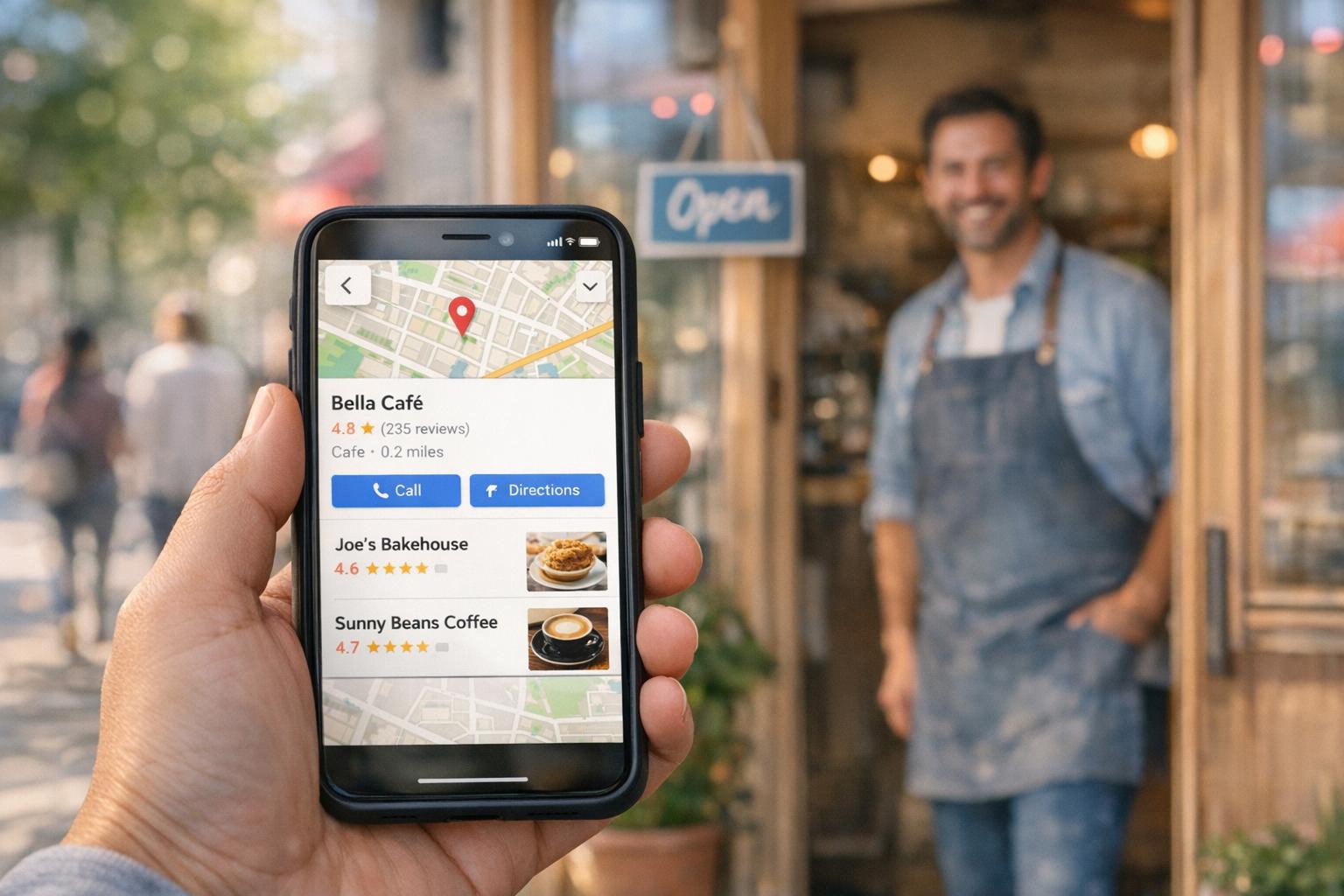
Why Google Business Profile Matters for Local SEO
Small Business Marketing
When users search for services like "plumber near me" or "best pizza in Chicago", your Google Business Profile (GBP) is often the first thing they see. It appears in the Local Pack - the top three business listings shown on Google Search and Maps. Here's why this matters:
46% of Google searches have local intent.
76% of people who search locally visit a business within 24 hours.
Businesses with optimized profiles see 35–50% more customer actions in just 60 days.
Your GBP influences local rankings through factors like relevance, distance, and prominence. A complete profile with accurate details, photos, and reviews increases visibility, trust, and customer engagement. Key stats include:
32% of Local Pack ranking weight comes from GBP signals.
Profiles with 50+ photos get 520% more direction requests and 240% more clicks.
Businesses responding to reviews within 24 hours see 12–18% higher click-through rates.
To stand out, keep your profile updated, manage reviews actively, and align it with your website. A well-maintained GBP can drive 5–7x more customer actions than your website alone.
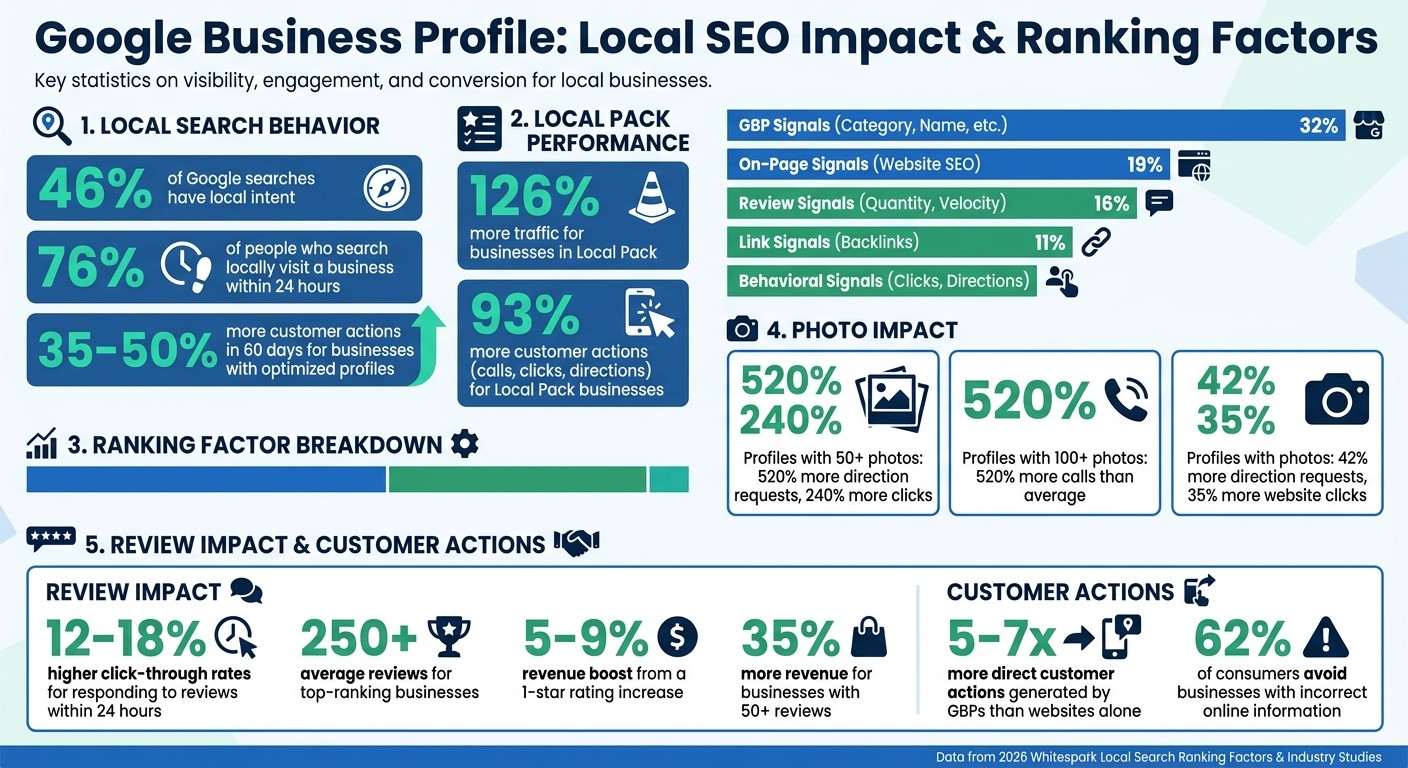
Google Business Profile Local SEO Impact: Key Statistics and Ranking Factors
Your Google Business Profile Is the Secret to Local SEO
How Google Business Profile Improves Local Search Visibility
Your Google Business Profile is a critical tool for boosting your presence in local search results. When someone looks for a service nearby, Google pulls information from your profile to populate the Local Pack. This is the group of three business listings that often appears at the very top of search results - sometimes even above traditional website links. Let’s break down why the Local Pack matters so much.
Businesses featured in the Local Pack enjoy a staggering 126% more traffic and 93% more customer actions - like calls, clicks, and directions - compared to those outside it. This prime placement ensures your business gets maximum exposure on both mobile and desktop, putting you right in front of customers who are ready to act.
What Is the Local Pack?
The Local Pack, sometimes called the 3-Pack or Map Pack, is a set of three business listings displayed alongside a map for queries with local intent. For example, if someone searches for “plumber near me” or “coffee shop in Chicago,” Google highlights this feature at the top of the search page, above standard organic results.
"The Google Local Pack is a small set of local business listings that typically appear above Google's organic listings when the intent of a search is perceived as local."
Miriam Ellis, Search Engine Land
This feature is designed for convenience. Users can call your business, get directions, check reviews, or visit your website directly from the Local Pack - without needing to scroll further. Whether or not your business lands in this prime spot depends heavily on how well your Google Business Profile is optimized.
Metrics That Affect Your Visibility
Several factors influence whether your business makes it into the Local Pack. Google evaluates three main criteria: Relevance (how closely your profile matches the search), Distance (proximity to the searcher), and Prominence (your business’s reputation and visibility).
A complete and verified profile is essential. Accurate business details signal to Google that your business is trustworthy and ready to serve customers. For example, profiles with over 50 photos see 520% more direction requests and 240% more website clicks than those with fewer than 10 photos. Even adding a moderate number of photos can boost direction requests by 42% and website clicks by 35%.
Reviews are another major factor. Google now prioritizes review velocity - the rate at which new reviews are added - over the total number of reviews. This emphasis on fresh feedback shows that your business is active and engaging with customers. Additionally, 92% of consumers are more likely to choose a business that responds to all reviews, whether they’re positive or negative. Other details, like your primary category, service descriptions, and business hours, also help Google match your profile with relevant searches.
3 Ranking Factors: Relevance, Distance, and Prominence
Google uses three main factors to evaluate local businesses: Relevance (how well your profile matches a search), Distance (your proximity to the searcher), and Prominence (your business's reputation and authority). While relevance and distance determine if your business qualifies for a search, prominence decides if you’ll secure a top spot. By understanding how these factors work - and how your Google Business Profile impacts them - you can fine-tune your strategy for better local rankings.
Relevance: Aligning Your Business with Search Intent
Relevance gauges how well your Google Business Profile matches a user’s search. One of the most critical elements here is your primary category, which carries a ranking influence score of 193 points, according to the 2026 Whitespark Local Search Ranking Factors report. Even your business name plays a role: including target keywords can score 181 points. For instance, a name like "Downtown Auto Repair" will naturally rank better for "auto repair" searches than something generic. But don’t overdo it - Google penalizes profiles that cram irrelevant keywords into their names.
Google also analyzes other profile elements like your business description, Q&A section, and Google Posts to understand what you offer. These details feed into Google’s AI Overviews for more complex searches. Adding up to 10 secondary categories can help you appear in a broader range of related searches. To optimize for relevance, research your target keywords on Google Maps, note the primary categories of the top results, and adopt one that accurately reflects your business.
Distance: The Importance of Proximity
Once relevance is established, proximity becomes the next key factor in determining your visibility. Distance - or how close you are to the searcher - is a dominant factor, accounting for roughly 55.2% of local ranking predictions. Google calculates this using data from device settings, network signals, and IP addresses.
"The closer a searcher's device is to a specific business location, the more visible that business will tend to be in local packs and maps."
Miriam Ellis, Local Search Columnist
A real-world example illustrates this: in November 2025, the Good Earth supermarket in Marin County, California, ranked #3 when searched near its location. However, it dropped to #39 when the search was conducted slightly farther away, where a closer Safeway was favored. This highlights the weight of proximity and the importance of having an accurate, verified physical address.
To make the most of distance signals, ensure your Google Maps pin is placed precisely at your entrance. Frequent edits or incorrect placements can weaken your proximity ranking. For service area businesses without a storefront, Google limits your reach to areas within a two-hour drive from your base. If competitors are closer to the searcher, you can still gain an edge by building prominence through stellar reviews and quality backlinks.
Prominence: Establishing Authority and Trust
Prominence reflects your business’s reputation, both online and offline. It becomes the deciding factor when multiple businesses are equally relevant and close to the searcher. Signals from your Google Business Profile contribute 32% of your local pack ranking, while reviews add another 16%.
Top-ranking businesses in the local pack average over 250 reviews, compared to 185 for lower-ranked competitors. Consistent review velocity matters more than sheer volume. Additionally, businesses that respond to reviews with longer, thoughtful replies - averaging 140 words - stand out.
Engagement through photos is another major factor. Businesses in top positions average 250 photos, signaling active participation. Posting at least one new photo weekly shows Google that your business is active and trustworthy. On the flip side, businesses that go over 30 days without updates often experience noticeable drops in search impressions. Google also tracks behavioral signals like clicks-to-call, direction requests, and photo views, which account for 8% of ranking weight.
Ranking Signal Category | Weight in Algorithm |
|---|---|
GBP Signals (Category, Name, etc.) | 32% |
On-Page Signals (Website SEO) | 19% |
Review Signals (Quantity, Velocity) | 16% |
Link Signals (Backlinks) | 11% |
Behavioral Signals (Clicks, Directions) | 8% |
Together, relevance, distance, and prominence create a powerful framework for improving your local search rankings. By aligning your Google Business Profile strategy with these factors, you can achieve better visibility and attract more local customers.
What Makes a Complete Google Business Profile
A complete Google Business Profile (GBP) is a cornerstone for local SEO success. It not only builds trust but directly impacts search rankings. By 2026, GBPs are responsible for generating 5–7 times more direct customer actions - like calls, directions, and bookings - compared to business websites. The key to success lies in ensuring your profile is thorough and accurate.
From precise business details to active review management and engaging visuals, every element plays a role in improving rankings and boosting conversions.
Accurate Business Information
Your business details - name, address, and phone number (NAP) - must be consistent across your website, GBP, and third-party directories. Even small inconsistencies (e.g., "Street" vs. "St." or "Suite 100" vs. "#100") can confuse Google, reducing your profile’s accuracy. This matters because 62% of consumers avoid businesses with incorrect online information.
Your primary category is one of the most impactful factors you control. Instead of choosing a broad category like "Plumber", opt for something more specific, such as "Emergency Plumber", if it aligns with your services. You can add up to nine secondary categories to capture additional search terms without losing focus. Interestingly, 86% of GBP views come from category-based searches rather than direct name searches, making this choice crucial for visibility.
Operating hours are another critical detail. Google penalizes profiles marked as "open" when users report them as "closed". Keep your hours updated for holidays and special events, and enable Google Business Messaging. Responding to messages within 24 hours earns a "responsive" badge, which has become a confirmed ranking factor. Using a local phone number instead of a toll-free one also signals your business's connection to the area.
Your business description allows up to 750 characters, but the first 250 are the most visible. Use this space to highlight your primary keywords and services. Google’s AI now relies on this description, along with your Q&A section and Google Posts, to generate summaries and answer queries in AI Overviews. Pre-populate your Q&A section with common questions to avoid inaccurate, crowdsourced answers.
Beyond accurate details, managing reviews effectively adds another layer of credibility.
How to Use Reviews and Ratings
By 2026, reviews account for 24% of ranking weight in local searches. Regularly collecting new reviews is essential, as Google prioritizes review velocity (the rate of new reviews) over the total count. Businesses earning 8–10 reviews per month often outperform those with hundreds of older reviews but minimal recent activity.
"Review velocity (rate of new reviews) matters more than total review count for local rankings." - SERPNAP
Responding to reviews is another confirmed ranking factor. Businesses that reply within 24 hours experience a 12–18% higher click-through rate on their GBP listing. Make your responses thoughtful and personalized, addressing both positive and negative reviews. A mix of high and a few lower ratings, handled professionally, builds trust. On the other hand, an all-5-star profile can seem suspicious to users and Google’s AI.
When asking for reviews, encourage customers to mention specific services they received. For example, a review like, "Great water heater installation - they arrived on time and cleaned up everything", provides keyword-rich signals that help Google match your business to relevant searches. Share your GBP short URL to make the review process easier - each extra click reduces completion rates by about 20%. Avoid offering discounts or gifts for reviews, as Google’s detection systems can flag this and potentially suspend your profile.
Most businesses appearing in the local 3-pack maintain 40+ reviews with an average rating of 4.2 or higher. A one-star increase in your rating can lead to a 5–9% revenue boost, while businesses with 50+ reviews see 35% more revenue than those with fewer.
Adding Photos and Videos
Visual content is a powerful way to engage potential customers. Photos are often the first thing people notice about your business. They help customers recognize your storefront, understand your brand, and decide whether to visit. Profiles with photos receive 42% more direction requests and 35% more website clicks than those without. Even more impressive, profiles with 100+ photos see 520% more calls than the average business.
"Taking care of the Photos section on your Google Business Profile is one of the easiest ways to get more visibility and conversions in Google's local results." - Claire Carlile, Local SEO Expert
Stick to original, high-quality images - avoid stock photos. Google’s Vision AI analyzes photos to identify keywords, which can influence your ranking for specific searches. Use JPG or PNG formats, ideally at 720 x 720 pixels, and keep file sizes between 10 KB and 5 MB. Start with 10–15 photos showcasing your storefront, interior, team, and completed projects (before-and-after shots work well), and aim to add 2–3 new photos each month to keep your profile fresh.
Since 2026, Google has also favored profiles with authentic video introductions (30–60 seconds) from business owners or lead technicians. Keep videos under 30 seconds, with a resolution of 720p or higher. Google AI Overviews now use GBP photos and videos as structured data to answer local service queries, making visual content essential for both engagement and ranking.
Connecting Google Business Profile with Your Website
Once your Google Business Profile (GBP) is complete, linking it to your website can take your local SEO efforts to the next level. Think of it this way: your GBP attracts attention, acting as the first impression for potential customers, while your website converts that attention into actions like sales, bookings, or inquiries. When these two elements are in sync, they create a powerful boost for local SEO.
One key step is ensuring your Name, Address, and Phone number (NAP) are consistent across your GBP, website, and any local pages. This uniformity strengthens the credibility of your online presence. Beyond that, integrating local keywords and embedding GBP features can further enhance the connection between your profile and your site.
Adding Local Keywords to Your Website
Your GBP essentially tells Google what your business does and where it’s located. To reinforce this, your website should provide more detailed context. Start by checking the "Queries" section in your GBP dashboard. This section reveals the search terms people used before finding your profile. If you notice high-impression terms that aren’t driving clicks, consider creating new pages or blog posts specifically tailored to those queries.
Incorporating hyperlocal content can also make a difference. Instead of generic phrases like "serving Dallas", try something more specific, such as "serving the Oak Lawn and Uptown neighborhoods near Klyde Warren Park". This level of detail helps Google match your business with users searching for services in those precise areas.
Additionally, make sure the services listed on your GBP align with those highlighted on your website. For example, if your GBP mentions "Emergency Plumbing", your website should include a dedicated page that explains your emergency services in detail. This alignment not only strengthens your ranking signals but also ensures a seamless customer experience when users move from your profile to your site.
For businesses with multiple locations, link each GBP profile to a dedicated local landing page instead of your homepage. These pages should feature location-specific NAP details, photos of the local team, testimonials from that area, and content tailored to the community. This approach helps establish your business as a trusted local authority.
Embedding Google Business Profile Features on Your Website
To further integrate your GBP with your website, embed a Google Map for each location on its respective landing page. Use LocalBusiness schema markup to provide Google with structured data about your business, such as NAP details, hours, and services. Adding AggregateRating and Review schema can even display star ratings in search results, which can improve click-through rates.
You can also mirror the Q&A section from your GBP on your website using FAQPage schema. By creating a detailed FAQ section that addresses common questions, you enhance topical relevance and provide additional signals to Google about your offerings.
Since 76% of people conducting a nearby search on their smartphone visit a related business within 24 hours, it’s essential that your website is fully mobile-responsive. Local searches are often done on mobile devices, so issues like slow loading times or poor navigation can lead to missed opportunities.
Tracking Performance and Making Adjustments
To measure the impact of your GBP, add UTM parameters (e.g., ?utm_source=gbp&utm_medium=organic) to the link directing users to your website. This allows you to track traffic and conversions in Google Analytics, giving you a clear view of how your GBP contributes to your overall strategy.
Keep an eye on metrics like website clicks, call requests, and the ratio of search views to Maps views. Search views indicate users finding you through specific queries, while Maps views suggest they discovered you based on proximity. These insights can help you fine-tune your approach, whether by improving local keyword integration or emphasizing geographic details.
Google Search Console is another useful tool for monitoring how your website performs for local keywords. It provides data on impressions, clicks, and average ranking positions for geographic queries. If a keyword drives significant GBP views but your website doesn’t rank well for it, consider creating dedicated content to target that term. Fully optimized profiles can lead to 35–50% more customer actions within the first 60 days compared to incomplete ones.
"Too many businesses treat their Google Business Profile as a 'set it and forget it' task. That's a massive mistake. Your GBP is not a static listing; it's a dynamic, living profile." - Itamar Haim, Web Creation and Digital Marketing Expert
Lastly, keep in mind that many users may find all the information they need - like your hours, phone number, and address - directly on your GBP without ever clicking through to your website. These "zero-click searches" might reduce web traffic, but they often result in valuable actions like calls or in-person visits, further solidifying the importance of your GBP.
Conclusion
Optimizing your Google Business Profile (GBP) is essential for standing out in local SEO. Think of your GBP as more than just an online listing - it's your business's virtual storefront in 2026. With 46% of all Google searches having local intent, a well-maintained profile can make all the difference in whether potential customers find, trust, and ultimately choose your business. The companies excelling in local search today consistently stick to the basics: ensuring NAP (Name, Address, Phone) details are accurate, posting regular updates, responding to reviews within 24–48 hours, and crafting detailed, keyword-focused service descriptions.
The numbers back this up. Fully optimized profiles drive noticeably higher customer engagement. Adding quality photos? That alone leads to significantly more calls and direction requests.
"A poorly optimized GBP is your most expensive missed opportunity." - Pinpoint Promote
If you haven’t already, start by auditing your profile. Make sure your primary category aligns closely with your core services, complete every field available, and double-check that your website reflects the same NAP details and service descriptions. Regular updates - whether it’s adding fresh photos, posting about your latest projects, or answering questions in the Q&A section - signal to Google that your profile is active. And yes, customers notice this too.
FAQs
How long does it take for GBP updates to improve local rankings?
When you make updates to your Google Business Profile, minor changes are usually reviewed within about 10 minutes. However, seeing those updates impact your local rankings can take longer - sometimes up to 30 days. The exact timing depends on the nature of the update and how Google processes the review.
What should I do if my business is a service area business with no storefront?
If your business doesn’t have a physical storefront, you should set it up as a service area business in your Google Business Profile. This means hiding your physical address while clearly defining the areas you serve. Be sure to select the most accurate primary category for your business.
To boost your visibility, include detailed descriptions of your services using relevant keywords. Upload high-quality photos that showcase your work or offerings, and actively collect customer reviews. These steps help Google better understand your business and improve your chances of appearing in local search results.
How can I get more reviews without risking a Google penalty?
To gather more reviews the right way, stick to ethical practices that align with Google’s guidelines. Offering incentives like discounts or rewards might seem tempting, but they’re a big no-no according to Google’s policies. Instead, focus on making the review process as easy as possible. For example, you can share direct links or provide QR codes that lead straight to your review page.
Timing is everything - ask for feedback shortly after a positive interaction while the experience is still fresh in the customer’s mind. By consistently and politely requesting reviews, you can build up your review count without risking any penalties.
Related Blog Posts
Únete a nuestra comunidad de 15,000+ propietarios de negocios
Artículos populares
Artículos populares sobre su sitio web y la comercialización de su pequeña empresa


