



Best Feedback Tools for Small Businesses 2026
Small Business Marketing
If you're a small business owner looking to improve customer experience and boost retention, feedback tools can make your life easier. These tools help you gather, analyze, and act on customer feedback efficiently. Here's a quick look at six popular options in 2026:
Gatsboy: Combines website building with feedback management, featuring tools like polls, forms, live chat, and Google Reviews integration. Pricing starts at $47/month after a $500 setup fee.
SurveyMonkey: Known for its versatile surveys and AI tools for quick survey creation. Free plans are available, with advanced features starting at $39/month.
Typeform: Offers engaging, conversational-style forms with AI features for better response rates. Plans start at €25/month (~$27).
Medallia: Focused on advanced analytics and customer experience insights, but it’s best for larger teams due to its complexity and custom pricing.
Hotjar: Specializes in visualizing user behavior with heatmaps and session recordings. Free plans are available, with paid plans starting at $32/month.
Trustpilot: A platform for managing customer reviews and building trust, with plans starting at €79/month (~$85).
Quick Comparison:
Tool | Key Features | Starting Price | Best For |
|---|---|---|---|
Gatsboy | Website builder + feedback tools | $47/month | Local businesses needing all-in-one solutions |
SurveyMonkey | Flexible surveys, AI tools | $39/month | Teams conducting surveys and research |
Typeform | Conversational forms, AI-driven | €25/month (~$27) | Businesses seeking high engagement |
Medallia | Advanced CX analytics, video feedback | Custom pricing | Larger teams with CX focus |
Hotjar | Heatmaps, session recordings | $32/month | Improving website user experience |
Trustpilot | Reviews, TrustScore, widgets | €79/month (~$85) | E-commerce and reputation building |
Each tool has unique strengths, so choose based on your business needs and budget. For simplicity and versatility, Gatsboy stands out by combining website management and feedback tools in one platform.
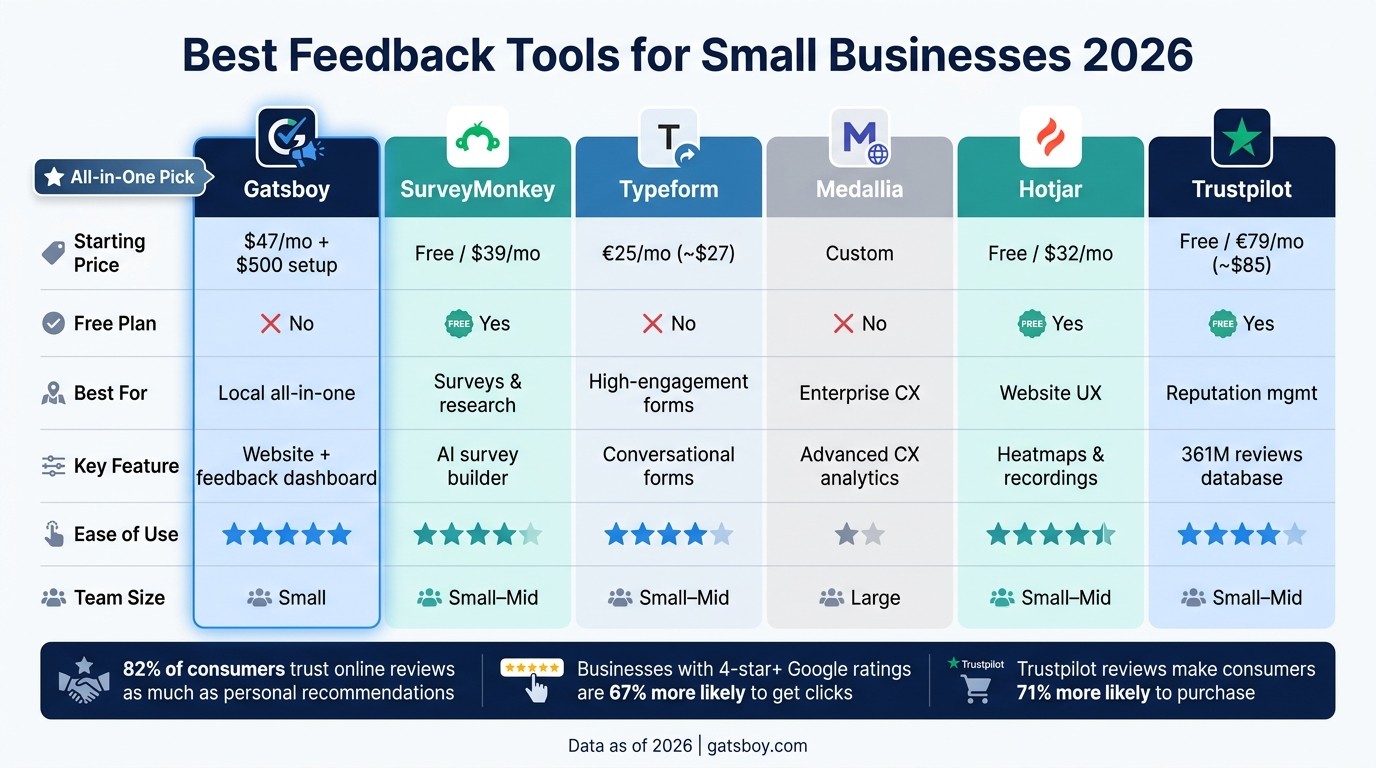
Best Feedback Tools for Small Businesses 2026: Side-by-Side Comparison
What are the Best Customer Feedback Tools in 2026 to Improve CX & Drive Growth?
1. Gatsboy

Gatsboy offers a comprehensive website solution tailored for small businesses. It combines a no-code website builder powered by Framer with tools for managing feedback and reviews.
Feedback Tools
Gatsboy simplifies feedback collection by centralizing multiple channels:
Poll Module: Embed interactive polls directly on your site.
Advanced Forms: Capture customer inquiries and generate leads effectively.
Live Chat: Engage in real-time conversations with visitors.
PRO Google Reviews Module: Import and showcase reviews from your Google Business Profile.
Dashboard and Visualization
All customer interactions are organized in the Business Portal, a unified dashboard where you can view, filter, and export leads, messages, and feedback. This setup makes it easier to analyze data and collaborate with your team. As Ella B from Brightline shared:
"I love how simple it is to use and have everything in one place. Gatsboy gives me control without complexity."
Seamless Integrations
Gatsboy connects with major platforms like Shopify, Square, Salesforce, and HubSpot, enabling you to sync customer data and automate follow-ups. Built on Framer, it also lets you update your website effortlessly - no coding required.
Pricing Options
Plan | Price | Features |
|---|---|---|
Website Only | $500 one-time fee | Includes a 5-page website, contact form, dashboard, and basic modules. |
Website + Pro | $500 one-time fee + $47/month | Adds advanced forms, Google Reviews integration, and lead management tools. |
The Website + Pro plan equips you with a full suite of feedback tools, making it a powerful option for businesses looking to grow and streamline operations. Up next, we’ll weigh the advantages and limitations of each tool to help you make the right choice for your needs.
2. SurveyMonkey

SurveyMonkey is a widely used survey platform, trusted by more than 300,000 organizations worldwide. For small businesses, it offers solutions for various feedback needs, including customer satisfaction (CSAT) and Net Promoter Score (NPS) surveys, employee feedback, and market research.
Feedback Types
SurveyMonkey supports over 30 question formats, such as multiple choice, matrix, ranking, and slider scales. One of its standout tools is Build with AI, which can create a complete survey draft from a simple text prompt in seconds. This feature is a time-saver, especially for small business owners who juggle multiple responsibilities.
"SurveyMonkey's Build with AI feature made creating surveys a breeze, even for someone with zero AI experience like myself." - Barbara Falci, Vice President, Friends of the Sullivan County Library
Surveys can be distributed through various channels, including web links, email invitations, QR codes, SMS, social media, or embedded directly on websites.
Visualization Features
SurveyMonkey offers real-time response visualization with pie, bar, line, and column charts. The AI Analysis Suite allows users to ask plain-language questions about their data and provides instant summaries, making it easier to interpret open-ended responses. Additional tools like word clouds and sentiment analysis help identify trends across large sets of text feedback.
Integrations
The platform integrates with over 200 tools, including Slack, HubSpot, Mailchimp, Google Sheets, and Microsoft Teams. It also works with Zapier, which extends connectivity to more than 5,000 additional apps. Smart Notifications keep your team informed, sending alerts when scores drop or specific conditions are met.
Pricing
Plan | Price | Key Features |
|---|---|---|
Basic | Free | Unlimited surveys; up to 25 responses per survey |
Individual | Starting at $39/month | Core survey tools for solo users |
Team Advantage | Starting at $25/user/month | 50,000 responses per year; skip logic; 200+ integrations (3-user minimum, billed annually) |
Enterprise | Custom pricing | HIPAA compliance; SSO; Salesforce integration |
The free plan works well for small-scale surveys, but accessing advanced visualization tools and integrations requires a paid plan. For teams, the Team Advantage plan starts at $75/month (for three users, billed annually).
Next, we’ll explore another tool that offers enhanced feedback visualization options tailored for small businesses.
3. Typeform
Typeform stands out in the feedback collection space by using a "one-question-at-a-time" format. This design feels more like a conversation than a traditional form, making it easier for users to engage. In fact, this approach has proven effective, with 75% of users reporting better completion rates compared to standard forms.
Feedback Types
Typeform caters to a wide range of feedback needs for small businesses, including NPS, CSAT, Voice of the Customer (VoC), product feedback, employee engagement, and market research. It offers 28 different question types, such as rating scales, rankings, and even file uploads. Its AI-driven form builder can create branded forms from a simple text prompt, while Interaction AI steps in to clarify vague responses by asking follow-up questions automatically. These tools help businesses capture more detailed and actionable feedback.
Visualization Features
Every plan includes a Results Summary, featuring visual charts for closed-ended questions and automatic NPS score calculations. For those on higher-tier plans, additional tools like drop-off analytics reveal where respondents abandon forms, while sentiment analysis classifies open-ended responses as positive, negative, neutral, or mixed. The "Ask AI" feature, available on Growth and Talent plans, allows users to query data in plain language and instantly generate charts - no spreadsheets needed.
"AI isn't about hype - it's about making work easier, not harder. Our AI helps you create high-performing forms in minutes, surface key insights instantly, and take action faster - without a steep learning curve or a full team behind you." - Aleks Bass, Chief Product Officer, Typeform
Integrations
Typeform works seamlessly with over 300 native apps and connects to 500+ more through Zapier. For small businesses, key integrations include Google Sheets and Airtable for real-time data syncing, Slack for instant response alerts, and HubSpot or Salesforce for CRM management (available on Business plans and above). One G2 user shared: "It integrates easily with HubSpot and Google Sheets, which keeps our data synced automatically."
Pricing
As a European-based company, Typeform lists its pricing in euros. Here’s a breakdown of the plans most relevant to small businesses:
Plan | Price (billed annually) | Monthly Responses | Key Features |
|---|---|---|---|
Basic | €25/month | 100 | AI form builder, unlimited questions |
Plus | €49/month | 1,000 | Remove Typeform branding, 3 users |
Business | €84/month | 10,000 | Drop-off analytics, sentiment analysis, HubSpot/Salesforce |
Growth Flow | €242/month | 10,000+ | Ask AI, data enrichment, Meta Pixel, reCAPTCHA |
One limitation of the Basic plan is its 100-response monthly cap, which could hinder growing businesses. Additionally, features like bot protection via reCAPTCHA are only available on the Growth Flow plan. This has led to some criticism, with users arguing that basic security features should not require a premium plan.
4. Medallia
Medallia is a major player in the customer experience world, primarily designed for enterprises but offering tools that smaller teams might find useful. It excels in advanced feedback collection, gathering input through email, SMS, video questions, live chat, and employee surveys. It also tracks indirect signals like web behavior, social media activity, and IoT data. A standout feature, Medallia Video, captures about six times more information than standard text-based questions. Research shows it delivers a 10–20% yearly boost in detailed insights into patient journeys. These extensive feedback options support Medallia's powerful visualization tools.
Visualization Features
Medallia's Digital Experience Score (DXS) evaluates every online session on a 0–10 scale across five dimensions: frustration, engagement, navigation, technical performance, and form interaction. Tools like session replays and heatmaps give a clear picture of user behavior, helping identify problem areas.
"Thousands of personalized comments are classified in real time by the natural language processing engine by sentiment and topic, which converts a sea of qualitative noise into queryable database fields." - Robert G., Sales Marketing in Finance
Users gave Medallia's data visualization an 80 out of 100 rating on SoftwareReviews as of May 2026.
Integrations
Medallia integrates with key enterprise platforms, including Salesforce, Adobe Experience Cloud, and ServiceNow. Its API framework scored 79 out of 100, while ease of data integration was slightly lower at 77 out of 100. However, these integrations often require technical expertise due to the platform's complexity.
"The platform is also likely to be customized, which will necessitate a heavy and costly professional services engagement. Changing the basic data model or reporting chain is hardly a self-service activity." - Robert G., Sales Marketing, Finance
Pricing
Pricing is a sticking point for smaller teams. Medallia doesn’t publish its pricing; instead, it provides custom quotes based on the organization’s size, chosen features, and deployment requirements. Costs include separate charges for login users and survey participants ("units").
"Due to its enterprise focus and rich capabilities the cost can be high and justifying the ROI might be challenging for smaller teams." - Priyanshu M., Information Technology Consultant
Medallia’s enterprise focus and extensive capabilities earned it recognition as a Leader in the 2026 Gartner® Magic Quadrant™ for Voice of the Customer Platforms.
5. Hotjar

Hotjar is all about uncovering how users actually interact with your site, focusing on clicks, scrolls, and drop-offs instead of relying on complicated surveys. Trusted by over 1.3 million websites globally, it’s particularly appealing for small businesses because you don’t need a developer or data expert to make sense of the results.
Feedback Type
Hotjar’s tools are grouped into three main categories: Observe, Ask, and Engage.
Observe tools let you track user behavior, such as clicks, taps, mouse movements, and how far users scroll down a page.
Ask tools include on-site surveys triggered by specific actions (like exit intent), shareable link surveys, and a handy feedback widget where users can rate their experience with emojis.
Engage tools allow for one-on-one user interviews to gain deeper insights.
For example, a small business might use exit-intent surveys on checkout pages alongside session recordings filtered by "rage clicks" to identify and fix confusing parts of the user experience.
Visualization Features
Hotjar is known for its ability to visually represent user behavior.
"Hotjar answers the questions that Google Analytics can't, by showing you exactly what users are doing on your site through heatmaps, session recordings, and on-page feedback tools." - Digital by Default
Its heatmaps - including click maps, move maps, and scroll maps - paint a clear picture of user engagement. These tools highlight where users focus their attention, where they lose interest, and how far down they scroll on a page. For instance, scroll maps often reveal that critical calls-to-action placed below the fold go unnoticed by 60% of visitors.
Beyond heatmaps, Hotjar offers Dashboards for an overview of key metrics, Trends for tracking custom metrics over time, and a Highlights feature to clip and share important session recordings with your team. By 2026, AI-generated summaries can even flag frustration signals and group sessions by behavior patterns, saving you the hassle of manually reviewing hours of recordings.
Integrations
Hotjar doesn’t just stop at visualization - it integrates seamlessly with popular tools to enhance your insights. It works with platforms like Google Analytics 4, HubSpot, Mixpanel, Jira, Slack, Zapier, Segment, Shopify, and WordPress. The GA4 integration is particularly helpful: while GA4 identifies pages with high bounce rates, Hotjar explains why users are leaving. Setup is quick and easy, typically taking just five minutes via Google Tag Manager. Plus, the tracking script is lightweight (around 30 KB) and won’t slow down your site.
Pricing
Plan | Monthly Price | Key Limits |
|---|---|---|
Basic | Free | 35 daily sessions, unlimited heatmaps, 30-day data retention |
Plus | $32/mo | 100 daily sessions, user attribute filtering, 365-day retention |
Business | $80/mo | 500 daily sessions, funnels, form analysis, custom integrations |
Scale | $171+/mo | Unlimited sessions, full AI features, SSO/SAML, priority support |
The free plan is a solid option for low-traffic sites, but keep an eye on the daily session limits for the lower-tier plans, especially if your site experiences traffic spikes. Hotjar has earned an 8.4/10 rating on ProPicked from 7,200 reviews as of May 2026, with its ease of use scoring an impressive 9.0/10. With its simple pricing and intuitive features, Hotjar is a great choice for small businesses looking to turn user behavior into actionable insights.
6. Trustpilot
Trustpilot is a platform that turns customer reviews into a powerful tool for building trust and driving sales. With a staggering 361 million reviews and 200,000 new ones added daily, it’s a go-to for small businesses looking to strengthen their reputation. A solid Trustpilot presence can give brands a competitive edge, as it makes consumers 71% more likely to make a purchase.
Feedback Type
Trustpilot collects two main types of feedback:
Service Reviews: These reflect the overall customer experience and directly impact your public TrustScore.
Product Reviews: These allow customers to provide detailed ratings and even upload photos of products.
Additionally, the Review Follow-up feature lets businesses ask private follow-up questions after a review is submitted. This helps clarify issues and gather insights for product improvements. Trustpilot’s AI has analyzed over 100 million reviews, sorting feedback into topics and identifying sentiment trends - whether positive, negative, or neutral.
Visualization Features
Trustpilot makes customer feedback highly visible and actionable with tools like TrustBox widgets and AI-driven Review Highlights. These features showcase TrustScores and key quotes, helping businesses boost conversions. According to Trustpilot, 73.6% of visitors are more likely to buy from sites that display Trustpilot reviews.
Another standout feature is the Rich Snippet stars, which appear in search results and can increase click-through rates by up to 35%.
Here’s an example: Lawfully, a legal tech company, improved its TrustScore from 4.6 to 4.9 in just a year. Their Chief Strategy Officer, Matt Gale, noted:
"We're able to showcase that we truly are a standout company when it comes to delivering on that value, and we've got evidence of that on Trustpilot." - Matt Gale, Chief Strategy Officer, Lawfully
Integrations
Trustpilot integrates seamlessly with popular tools, making it easy for small businesses to automate review management using smart modules. It works with platforms like Shopify, WooCommerce, Magento, and BigCommerce to send automated review invitations and set up widgets.
For customer support, integrations with Zendesk and Freshworks allow teams to respond to reviews directly within their existing workflows. Salesforce users can access additional features through higher-tier plans. Trustpilot also connects with Google Store Ratings and supports Answer Engine Optimization (AEO), ensuring reviews appear in AI-generated recommendations from tools like ChatGPT and Gemini. With 58% of consumers now relying on AI for product suggestions, this visibility is more important than ever.
Pricing
Although Trustpilot’s pricing is listed in euros, it’s widely used by U.S. businesses. Here’s a breakdown of its plans:
Plan | Monthly Price (billed annually) | Key Features |
|---|---|---|
Free | €0 | 50 invitations/month, basic profile, 3 integrations |
Starter | From €79 | 100 invitations/month, 1 user, 2 widgets, 15 integrations |
Plus | From €149 | 300 invitations/month, 3 users, 10 widgets, 25 integrations |
Premium | From €369 | 1,000 invitations/month, 10 users, advanced insights, API access |
Enterprise | Custom | Unlimited invitations, 1,000 users, full analytics suite |
Pros and Cons of Each Tool
Here's a quick comparison of the tools we reviewed, highlighting their main strengths, weaknesses, and ideal use cases. This should help you decide which one aligns best with your business's needs, technical expertise, and future plans.
Tool | Pros | Cons | Best-Fit Use Case |
|---|---|---|---|
Gatsboy | Easy setup, integrates Google Reviews, all-in-one dashboard, no tech skills required | None noted | Local small businesses needing a website with built-in feedback and reviews management |
SurveyMonkey | Well-known, extensive template library, strong analytics features | ~$99/month for team plans | General-purpose surveys and market research for small teams |
Typeform | Sleek, engaging forms that encourage high completion rates | ~$99/month for business plans | Branded surveys and lead generation forms for local businesses |
Medallia | Advanced analytics and in-depth customer experience insights | Complex setup and high costs, suited for larger teams | Mid-to-large businesses with dedicated customer experience (CX) teams |
Hotjar | Heatmaps and session recordings for visual insights, simple to install | Free plan is limited; feedback tools are secondary | Small businesses aiming to improve website user experience (UX) |
Trustpilot | Huge database of 361 million reviews, builds consumer trust, star ratings can increase click-through rates by up to 35% | Pricing in euros; advanced features need higher-tier plans | Small businesses focusing on reputation management and e-commerce trust-building |
Each tool offers a mix of analytics capabilities and user-friendly features, but they vary in cost and complexity. For example, Gatsboy stands out for small businesses by combining website management with Google Reviews and feedback tools in one dashboard, eliminating the hassle of juggling multiple platforms.
Use this table to quickly identify which tool aligns with your goals and resources.
Conclusion
Selecting the right feedback tool depends on your business's specific needs. Typeform and SurveyMonkey are great for creating sleek surveys and conducting market research. Hotjar helps you analyze visitor behavior on your website. For e-commerce businesses, Trustpilot builds consumer trust, while Medallia is tailored for larger teams focused on customer experience. Each tool has its strengths, but juggling multiple feedback platforms can complicate your workflow.
For small businesses, managing feedback while handling daily tasks can be overwhelming. Instead of adding yet another tool to your lineup, Gatsboy simplifies things by combining your website, Google Reviews, advanced forms, and lead management into one dashboard. This approach directly tackles the challenge of maintaining an online presence without dealing with multiple platforms.
The stats behind online reviews highlight why this is crucial. 82% of consumers trust online reviews as much as personal recommendations, and businesses with a 4-star or higher Google rating are 67% more likely to get clicks. By unifying your web presence and review management in one system, you can eliminate unnecessary hassle.
If you're looking for an all-in-one solution to streamline your operations, check out Gatsboy at gatsboy.com.
FAQs
Which feedback tool is best for my small business goals?
The best feedback tool for your small business hinges on what you’re aiming to achieve. If affordability and simplicity are your priorities, GoodMarks stands out. For just $30/month (and with no long-term contract), it offers features like multi-platform review routing, private feedback channels, and real-time analytics.
Looking to improve your Google reviews? Feedback Guru is a great option, providing a privacy-compliant way to collect and manage customer feedback. On the other hand, if you're after advanced analysis, feedback.tools leverages AI-powered insights to give you a deeper understanding of your customer data.
How can I turn feedback into actions that improve retention?
An automated feedback system can be a game-changer for improving customer retention. Start by setting up workflows, like post-service surveys, to gather customer input consistently. If you spot dissatisfied customers, follow up with them within 48 hours. This quick response shows you care and can help address issues before they escalate.
But don't stop there. Close the loop by letting customers know how their feedback has driven changes or improvements. This not only builds trust but also reinforces their sense of value in your business.
Make it a habit to analyze feedback trends regularly. This will help you identify patterns and prioritize changes that have the most impact on customer satisfaction and loyalty. By focusing on what matters most to your customers, you'll strengthen their connection to your brand.
What’s the easiest way to collect Google reviews on my website?
Collecting Google reviews can be effortless when you use a review widget that integrates directly with your Google Business Profile. Tools like Gatsboy’s PRO Google Reviews module offer features to simplify the process. You can import existing reviews, send personalized requests via email or SMS, and even generate direct links for reviews. These tools make it easier for your customers to share their feedback, helping you gather more reviews with less effort.
Related Blog Posts
Únete a nuestra comunidad de 15,000+ propietarios de negocios
Artículos populares
Artículos populares sobre su sitio web y la comercialización de su pequeña empresa


